Home
How to Complete the Line in the Sand Quest in Arc Raiders
To complete Line in the Sand , you must navigate the Buried City map. First, approach the derailed train between the Warehouse and Piazza Roma. Next, locate the square tower to the East and interact with a detonator hidden in a southwest corner bush to find the Marano Market Business Card . Finally, travel to the Merchant's Apartment in Dune's End, take the zipline to the basement, and photograph the cardboard boxes using your in-game camera.
Prerequisites and Requirements for Starting Celeste’s Mission
Before you can embark on the "Line in the Sand" quest, you must establish your standing within the Speranza hub. This mission is not available to new Raiders immediately; it is part of a narrative progression that explores the activities of the Stella Montis group and the mysterious Exodus materials.
Completing the Untended Garden Chain
According to Polygon , players must first complete the Untended Garden quest chain. This prerequisite ensures you have a basic understanding of the Buried City's layout and the mechanics of the game's investigation system. Once the final objective of Untended Garden is turned in, Celeste will offer "Line in the Sand" as a follow-up.
Finding Celeste in the Speranza Hub
Celeste is located in the main social hub of Speranza. She typically handles quests related to lore and high-tech salvage. Ensure you have spoken to her and officially accepted the quest from your menu before heading into the raid. If the quest does not appear, double-check your completed missions list to ensure no steps of the previous chain were missed.
While there is no strict level requirement, the Buried City is a high-threat zone. It is widely regarded as one of the more challenging maps due to its verticality and high player density. We recommend equipping at least Tier 2 armor and ensuring your weapons are modified for both mid-range and close-quarters encounters.
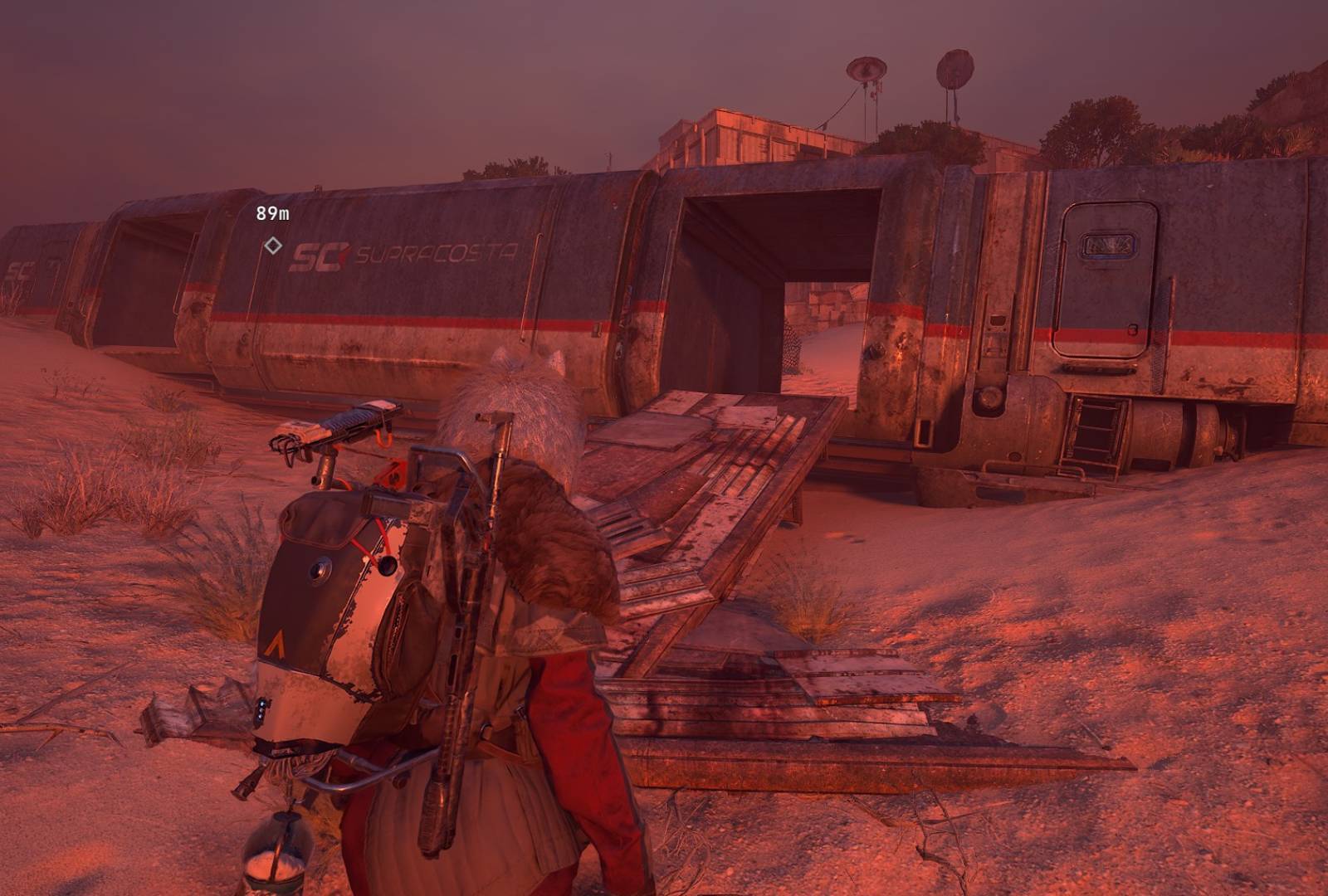
Image source: Polygon.com
Finding the Derailed Train Near Marano Station
The first objective in the quest is to investigate a train crash that occurred near Marano Station. This step is designed to set the scene for the robbery you are investigating. The location is central but exposed, making it a dangerous spot for solo players.
Navigating the High-Threat Buried City Map
The Buried City is characterized by its dense urban ruins and rusted industrial infrastructure. To find the train, you should aim for the area situated between the Warehouse and Piazza Roma . This corridor is a frequent patrol route for ARC machines, including Drones and Husks, so proceed with caution.
Identifying the Blue Train Car Proximity Trigger
Look for a series of blue derailed train cars scattered across the tracks. Unlike many other quests in Arc Raiders, this objective does not require you to hold a button to interact with an object. Instead, it is a proximity-based trigger . As noted by PC Gamer , simply standing near the wreckage will update your quest log. If the objective doesn't update immediately, try walking along the length of the blue cars until the dialogue from Celeste triggers.
The train tracks offer very little cover. If you find yourself under fire from ARC machines or other Raiders, retreat to the nearby Warehouse buildings to break line-of-sight before attempting to trigger the objective again.
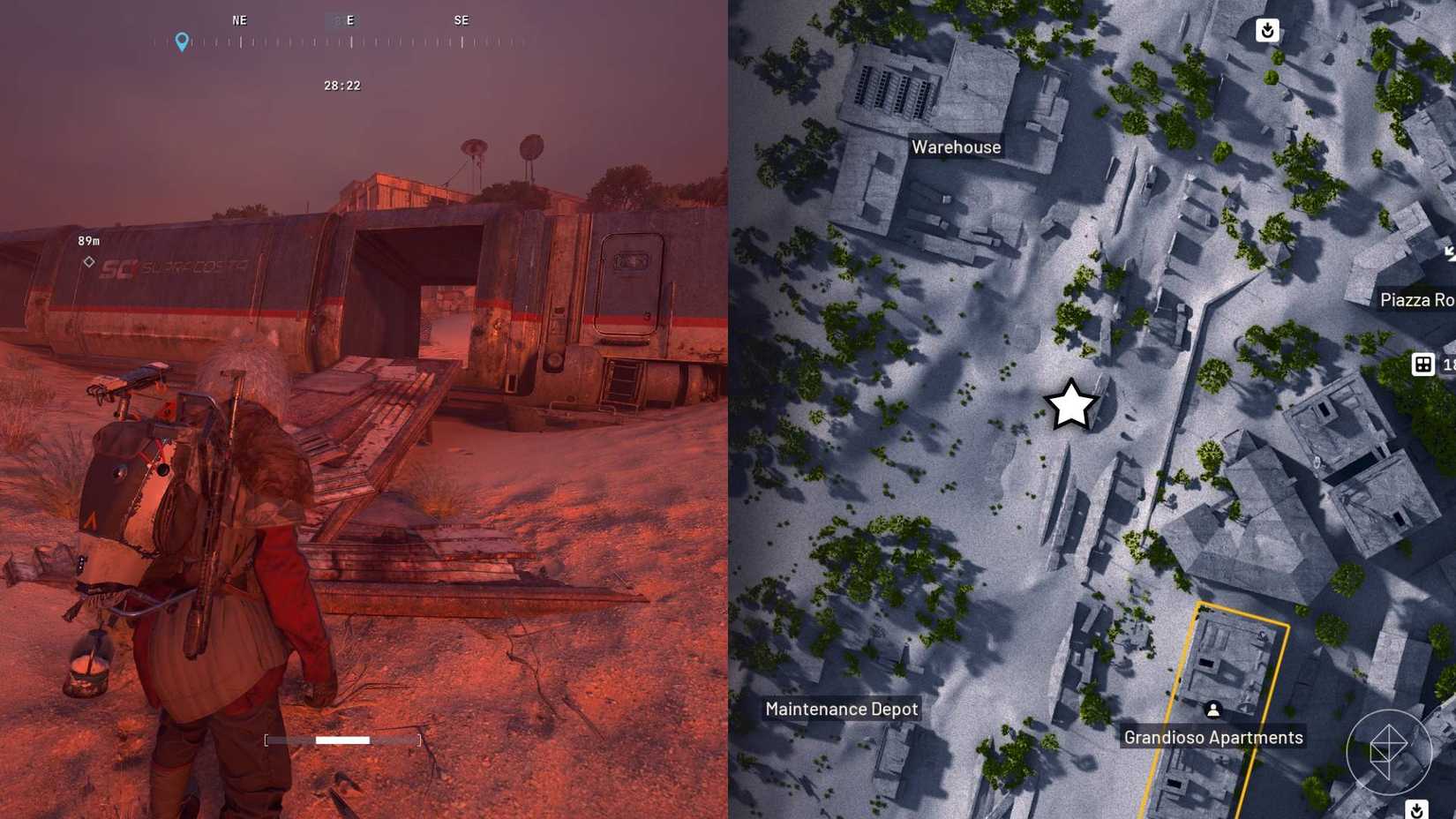
Image source: Polygon.com
Locating the Detonator and the Marano Market Business Card
After confirming the train crash, Celeste will direct you to find evidence of the robbery. This leads you to a specific structure near the Piazza Roma, where a vital piece of evidence was left behind.
Searching the Square Tower Near Piazza Roma
Head East from the train tracks toward the Piazza Roma district. You are looking for a distinct square tower . This building is a multi-story stone structure that stands out against the more modern ruins surrounding it. The item you need is not inside the tower itself, but rather on its exterior.
The Hidden Detonator and the SW Corner Bush
This is where many players become stuck. The interaction point is a small detonator . According to community reports on Reddit , the detonator is located in the southwest corner of the tower's base, partially obscured by a bush. You must get close to the foliage to see the interaction prompt. Interacting with this detonator will grant you the Marano Market Business Card .
Utilizing the Safe Pocket for Quest Items
The Marano Market Business Card is a physical item that occupies a slot in your inventory. Because "Line in the Sand" is an extraction-based quest, losing this card upon death means you must restart the tower objective in a new raid. Immediately move the Business Card to your Safe Pocket (default key 'P' or drag-and-drop in the inventory menu). This ensures that even if you are eliminated, the card remains with you, allowing you to proceed to the next step without backtracking.
Reaching the Market Ruins and Advancing the Investigation
With the business card in your possession, your next goal is to track the destination of the stolen goods. This takes you to the Market Ruins, a location that ranks among the most contested areas in the Buried City.
Moving Toward the Northeast Sector
From the square tower, travel North, passing the Hospital. Your destination is the Market Ruins , located in the Northeast corner of the map. This area is often used as an extraction point, meaning you are highly likely to encounter other players here. Move through the buildings rather than the open streets to minimize your profile.
Managing Player Encounters Near Extraction Points
Entering the Market Ruins will trigger the next phase of the quest, often referred to as the "Thruster Valves" objective. You don't need to find a specific item here; the act of entering the zone updates the quest. However, because this is a high-traffic zone, we recommend using smoke grenades or scan abilities to ensure the area is clear before you linger. Once the quest updates, your final destination will be revealed: Dune's End.
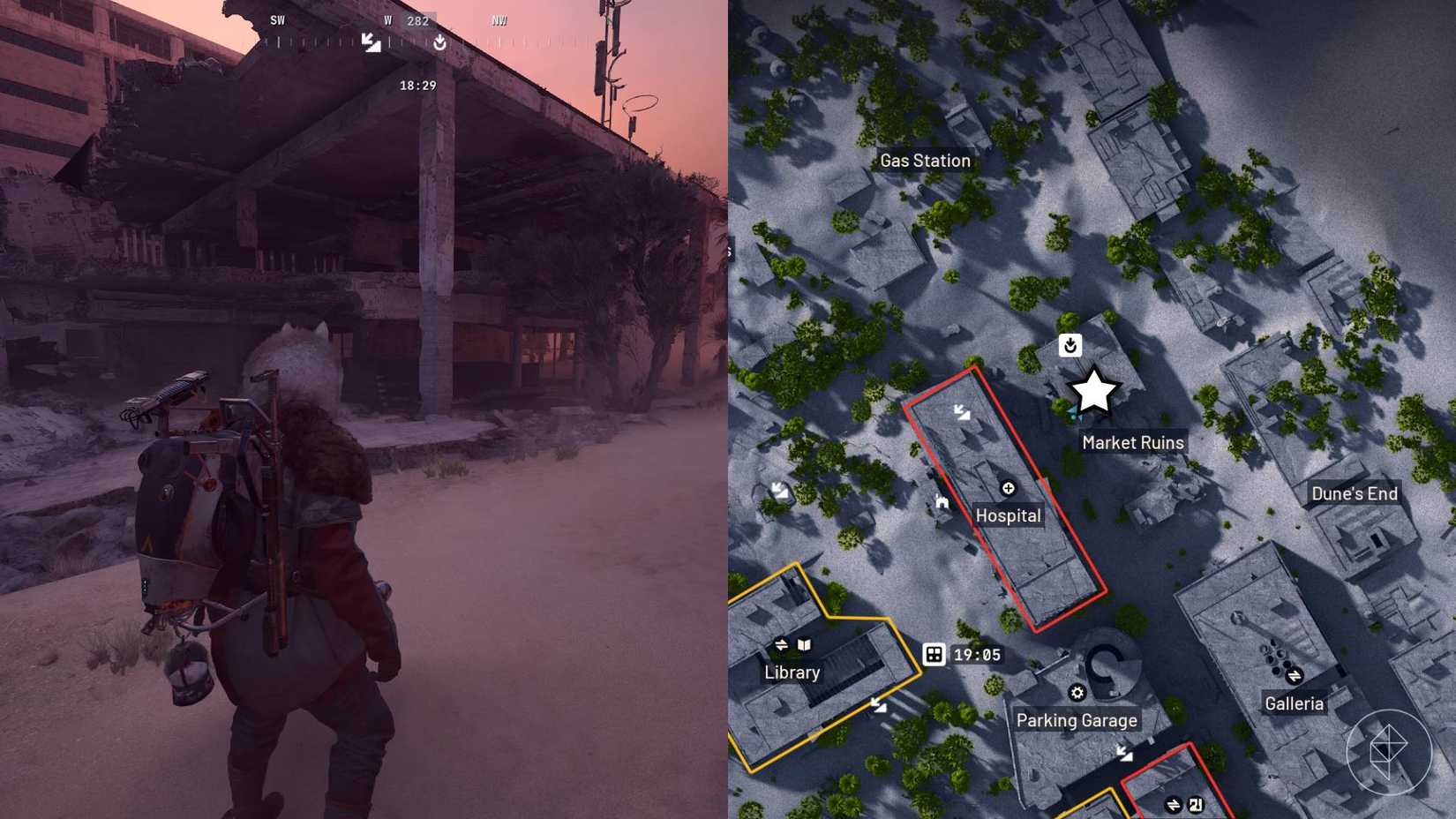
Image source: Polygon.com
Exploring the Merchant’s Apartment in the Dune’s End District
The climax of the quest takes place in the Merchant's Apartment , located within the Dune's End district on the eastern edge of the map. This is a multi-stage objective that requires both navigation and the use of your Raider's utility tools.
Accessing the Basement via the Zipline
Once you reach the building marked as the Merchant's Apartment, you need to find a way into the basement. Look for an elevator shaft or a zipline that leads downward. The basement is a cramped, dark environment that favors close-quarters combat. Be prepared for ARC machines that may be lurking in the shadows of the storage rooms.
Using the Camera Tool for Evidence Photography
In the basement, you will find a pile of cardboard boxes that look out of place. To complete the quest, you must take a photograph of this evidence.
- Open your Camera Tool (check your keybinds, usually 'C' or accessible via the radial menu).
- Frame the cardboard boxes in the center of the viewfinder.
- Take the photo. You should see a quest notification confirming the evidence has been recorded.
Troubleshooting Common Bugs and Trigger Issues
Despite being a well-structured mission, "Line in the Sand" has been known to experience trigger issues, particularly regarding the proximity objectives. If you find yourself stuck, consider the following workarounds based on community feedback.
If the quest doesn't update at the train, try approaching from the North (Marano Station side). Sometimes the script fails to fire if you approach from the South or if you are moving too quickly on a vehicle.
Quest scripts in Arc Raiders often pause if the player is in an "Active Combat" state. If an objective won't trigger, clear all nearby ARC machines and wait for the combat music to fade. Once you are "Hidden" or "Neutral," the script should resume.
If the detonator in the tower bush is not interactable, it may be due to a desynced instance. The most reliable fix is to extract and start a new raid. This resets the map state and usually resolves interaction bugs.
Recommended Loadouts and Raider Strategies for Buried City
The Buried City's mix of long sightlines and tight interiors makes loadout choice critical. A top-tier setup will allow you to handle the open tracks near the train and the claustrophobic basement of the Merchant's Apartment.
Selecting the Right Raider for Mobility and Intel
Raiders with mobility or scanning abilities stand out as top choices for this quest. Hayseed is highly recommended for his ability to deploy gadgets that can distract ARC machines while you interact with quest objects. Alternatively, Raiders with scan pulses can help you navigate the Market Ruins safely by highlighting "campers" or hidden enemies before you enter the zone.
Weapon and Utility Recommendations for Close-Quarters Combat
For your primary weapon, a versatile Assault Rifle is a strong contender, providing the range needed for the train tracks. However, you should carry a Shotgun or SMG as a secondary. The basement of the Merchant's Apartment is extremely tight, and a long-range weapon will be a liability there. Additionally, Smoke Grenades are an excellent choice for crossing the open Piazza Roma area without being picked off by snipers.
Comparing Line in the Sand with the Safe Harbor Quest
To understand where this quest fits in your progression, it is helpful to compare it to other early-to-mid-game missions like "Safe Harbor." While both involve investigation, they offer different challenges and rewards.
| Feature | Line in the Sand | Safe Harbor |
|---|---|---|
| Primary Location | Buried City | Rustbelt |
| Core Mechanic | Photography & Proximity | Item Retrieval |
| Key Reward | Exodus Modules | Calibrated Sensors |
| Risk Level | High (Urban CQC) | Medium (Open Fields) |
While Safe Harbor is often considered a more straightforward "fetch quest," Line in the Sand requires more precise navigation and the use of the camera tool, making it a significant step forward in mission complexity.
Final Takeaways for Completing the Investigation
- Complete prerequisites first: Ensure the "Untended Garden" quest is finished before visiting Celeste.
- Use the Safe Pocket: Always place the Marano Market Business Card in your Safe Pocket immediately upon pickup.
- Check the SW corner: The detonator is hidden in a bush at the southwest corner of the square tower.
- Prepare for CQC: The final objective in the Merchant's Apartment basement requires close-quarters weapons.
- Master the Camera: Familiarize yourself with the camera tool keybinds before entering the high-risk Dune's End district.
- Watch for bugs: If a trigger fails, clear nearby enemies to exit the "Combat State."
Once you have photographed the evidence, return to Celeste in Speranza to claim your rewards and unlock the next chapter of the Riven Tides storyline.
Frequently Asked Questions
The card is found at the base of the square tower near Piazza Roma. You must interact with a small detonator hidden inside a bush in the southwest corner of the tower's exterior. Once you interact with it, the card will appear in your inventory.
This is a common proximity bug. Ensure you are not in an active combat state by clearing nearby ARC machines. Walk slowly along the blue derailed cars. If it still fails, try approaching the wreckage from the Marano Station side (North) rather than the Warehouse side.
The quest objectives (like taking the photo and finding the card) update in real-time. However, to keep any loot you found during the raid (including the rewards if they are physical items), you must successfully extract. If you die after the quest updates, the quest remains "completed," but you lose your un-pocketted gear.
The Merchant's Apartment is in the Dune's End district, which is on the eastern side of the Buried City map. Look for a building with "Dune's End" signage and find the zipline or elevator shaft that leads to the basement level.
Equip the camera tool (usually the 'C' key on PC) once you are in the basement of the Merchant's Apartment. Aim at the pile of cardboard boxes and take a photo. A quest notification will appear on the right side of your screen once the photo is successfully recorded.