Home
How to Dye Clothes in Stardew Valley Using Dye Pots and Sewing Machines
Character customization is a cornerstone of the Stardew Valley experience, allowing players to express their farmer's personality beyond simple crop management. Whether you want to match the aesthetic of your farm or prepare for the Flower Dance, mastering the dyeing system is essential. The game offers two distinct paths for color modification, each with its own resource costs and levels of precision. According to the official Stardew Valley Wiki , these systems provide a deep level of control that many players overlook in their early years on the farm.
How Do You Unlock Dyeing in Stardew Valley?
Before you can start experimenting with colors, you must unlock the tailoring system. This process is tied to your progression in resource gathering rather than a specific date or friendship level.
You must acquire at least one piece of Cloth. This can be done by processing Wool from Sheep or Rabbits in a Loom, or by placing Soggy Newspaper into a Recycling Machine (which has a roughly 10% chance of producing Cloth).
On the first sunny day after you have obtained Cloth, Emily will visit your farmhouse in the morning. She will explain that you can use her sewing machine at her home.
Head to Emily and Haley’s house, located in the southern part of Pelican Town. The sewing machine and dye pots are located in the room to the right of the front door.
It is important to note that you do not need to own a sewing machine yourself to begin dyeing, though you can eventually earn one as a reward for the "Rock Rejuvenation" special order. Accessing Emily's tools is the most common way for players to start their fashion journey.
How to Use the Sewing Machine for Precision Dyeing
The sewing machine serves two purposes: creating new clothes and dyeing existing ones. When used for dyeing, it functions as an "additive" system. This means the color of the item you use as dye will blend with the current color of the garment.
Understanding the UI Slots
The sewing machine interface has two primary slots that must be filled correctly for the process to work:
- The Cloth Slot (Bottom Left): This is where you place the garment you wish to dye. Only dyeable items (indicated in their item description) will be accepted here.
- The Spool Slot (Top Right): This is where you place the item you are using as a dye source. This item will be consumed in the process.
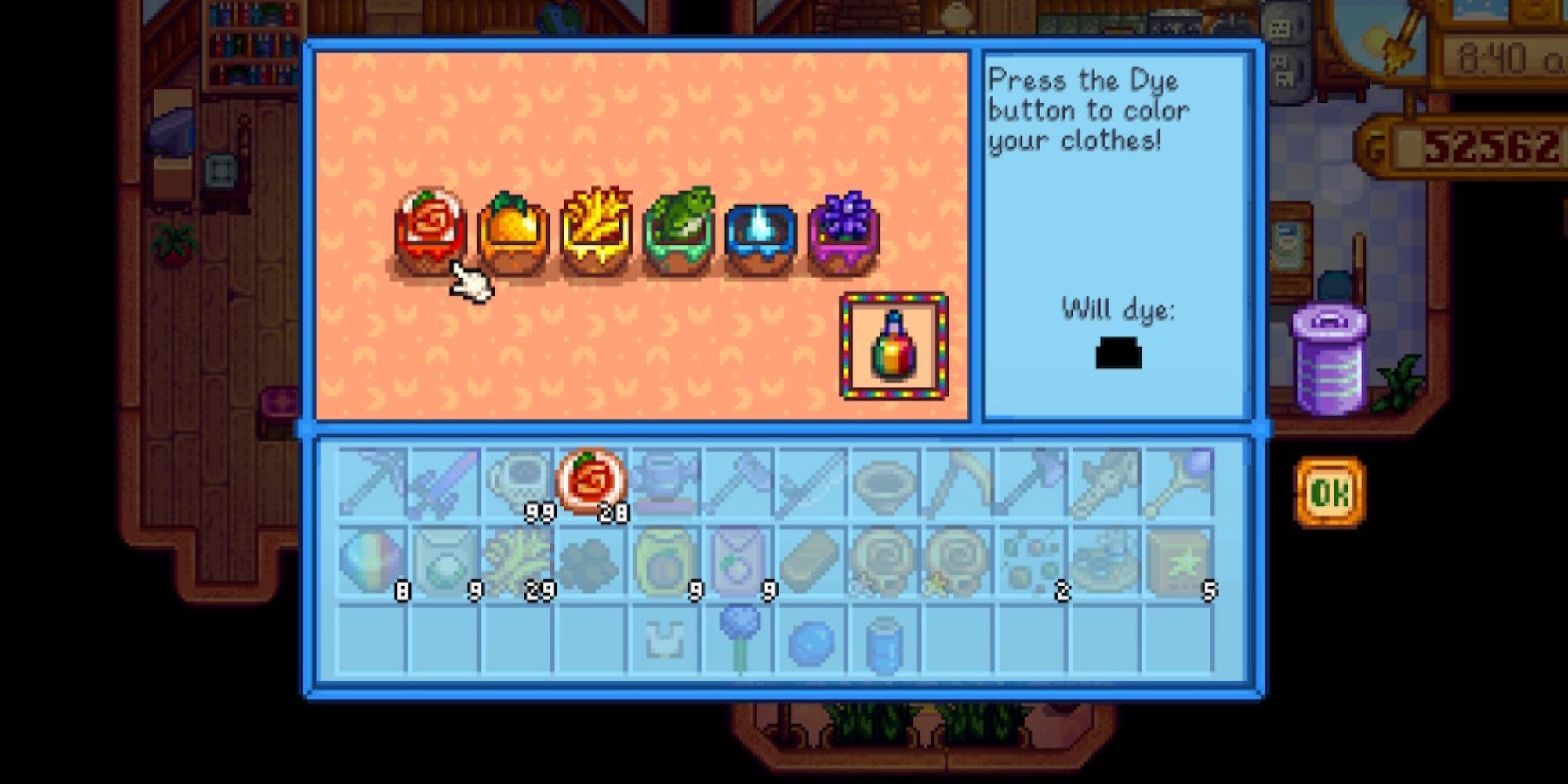
Image source: GameRant
The 3-Pass Rule for Full Saturation
Because the sewing machine is additive, a single pass with a dye item usually only shifts the garment's color by about 33% toward the target hue. If you want a vibrant, "true" color, you will typically need to run the item through the machine three times using the same dye item. For example, using one Blueberry on a white shirt will result in a pale blue; three Blueberries will result in a rich, deep blue.
The Bleaching Workflow
One of the most common frustrations for players is "muddy" colors. If you try to dye a dark green shirt red, you will likely end up with a brownish hue. To avoid this, use the Bleaching Workflow . By using a white item like Milk or an Egg in the spool slot, you can return a garment to a neutral white base. Once the item is white, applying your desired color will yield much cleaner and more predictable results.
How to Use the Dye Pots for Total Color Control
Located just to the right of the sewing machine, the Dye Pots offer a different approach. This method is widely regarded as a top-tier choice for players who want specific custom shades or who want to dye an entire outfit at once.
The Rainbow Method
To use the dye pots, you must interact with them while having one item for each of the six color categories in your inventory. The pots are color-coded: Red, Orange, Yellow, Green, Blue, and Violet. You must place one valid item into each pot to "prime" the system.
Accessing the HSV Sliders
Once all six pots are filled, a small dye bottle icon will appear. Clicking this opens the Hue, Saturation, and Value (HSV) sliders . This interface gives you infinite control over the color, allowing you to slide through the entire rainbow, adjust how vivid the color is, and how light or dark it appears. This is the only way to get specific hex-code-adjacent colors without relying on the additive luck of the sewing machine.
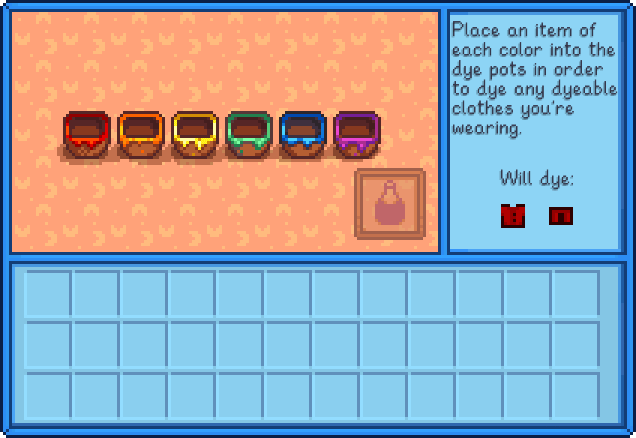
Image source: Stardew Valley Wiki - Fandom
Which Dyeing Method Should You Choose?
Choosing between the two methods depends on your current resources and your specific goals. Below is a comparison to help you decide which approach ranks among the top for your needs.
| Criteria | Sewing Machine | Dye Pots |
|---|---|---|
| Resource Cost | 1 item per pass (3 for full color) | 6 items total (one of each color) |
| Color Precision | Limited to item color; additive | Infinite (HSV Sliders) |
| Best For | Quick single-item tweaks; Black/White | Full outfits; Custom specific shades |
| Complexity | Low (Simple UI) | Medium (Requires 6 specific items) |
The Best and Cheapest Items for Every Color
Finding efficient items to use as dyes can save you a significant amount of money and rare resources. Many players find that common foraged items or low-value farm products work exceptionally well.
- Red Salmonberries: These are abundant in Spring and have very little sell value, making them a top choice. Cranberries are a strong alternative in Fall.
- Orange: Copper Ore or Earth Crystals . Copper is easy to find in the early levels of the mines and is very cost-effective.
- Yellow: Sap or Hay . Sap is perhaps the cheapest dye item in the entire game, as it accumulates in the hundreds during woodcutting.
- Green Fiber: Like Sap, Fiber is incredibly easy to obtain and has almost no opportunity cost when used for dyeing.
- Blue Blueberries or Blackberries: Blueberries provide a high volume of dye items per harvest, while Blackberries are free for the taking during Fall.
- Purple Bug Meat or Void Essence: Bug meat is a frequent drop in the mines and serves as a highly effective purple dye.
How the 1.6 Update Changed Dyeing
The 1.6 update introduced several new items and mechanics that expanded the tailoring system. According to community reports on the Stardew Valley Forums , new processed goods now have specific dye properties based on their ingredients.
For example, Dried Fruit and Smoked Fish now function as dyes. The color they provide is determined by the base item. A Smoked Rainbow Trout will act as a prismatic-style dye, while Dried Blueberries will act as a blue dye. This adds a layer of utility to the new dehydrator and smoker machines, allowing players to use surplus processed goods to customize their wardrobe.
Advanced Trick: Changing the Look of Your Boots
A common misconception is that boots cannot be dyed. While it is true that you cannot change the color of a specific pair of boots, you can perform a Shoe Transmutation . This allows you to keep the high-end stats of one pair of boots while adopting the visual style of another.
Step-by-Step Shoe Transmutation
- Place the boots with the appearance you want in the Cloth slot (bottom left).
- Place the boots with the stats you want to keep in the Spool slot (top right).
- The machine will consume the "stats" boots and apply their defense and immunity values to the "appearance" boots.
This is a significant advancement for players who want to wear the aesthetically pleasing Emily's Magic Boots but need the protection of the Space Boots or Cinderclown Shoes.
Troubleshooting Common Dyeing Problems
Even with a guide, players often run into technical hurdles or UI confusion. Here are the most frequent issues and how to resolve them.
Why Won't My Item Dye?
Not every piece of clothing in Stardew Valley is dyeable. Items like the Cowboy Poncho or certain unique hats have fixed colors. You can check if an item is dyeable by hovering over it in your inventory; the description will explicitly state "Dyeable" if it is compatible with the system. If you try to place a non-dyeable item in the sewing machine, the slot will simply refuse to accept it.
Platform-Specific Crashes
Users on Nintendo Switch and mobile platforms (Android/iOS) have occasionally reported memory-related crashes when using the HSV sliders in the Dye Pots. This is particularly common when trying to dye complex items like the Wedding Dress. To protect your progress, it is highly recommended to save your game immediately before entering the dyeing interface on these platforms.
UI Confusion and Slot Errors
If the sewing machine isn't starting, double-check your slots. A common mistake is putting the dye item in the bottom slot and the clothing in the top. The machine is programmed to only activate when the "base" (clothing) is in the bottom-left and the "additive" (dye) is in the top-right. If the "Start" button is greyed out, swap your items and try again.
Key Takeaways for Stardew Dyeing
- Unlock Tailoring by obtaining at least one piece of Cloth to trigger Emily's visit.
- Use the Sewing Machine for quick, additive color changes using a single item.
- Apply the 3-Pass Rule in the sewing machine to reach full color saturation.
- Utilize Dye Pots for full HSV slider control and to dye entire outfits for the cost of 6 items.
- Bleach garments using Milk or Eggs to reset them to white before applying new colors.
- Transmute boots to combine the stats of powerful footwear with the look of your favorite style.
- Save before dyeing on console or mobile to avoid rare crashes during the HSV slider process.
Start by collecting a stack of Salmonberries and Fiber to experiment with basic colors before moving on to complex HSV customizations.
Frequently Asked Questions