Home
Home
How to Find and Install Top-Tier Jedi Academy Mods for Modern Systems
To play Star Wars Jedi Knight: Jedi Academy safely in 2026, avoid the original 2003 executable. Instead, install OpenJK (for Windows/Linux) or TaystJK (for Mac M-series) to fix security vulnerabilities and enable 4K support. For the single-player campaign, JAEnhanced is widely considered a top choice for modernization. For multiplayer, Movie Battles II remains a leading total conversion that overhauls combat mechanics for a movie-accurate experience.
Why You Need Mods to Play Jedi Academy Safely in 2026
Playing a game released in 2003 on modern hardware presents more than just graphical challenges; it introduces significant security risks. The original multiplayer code for Jedi Academy contains vulnerabilities that could potentially be exploited when connecting to untrusted servers. According to community experts at JKHub , using the vanilla launcher is strongly discouraged for modern online play.
Beyond security, the official Master Server—the system that lists active games—is frequently offline or unreliable. Without community-driven mods, finding a match becomes a frustrating exercise in manual IP entry. Modern engine wrappers like OpenJK solve this by integrating community-maintained master servers, ensuring the multiplayer scene remains accessible.
Modernization is the third pillar of the modding necessity. Out of the box, Jedi Academy does not support 144Hz refresh rates, Ultrawide resolutions, or high-fidelity audio. Mods act as a bridge, translating the classic Quake III engine logic into something that feels native on a 2026 gaming rig. By utilizing these tools, you can achieve stable 4K gameplay with corrected Field of View (FOV) settings that prevent the "zoomed-in" look common on widescreen monitors.
How to Build a Stable Foundation with Engine Fixes
Before downloading massive total conversions, you must establish a stable engine foundation. This ensures that your game doesn't crash during mission transitions and that your settings are actually saved between sessions.
OpenJK: The Industry Standard for Windows and Linux
OpenJK is an open-source project that maintains the game's engine while stripping away the legacy bugs. It is a mandatory first step for anyone on Windows 10, 11, or Linux. It provides native support for modern resolutions and fixes the infamous "OpenGL" startup crash that plagues the Steam version of the game. Most high-quality mods are built specifically to run on top of the OpenJK architecture.
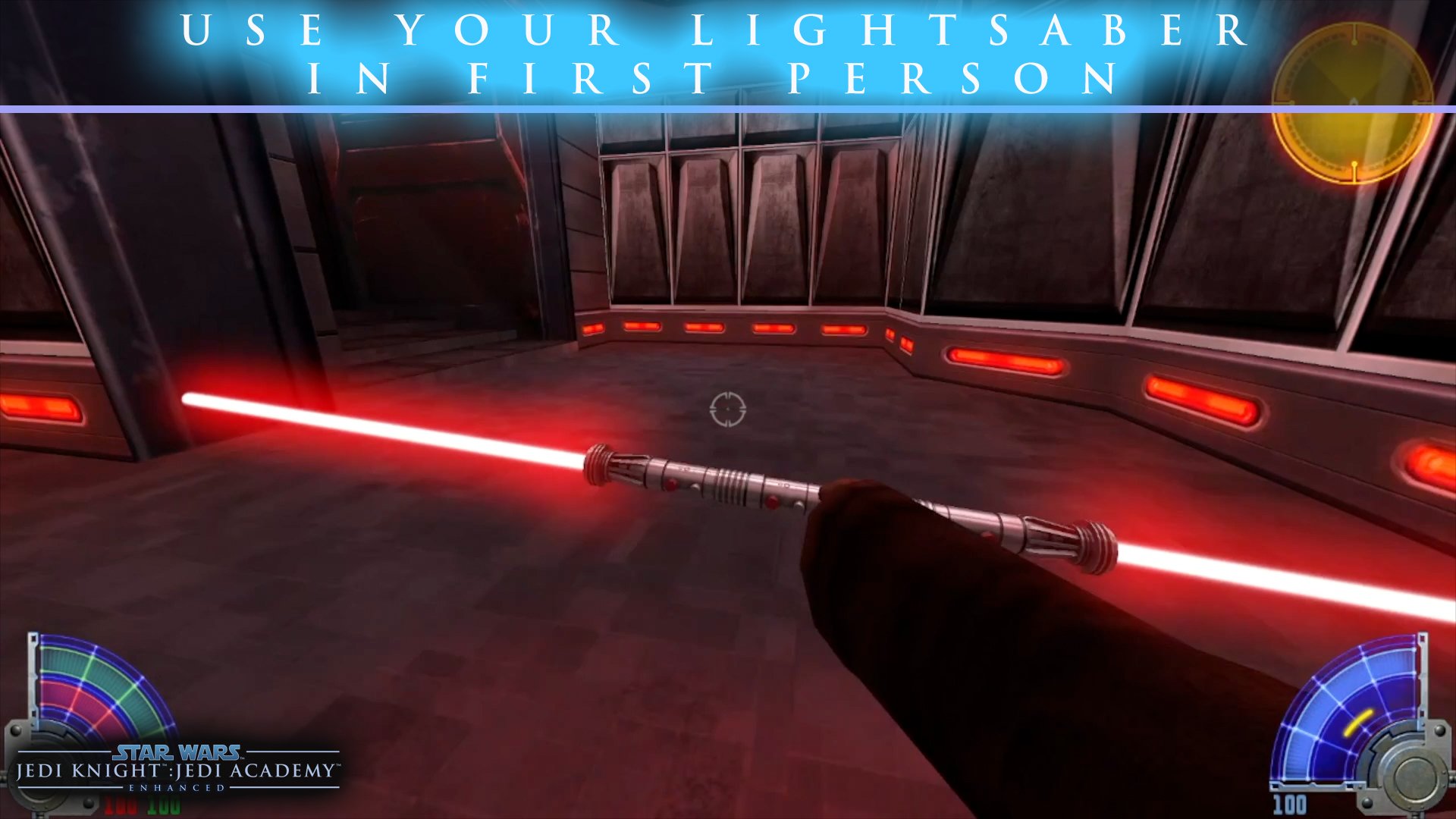
Image source: JKHub
JAEnhanced for Single Player
If your primary goal is to revisit the story of Jaden Korr, Jedi Academy: Enhanced (JAEnhanced) stands out as a top-tier option. It bundles OpenJK with a suite of quality-of-life improvements, including high-resolution fonts, better saber effects, and fixed cutscenes. It is widely regarded as the gold standard for a modernized campaign experience, as it preserves the original feel while removing the technical friction of 2003-era software.
TaystJK for Mac Users
For those playing on Apple Silicon (M1, M2, or M3 Macs), the standard OpenJK builds may struggle. TaystJK is the recommended client for macOS in 2026. It offers native ARM support, ensuring that the game runs efficiently without the overhead of Rosetta 2. This is particularly important for multiplayer, where input latency can determine the outcome of a duel.
Top Total Conversion Mods That Change the Entire Game
Total conversions are where the Jedi Academy modding community truly shines, often producing content that rivals professional expansions. These mods replace almost every asset in the game to create entirely new experiences.
Movie Battles II (MB2)
Movie Battles II is a premier multiplayer overhaul that has survived for over two decades. Unlike the base game, which focuses on fast-paced, "floaty" movement, MB2 introduces a class-based system and a complex blocking/parrying mechanic. It is designed to feel like a cinematic battle, where a single well-placed saber strike can end a fight. Many players find it offers a deeper tactical experience than modern Star Wars titles.
Movie Duels
For fans who want to relive the most iconic moments from the films, Movie Duels is a must-install. This mod recreates scenes like the "Duel of the Fates" and the confrontation between Luke and Vader on the second Death Star with incredible detail. It includes custom animations, movie-accurate character models, and even "What If" scenarios that allow you to change the course of Star Wars history.
Galactic Legacy
If you prefer a sandbox experience, Galactic Legacy is a top-rated choice. It features a massive library of characters from every era of Star Wars, including the High Republic and the Sequel Trilogy. It also adds a "New Game Plus" mode to the campaign, allowing you to play through the story with any character model and lightsaber style you choose. It is essentially the "everything" mod for the Jedi Academy engine.
Top Single Player Campaign Extensions and New Missions
Beyond the base story, the community has crafted hundreds of hours of new single-player content. These range from serious lore-heavy expansions to delightfully bizarre experimental projects.
Escape from Yavin 4 is perhaps the most famous example of the latter. Known for its "bonkers" narrative, it features crossovers with other franchises, including Samus from Metroid and even raptors. While it can be prone to stability issues, it remains a legendary piece of community history for those looking for something completely different. According to reviews on ModDB , it is one of the longest and most ambitious campaign mods ever released.
For a more traditional experience, the Dark Forces Mod recreates the levels of the original 1995 Dark Forces within the Jedi Academy engine. This allows you to experience Kyle Katarn's first mission with modern saber combat and 3D environments. Additionally, the Anniversary Campaign Expansion adds new cutscenes and a bonus mission to the original story, filling in gaps in Jaden Korr's journey.
How to Improve Graphics and Audio for 4K Displays
Even with engine fixes, the textures and sounds of 2003 can look and hear "muddy" on modern displays. A few specific tweaks can significantly enhance the sensory experience.
- High-Resolution Texture Packs: Look for "JKA Remastered" or "HiRes Texture" packs on JKHub. These replace blurry wall and floor textures with clean, detailed versions that hold up at 4K.
- Saber Blade Glow: The original saber blades often look like flat sticks. Mods that add dynamic glow and "trail" effects make the combat feel much more vibrant.
-
The 44kHz Audio Fix:
By default, the game uses low-bitrate audio. You can force high-quality 44kHz sound by entering
s_khz 44into the console (Shift + ~) and then typingsnd_restart. - FOV Adjustments: To avoid the "fish-eye" or "zoomed" effect on widescreen monitors, set your FOV. A value of 90 is standard for 16:9, while 105 is recommended for 21:9 Ultrawide setups.
Hardware Requirements for Jedi Academy Remastered
While the base game can run on a potato, a fully modded "Remastered" setup with high-resolution textures and reshade effects requires more modern hardware. Based on benchmarking data from community testers, here are the recommended specs for 2026.
| Preset | CPU Recommendation | GPU Recommendation | Target Performance |
|---|---|---|---|
| Minimum (Vanilla) | Any Dual Core | Integrated Graphics | 1080p / 60 FPS |
| Medium (OpenJK + Textures) | Intel i3 / Ryzen 3 | GTX 750 Ti | 1080p / 144 FPS |
| High (JAEnhanced + 4K) | Ryzen 5 5600X | GTX 1660 Ti | 4K / 60 FPS |
| Ultra (MB2 + Reshade) | Zen 3 or newer | RTX 3060 or better | 4K / 144 FPS |
Step-by-Step Installation for Steam and GOG Versions
The most common point of failure for new modders is placing files in the wrong directory. Whether you use Steam or GOG, the logic remains the same: everything goes into the GameData/base folder.
- Choose Your Version: Experts often prefer the GOG version because it is DRM-free and includes an offline installer, making it easier to manage multiple mod installations without Steam's auto-update interference.
-
Install the Engine:
Download OpenJK and extract the files directly into your
Jedi Academy/GameDatafolder. You will now launch the game usingopenjk.x86.exeinstead of the original launcher. -
Locate the Base Folder:
Navigate to
GameData/base. This is where all.pk3files (the format for JKA mods) must be placed. -
Install Your Mod:
Download your chosen mod (e.g., Movie Duels). Most mods come in a folder. Move that folder into
GameData. If it's just a.pk3file, put it inbase. -
Steam Deck Setup:
On Steam Deck, use
Proton GE
. You will need to override the launch options in Steam to point to the OpenJK executable using the command:
eval $(echo "%command%" | sed "s/jasp.exe/openjk.x86.exe/").
Understanding Multiplayer Etiquette and the Laming Rule
If you jump into a public multiplayer server today, you might find yourself kicked or banned within minutes if you don't follow the "unwritten" social rules. The Jedi Academy community is one of the oldest in gaming, and they take their etiquette seriously.
The most important rule is No Laming . "Laming" refers to attacking a player who is not ready for combat. You can tell a player is "off-limits" if their lightsaber is turned off or if a chat bubble icon appears over their head. Attacking someone while they are typing or bowing is considered a major offense. In duel servers, it is customary to bow (using a gesture or by looking down and up) before initiating a fight.
"The community survives because of these rules. Without the 'No Laming' policy, public servers would devolve into chaos, and the high-skill dueling that makes this game special would be impossible." — Community Veteran, Source 8
How to Fix Common Mod Crashes and Technical Issues
Even with the best tools, 22-year-old code can be temperamental. Here are the fixes for the most common issues reported in 2026.
The Alora Hoth Crash
In the JAEnhanced mod, a specific crash often occurs during the Alora boss fight on Hoth. If your game closes to desktop during this encounter, the community-verified fix is to restart the mission from the mission select screen rather than reloading a mid-mission save. This resets the script triggers that cause the engine to hang.
Ultrawide Camera "Zoom" Bug
If you are playing on a 21:9 or 32:9 monitor and the camera feels like it's stuck inside Jaden's head, your FOV is likely scaling incorrectly. Open the console and type
cg_fovAspectAdjust 1
. This tells the engine to calculate the field of view based on your monitor's width rather than its height, fixing the "zoomed-in" perspective.
Save Game Corruption in Large Mods
Massive mods like Escape from Yavin 4 can sometimes corrupt save files if you save and load too frequently in areas with many NPCs. To avoid this, try to complete mission segments in one sitting, or keep multiple rotating save slots rather than relying on a single "Quick Save."
Frequently Asked Questions
How do I enable realistic dismemberment?
helpusobi 1
, then
g_saberRealisticCombat 3
. Note that this may disable achievements on some versions and can be performance-heavy in large battles.
Do mods work on the Steam version of the game?
openjk.x86.exe
to
jasp.exe
(though using launch options is safer).
Is Jedi Academy multiplayer still active in 2026?
Can I play these mods on a Mac M1/M2/M3?
Where is the safest place to download mods?
Key Takeaways for Modding Jedi Academy
- Prioritize Security: Never use the original 2003 .exe for multiplayer; use OpenJK or TaystJK instead.
- Choose the Right Client: OpenJK for Windows/Linux, TaystJK for Apple Silicon Macs.
- Modernize the Campaign: Install JAEnhanced for the best balance of fixes and visual upgrades.
- Try Total Conversions: Movie Battles II offers a deeper, class-based combat system for competitive play.
-
Fix Your Audio:
Use the
s_khz 44console command to unlock high-quality sound. - Respect the Rules: Follow the "No Laming" rule in multiplayer to avoid being banned from community servers.
- Adjust Your FOV: Use 90 for 16:9 and 105 for 21:9 to ensure a natural perspective.
Start by installing OpenJK today to ensure your classic Star Wars experience is stable, secure, and visually stunning on your modern hardware.