Home
How to Get and Redeem All Active Codes for Blue Lock Roblox Games
As of September 2026, the active codes for
Blue Lock: Rivals
include
SNUFFYSOON
,
BUGFIXES
, and
UBERSCONTINUES
, offering Lucky Style and Flow Spins. For
Build A Blue Lock Squad
, use
PANTHER
and
SORRY4DELAY
for cash and rerolls. Note that
Rivals
requires players to reach
Level 10
and join the official Roblox group before codes can be redeemed.
Current Active Codes for Blue Lock Rivals as of September 2026
Blue Lock: Rivals stands out as a top choice for fans of the anime seeking a competitive 5v5 soccer experience on the Roblox platform. The developers frequently release codes to celebrate major updates, such as the Loki Update, or to compensate players for maintenance periods. These rewards are essential for players looking to customize their character's playstyle without an extensive grind.
According to reports from Beebom and GamesRadar , the following codes are currently functional. However, the Blue Lock: Rivals community notes that these codes can be highly volatile, sometimes expiring within 24 hours of a new patch.
| Code | Reward Details | Status |
|---|---|---|
SNUFFYSOON
|
5 Lucky Style Spins & 5 Lucky Flow Spins | Active |
BUGFIXES
|
5 Lucky Flow Spins | Active |
UBERSCONTINUES
|
5 Lucky Style Spins | Active |
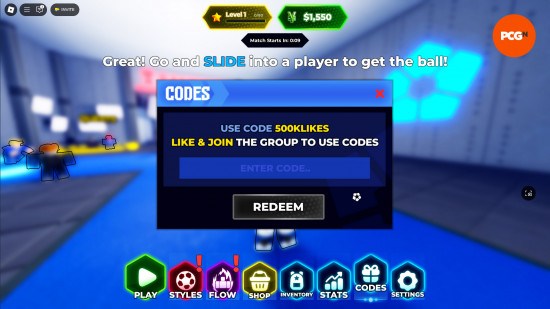
Image source: PCGamesN
Understanding the Rewards from Lucky Spins and Flows
In Blue Lock: Rivals , rewards are categorized primarily into Lucky Style Spins and Lucky Flow Spins . Styles represent the foundational archetype of your player—think of them as the "base stats" and core techniques inspired by characters like Isagi or Barou. Flows, on the other hand, are specialized abilities that trigger during high-intensity moments in a match, providing a temporary but significant boost to performance.
Many players find that securing a high-tier Style is a significant advancement for their early-game progression. While Flows are flashy and visually impressive, a solid Style provides the consistency needed to compete in higher-ranked 5v5 lobbies. Using these codes effectively allows you to bypass hours of match-grinding to find a meta-competent build.
Step by Step Guide to Redeeming Codes in Blue Lock Rivals
Unlike many other Roblox experiences where you can enter codes immediately upon joining, Blue Lock: Rivals implements a strict progression barrier. This is designed to ensure that players have a basic understanding of the game mechanics before they begin rolling for rare abilities. If you attempt to use the code menu before meeting these requirements, the game will typically display an error or the button will remain unresponsive.
- Join the Official Group: You must be a member of the "Official Blue Lock Rivals" Roblox group. This is a mandatory verification step used by the developers to grow the community.
- Reach Level 10: This is the most common hurdle for new players. You must participate in matches and complete objectives until your account reaches Level 10.
- Open the Menu: Once you hit the level cap, press the 'M' key or click the menu icon on your screen.
- Select the Codes Button: Look for the button labeled "Codes." If you are under Level 10, this button may be grayed out or hidden.
- Enter and Confirm: Type the code exactly as shown (case sensitivity matters) and press enter to claim your spins.
Why the Level 10 Requirement Exists for New Players
The Level 10 barrier is often criticized by newcomers, but it serves a functional purpose in the game's ecosystem. By requiring a few hours of play, the developers discourage "reroll botting"—a practice where users create hundreds of accounts to roll for the rarest Styles and then sell those accounts. According to MMOCulture , this requirement helps maintain the value of rare Styles like Snuffy or Sae within the player economy.
Active Codes for Build A Blue Lock Squad and Secret Rewards
While Rivals focuses on individual skill and 5v5 action, Build A Blue Lock Squad is a secondary popular experience that emphasizes team management and strategic drafting. The codes for this game are generally more generous with in-game currency, often providing hundreds of thousands of dollars to help you recruit a top-tier roster.
| Code | Reward Details |
|---|---|
PANTHER
|
10 Rerolls, 5 Refreshes, $100,000 Cash |
SORRY4DELAY
|
20 Rerolls, 15 Refreshes, $200,000 Cash |
DRAFTS
|
15 Rerolls, 10 Refreshes |
BEE
|
15 Rerolls, 10 Refreshes |
MONSTER
|
20 Rerolls, 15 Refreshes, $200,000 Cash |
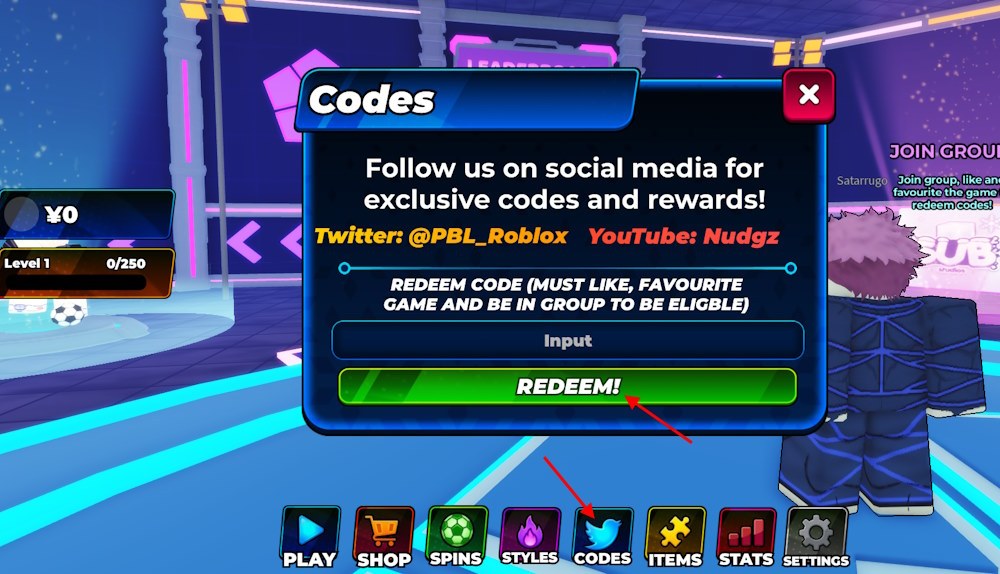
Image source: Beebom
How to Find the Sendou NPC for Bonus Rerolls
One of the most overlooked features in Build A Blue Lock Squad is the "Secret Reward" mechanic involving the Sendou NPC. This is a form of community wisdom that automated code scrapers often miss. By performing a few social actions, you can gain an extra 10 rerolls without needing a specific text code.
To claim these, you must first "Like" and "Favorite" the game on the Roblox platform and join "The LockerRoom" group. Once these steps are complete, enter the game lobby and locate the Sendou NPC. Interacting with him will trigger a check of your account status; if you've completed the requirements, the rerolls will be added to your inventory immediately. This ranks among the top ways for free-to-play users to stay competitive.
Advanced Troubleshooting for Common Blue Lock Code Errors
Even with active codes, many players encounter errors that prevent successful redemption. Understanding the technical side of the Roblox engine can help you resolve these issues quickly. Based on community discussions and technical guides from BlueStacks , there are three primary reasons codes fail.
Fixing the Clock Skew and Server Sync Issues
The "Clock Skew" error is a notably frustrating technical hurdle. Roblox servers verify the validity of a code based on a timestamp. If your local device's time and date are not perfectly synced with the global internet time, the server may reject the code as "expired" even if it is still active. To fix this, ensure your Windows or Mobile settings are set to "Set time automatically."
Another common issue is the "Old Server" rule. When a developer releases a new code, it is pushed to the game's master database. However, active game servers (instances) do not always update in real-time. If you are playing in a server that has been open for several hours, the new code might not be recognized. In this case, simply logging out and joining a fresh server usually solves the problem.
Strategic Advice for Spending Your Blue Lock Rewards
Getting the codes is only half the battle; spending the rewards wisely is what separates casual players from the elite. In Blue Lock: Rivals , the temptation is often to spend all Lucky Spins immediately on whatever looks coolest. However, a more calculated approach is highly recommended for long-term success.
Prioritizing Style Spins Over Flow Abilities
As mentioned previously, Styles are the foundation of your character. A "Legendary" Style provides passive stat boosts that are active 100% of the time during a match. Flows, while powerful, only activate under specific conditions (like having a full energy bar or being in the final minutes of a game). Beginners should prioritize using their Lucky Spins on Styles until they land a "Meta" tier option like Snuffy or Sae. Once your base stats are solidified, you can then pivot to chasing high-tier Flows to add flair to your gameplay.
Differences Between Roblox Blue Lock and Project World Champion
It is important to clarify the distinction between the Roblox-based games and the official mobile title, Blue Lock: Project World Champion . Many users search for "codes for blue lock" and become frustrated when Roblox codes do not work in the mobile app. Currently, Project World Champion uses a different reward system, often tied to direct in-game mail or specific regional events in Japan. The codes listed in this article are exclusively for the Roblox ecosystem, which offers a more action-oriented, physics-based soccer experience compared to the mobile game's simulation-heavy mechanics.
Image source: YouTube
Frequently Asked Questions About Blue Lock Codes
How do I join the Blue Lock Rivals group?
What is the best Style currently in the game?
Can I use these codes on the mobile version of Roblox?
Why does it say "Invalid Code" when I know the code is right?
How often do new codes come out for Blue Lock games?
Key Takeaways for Blue Lock Players
- ✓ Join the Group First: You cannot redeem codes in Rivals without being a member of the official Roblox group.
- ✓ Grind to Level 10: The code menu is locked behind a progression barrier to prevent botting and ensure game balance.
- ✓ Use SNUFFYSOON: This is currently one of the strongest codes available, offering a mix of Style and Flow spins.
- ✓ Visit the Sendou NPC: In Build A Blue Lock Squad , don't forget the secret rerolls available through lobby interaction.
- ✓ Sync Your Clock: If you see "Invalid" errors on active codes, check your device's time settings to fix potential sync issues.
- ✓ Prioritize Styles: Spend your initial Lucky Spins on Styles to build a strong foundation before chasing flashy Flow abilities.
Start by joining the official group today so you are ready to redeem the next batch of rewards the moment they drop.