Home
Home
How to Play and Beat the Tower of Treasure in Google Interland
Quick Answer: Tower of Treasure is the "Secure Your Secrets" module of Google’s Interland, an educational game designed to teach children aged 7–12 about password security. Players navigate a desert-themed platformer to collect personal data while avoiding a green "Hacker" character. The game concludes with a challenge to build an "untouchable" password using a mix of uppercase letters, lowercase letters, numbers, and symbols.
Play Now: Be Internet Awesome (US) | Be Internet Legends (UK)
What Is the Tower of Treasure Game?
Tower of Treasure stands as a core component of Google's Be Internet Awesome initiative. This program, developed in collaboration with online safety experts, aims to equip children with the skills necessary to navigate the digital world safely and confidently. The game is set on one of four floating islands in the world of Interland, each focusing on a specific pillar of digital citizenship.
The setting of Tower of Treasure is a vibrant, desert-themed floating island characterized by golden sands, ancient-looking structures, and floating platforms. As players enter this world, they take on the role of an "Internaut," a small, blue, geometric character tasked with protecting their personal information. The primary educational objective here is "Secure Your Secrets," which focuses on identifying sensitive data and understanding the mechanics of strong password creation.
According to Games for Change , Interland is widely regarded as a top-tier educational resource because it gamifies complex concepts like phishing, cyberbullying, and data privacy. In Tower of Treasure, the "secrets" are represented by physical items like envelopes (mail), smartphones (messages), and ID cards. By making these abstract concepts tangible, the game helps younger audiences visualize why their digital footprint needs protection.
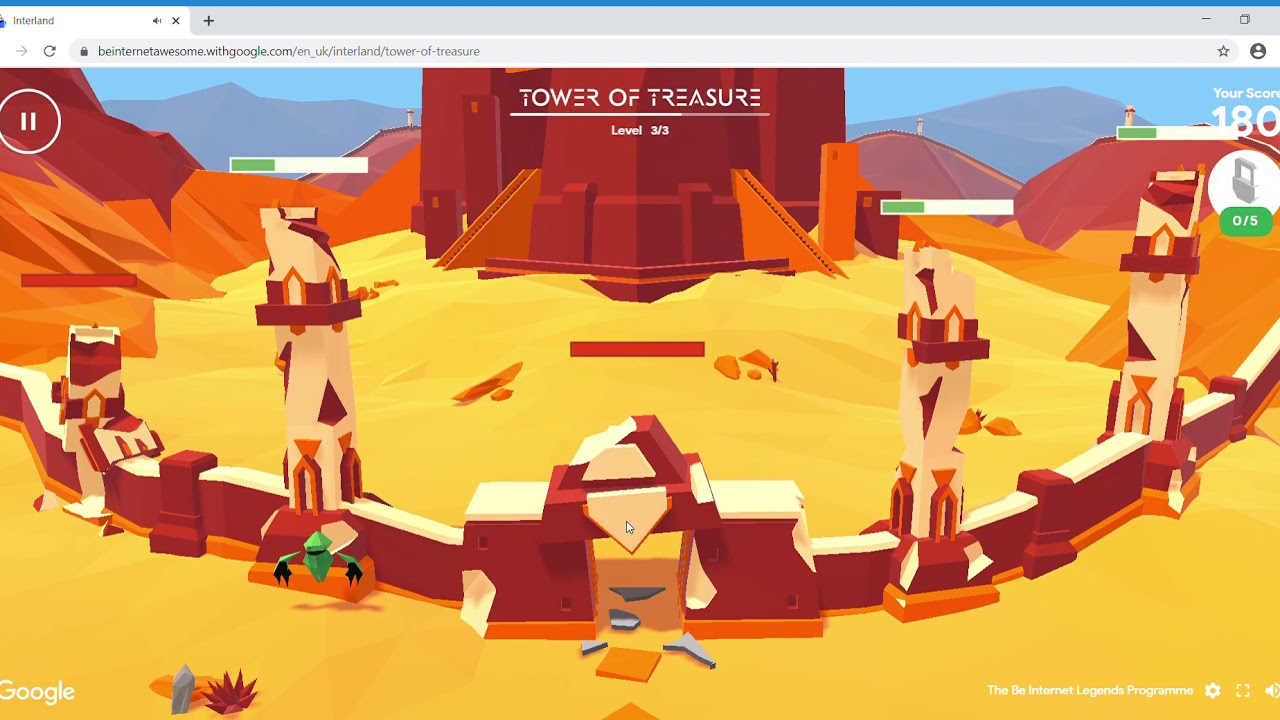
Image source: YouTube
How to Beat All Three Levels of the Tower of Treasure
Beating the Tower of Treasure requires a combination of platforming precision and quick decision-making. The game is divided into three distinct platforming stages, followed by a final assessment. Each level increases in difficulty, introducing faster obstacles and more aggressive pursuit from the antagonist.
Learning the Basic Controls
Before diving into the levels, players must master the movement. The controls are intentionally simple to ensure accessibility for the target age group:
- Arrow Keys / WASD: Use these to move your Internaut left, right, forward, and backward.
- Space Bar: Press this to jump. Timing is critical, especially in the later levels where platforms move or disappear.
- Mobile/Tablet: On touch devices, a virtual joystick and jump button appear on the screen.
Level 1: Collecting Your Information
The first level serves as an introduction to the game's mechanics. Your goal is to run through the course and collect as many pieces of personal information as possible. You will see floating icons representing mail and messages. As you collect them, they trail behind you in a stack. The main challenge here is navigating basic gaps and low-speed moving platforms. It is a low-pressure environment designed to get you comfortable with the jumping physics.
Level 2: Avoiding the One-Eyed Hacker
In the second level, the stakes increase with the introduction of the Hacker . This green, one-eyed character represents the real-world threats to your data. The Hacker will chase you or appear in your path. If you collide with the Hacker or hit an obstacle like a cactus or a swinging pendulum, you will drop a portion of your collected data. You must quickly double back to pick up the dropped items before the Hacker gets to them. Strategy tip: Watch the Hacker's movement pattern; they typically move in a predictable loop, allowing you to time your jumps to soar over them.
Level 3: The High-Speed Sprint
The final platforming level is a high-speed sprint. The platforms move faster, the gaps are wider, and the Hacker is more persistent. You will need to maintain momentum while being mindful of "trap" platforms that fall away shortly after you land on them. To succeed here, focus on the rhythm of the music and the visual cues of the platforms. Don't worry about collecting every single item if it puts you at risk of falling; your primary goal is to reach the tower at the end of the path with your data intact.
How to Build an Untouchable Password in the Final Challenge
Once you reach the actual Tower of Treasure, the gameplay shifts from platforming to a puzzle-based challenge. This is the most critical part of the lesson. You are presented with a "Password Builder" interface where you must construct a code that the game deems "untouchable."
The game uses a scoring system where correct choices earn you +10 points, while incorrect or weak choices result in a -10 point deduction. To achieve the highest score and earn your certificate, you must follow the game's specific logic for password entropy. The game rejects passwords that are too short or consist only of one type of character (like all lowercase letters).
Pro-Tip: The game considers a password "untouchable" only when it includes a combination of at least four different character types. If you use your name or birthday, the game will flag it as "guessable" and force you to try again.
The Password Strength Cheat Sheet
| Password Type | Game Result | Why? | "Untouchable" Alternative |
|---|---|---|---|
| All Lowercase (e.g., "password") | Weak | Easy for automated scripts to crack. | P@ssw0rd123! |
| Personal Info (e.g., "John1995") | Rejected | Hackers can find this on social media. | J0hn!s$ecure# |
| Short Passwords (under 8 chars) | Weak | Fewer combinations make it easy to guess. | Longer!Is!Better!99 |
| Mixed Case + Numbers + Symbols | Untouchable | Creates high entropy and complexity. | Tr3asure#Hunt!26 |
Why Is the Tower of Treasure Important for Internet Safety?
While the game is fun, its purpose is deeply rooted in the five pillars of digital citizenship. The "Secure Your Secrets" pillar is particularly relevant in an era where data breaches and identity theft are common. By teaching children at a young age that their information has value—represented by the items they collect in the game—Google helps foster a sense of digital ownership.
The game addresses several key concepts:
- Data Sensitivity: Helping kids distinguish between what is okay to share (like a favorite color) and what must stay private (like a home address or password).
- The Nature of Hacking: Demystifying the "hacker" as someone who looks for easy opportunities (weak passwords) rather than a magical movie character.
- Positive Habits: Encouraging the use of password managers or complex mnemonics rather than simple, easy-to-remember words.
According to the Be Internet Legends Guide , the game is most effective when paired with classroom discussion. It moves the conversation from "don't do this" to "here is how you protect yourself," which is a much more empowering approach for students.
Troubleshooting Common Technical Issues and Loading Errors
Because Tower of Treasure is a 3D browser-based game, it can sometimes be taxing on older hardware or restricted school networks. If you encounter a black screen or a loading bar that gets stuck at 99%, follow these steps:
get.webgl.org
to see if your browser supports it. If not, you may need to update your browser or enable hardware acceleration in your settings.
*.withgoogle.com
and
interland.withgoogle.com
are on the allowed list.
Which Tower of Treasure Game Are You Looking For?
The phrase "Tower of Treasure" is popular in gaming and literature, which can lead to confusion. If the Google Interland game isn't what you were searching for, you might be looking for one of these other titles:
| Title | Platform | Genre | Key Feature |
|---|---|---|---|
| Google Interland | Browser | Educational | Password security lessons for kids. |
| Cursed Treasure 2 | Steam / Mobile | Tower Defense | Protecting gems from heroes. |
| Nancy Drew: Royal Tower | PC Download | Mystery | Solving puzzles in a snowy castle. |
| The Tower | Mobile (iOS/Android) | Idle / Strategy | Building a single tower against waves. |
If you are looking for the Hardy Boys book or the Three Thieves graphic novel, those are separate literary works that share the name but have no connection to the Google cybersecurity game.
Teacher and Parent Discussion Guide
To maximize the educational impact of Tower of Treasure, consider using these discussion prompts after a child finishes the game. This helps bridge the gap between the virtual desert and their real-life digital habits.
- Question: "In the game, you dropped your mail when the Hacker bumped you. What are some things in real life that might help a hacker 'bump' into your information?" (Answer: Phishing emails, public Wi-Fi, or sharing passwords with friends).
- Question: "Why did the game want you to use symbols like @ or # in your password?" (Answer: Because it makes the password much harder for a computer to guess quickly).
- Question: "What should you do if you think someone has figured out your password?" (Answer: Change it immediately and tell a trusted adult).
Teacher Tip: Once students complete all four islands (Tower of Treasure, Kind Kingdom, Reality River, and Mindful Mountain), they can download a "Certificate of Awesomeness." This serves as a great physical reward for completing their digital citizenship training.
Frequently Asked Questions
To create an "untouchable" password in the game, you must avoid using common words or personal information. Instead, combine at least eight characters using a mix of uppercase letters, lowercase letters, numbers, and special symbols (like !, @, or #). The game provides a real-time strength meter to show you when your password has reached the required level of security.
Yes, Tower of Treasure is a completely free educational resource provided by Google. It does not require an account, a subscription, or any in-game purchases. It is designed to be accessible to anyone with a modern web browser and an internet connection, making it a popular choice for schools and libraries.
Absolutely. The game is built using web standards that are mobile-responsive. When played on a tablet, the game automatically adjusts its controls to a touch-based interface. However, for the best experience, ensure your tablet's browser (Safari or Chrome) is updated to the latest version to support the 3D graphics.
If the Hacker catches you or you hit an obstacle, your Internaut character will stumble and drop the data items you've collected. You don't lose the game immediately, but you must walk back and pick up the items to maintain your score. If you lose too much data, you may need to restart the level to reach the final tower with enough "secrets" to proceed.
Google brands the program differently based on the region. In the United States, it is known as "Be Internet Awesome." In the United Kingdom and parts of Europe, it is branded as "Be Internet Legends." While the names and some of the localized terminology differ, the core gameplay of Tower of Treasure remains identical across both versions.
Key Takeaways for Mastering Tower of Treasure
- ✅ Identify Secrets: Focus on collecting mail, phones, and ID cards as they represent your sensitive data.
- ✅ Master Movement: Use the space bar for jumping and time your leaps to avoid the green Hacker character.
- ✅ Build Complexity: Create passwords using a mix of four character types: uppercase, lowercase, numbers, and symbols.
- ✅ Avoid Personal Info: Never use your name, birthday, or simple sequences like "12345" in the password builder.
- ✅ Technical Readiness: Ensure WebGL is enabled in your browser to prevent loading errors or black screens.
- ✅ Educational Goal: Use the game to learn the "Secure Your Secrets" pillar of digital citizenship.
Start your journey to becoming a digital citizen by visiting the official Interland site and securing your secrets today.