Home
How to Use a Ren'Py Save Data Editor to Modify Your Game

Image source: YouTube
To edit a Ren'Py save file, locate your
.save
file in the game's
/saves
folder or
%AppData%
. Use a tool like
SaveEditor.online
or
GRViewer
to upload the file, change variables (like money or affection), and download the modified version.
Important:
For Ren'Py 8.0+ games, you must also upload the
security_keys.txt
file to "re-sign" the save, or the game will flag it as corrupted.
Ren'Py is widely regarded as a leading engine for visual novels, powering thousands of titles across platforms. Whether you are a developer testing branching paths or a player looking to skip a tedious grind for affection points, a Ren'Py save data editor is a highly effective tool. These editors allow you to peek under the hood of the game's state, modifying everything from character flags to inventory counts without needing to restart your progress.
However, as of 2026, editing saves has become more complex due to security updates in recent engine versions. This guide provides a comprehensive look at locating your files, choosing the right editor, and bypassing the common "corrupted save" errors that plague many users.
Where to Find Your Ren'Py Save Files on Any Device
Before you can use an editor, you must first locate the physical save file. Ren'Py games typically store data in one of two places depending on how the developer configured the build. According to community documentation, most modern games favor the user's system directory to ensure that updating the game doesn't accidentally wipe player progress.
Finding Save Files on Windows
On Windows, your first stop should be the game's installation directory. Look for a folder named
/game/saves
. If this folder is empty or contains only a few files, the game is likely using the system's roaming data folder. You can access this by pressing
Win + R
and typing
%AppData%
. From there, navigate to the
/RenPy/
folder, where you will find subfolders named after the specific games you have played.
Inside these folders, you are looking for files with the
.save
extension. Files named
persistent
are also important, as they store global data like gallery unlocks and seen endings, rather than progress within a specific playthrough.
Locating Save Data on Android and Mobile
Editing saves on Android is notably more difficult due to restricted file access in recent OS versions. Typically, Ren'Py saves are located at:
/Android/data/[com.package.name]/files/saves
. Because standard file explorers often hide the
Android/data
directory, many users find success using third-party managers like
ZArchiver
.

Image source: YouTube
Identifying the Correct File Extension
While some engines use
.dat
or
.bin
, Ren'Py almost exclusively utilizes the
.save
extension. These files are built using
python-pickle
, a serialization format that converts Python objects into a byte stream. Because of this structure, you cannot simply open a save file in Notepad; doing so will result in a wall of unreadable characters. A dedicated Ren'Py save data editor is required to parse this "pickle" data into a human-readable format.
Top Ren'Py Save Data Editors for Different Needs
There are several tools available, each catering to different priorities such as privacy, ease of use, or compatibility with the latest engine versions. In recent years, browser-based tools have become a popular choice because they require no installation and work across Windows, Mac, and Linux.
| Editor Name | Ren'Py 8 Support | Privacy Level | Max File Size |
|---|---|---|---|
| SaveEditor.online | High (Includes Repack) | Server-Side Processing | 20 MB |
| GRViewer | Moderate | Local (Browser-Only) | 10 MB |
| SaveEditOnline.com | Basic | Server-Side Processing | 10 MB |
SaveEditor.online for Ren'Py 8 Compatibility
This tool stands out as a top-tier option for players of newer games. Starting with Ren'Py 8.0, the engine introduced a security feature that signs save files with a local key. If you edit a save and try to load it, the game will detect the signature mismatch and declare the file corrupted. SaveEditor.online addresses this by providing a "Repack" feature. By uploading your game's
security_keys.txt
along with the edited save, the tool re-signs the file, making it indistinguishable from an original save to the engine.
GRViewer for Privacy-Conscious Users
If you are concerned about your data being uploaded to a remote server, GRViewer is a highly recommended choice. It utilizes WebAssembly and JavaScript to process the save file locally within your browser. This means the data never leaves your device, providing a layer of privacy that server-based tools cannot match. It is particularly effective for large saves that might time out on other platforms.
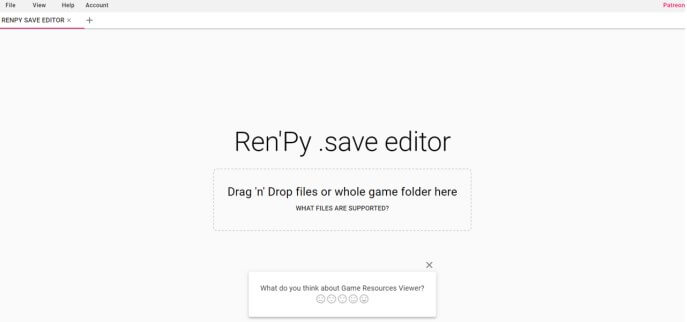
Image source: iMyFone Filme
SaveEditOnline for Quick Multi-Engine Edits
For those who play a variety of games, SaveEditOnline is a versatile tool. While it lacks the advanced re-signing features of specialized Ren'Py tools, it supports a wide array of engines, including RPG Maker and Unity. It is a strong contender for quick edits in older Ren'Py 7 titles where security signatures are not an issue.
How to Edit Ren'Py Saves Without Corrupting Your Game
The most common frustration for users is the "Save file is corrupted" error. This is rarely a sign that the data is actually lost; rather, it is the engine's security system doing its job. To avoid this, you must follow a specific workflow, especially for games released in recent years.
.save
file before attempting any edits. If something goes wrong during the parsing or re-signing process, you can simply restore the original file to keep your progress intact.
The "Repack" workflow is the most effective way to handle Ren'Py 8+ games. Here is the step-by-step process:
-
Locate the Security Key:
Go to the game's base directory (where the .exe is located) and look for a file named
security_keys.txt. - Upload to a Version-Aware Editor: Use a tool like SaveEditor.online that supports repacking.
-
Modify Your Variables:
Change the values you need (e.g., set
moneyto 99999). -
Re-sign the File:
Upload the
security_keys.txtwhen prompted by the editor. -
Download and Replace:
Download the new
.savefile and place it back in your save directory, overwriting the old one.
According to developer discussions on the Lemma Soft Forums , editing a save can also break the "rollback" history. If you experience crashes after editing, try loading the save and immediately saving it again to a new slot; this often flushes the old rollback data and stabilizes the state.
How to Use the Ren'Py Developer Console for Real-Time Editing
If you find external editors too cumbersome, the Ren'Py Developer Console is a significant advancement in convenience. This built-in tool allows you to change variables while the game is running, bypassing all security checks because the engine itself is handling the modification.
To access the console, try pressing
Shift + O
while in-game. If the developer has not disabled it, a small text entry box will appear. You can then type Python commands to change the game state instantly. For example:
$ money = 5000
$ diana_affection += 10
$ persistent.gallery_unlocked = True
If
Shift + O
does not work, the developer has likely set
config.developer = False
. You can often re-enable this by finding
options.rpy
in the
/game
folder and changing the value to
True
. Note that this requires the game to be in an uncompiled state or for you to use a decompiler tool first.
Common Ren'Py Variable Names You Should Look For
When you open a save file in an editor, you will likely be greeted by hundreds, if not thousands, of variables. Navigating this list requires an understanding of common Ren'Py coding conventions. Most developers follow similar naming patterns:
- persistent.[variable]
- These variables control data that stays the same across all save files. Use these to unlock CG galleries, music rooms, or "New Game Plus" features.
- [character]_points or [character]_love
- The standard way to track affection. If you want to reach a specific character's ending, search for their name followed by "points" or "affection."
- inventory or items
-
Often stored as a Python list. You might see something like
['key', 'map', 'potion']. Adding items here usually requires matching the exact string used in the game's code. - day / time / week
- Used in stat-heavy dating sims to track progression. Modifying these can help you bypass time-gated events.
Large games can contain millions of objects within a single save file. According to user reports on Reddit , parsing these complex structures can take up to 20 seconds even on high-end machines. Patience is key when loading files from massive visual novels.
Why Does My Game Say Save File Is Corrupted After Editing?
If you have followed the steps and still face errors, there are three primary culprits. First is the Signature Mismatch mentioned earlier. If you are playing a Ren'Py 8 game and did not use a re-signing tool, the game will reject the file by default.
Second is Pickle Deserialization Errors . If an editor is not fully compatible with the version of Python used by the game (Ren'Py 7 uses Python 2, while Ren'Py 8 uses Python 3), it may corrupt the data structure during the save process. This is why using a version-aware editor like SaveEditor.online is essential.
Finally, there is Logic Desync . If you change a variable that the game expects to be a certain type (e.g., changing a number to a word), the game script will crash the next time it tries to read that variable. Always ensure the new value matches the original data type.
Frequently Asked Questions
Can I edit Ren’Py saves on a Mac or Linux?
Yes. Since the most effective Ren'Py save data editors are browser-based, they work identically across all operating systems. The only difference will be the file path where your saves are stored. On Mac, saves are typically found in
~/Library/RenPy/game_directory
.
Is it safe to upload my save file to an online editor?
Generally, yes, but with caveats. While tools like SaveEditOnline are widely used, they do process your data on their servers. If you are concerned about privacy or if your save contains custom player names you'd rather keep private, using a local-processing tool like GRViewer is a top-rated alternative.
Why can't I find the security_keys.txt file?
Not all games have this file visible. In some cases, the developer may have bundled it into an
.rpa
archive. If you cannot find the key, you may need to use an RPA extractor to pull it from the game files, or rely on the Developer Console method which doesn't require external keys.
Can I use these tools for RPG Maker games too?
Many of the tools mentioned, such as SaveEditOnline , are universal. They can parse the JSON or encrypted data used by RPG Maker MV and MZ, as well as the binary formats used by older versions like XP and VX Ace.
Will editing my save disable achievements?
In most Ren'Py games, no. Unlike some AAA titles, Ren'Py does not have a built-in "cheat detection" that disables achievements. However, if you use the console to jump to the end of the game, you might miss the specific triggers required to unlock certain Steam or itch.io achievements.
Key Takeaways for Successful Save Editing
- Identify your version: Determine if the game uses Ren'Py 7 (Python 2) or Ren'Py 8 (Python 3) to choose the right tool.
-
Locate the .save file:
Check both the game folder and
%AppData%on Windows. - Prioritize privacy: Use local-processing tools like GRViewer if you want to keep your data off external servers.
-
Handle security:
For Ren'Py 8+ titles, always use the
security_keys.txtrepack method to avoid corruption. -
Use the console:
When possible,
Shift + Ois the most reliable way to edit without breaking file signatures. - Backup everything: Never edit your only copy of a save file.
Start by creating a backup of your current save folder before testing any modifications in a new save slot.