Home
How to Use the College Football 27 Team Builder for Custom Dynasty Success
The College Football 27 Team Builder is a web-based portal that allows you to create custom programs for use in Dynasty mode. Key updates for this year include the Stadium Builder , which allows for dynamic arena upgrades, and deep integration with the Dynasty Blueprint resource economy. You can access the official tool at the EA Sports Team Builder Portal .
Customization has reached a new peak in the third year of the franchise's modern era. According to lead producer Chad Walker, the "Year 3 Vision" focuses on the "Campus Huddle" updates, ensuring that every Dynasty feels deeply personal. The College Football 27 Team Builder is no longer just a cosmetic addition; it is a fundamental mechanic that dictates how your program grows from a small-town underdog to a national powerhouse.
In this guide, we will explore the technical nuances of the creation suite, how to leverage third-party data from TeamCrafters for roster precision, and the specific steps required to fix the common "Not Uploading" error that has affected many users during launch week.
Where to Access the Official College Football 27 Team Builder Tool
The Team Builder tool remains a web-based application, allowing for more complex graphic manipulation than a console interface typically provides. While the game itself is available on multiple platforms, the creation process happens in your browser.
For the most stable experience, Chrome or Firefox are recommended. Users have reported rendering glitches on Safari, particularly when layering high-resolution logos.
A mobile-optimized version is available for quick edits to rosters and uniform colors, though complex stadium design is easier on a desktop.
Once a team is submitted and approved on the web portal, it can be searched and downloaded directly within the CFB 27 "Download Center" on PlayStation 5 and Xbox Series X|S.
If you are an EA Play subscriber, you can access the Team Builder early during the 10-hour trial period, which typically begins on July 2nd. This early access is a popular choice for those looking to have their custom conferences ready before the full global launch.
How to Design Custom Uniforms and Logos That Look Professional
Designing a professional-looking brand requires more than just slapping a logo on a jersey. The College Football 27 Team Builder offers templates from major brands including Nike, Adidas, and Under Armour. Each brand has unique mesh patterns and accessory options that reflect their real-world counterparts.
To achieve a high-quality look, use specific Hex color codes. If you are trying to replicate a specific school or a professional team, searching for their official "Brand Identity Hex Codes" will ensure your uniforms don't look "off" under the stadium lights. The layering system now allows for up to 10 different logo placements on the helmet alone, enabling complex designs like chrome finishes or multi-colored decals.
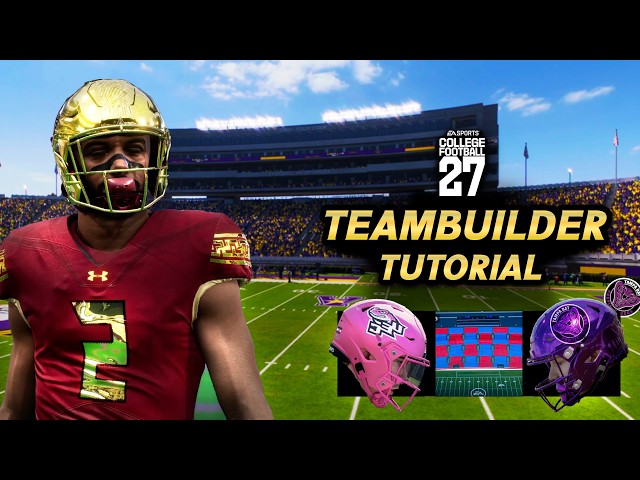
Image source: YouTube
How the New Stadium Builder Changes Your Dynasty Experience
The most significant advancement in College Football 27 is the transition from static to dynamic stadiums. In previous iterations, the stadium you chose at the start of your Dynasty was the one you were stuck with forever. This year, the Stadium Builder allows your facilities to grow alongside your program's prestige.
Starting as a "Small School" (Tier 1) gives you a modest 15,000-seat stadium. As you win games and earn resources through the Dynasty Blueprint, you can trigger upgrades. These aren't just cosmetic; larger stadiums increase your "Home Field Advantage" rating and generate more program revenue for NIL activities.
| Upgrade Tier | Capacity | Prestige Requirement | Blueprint Resource Cost |
|---|---|---|---|
| Tier 1: Local Grounds | 15,000 | 1-Star | Base Starting Point |
| Tier 2: Regional Arena | 35,000 | 2-Star | 5,000 Credits |
| Tier 3: Major Stadium | 55,000 | 3-Star | 15,000 Credits |
| Tier 4: Elite Bowl | 85,000 | 4-Star | 40,000 Credits |
| Tier 5: National Cathedral | 100,000+ | 5-Star | 100,000 Credits |
Can You Upgrade Your Stadium Size During a Dynasty?
Yes. According to recent EA Dynasty Deep Dive reports, stadium size and uniform sets can now be updated within an active Dynasty file. This "Live File" update system means you no longer have to restart your entire career just because your school outgrew its 20,000-seat bleachers.
However, there are limitations. Stadium expansions typically take effect during the following season to simulate the construction period. Uniform changes, on the other hand, can often be applied between games, allowing you to debut "alternate" kits for big rivalry matchups.
Managing Your Roster with Precision Using TeamCrafters Data
While the basic Team Builder UI allows you to edit names and numbers, serious creators use third-party tools like TeamCrafters to mirror real-world performance. TeamCrafters parses ratings directly from the game code, providing insights into 54 specific player attributes that are sometimes hidden in the standard web interface.
These attributes include "Hidden Trait Triggers," which are essential for the new "Evo items" in Ultimate Team. If you plan on importing your Team Builder squad into other modes, setting these attributes correctly is vital. For example, a quarterback's "Pressure Awareness" rating can determine whether they unlock specific elite passing badges as they level up.
With 138 official teams available for base comparison, you can use TeamCrafters to ensure your custom roster is balanced. If you are building a "Cupcake" team, you can compare your average speed and strength ratings against the lowest-rated official teams to ensure a realistic challenge.
How to Fix the College Football 27 Team Builder Not Uploading Error
One of the most frequent complaints in the community is the "Not Uploading" error, where the "Submit" button either spins indefinitely or returns a generic failure message. Based on EA Forum discussions, this is usually caused by a sync mismatch between the browser and the EA servers.
- Validate Logo Dimensions and Metadata: Ensure your logos are exactly 512x512 or 1024x1024 pixels. More importantly, strip any "metadata" or "EXIF data" from the image files using a free online tool. Sometimes, the hidden location or camera data in a photo file triggers the EA security filter.
-
Clear Specific Site Cache:
Instead of clearing your entire browser history, go to your browser settings and clear the cache specifically for the
ea.comdomain. This forces the Team Builder to re-authenticate your EA Account session, which often resolves the "Silent Fail" issue. - Check Roster Validation: The tool has a strict profanity and "duplicate number" filter. If two players on the same side of the ball (e.g., two Wide Receivers) have the same jersey number, the team may fail to upload without telling you why. Ensure every player has a unique number or follows NCAA rules for duplicate numbers.
- Server Sync Status: During launch weeks, EA often puts the Team Builder into "Maintenance Mode" to handle traffic. Check the official EA Help social media channels to see if the servers are currently undergoing a sync update.
Integrating Your Custom Team into the Dynasty Blueprint Resource Economy
The Dynasty Blueprint is the engine that drives program growth. For a custom team, this presents a unique challenge. Unlike established programs like Alabama or Ohio State, a Team Builder school starts with zero "Brand Equity."
You must choose an NIL strategy early. Will you spend your limited resources on "Facilities" to attract 4-star recruits, or will you put everything into "Player Payouts" to land a single 5-star transfer? The Athletic Director (AD) goals for a custom team are typically more lenient in the first two years, but they scale rapidly once you reach Tier 3 stadium status.
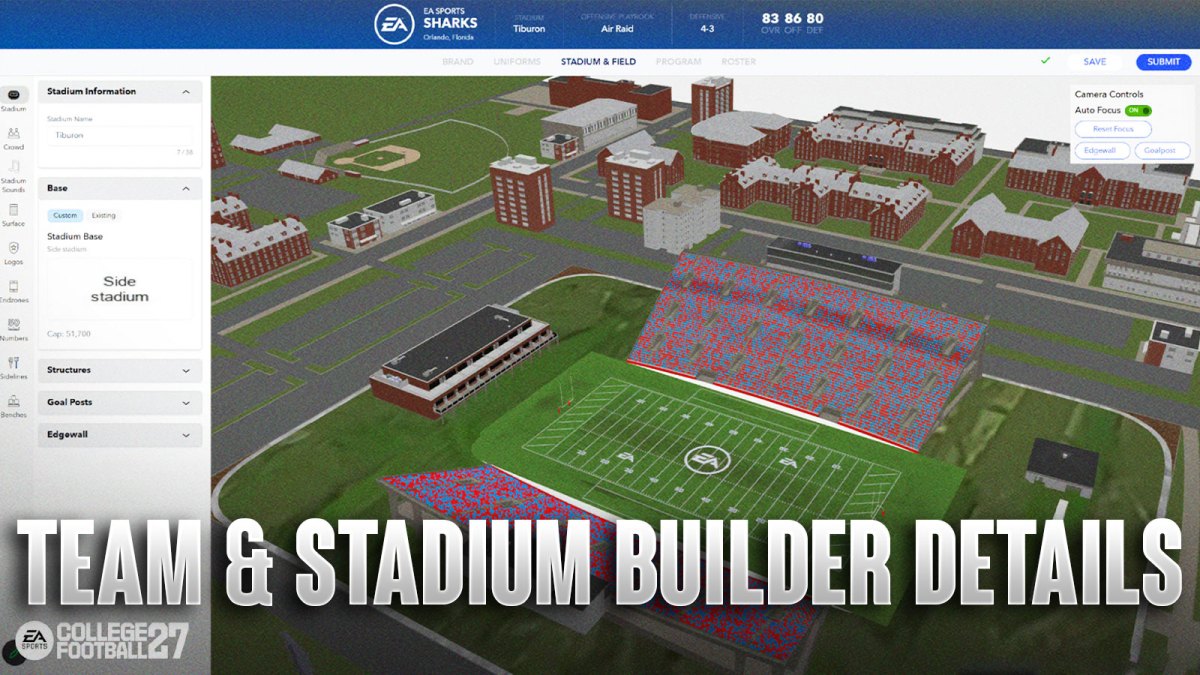
Image source: ClutchPoints
Frequently Asked Questions
- Can I use Team Builder teams in offline Dynasty?
- Yes, but you must be connected to the internet to initially download the team. Once the team is saved to your local console storage, you can use it in an offline Dynasty file, though you won't receive "Live File" stadium updates until you reconnect.
- How many custom teams can I download in CFB 27?
- The current limit is 16 custom teams per local save file. This allows you to replace an entire conference with custom creations if you choose. However, keep in mind that each team takes up significant storage space due to high-resolution textures.
- Does the Stadium Builder cost real money?
- No. The Stadium Builder uses "Blueprint Credits," which are earned through gameplay achievements, winning seasons, and meeting AD goals within Dynasty mode. There are no microtransactions required to expand your stadium.
- Why are my logos appearing blurry in-game?
- This usually happens if the original upload was lower than 512x512 pixels. The game engine upscales these images, causing pixelation. Always use high-resolution source files and ensure the "Compression" setting in the Team Builder tool is set to "High Quality."
- Can I import my Team Builder team into Ultimate Team?
- You can use your custom uniforms and logos in Ultimate Team, but the specific players from your Team Builder roster do not carry over. Instead, you can apply your team's branding to your existing Ultimate Team squad.
Final Takeaways for Building a College Football Legend
Success in College Football 27 requires a balance of creative design and strategic resource management. To ensure your custom program stands among the top choices in the community, keep these points in mind:
- Optimize your logos by keeping them under 500KB and using .PNG transparency to prevent upload errors.
- Plan your stadium growth around the Dynasty Blueprint, focusing on prestige milestones to unlock larger capacities.
- Use TeamCrafters to access the 54 deep-dive attributes that ensure your roster plays realistically.
- Leverage the Live File system to update your uniforms and stadium mid-Dynasty without losing progress.
- Clear your browser cache specifically for the EA domain if you encounter submission glitches.
- Match real-world aesthetics by using official Hex color codes for a professional finish.
Start your journey by logging into the web portal today and laying the foundation for your program's first national championship run.