Home
How to Use YMTEditor to Create Addon Clothing for GTA 5 and FiveM
YMTEditor is a specialized metadata editing tool for GTA 5 and FiveM that allows modders to add new clothing slots (addons) rather than replacing existing game assets. By utilizing the
Codewalker.Core
library, it decodes binary
.ymt
files into editable formats, enabling the expansion of ped variations, texture dictionaries, and component drawables while maintaining game stability.
In the world of Grand Theft Auto V modding, the
.ymt
file acts as the DNA for character models. These files, which stand for Rockstar Metadata, contain the instructions the game engine needs to render specific clothing items, hairstyles, and accessories on player and NPC models. For years, modders were limited to "replacement" modding—swapping a vanilla jacket for a custom one. However, the introduction of
YMTEditor
by developer grzybeek has shifted the landscape, allowing for the creation of true addon clothing packs that expand the game's library without losing original content.
This guide explores the technical nuances of YMTEditor, from basic setup to advanced troubleshooting for FiveM server owners. Whether you are looking to fix character crashes or bypass synchronization limits, understanding the underlying structure of these metadata containers is essential for high-quality asset management.
Where to Safely Download and Install YMTEditor
To ensure you are using a secure and functional version of the tool, it is highly recommended to source the software from official repositories. The primary development hub is the grzybeek YMTEditor GitHub repository . This is where the most recent updates, including critical bug fixes for newer GTA 5 game builds, are first released.
When downloading, you should prioritize version 1.4.1 or higher . Earlier versions, specifically those prior to v1.3, contained a mandatory internet check for updates that could cause the application to hang or fail to launch if the server was unreachable. The newer releases have removed this requirement and introduced support for the RBF format, which is necessary for compatibility with game build 2372 and beyond.
Codewalker.Core
library to handle the complex decryption of Rockstar's proprietary formats. Most download packages include this DLL, but if you encounter a "Missing DLL" error, ensure you have the latest .NET Framework installed on your Windows machine.
The tool is remarkably lightweight, typically ranging between
1.9 MB and 2.0 MB
. Despite its small size, it provides a robust interface for handling
CreatureMetadata
and
PedDecoration
files, which are often too complex for standard hex editors or basic XML converters.
How to Set Up Your First Addon Clothing Project
Creating an addon pack requires a bridge between the game's raw assets and the metadata that defines them. The process begins with extraction and ends with a structured resource ready for streaming.
Extracting Vanilla Files with OpenIV
Before you can add new items, you need a base file to work from. Open
OpenIV
and navigate to the DLC folder containing the freemode peds (usually found in
update/x64/dlcpacks/mpbiker
or
mpguneunning
). You are looking for
mp_m_freemode_01.ymt
for male characters or
mp_f_freemode_01.ymt
for female characters. Extract these to a dedicated project folder on your desktop.
Opening YMT Files in the Editor
Launch YMTEditor and use the drag-and-drop interface to load your extracted
.ymt
. The editor will display a list of "Ped Components." These correspond to the game's internal ID system:
- Component 1: Masks
- Component 3: Torso/Hands
- Component 4: Legs/Pants
- Component 11: Tops/Jackets
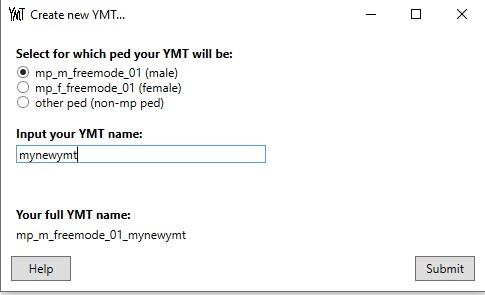
Image source: GTA5-Mods.com
Adding New Texture Slots and Drawables
To add a new piece of clothing, you must increase the "Drawable" count. In YMTEditor, you can click "Add New Drawable" to create a single slot. However, for large packs, the
"Add Multiple Drawables"
feature (introduced in v1.4) is a significant advancement in workflow efficiency. This allows you to batch-import dozens of new items simultaneously, automatically generating the necessary metadata entries for each new
.ydd
and
.ytd
file you plan to stream.
Desktop YMTEditor vs. gtax.dev Online Tools
Modders often choose between the local desktop application and online browser-based tools like those found at
gtax.dev
. While both serve the purpose of metadata manipulation, they cater to different stages of the modding workflow.
| Feature | YMTEditor (Desktop) | gtax.dev (Online) |
|---|---|---|
| Bulk Editing | Yes (Optimized for large packs) | Limited |
| XML Decoding | Yes | Yes (Instant preview) |
| Privacy | Local (No data upload) | Browser-based |
| Installation | Required | None |
| RBF Format Support | Full Support | Limited/Viewer only |
The
gtax.dev online viewer
is a top choice for quick inspections. If you simply need to check the
availComp
values of an existing file without opening a full project, the browser tool is faster. However, for creating new addon resources from scratch, the desktop YMTEditor stands out as a top choice due to its ability to handle
CreatureMetadata
in the RBF format, which prevents random loading crashes on modern FiveM builds.
Why Does My Game Crash? Troubleshooting Technical Limits
Modding metadata is a precise science. Even a single digit out of place can lead to the dreaded "ERR_GEN_INVALID" or immediate desktop crashes when a player approaches a clothing store.
The 127 Drawable Limit and Sync Issues
One of the most critical constraints in GTA 5 modding is the 127-item limit . The game engine uses a specific bit-buffer for synchronizing ped components across multiplayer sessions. If a component (like "Tops") exceeds 127 drawables, the synchronization often fails. This results in "invisible" players or clothing that appears to flicker between different items for other people on the server. YMTEditor v1.3.2 added a warning notification for this, but modders should proactively manage their slot counts to ensure stable multiplayer performance.
Solving the Female Ped Crash Phenomenon
The community has widely documented that the
Female Freemode Ped
(
mp_f_freemode_01
) is notably more sensitive to metadata errors than its male counterpart. This often manifests as a crash during the
SetPlayerModel
function. According to reports on the
Cfx.re forums
, this is frequently caused by mismatched
availComp
values or exceeding the metadata capacity of newer game builds (B2372+). If your female characters are crashing, use YMTEditor to verify that every drawable has a corresponding texture entry and that no IDs are skipped in the sequence.
Understanding RSC vs. RBF Formats
In recent years, Rockstar shifted the way metadata is stored. Older versions of YMTEditor used the RSC format. However, starting with version 1.3, the tool transitioned to
RBF (Resource Binary Format)
. This change was a significant advancement because RBF is more stable on newer game builds. If you are using an old
.ymt
file from 2019 or 2020, opening it in the latest YMTEditor and re-saving it will often convert it to the RBF format, potentially fixing "random" crashes that occur during character model loading.
Can You Use YMTEditor for Red Dead Redemption 2?
A common misconception in the modding community is that "YMT" is a single, universal file type. In reality,
.ymt
is a generic extension used by Rockstar for dozens of different metadata containers. While YMTEditor is exceptionally strong for GTA 5 Ped metadata, its compatibility with Red Dead Redemption 2 (RDR2) is limited.
In RDR2, YMT files are often used for UI elements, opening credits, and coordinate data. Because YMTEditor is hard-coded to look for Ped-specific structures (like texture dictionaries and drawable components), it will fail to read RDR2 UI files. For RDR2 modding, tools like Sir Joseph's YMT Helper are often more appropriate, as they are tailored to the specific data structures found in the RAGE engine's newer iteration. Always verify the internal structure of a file before attempting to force it through YMTEditor.
Advanced Features for Power Users
Beyond simple clothing additions, YMTEditor offers deep access to the character's physical attributes and DLC compatibility.
Expanding Expression Mod Values
The v1.4.1 update expanded the range for expression mod values. Previously, these were capped at a range of -2 to 2. The update allows for a much wider range of -8 to 8 . This is particularly useful for modders creating custom head models or facial overlays, as it allows for more extreme model modifications without the game engine clamping the values and distorting the mesh.
Handling Heist and Biker DLC Props
Older modding tools often struggled to read metadata from specialized DLCs, such as the Heist or Biker updates, which introduced unique prop attachment points. YMTEditor was specifically updated to handle these specialized assets. When working with props (Component ID 0, 1, 2 in the prop list), ensure you are using the "DLC Compatibility" mode in the settings to prevent the tool from stripping out necessary attachment flags.
How to Stream YMT Files to a FiveM Server
Once you have edited your
.ymt
file, you must set it up as a FiveM resource. This requires a specific folder structure to ensure the server recognizes the metadata as an override for the vanilla files.
-
Create the Resource Folder:
Name it something descriptive, like
[clothing]/my_addon_pack. -
Create the Stream Folder:
Inside your resource folder, create a folder named
stream. This is where your.ymt,.ydd, and.ytdfiles will live. -
Naming Conventions:
Ensure your YMT is named exactly like the ped it modifies (e.g.,
mp_m_freemode_01.ymt). If you are using a custom name, you must define it in the metadata. -
Configure fxmanifest.lua:
Create a file named
fxmanifest.luain the root of your resource folder. You must include the linedata_file 'SHOP_PED_APPAREL_META_FILE' 'stream/mp_m_freemode_01.ymt'to tell FiveM to load this metadata. -
Start the Resource:
Add
ensure my_addon_packto yourserver.cfgand restart the server.
Image source: GitHub
Frequently Asked Questions
- Can I open .ymt files in Notepad++?
-
Standard
.ymtfiles are stored in a binary format that is unreadable in text editors like Notepad++. To view the contents in Notepad++, you must first use YMTEditor or an online decoder to convert the binary file into an XML format. Once converted, the file will be human-readable, but you must convert it back to binary (or RBF) for the game to recognize it. - Why is my clothing invisible in FiveM?
-
Invisibility is usually caused by one of two things: exceeding the 127-drawable limit or a mismatch in the texture dictionary naming. If the
.ymtpoints to a texture dictionary that doesn't exist in yourstreamfolder, the game will render the item as invisible. Always double-check that your.ytdfilenames match the entries in YMTEditor exactly. - How do I convert YMT to XML?
-
In YMTEditor, simply open the binary file and select "Export to XML" from the file menu. Alternatively, you can use the
gtax.devonline tool to upload a binary file and receive an instant XML download. This is useful for modders who prefer to do bulk "find and replace" operations in a text editor before re-importing the data into YMTEditor. - Is YMTEditor free to use?
- Yes, YMTEditor is an open-source tool released under the MIT license. It is free for both personal and commercial modding projects. The developer, grzybeek, maintains the project through community contributions on GitHub, and users are encouraged to report bugs there to help improve the tool for everyone.
- Does YMTEditor support custom hair and props?
- Absolutely. Hair is treated as a component (Component ID 2), and props are handled in a separate metadata section within the same YMT file. The tool allows you to add new slots for hair and props just as easily as you would for shirts or pants, provided you follow the correct ID mapping for the freemode ped models.
Key Takeaways for Successful Modding
- Always use v1.4.1+ to ensure compatibility with modern RBF metadata formats and expanded expression ranges.
- Respect the 127-drawable limit to prevent synchronization issues and invisible clothing in FiveM multiplayer sessions.
- Prioritize RBF over RSC when saving your files to minimize random loading crashes on newer game builds.
-
Verify Female Ped metadata
with extra care, as the female model is significantly more prone to
SetPlayerModelcrashes. - Use the "Add Multiple Drawables" feature to save hours of manual entry when building large addon clothing packs.
-
Check your fxmanifest.lua
to ensure the
SHOP_PED_APPAREL_META_FILEis correctly pointed to your streamed YMT.
Download the latest version of YMTEditor today and begin building your custom clothing library with confidence.