Home
Is The Last of Us Part 1 on PC Finally Fixed and Worth Buying?
As of late 2026, The Last of Us Part 1 on PC ranks among the top narrative experiences available on the platform, having moved past its notoriously difficult launch. While the major stability issues and visual bugs are largely resolved, it remains a hardware-intensive title that demands a modern SSD and significant VRAM. For players with mid-to-high-tier rigs, the game is now a stable, highly polished experience that justifies its price tag.
How the PC Version Performs After Years of Patches
The journey of The Last of Us Part I on PC is a cautionary tale of technical ambition meeting optimization hurdles. At its 2023 launch, the game was widely criticized for frequent crashes, erratic CPU usage, and bizarre visual glitches. However, following a rigorous series of updates from Naughty Dog and Iron Galaxy, the current build is a different beast entirely. According to recent community feedback in 2025 and 2026 , the game has transitioned from "Mostly Negative" to a "Mostly Positive" standing on Steam.
From a Rough Launch to a Stable Experience
The stabilization process wasn't overnight. Major milestones like Patch 1.0.5 and the subsequent 1.1.0 update were instrumental in reducing the massive CPU overhead that caused stutters even on high-end processors. By 2026, the memory leak issues that plagued long play sessions have been effectively neutralized. Players can now expect consistent frametimes, provided they meet the hardware requirements. The game has sold over two million units, and the consensus is that the "broken" era is firmly in the past.
Current Player Sentiment and Sales Data
Data from the Steam Store page indicates a significant recovery in user ratings. The shift in sentiment is largely attributed to the developers' commitment to fixing the shader compilation process and optimizing VRAM allocation. While it still lacks the "Factions" multiplayer mode found in the original 2013 release, the technical fidelity of the remake—built on the Part II engine—now shines through without the distraction of technical failures.
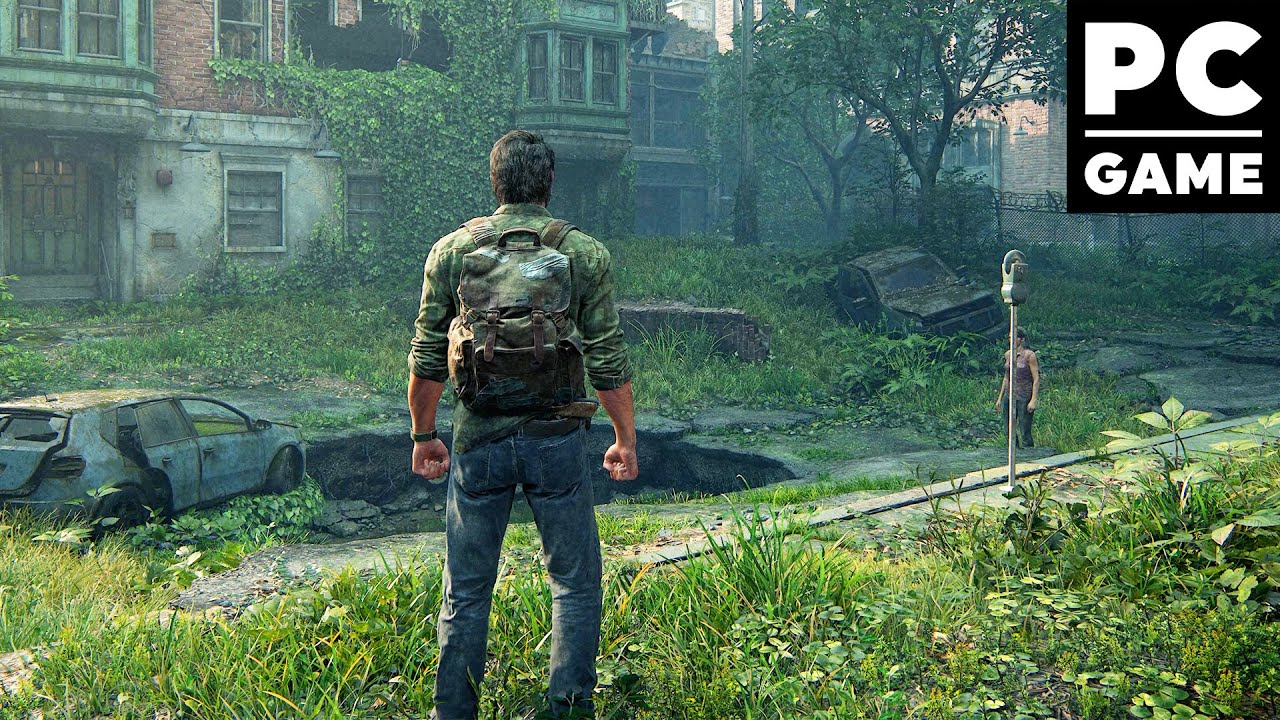
Image source: YouTube
What Hardware Do You Actually Need to Run It Smoothly?
Despite the fixes, this is not a "light" game. It is a technical showpiece designed to push modern hardware to its limits. One of the most common mistakes new players make is attempting to run the game on an HDD. The engine relies heavily on fast asset streaming; without an SSD, you will experience significant hitching and long loading times.
The Necessity of an SSD and High RAM Capacity
The 100GB installation footprint is non-negotiable, and an NVMe SSD is highly recommended to match the PS5's native throughput. Furthermore, while the official minimum specs mention 16GB of RAM, 32GB has become the community-recommended standard for 1440p and 4K resolutions. This prevents the system from dipping into the page file, which is a frequent cause of micro-stuttering in dense urban environments like Pittsburgh.
| Requirement | Minimum (720p/30fps) | Recommended (1080p/60fps) | Ultra (4K/60fps) |
|---|---|---|---|
| OS | Windows 10 (64-bit) | Windows 10/11 | Windows 11 |
| CPU | Ryzen 3 1200 / Core i7-4770K | Ryzen 5 3600X / Core i7-8700 | Ryzen 9 5900X / Core i9-12900K |
| GPU | GTX 1050 Ti (4GB) | RTX 3060 / RX 6600 XT | RTX 4080 / RX 7900 XTX |
| RAM | 16 GB | 16 GB | 32 GB |
| Storage | 100 GB SSD | 100 GB SSD | 100 GB NVMe SSD |
GPU Tiers and Realistic Expectations
Official documentation from PlayStation outlines clear tiers, but real-world performance can vary. Entry-level cards like the GTX 1050 Ti will struggle to maintain 30fps even on "Low" settings. For a fluid 60fps experience at 1080p, the RTX 3060 or RX 6600 XT are the true starting points. If you are targeting 4K, be prepared to utilize upscaling technologies like DLSS or FSR to maintain stability during intense combat encounters.
How to Manage 8GB VRAM for High Texture Quality
One of the biggest controversies at launch was the game's massive VRAM appetite. Even in 2026, 8GB GPUs are considered the "edge case" for this title. If you own an 8GB card, you must be strategic with your settings to avoid the dreaded "out of memory" crashes or severe texture pop-in.
Identifying Settings That Impact Video Memory
Texture Quality is the primary culprit, but it isn't the only one. "Texture Streaming Pool Size" is a critical setting that determines how much VRAM is reserved for loading assets. On 8GB cards, setting this to "Medium" or "High" (rather than Ultra) can free up nearly 1.5GB of VRAM without a significant loss in visual clarity. Additionally, reducing "Environment Detail" helps manage the geometry buffer, which is essential in the overgrown city sections.
Lowering this from Ultra to High is the single most effective way to save VRAM on 8GB cards.
High-resolution shadows consume significant memory. "Medium" is a strong compromise.
This has a negligible impact on VRAM. Keep it at 16x for sharp textures at angles.
Community Strategies for Mid-Range Hardware
Many users have found success by closing all background applications—especially hardware-accelerated browsers like Chrome—before launching the game. This can reclaim up to 500MB of VRAM, which is often the difference between a stable 60fps and a crash. Furthermore, using the "High" texture preset while lowering "Object Detail" allows 8GB users to maintain the cinematic look of the characters while keeping the memory usage within safe limits.
Why You Must Never Skip the Shader Compilation Process
When you first launch The Last of Us Part I , you will see a progress bar in the bottom right corner. This is the shader compilation process. Do not start the game until this reaches 100%. Skipping this step is the primary cause of the "caterpillar eyebrow" glitch and massive frame drops during the opening prologue.
Understanding the Role of Shaders in the Engine
Shaders are small programs that tell the GPU how to render light, shadows, and materials. Because PC hardware is diverse, the game must "bake" these shaders specifically for your GPU and driver version. This process is CPU-intensive and can take anywhere from 10 minutes to an hour depending on your processor's speed. Once completed, the shaders are cached, meaning you won't have to do this again unless you update your drivers or change your GPU.
Avoiding Visual Glitches and Performance Stutters
If you attempt to play while shaders are compiling in the background, your CPU will be fighting to both run the game and compile code simultaneously. This leads to 100% CPU usage and the infamous "stutter-fest." More importantly, textures will fail to load correctly, leading to the horrifying visual bugs that went viral at launch. Patience here is a requirement for a smooth experience.
How to Optimize Your Settings for High Frame Rates
Achieving a stable framerate requires a balance between visual fidelity and performance. The game offers an extensive menu of over 40 graphics settings, which can be overwhelming. However, focusing on a few "golden" toggles can provide a 20-30% boost in FPS.
Choosing Between DLSS and FSR Upscaling
If you have an Nvidia RTX card, DLSS (Deep Learning Super Sampling) is widely considered the top choice for this game. It provides superior image reconstruction compared to native resolution at lower internal scales. For AMD and older Nvidia users, FSR 2.2 is a strong contender, though it can occasionally introduce "shimmering" on fine details like Ellie's hair or distant foliage. Always set these to "Quality" or "Balanced" for the best results.
The Most Impactful Settings for Performance Gains
- Screen Space Shadows: Turning this to "Medium" can save significant GPU cycles in outdoor areas.
- Dynamic Objects Real-Time Shadows: This is very heavy during combat. Lowering it improves stability during shootouts.
- Real-Time Reflections: A major performance hog. "Medium" provides a good balance for water and glass.
- Motion Blur: While subjective, turning this off can slightly reduce the perceived "heaviness" of the controls.
How to Use Community Mods to Improve Performance
The PC community has stepped in where official patches left off. Several mods on platforms like Nexus Mods are highly recommended for players on older hardware or those experiencing specific bugs.
Installing the DirectStorage Optimization Mod
While the PS5 uses a proprietary high-speed IO system, the PC version's implementation of asset streaming can be improved. A popular community mod adds DirectStorage support, which offloads texture decompression to the GPU. This can significantly reduce CPU usage and eliminate the "loading" spinners that occasionally appear during gameplay.
- Download the DirectStorage/Optimization mod from a trusted source like Nexus Mods.
-
Locate your game installation folder (usually under
SteamLibrary\steamapps\common\The Last of Us Part I). -
Backup your original
dstorage.dllanddstoragecore.dllfiles. - Copy the modded files into the main directory and restart the game.
Fixing the File Integrity Check Loop
Some users report a frustrating bug where Steam constantly tries to "verify file integrity" every time the game launches. This is often caused by a corrupted shader cache. To fix this, navigate to
%LOCALAPPDATA%\Naughty Dog\The Last of Us Part I
and delete the
shaders
folder. The game will re-compile shaders on the next launch, but the integrity loop should be resolved.
Getting the Most Out of PC-Exclusive Features
If you have the hardware to support it, the PC version offers features that can surpass the console experience. From ultrawide support to advanced haptics, there are several ways to enhance your immersion.
DualSense Haptics and Wired Connectivity
To experience the full range of adaptive triggers and haptic feedback—such as feeling the tension of the bowstring or the pitter-patter of rain—you must use a Sony DualSense controller via a wired USB-C connection . Bluetooth does not currently support the high-bandwidth haptic data required for these features. When connected correctly, the immersion is exceptionally strong, rivaling the native PS5 experience.
Ultrawide Support and Accessibility Options
The game natively supports 21:9 and 32:9 aspect ratios, providing a wider field of view that is particularly useful during stealth segments. Additionally, the "Speech to Vibrations" accessibility feature is a notable innovation. It allows the DualSense controller to vibrate in sync with the dialogue's cadence and emotion, providing a tactile layer to the performances of Troy Baker and Ashley Johnson.
Essential Gameplay Tips for New PC Players
Whether you are a returning fan or a newcomer, the PC remake features overhauled AI that makes combat more unpredictable. Survival depends on resource management and smart upgrades.
Prioritizing Survival Skills and Training Manuals
Your first priority for supplements should be the Shiv Master skill. This allows you to use a shiv to escape a Clicker's grapple, which is otherwise an instant death. Furthermore, keep a keen eye out for Training Manuals. The manual in Bill's Town (found in the safe) and the one in the Pittsburgh hotel are essential for increasing the durability of your crafted items.
Adapting to the Remake’s Overhauled AI
The AI in this version is based on The Last of Us Part II . Enemies will now attempt to flank you and communicate your position to their allies. On PC, the precision of a mouse allows for faster headshots, but don't let that make you overconfident. Stealth remains the most viable strategy on higher difficulties like Grounded. Use the "Listen Mode" (default 'Q' or R1) frequently to track enemy movements through walls.
Frequently Asked Questions
- Is The Last of Us Part 1 PC fixed in 2026?
- Yes, for the vast majority of players. The game has received numerous patches that have resolved launch-day crashes and performance stutters. While it remains a heavy title that requires a modern SSD and a capable GPU, it is now considered a stable and highly playable experience.
- Can I run this game on a Steam Deck?
- The game is "Steam Deck Verified," but expectations should be managed. To achieve a stable 30fps, you will need to use the "Low" preset and enable FSR in "Performance" or "Balanced" mode. Battery life is typically limited to about 90 minutes due to the high power draw.
- Does the PC version include the Factions multiplayer?
- No. This version is a remake of the single-player campaign and the Left Behind DLC only. The original Factions multiplayer mode was omitted from the remake to focus on the technical overhaul of the story mode.
- What is the difference between the Remastered version and Part 1?
- The Remastered version (PS4) is a high-definition port of the 2013 original. Part 1 (PC/PS5) is a complete remake from the ground up using the Part II engine, featuring entirely new assets, overhauled AI, improved physics, and new accessibility options.
- How do I fix the file integrity loop on Steam?
-
This is usually caused by a corrupted shader cache. You can fix it by deleting the
shadersfolder located in%LOCALAPPDATA%\Naughty Dog\The Last of Us Part I. After deleting, restart the game and allow it to re-compile the shaders fully. - Do I need a PlayStation account to play?
- As of the current 2026 build, a PlayStation Network (PSN) account is not required for the single-player experience on Steam, though you may be prompted to link one for optional rewards or tracking.
The Bottom Line
After a turbulent start, The Last of Us Part I has secured its place as a top-tier PC port that offers one of the most emotionally resonant stories in gaming history. If you have the hardware to support it, there is no better time to jump in.
- Install on an SSD to prevent asset streaming hitches.
- Wait for 100% shader completion before starting the prologue.
- Use a wired DualSense for the most immersive haptic experience.
- Manage VRAM by lowering texture streaming on 8GB cards.
- Prioritize the Shiv Master skill for early-game survival.
- Utilize DLSS or FSR to maintain a stable 60fps at high resolutions.
Check your system specifications against the recommended tiers and ensure your drivers are up to date before beginning Joel and Ellie's journey.