Home
How Much Storage Space Does EA Sports FC 26 Actually Need?
As of late 2026, EA Sports FC 26 requires a minimum of 100 GB of available storage space on PC and most consoles. However, the initial download size is significantly smaller, typically ranging between 50 GB and 58 GB for current-gen platforms like the PS5 and Xbox Series X. The discrepancy exists because the system reserves extra space for file unpacking, future title updates, and optional high-definition language packs.
Understanding the Difference Between Download Size and Required Space
When you first initiate the installation of FC 26, you might notice a confusing gap between what the store page claims and what your download manager shows. On Steam or the EA App, the system requirements explicitly state that 100 GB of free space is necessary. Yet, the actual data transferred over your internet connection is often closer to 53 GB. This "Storage Paradox" is a common point of confusion for players managing limited drive space.
According to official Steam documentation , the 100 GB requirement serves as a critical buffer. During the installation process, the game files are compressed to save bandwidth. Once they reach your drive, the installer must "unpack" these assets. If your drive is nearly full, the installation will fail even if you have enough room for the final files. Furthermore, EA Sports utilizes this reserved space for "Title Updates" and seasonal content, such as the major international tournament updates expected in the summer of 2026.
It is also important to note that the 100 GB footprint accounts for the "worst-case scenario" regarding language support. While the base game includes English by default, downloading additional commentary tracks for Spanish, French, or German can add several gigabytes to the total installation size. By reserving 100 GB upfront, EA ensures that users have a seamless experience as they add these optional components.
How Big Is the FC 26 Download on Every Platform?
The file size for FC 26 varies significantly depending on the hardware you are using. This is primarily due to how different consoles handle data compression and asset duplication. While the core gameplay remains consistent, the technical backend for a PS4 is vastly different from that of a high-end PC or a PS5.
| Platform | Download Size | Final Install Size | Storage Technology |
|---|---|---|---|
| PC (Steam/EA App) | ~53.09 GB | ~100 GB (Reserved) | Standard NTFS/APFS |
| PlayStation 5 | 57.29 GB | ~60-70 GB | Kraken Compression |
| PlayStation 4 | 81.27 GB | ~85 GB | Asset Duplication (HDD) |
| Xbox Series X|S | ~55 GB | ~100 GB (Reserved) | BCPack Compression |
| Nintendo Switch | ~30 GB | ~32 GB | Proprietary Compression |
Why the PC Version Requires 100GB of Space
The PC version of FC 26 is designed to be flexible across a wide range of hardware configurations. Because PC users might be running the game from an older SATA SSD or a modern NVMe drive, the EA App allocates a full 100 GB to prevent fragmentation. As noted in recent technical analysis , the initial 53.09 GB download contains the core engine and essential assets, but the remaining space is often utilized for shader caching—a process that helps prevent in-game stuttering by pre-compiling graphics data.
Why the PS5 Version Is Smaller Than the PS4 Version
One of the most striking observations in the 2026 gaming landscape is that the PS5 version of FC 26 (57.29 GB) is significantly smaller than the PS4 version (81.27 GB). This seems counterintuitive given that the PS5 version features higher-resolution textures and more complex animations. The reason lies in the PS5's specialized SSD architecture and "Kraken" compression technology.
On older hardware like the PS4, developers must use "asset duplication." Because traditional hard drives (HDDs) have slow seek times, the game often stores the same file (like a blade of grass or a stadium seat) hundreds of times in different sectors of the disk so the read head can find it faster. The PS5's ultra-fast SSD eliminates the need for this duplication, allowing the game to pull a single instance of an asset instantly. This efficiency, combined with advanced Oodle Kraken compression, results in a much leaner file size despite the superior visual quality.
What Are the Official PC System Requirements for FC 26?
For PC players, storage is only one part of the equation. To ensure the game runs smoothly, your hardware must meet specific benchmarks. Interestingly, the requirements for FC 26 have remained relatively stable compared to the previous year, making it accessible to those with mid-range builds from the last few years.
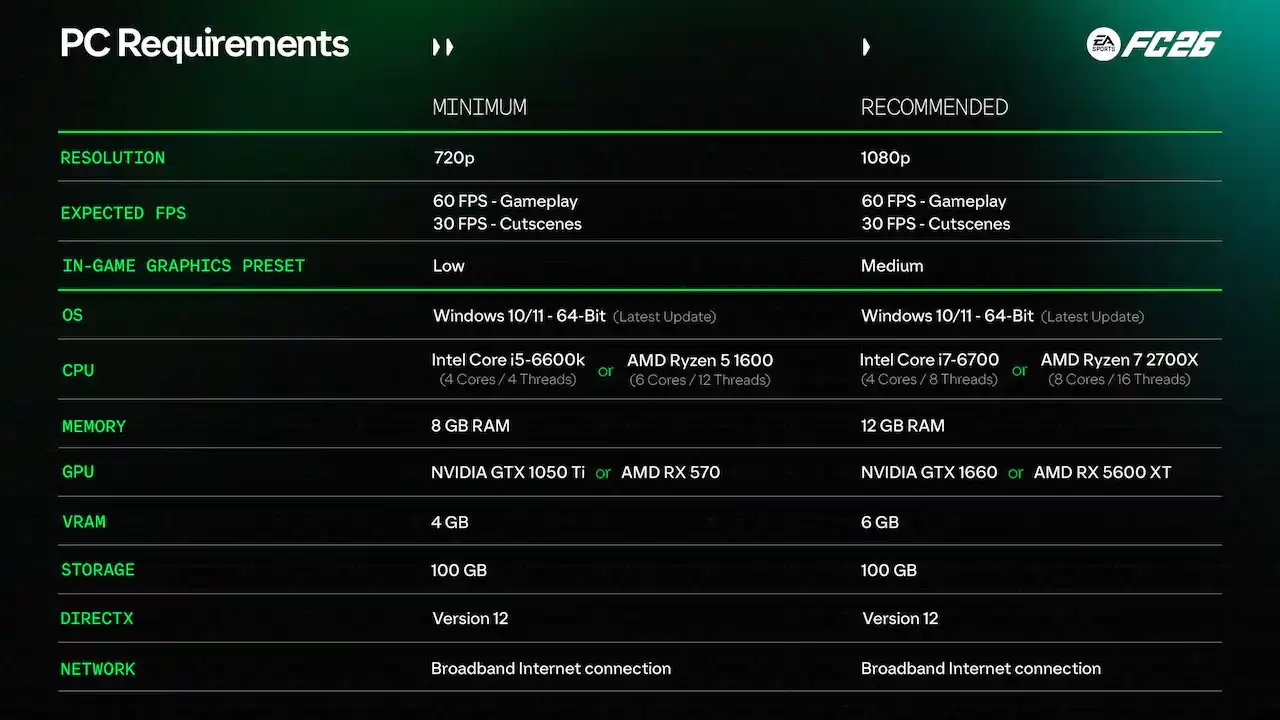
Image source: FIFA U Team
Minimum Specs
- OS: Windows 10 (64-bit)
- CPU: Intel Core i5 6600K / AMD Ryzen 5 1600
- RAM: 8 GB
- GPU: NVIDIA GTX 1050 Ti / AMD RX 570
- DirectX: Version 12
Recommended Specs
- OS: Windows 10/11 (64-bit)
- CPU: Intel Core i7 6700 / AMD Ryzen 7 2700X
- RAM: 12 GB
- GPU: NVIDIA GTX 1660 / AMD RX 5600 XT
- Storage: 100 GB SSD
According to System Requirements Lab , while the game can technically run on 8 GB of RAM, 12 GB is strongly suggested to avoid background process interference. The Frostbite engine, which powers FC 26, is highly dependent on VRAM for its new "overhauled gameplay" features, so having at least 6 GB of video memory will provide a much more stable experience during high-intensity matches.
How to Fix PC Performance and Stuttering Issues
Even if you meet the storage and hardware requirements, many PC users have reported micro-stuttering or locked refresh rates. These issues often stem from how the game interacts with your monitor's settings rather than a lack of raw power. Community members on Reddit and EA forums have identified a specific fix that involves manual configuration.
Manually Setting Your Refresh Rate in the Setup File
If you find that your in-game refresh rate is "greyed out" or stuck at 60Hz despite having a 144Hz monitor, follow these steps to edit the configuration file directly:
-
Navigate to your local AppData folder:
C:\Users\[YourUsername]\AppData\Local\EA Sports FC 26. -
Locate the file named
fcsetup.ini. - Right-click the file and select "Open with Notepad."
-
Find the line that says
REFRESH_RATE = 0and change it to match your monitor's actual refresh rate (e.g.,REFRESH_RATE = 144). - Save the file and set it to "Read Only" in the file properties to prevent the game from resetting it.
Managing Your Storage and Hidden Data Costs
If you are struggling to find space for the 100 GB requirement, there are several ways to trim the fat from your installation. Not every file included in the initial download is necessary for your specific needs.
The Impact of Optional Language Packs on Total Size
One of the largest "hidden" storage costs comes from commentary and localized text. By default, the game may download several language packs based on your region. Each additional audio commentary track (such as Brazilian Portuguese or Italian) can take up between 2 GB and 5 GB. If you only play in English, you can navigate to the "Manage Add-ons" section in the EA App or Steam and uncheck the unused languages to reclaim significant space.
Future Proofing for Title Updates and Live Content
It is a common mistake to think that the 100 GB requirement is static. As the 2025-2026 season progresses, EA releases "Title Updates" that fix bugs and add new player faces. Furthermore, the "Summer of Football" content—which typically includes massive tournament modes—can add another 10-15 GB to the total footprint. If you are currently sitting at exactly 100 GB of free space, you may find yourself needing to delete other games by mid-2026 to accommodate these mandatory updates.
Does FC 26 Require an SSD for Optimal Performance?
While the minimum requirements technically allow for a standard Hard Disk Drive (HDD), an SSD is highly recommended for FC 26. The Frostbite engine's new asset streaming system is designed to load high-fidelity player models and stadium details on the fly. On a traditional HDD, you may experience "pop-in" (where textures appear suddenly) or long loading screens before matches.
More importantly, the "cutscene stutter" that many players complain about is often caused by the slow read speeds of an HDD. When the game transitions from gameplay to a replay or a corner kick animation, it must quickly pull new assets from the drive. An NVMe SSD stands out as the premier choice for eliminating these micro-stutters, ensuring that the transition between live play and cinematic moments is seamless.
Key Takeaways: FC 26 Storage Guide
Managing your storage for EA Sports FC 26 requires understanding both the immediate download and the long-term reserved space. Here is the bottom line:
- Reserve 100 GB: Regardless of your platform, ensure you have at least 100 GB of free space to allow for unpacking and future patches.
- PS5 Efficiency: The PS5 version is roughly 24 GB smaller than the PS4 version due to superior Kraken compression technology.
- SSD is Essential: To avoid stuttering in the Frostbite engine, installing the game on an SSD is a top-tier recommendation.
- Trim Language Packs: You can save up to 10 GB by deleting unused commentary tracks in your game settings.
-
PC Performance Fix:
Manually editing the
fcsetup.inifile is a highly effective way to resolve refresh rate issues. - Future Growth: Expect the total file size to increase by 10-15% over the course of the 2026 season as live content is added.
Before you start your download, verify your drive's health and clear out old cache files to ensure a smooth installation process.
Frequently Asked Questions
- Can I run FC 26 on a 60GB SSD?
- No, you cannot. Even though the initial download might be around 53 GB, the installation process requires a 100 GB buffer to unpack files. If your drive has less than 100 GB of free space, the EA App or Steam will likely prevent the installation from starting to avoid data corruption.
- Why is my PS4 download so much larger than my friend's PS5?
- This is due to asset duplication. Because the PS4 uses a slower mechanical hard drive, the game files are duplicated multiple times across the disk to reduce the time the drive head spends searching for data. The PS5 uses an ultra-fast SSD and Kraken compression, which removes the need for these duplicates, resulting in a smaller file size.
- Is FC 26 larger than FC 25?
- Yes, FC 26 is slightly larger than its predecessor. While the core engine remains similar, the addition of new "Grounds" social hubs and expanded international tournament assets has increased the base footprint by approximately 5-8 GB across all platforms.
- How long does it take to download FC 26?
- On a standard 100 Mbps connection, the 53 GB download will take approximately 1 hour and 15 minutes. If you have a Gigabit (1000 Mbps) connection, the process can be completed in under 10 minutes, provided the EA servers are not congested.
- Do I need to redownload the whole game for the 2026 International Tournament update?
- No, you will not need a full redownload. EA typically releases these as "Title Updates" that modify existing files and add new ones. However, you should expect a significant patch size of 10-15 GB when major tournament content arrives in mid-2026.