Home
How to Attach and Use Fish Bait in Stardew Valley on Every Platform
To use bait in Stardew Valley, you must first own a Fiberglass Rod or Iridium Rod . The starter Bamboo Pole cannot hold bait. Open your inventory, select the bait stack (Left-click on PC, A on Switch/Xbox, X on PS), and then use the "apply" button on the rod (Right-click on PC, Y on Switch, X on Xbox, Square on PS). On mobile, simply drag the bait onto the rod.
Why You Cannot Put Bait on a Bamboo Pole
One of the most frequent points of confusion for new players in Pelican Town is the inability to equip bait to the very first tool they receive. When Willy hands you the Bamboo Pole on the beach, it serves as an introductory tool designed to teach the basic mini-game mechanics. However, this rod lacks the necessary attachment slot for bait or tackle.
According to official game data , you must progress to at least Fishing Level 2 to purchase the Fiberglass Rod from Willy’s Fish Shop for 1,800g. Once you reach Level 6, you can upgrade to the Iridium Rod (7,500g), which allows for both bait and tackle. To identify if your rod can hold bait, hover over it in your inventory; compatible rods will show a small, empty square slot in the tooltip.
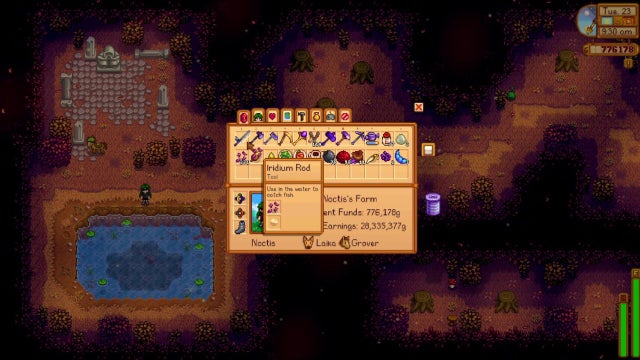
Image source: IGN
How to Attach Bait to Your Rod on PC
On the PC version of Stardew Valley, the interface relies on specific mouse clicks that can sometimes lead to items being swapped rather than combined. To successfully load your rod, follow this precise sequence:
-
Open Inventory:
Press
EorEscto bring up your backpack. - Select the Bait: Left-click the stack of bait to pick up the entire pile, or Right-click to pick up a single piece.
- Apply to Rod: Move the cursor over your Fiberglass or Iridium Rod and Right-click .
Many players mistakenly try to Left-click the rod while holding the bait, which often just swaps the positions of the two items in the inventory grid. If you see the bait count appear as a small number on the rod's icon, you have successfully attached it. This mechanic is widely considered a top choice for increasing efficiency, as it significantly reduces the time between casts.
How to Attach Bait to Your Rod on Nintendo Switch
The Nintendo Switch version uses a controller-based UI that differs slightly from the PC experience. The buttons are mapped to ensure you don't accidentally throw away your bait while trying to equip it.
-
Pick Up Bait:
Press the
Abutton on the bait stack in your inventory. -
Attach to Rod:
Hover over the rod and press the
Ybutton.
If you find that these buttons are not responding, you may be encountering a rare UI glitch. Community members on the Stardew Valley Forums suggest going into the Options Menu and toggling the "Controller Type" setting. Switching this setting can often reset the button mapping and fix the attachment issue for Switch users.
How to Attach Bait to Your Rod on Xbox and PlayStation
Console players on Xbox and PlayStation follow a similar logic to the Switch, using the secondary action button to apply the bait to the tool. This ensures that the primary "select" button doesn't conflict with the "combine" action.
| Platform | Select Bait Stack | Attach to Rod | Remove Bait |
|---|---|---|---|
| Xbox | Press A | Press X | Press X on Rod |
| PlayStation | Press X | Press Square | Press Square on Rod |
| PC | Left-click | Right-click | Right-click on Rod |
For PlayStation 4 and 5 users, the
Square
button acts as the "use" or "tool" button within the inventory. For Xbox One and Series X/S users, the
X
button serves the same purpose. Mastering these shortcuts is essential for high-level fishing, especially during timed events like the Festival of Ice or the SquidFest.
How to Attach Bait to Your Rod on Mobile (iOS and Android)
The mobile version of Stardew Valley utilizes a touch-first interface that simplifies the process into a single motion. Instead of multiple button presses, you rely on a drag-and-drop mechanic.
To attach bait, tap and hold the bait stack in your inventory, then drag it directly onto the fishing rod. You will see the rod icon update to show the bait is equipped. However, mobile users face a unique challenge: there is no dedicated "remove" button for bait. If you want to take bait off your rod, you must drag a different type of bait (or a Magnet) onto the rod. This will "pop" the current bait back into your inventory, allowing you to swap them.
Using the Bait Maker and Targeted Bait in the 1.6 Update
The 1.6 update introduced significant advancements to the fishing system, most notably the Bait Maker . This machine allows players to move beyond generic bait and focus on specific goals. By placing any fish into the Bait Maker, the machine produces Targeted Bait for that specific species.
Targeted Bait
Significantly increases the chance of catching the specific fish used to create it. A top-tier option for completing the Master Angler achievement.
Advanced Iridium Rod
This new rod features two tackle slots in addition to the bait slot, allowing for powerful combinations like double Lead Bobbers or Treasure Hunters.
According to Wiki documentation , the Bait Maker recipe is unlocked at Fishing Level 6 and requires 3 Iron Bars, 3 Coral, and 1 Sea Urchin to craft. This machine is a significant step forward for players looking to farm high-value fish like Lava Eels or Ice Pips without relying on pure RNG.
Every Type of Bait and What It Actually Does
Not all bait is created equal. Depending on your goals—whether you want fast bites, rare treasure, or specific legendary fish—you should choose your bait carefully. The "Bite Rate" refers to how quickly the fish nibbles after you cast your line.
- Standard Bait: Reduces the time for a fish to bite by 50%. It is widely regarded as the standard for everyday fishing.
- Wild Bait: Unlocked via Linus’s 4-heart event. It reduces bite time by 62.5% and gives a small chance to catch two fish at once.
- Deluxe Bait: A premier choice that increases the size of your fishing bar, making it easier to catch difficult fish.
- Magic Bait: Allows you to catch any fish regardless of the current season, time of day, or weather conditions.
- Magnet: Technically a bait, it increases the chance of finding treasure chests to 30%, though it offers a lower bite rate than standard bait.
How to Use Bait in Crab Pots
Fishing rods aren't the only tools that require bait. Crab Pots are stationary traps that will not produce anything unless they are loaded with bait daily. To use them, place the Crab Pot in any body of water (fresh or salt), select your bait in your active toolbar, and interact with the pot.
There is one major exception: if you choose the Luremaster profession at Fishing Level 10, your Crab Pots will no longer require bait to function. For all other players, using standard bait is the most cost-effective way to maintain a line of pots, as the 5g cost is easily offset by the value of the catch or the refined quartz produced from trash.
Advanced Fishing Synergies and Pro Tips
For players looking to maximize their efficiency, understanding how bait interacts with other game systems is key. One helpful mental model is the Slingshot Parallel : the mechanic for loading bait into a rod is identical to loading stones or explosive ammo into a Slingshot. Once you master one, you have effectively mastered both.
Another powerful synergy involves the Preserving Enchantment . By using Cinder Shards at the Forge in the Ginger Island Volcano, you can enchant your rod with "Preserving," which gives a 50% chance that bait and tackle will not be consumed when you catch a fish. This is exceptionally strong when paired with expensive options like Magic Bait or Targeted Bait for legendary fish.
Key Takeaways for Fishing Success
- Upgrade Early: Purchase the Fiberglass Rod at Fishing Level 2 to begin using bait.
- Check Your Buttons: Use the secondary action button (Y/X/Square/Right-click) to attach bait, not the primary select button.
- Use the Bait Maker: In the 1.6 update, use this machine to target specific fish for bundles or profit.
- Linus is Key: Befriend Linus to unlock Wild Bait, which offers a chance for double catches.
- Mobile Workaround: Drag and drop bait to attach it, and swap bait types to remove them.
- Save Your Magnets: Only use Magnets when hunting for artifacts, as they are less efficient for pure fish farming.
Start by visiting Willy's shop today to see if you have unlocked the Fiberglass Rod upgrade.
Frequently Asked Questions
- Why can't I put bait on my Bamboo Pole?
- The Bamboo Pole is a starter item that lacks an attachment slot. You must upgrade to at least the Fiberglass Rod, which becomes available at Willy's shop once you reach Fishing Level 2.
- Where do I get Bug Meat for crafting bait?
- Bug Meat is a common drop from insects in the Mines, such as Cave Flies, Grubs, and Bugs. One piece of Bug Meat crafts five pieces of standard bait.
- Does bait work on the Training Rod?
- No, the Training Rod is designed for beginners to practice the mini-game and cannot be equipped with bait or tackle.
- How do I get the Wild Bait recipe?
- You must trigger Linus's 4-heart event. Enter the tent area near the mines on a sunny day between 8 PM and 12 AM to receive the recipe.
- Can I use two types of bait at once?
- Standard rods only have one bait slot. However, the Advanced Iridium Rod introduced in update 1.6 allows for two tackle slots, though it still only utilizes one type of bait at a time.