Home
How to Use Bait in Stardew Valley on Every Platform
You cannot use bait on the Bamboo Pole or Training Rod . To use bait, you must own at least a Fiberglass Rod (Level 2 Fishing) or an Iridium Rod (Level 6 Fishing). On PC, right-click the bait then right-click the rod. On Switch, press A on the bait then Y on the rod. On Xbox/PlayStation, use A/X then X/Square. On Mobile, drag the bait onto the rod icon.
Why Can’t I Put Bait on My Fishing Rod?
One of the most frequent points of confusion for new players in Stardew Valley involves the initial equipment provided by Willy. When you first start your journey in Pelican Town, you are given a Bamboo Pole. While this tool is functional for catching basic fish, it lacks the necessary slots for modifications. According to the official Stardew Valley Wiki , bait and tackle can only be applied to specific tiers of fishing gear.
The Bamboo Pole and the Training Rod are entry-level items designed to teach the basics of the fishing mini-game. They do not have the physical "slot" required to hold bait. To begin using bait, you must reach Fishing Level 2, at which point Willy will sell you the Fiberglass Rod for 1,800g. This rod features a single slot specifically for bait. Later, at Level 6, you can purchase the Iridium Rod for 7,500g, which includes slots for both bait and tackle.
With the release of the v1.6 update, a new top-tier option has emerged: the Advanced Iridium Rod . This tool stands out as a top choice for dedicated anglers because it allows for one bait slot and two separate tackle slots. This addition has significantly shifted the late-game meta, allowing players to combine different bobbers to catch the most difficult legendary fish with greater ease. If you are clicking on your rod and nothing is happening, check your inventory to ensure you aren't still using the starter Bamboo Pole.
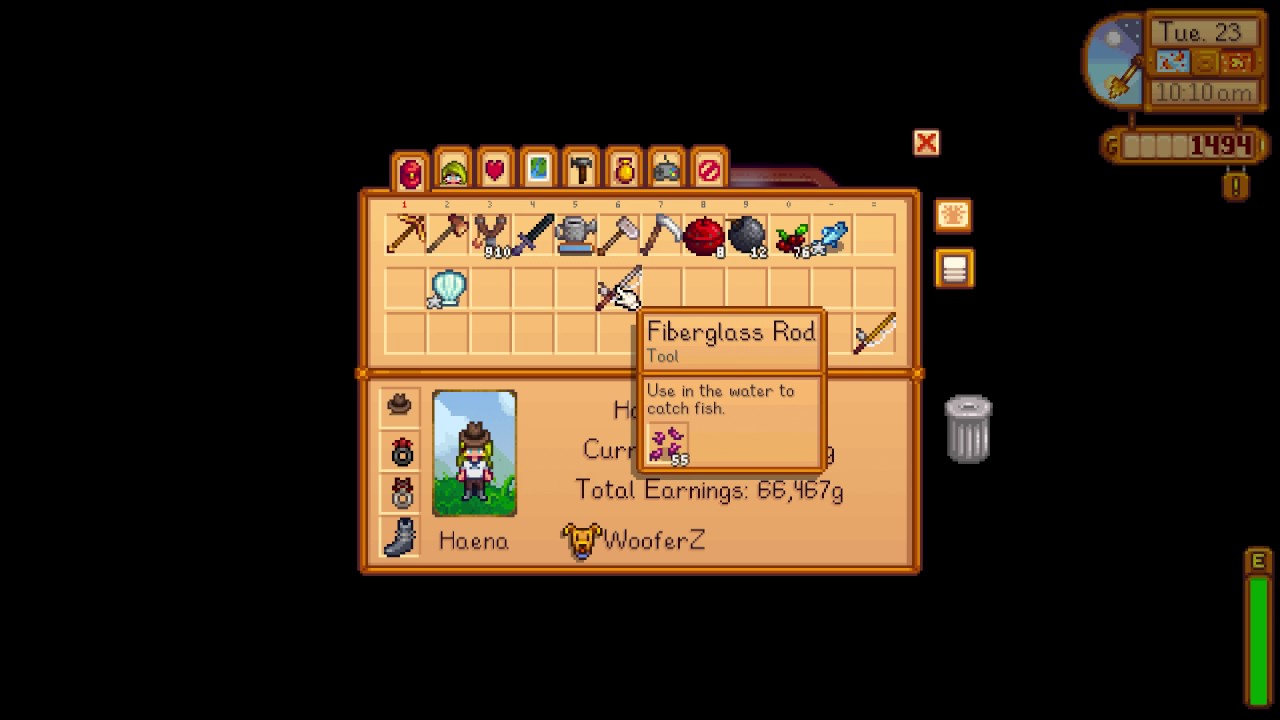
Image source: YouTube
How to Attach Bait Based on Your Device
The mechanical process of attaching bait varies significantly depending on whether you are playing on a computer, a console, or a mobile device. Understanding these platform-specific UI quirks is essential to avoid accidentally throwing your bait away or eating it.
How to Use Bait on PC and Mac
On PC, the interface relies on a specific mouse-click combination that can be unintuitive for those used to standard drag-and-drop mechanics. Many players mistakenly try to left-click the bait onto the rod, which simply swaps their positions in the inventory.
- Open your inventory screen by pressing E or Esc .
- Left-click the stack of bait to pick it up. If you only want to use one piece, Right-click the stack instead.
- Hover your cursor over the Fiberglass, Iridium, or Advanced Iridium Rod.
- Right-click the rod to attach the bait. You will see the bait icon appear in the rod's sub-slot.
How to Use Bait on Nintendo Switch
The Nintendo Switch version uses a combination of the A and Y buttons. A common issue on this platform is the "cursor glitch," where the selection box may jump between slots unexpectedly if you use the joystick instead of the D-pad for fine navigation.
- Open your inventory by pressing the X button.
- Navigate to your bait and press A to select the entire stack.
- Move the cursor over to your fishing rod.
- Press the Y button to attach the bait to the rod.
How to Use Bait on Xbox and PlayStation
Console controls are standardized but use different button labels. The logic remains the same: one button to "pick up" and another to "apply."
- Xbox: Press A on the bait to select the stack, then press X while hovering over the rod to attach it.
- PlayStation: Press X on the bait to select the stack, then press Square while hovering over the rod to attach it.
How to Use Bait on Mobile (iOS and Android)
Mobile players use a touch-based drag-and-drop system. However, as of the v1.6 mobile rollout, users have reported a specific bug where long-pressing a stack of bait can sometimes cause existing bait on the rod to disappear rather than returning to the inventory. According to reports on the Stardew Valley Forums , it is safer to tap the bait and then tap the rod rather than dragging long distances.
Different Types of Bait and Their Effects
Not all bait is created equal. Depending on your goals—whether you are looking for profit, specific rare fish, or treasure chests—you should choose your bait carefully. The v1.6 update introduced several notably innovative options that have changed how players approach the fishing skill.
Standard Bait
Reduces the time it takes for a fish to bite by 50%. It is easily crafted from Bug Meat (1 meat = 5 bait) or purchased from Willy for 5g each.
Wild Bait
Learned from Linus during his 4-heart event. It reduces bite delay by 62.5% and gives a chance to catch two fish at once.
Deluxe Bait
A significant step forward from standard bait. It reduces bite delay even further and actually increases the size of your fishing bar, making difficult fish easier to catch.
Targeted Bait
Crafted using a Bait Maker. This allows you to target a specific species of fish, greatly increasing the odds that the next bite will be that specific fish.
| Bait Type | Bite Rate Reduction | Special Effect | Best Use Case |
|---|---|---|---|
| Standard Bait | 50% | None | General leveling and early game |
| Wild Bait | 62.5% | Chance for double catch | Maximizing profit per hour |
| Deluxe Bait | 67% | Larger fishing bar | Catching Legendary fish |
| Magic Bait | 50% | Ignore season/time/weather | Completing the Master Angler achievement |
| Magnet | 50% | +15% Treasure chance | Hunting for Artifacts or Neptune's Glaive |
Using Bait in Crab Pots Effectively
Crab pots are a passive way to gain fishing experience and resources, but they are entirely dependent on bait unless you have chosen the Luremaster profession at Level 10 Fishing. Without bait, a crab pot will only ever collect trash, and even then, it does so at a much lower rate.
Many players wonder if using expensive bait like Wild Bait or Deluxe Bait in a crab pot is worth it. Generally, the answer is no. Crab pots do not benefit from the "double catch" chance of Wild Bait, nor do they benefit from the bar-size increase of Deluxe Bait. Standard bait is the most cost-effective choice here. However, if you are looking to optimize your workflow, consider the Mariner profession, which ensures crab pots never catch trash, making even standard bait highly profitable.
A popular strategy for those without the Mariner profession is the "Recycling Loop." By using standard bait in dozens of pots, you will inevitably catch a large amount of soggy newspaper, driftwood, and broken glasses. Instead of discarding these, run them through a Recycling Machine (unlocked at Fishing Level 4). This can yield valuable Refined Quartz, Cloth, and Iron Ore, often proving more valuable than the actual crustaceans caught in the pots.
Advanced Fishing Tips for Using Bait Like a Pro
To truly master the fishing mechanics in Stardew Valley, you must look beyond just attaching the bait. The interaction between bait, tackle, and player technique determines your success rate with high-difficulty fish like the Lava Eel or the Legend.
The "Tapping" Technique
When dealing with aggressive fish that bounce rapidly from the top to the bottom of the meter, many players hold the action button down. This is often a mistake. Holding the button builds upward momentum that is difficult to stop, leading to the bar crashing into the top or bottom and bouncing. Expert players recommend a rapid tapping motion. This allows for much finer control and lets you "hover" the bar in place with minimal momentum, making it easier to react to sudden fish movements.
Optimizing the Advanced Iridium Rod
With the introduction of the Advanced Iridium Rod in 1.6, you can now stack effects. A top-tier strategy involves using Deluxe Bait (for the bar size increase) combined with a Trap Bobber and a Cork Bobber . The Trap Bobber causes the "catching" bar to decrease slower when the fish is outside your green zone, while the Cork Bobber increases the size of your bar even further. When combined with Deluxe Bait, your green bar can cover nearly a third of the entire fishing track, making even the most erratic fish much easier to manage.
The Preserving Enchantment
Once you reach the late-game Forge on Ginger Island, you can enchant your tools. The Preserving enchantment is exceptionally strong for fishers. It provides a 50% chance that bait and tackle will not be consumed when you catch a fish. Over a long fishing session, this can save hundreds of gold and significant crafting resources, especially when using expensive options like Magic Bait.
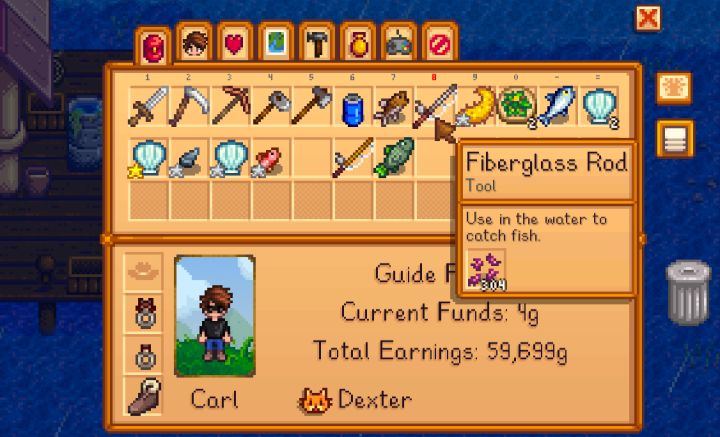
Image source: Carl's Guides
Troubleshooting Common Bait Problems and Bugs
Even experienced players encounter issues with the fishing UI. One common problem is accidentally eating the bait. This happens when a player has the bait selected in their active hotbar and presses the "use" button while not facing a crab pot or having the inventory open. To avoid this, always keep your bait in the main inventory rows rather than the active hotbar.
Another frequent issue is the Switch "Mouse Stuck" Glitch . Occasionally, the inventory cursor on the Nintendo Switch will behave as if it is a PC mouse, getting stuck on the edge of the screen or refusing to highlight the bait slot. If this happens, go into your game settings and toggle the "Use Console Cursor" option. This usually resets the UI and allows for standard D-pad navigation again.
Key Takeaways for Using Bait
- Upgrade your rod to at least Fiberglass or Iridium; the Bamboo Pole cannot use bait.
- Use the correct button for your platform (Right-click on PC, Y on Switch, X/Square on Console).
- Craft Deluxe Bait in the late game to increase your fishing bar size for legendary catches.
- Target specific species using the new v1.6 Targeted Bait and the Bait Maker machine.
- Avoid the mobile bug by tapping to attach rather than long-pressing or dragging large stacks.
- Recycle trash from baited crab pots to turn low-value catches into refined resources.
- Stack tackle on the Advanced Iridium Rod to create a massive fishing bar.
By following these steps, you can significantly increase your fishing efficiency and start catching the rarest specimens Pelican Town has to offer.
Frequently Asked Questions
- Can you use bait on the Training Rod?
- No, the Training Rod is strictly for beginners and does not have a bait slot. It is designed to help players reach Level 5 Fishing more easily by making the bar larger, but it limits you to catching common fish. Once you are comfortable, you should switch to a Fiberglass Rod to begin using bait.
- How do I get the recipe for Wild Bait?
- You must trigger Linus's four-heart event. Enter the mountain area near his tent on a non-rainy day between 8:00 PM and 12:00 AM. He will invite you into his tent and show you how to craft this notably innovative bait using Bug Meat, Slime, and Fiber.
- Does bait work in the Mines or the Desert?
- Yes, bait functions in every body of water in the game, including the underground ponds in the Mines and the oasis in the Calico Desert. Using bait in these locations is highly recommended to reduce the wait time for rare catches like the Stonefish or the Ice Pip.
- What is the best bait for catching the Legend fish?
- While "best" is subjective, most expert players consider Deluxe Bait to be a top-tier choice for the Legend. The increase in the fishing bar size is crucial for tracking the Legend's erratic movements. Combining this with a Trap Bobber on an Iridium Rod provides the highest statistical chance of success.
- How do I remove bait from my fishing rod?
- On PC, right-click the rod in your inventory while your cursor is empty. On Switch, press Y on the rod. On Xbox/PlayStation, press X or Square. On Mobile, you generally have to swap the bait with another item or another bait type, as there is no dedicated "remove" button in the current touch UI.
All trademarks, copyrighted content, and quoted material referenced in this article belong to their respective owners. Brief excerpts are used under fair use (17 U.S.C. § 107) for purposes of commentary, criticism, and informational reporting. This article is not affiliated with or endorsed by ConcernedApe or Chucklefish.