Home
How to Find and Install Top-Rated Stardew Valley Sprite Mods for 1.6
As of 2026, Stardew Valley sprite mods have evolved significantly following the landmark 1.6 update. The transition from XNB overwriting to Content Patcher (CP) is now the industry standard, ensuring game stability and compatibility with new features like seasonal winter outfits. To refresh your game, prioritize mods tagged as "1.6 Updated" on Nexus Mods and always use SMAPI to manage your installations safely.
Stardew Valley has maintained its position as a titan of the cozy gaming genre for over a decade, and much of that longevity is owed to its vibrant modding community. Sprite mods, which alter the pixel art of characters, animals, and the environment, remain a top choice for players looking to modernize the game's aesthetic. Whether you are seeking a "Vanilla+" look that stays true to ConcernedApe's original vision or a complete anime-style overhaul, the options available in 2026 are more diverse than ever.
However, the 1.6 update introduced technical hurdles that changed how we interact with these visual assets. Older mods that once worked perfectly may now cause glitches or revert to default textures during specific seasons. Understanding the shift in modding standards is essential for anyone looking to customize their Pelican Town experience without breaking the game.
Why the 1.6 Update Changed Everything for Sprite Mods
The 1.6 update was a significant advancement for Stardew Valley, but it fundamentally altered the game's internal sprite handling. Before this update, many NPCs shared a limited set of sprites regardless of the weather or season. The introduction of unique winter outfits for every villager meant that mod authors had to create entirely new sets of pixel art to maintain visual consistency.
-
Does the mod include a
winter_outfitsprite sheet? - Is the mod built for Content Patcher rather than XNB replacement?
-
Has the author updated the
manifest.jsonto support SMAPI 4.0+? - Are there specific patches for new 1.6 NPCs or pets?
If you use an outdated mod, you may encounter the "Vanilla Fallback" issue. This occurs when the game looks for a winter sprite that doesn't exist in the mod folder, causing the character to suddenly switch back to their original, unmodded look as soon as the first of Winter arrives. Furthermore, new animations—such as NPCs sitting on benches or interacting with new festival items—require updated sprite sheets to avoid "invisible" frames or graphical flickering.
According to community experts on the Stardew Valley Forums , the shift to Content Patcher is the most important change. Content Patcher allows mods to "inject" new textures into the game's memory while it runs, rather than permanently deleting and replacing the original game files. This makes troubleshooting much easier and prevents the need for a full game reinstallation if a mod fails.
Top NPC Sprite Overhauls for a Fresh Look
Why the Slightly Cuter Aesthetic Is a Top Choice
For many players, the original Stardew Valley art style is charming but has minor quirks, such as the "bowlegged" stance of certain characters. The Slightly Cuter Character Sprites mod ranks among the top options for those who want a "Vanilla+" experience. It focuses on subtle refinements: fixing posture, adding seasonal variety, and ensuring that sprites match their dialogue portraits more closely.
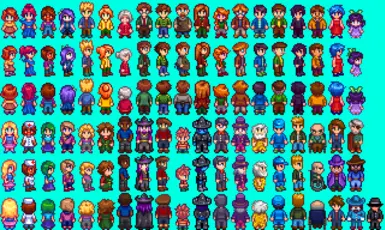
Image source: Nexus Mods
This mod is widely regarded as a standard for modern playthroughs because it includes full support for the 1.6 winter outfits. It doesn't try to reinvent the characters; instead, it makes them look like a higher-resolution version of themselves. As noted on Nexus Mods , this collection is highly compatible with other "Vanilla-style" expansions, making it a safe bet for large mod lists.
How to Get the Nyapu Anime Style for All Villagers
If you prefer a more dramatic departure from the base game, the Nyapu style is a premier option. This aesthetic draws inspiration from 90s anime, giving every villager large, expressive eyes and more detailed clothing. The Nyapu style has become so popular that a massive ecosystem of "patches" has been created to ensure that even NPCs from other mods (like Stardew Valley Expanded) match this specific look.
Maintaining this style requires coordination, as the original artist, Nyapu, has collaborated with others like AhCuteArt to keep the assets updated for 1.6. Many users find that this style breathes new life into the social aspect of the game, making dialogue encounters feel more like a visual novel. It is exceptionally strong in its consistency, covering everything from the standard villagers to the special characters found in the late-game areas.
Making Your Sprites Match Your Portraits Perfectly
A common immersion-breaker in Stardew Valley is the discrepancy between a character's detailed dialogue portrait and their simplified overworld sprite. The Portrait Accurate NPC Sprites mod addresses this head-on. If a character's portrait shows them wearing a specific necklace or having a certain hairstyle that isn't reflected in their pixel model, this mod fixes it.
This mod is a strong contender for players who use high-resolution portrait mods. By aligning the pixels with the art, the world feels more cohesive. According to Nexus Mods documentation , this mod is built specifically for Content Patcher, allowing for easy toggling of specific character features in the configuration menu.
How to Fix Your Farmer’s Slouched Side Profile and Body Shape
While NPC mods are plentiful, many players feel the default "Farmer" sprite—the character you play as—needs the most work. A frequent complaint in the community is the farmer's side profile, which many describe as looking "slouched" with a "massive nose area" that doesn't match the front-facing view. In recent months, several mods have emerged to address these specific posture issues.
The Elegant Farmer Body mod is a popular choice for fixing the slouched posture. It adjusts the pixel alignment of the farmer's spine and neck, making them stand taller and move with more fluid animations. This is particularly noticeable when running or using tools like the watering can. By refining the silhouette, clothing items—especially those added by other mods—fit the character model much better.
| Feature | Vanilla Farmer | Elegant Farmer Body | Peach Body Type |
|---|---|---|---|
| Posture | Slightly slouched | Upright/Elegant | Soft/Curvy |
| Side Profile | Pronounced nose area | Refined/Flat profile | Aesthetic-focused |
| Clothing Fit | Standard | Tailored look | Custom silhouettes |
| 1.6 Support | Native | Full CP Support | High (via patches) |
Another major trend is the Peach Body Type , which originated in the Korean modding scene. This mod provides a more stylized, aesthetic silhouette for both male and female farmers. It is often paired with "Oppa-style" hair mods to create a character that looks like they stepped out of a modern manhwa. As discussed on Reddit , these body mods often require specific clothing mods to avoid "pixel bleeding," where the clothes don't quite cover the new body shape.
How to Access Exclusive Korean Sprite Mods on Naver
For many Western players, the "Holy Grail" of Stardew Valley aesthetics is found on Naver , a Korean search engine and social platform. The Korean modding community is known for producing incredibly high-quality "Oppa-style" glow-ups for male NPCs and delicate, pastel-colored environment sprites. However, navigating Naver can be a "black box" for those who don't speak the language.
Step-by-Step Guide to Navigating Naver for Mods
- Use a Browser with Translation: Open the Naver blog or Cafe link in a browser like Chrome or Edge that offers built-in page translation.
- Identify the Download Icon: Look for a small diskette icon or a paperclip icon, usually located at the top right or bottom of the post. This is the file attachment area.
- Check for "Cafe" Requirements: Some mods are hosted in "Naver Cafes" (similar to private forums). These may require you to create a Naver account and "level up" by posting, though many popular creators keep their blogs public for direct downloads.
- Look for the .zip or .rar Extension: Even if the text is untranslated, the file extensions remain the same. Click the link next to these extensions to start the download.
- Safety First: Avoid clicking on large, flashing "Download" buttons that look like advertisements. Stick to the plain text links in the attachment section.
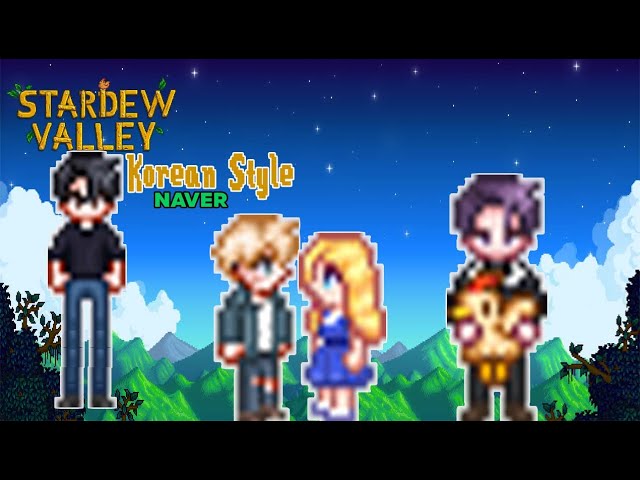
Image source: YouTube
The "Oppa" style is particularly sought after for characters like Sebastian, Alex, and Shane, giving them a more refined, K-drama-inspired appearance. While these mods are visually stunning, be aware that they may not always include the 1.6 winter outfits unless they have been recently updated. Always check the post date; anything before March 2024 will likely need a manual patch for winter consistency.
How to Install Sprite Mods Safely Using Content Patcher
In the early days of Stardew modding, players had to manually replace
.xnb
files in the game's internal folders. This was a dangerous practice that often led to permanent game crashes. In 2026, the community stance is clear:
never overwrite XNB files
. Instead, use Content Patcher, which is a notably innovative tool that manages all visual changes externally.
The Content Patcher Advantage
Content Patcher acts as a bridge between your mod files and the game. When the game asks for "Abigail's Sprite," Content Patcher intercepts that request and provides the modded version instead. This is non-destructive; if you want to go back to the original look, you simply delete the mod folder. It also allows for "dynamic" changes, such as characters changing clothes based on the weather, the season, or even the player's friendship level.
A Step-by-Step Installation Process for PC
- Install SMAPI: This is the mod loader for Stardew Valley. Download it from the official site and run the installer.
-
Install Content Patcher:
Download this from Nexus Mods and place the folder into your
Stardew Valley/Modsdirectory. - Download Your Sprite Mod: Ensure it is the "Content Patcher" version.
-
Extract and Move:
Unzip the mod folder and move it into the
Modsfolder. Your path should look like:Stardew Valley/Mods/[Mod Name]. -
Launch via SMAPI:
Always start the game using the
StardewModdingAPI.exeto ensure the mods load correctly.
For those using Steam, you can set your launch options to point to SMAPI, allowing you to track hours and earn achievements while playing with mods. This integration is a major improvement over older methods and ensures that your game remains stable even with dozens of active sprite changes.
Troubleshooting Common Sprite Glitches and Conflicts
Even with the best tools, modding can occasionally lead to visual bugs. The most common issues in the 1.6 era involve "layering" conflicts, where two mods try to change the same sprite, or where the game's new features clash with old mod logic.
How to Fix the Double Nose Glitch on Modded Faces
A specific issue that arose with recent updates is the "Double Nose" glitch. Some mods add a nose to the character's face, but the base game or a secondary mod might also be applying a nose layer. This results in a strange, stacked appearance.
"To fix the double nose issue, navigate to the mod's folder and look for files ending in
_Nose. If you make these files blank (transparent) using an image editor, the game will stop layering the extra nose onto your modded face." — Expert Tip from the SMAPI Community.
What to Do When Your Sprites Disappear in Winter
If your characters turn invisible or revert to vanilla in Winter, the mod is likely missing the
winter_outfit
entry in its
content.json
file. You can often fix this by opening the
content.json
with a text editor and checking if there is a "Target" line for
Characters/Farmer/winter_outfit
. If it's missing, you may need to download a 1.6 compatibility patch from the mod's "Files" tab on Nexus.
Using SMAPI Logs to Identify Visual Conflicts
When in doubt, check the SMAPI console (the black window that opens with the game). If a sprite mod fails to load, the text will turn red and explain why. It might say "Multiple mods want to change Abigail's sprite." In this case, you must choose one and delete the other. You can also use the SMAPI Log Parser to upload your log file and get a simplified explanation of what is going wrong.
Frequently Asked Questions
Do sprite mods work on Stardew Valley mobile?
As of late 2026, modding on mobile is more restricted than on PC. While Android users can use a mobile version of SMAPI to install some Content Patcher mods, the 1.6 update parity on mobile often lags behind the PC version. iOS users generally cannot use these mods due to the closed nature of the operating system. Always check the mobile SMAPI compatibility list before attempting an installation.
Will sprite mods disable my Steam achievements?
No, using sprite mods through SMAPI will not disable your Steam achievements. However, you must ensure that Steam is correctly configured to launch the SMAPI executable. You can do this by right-clicking Stardew Valley in Steam, selecting Properties, and pasting the file path to SMAPI into the "Launch Options" field. This allows you to enjoy a modded aesthetic while still progressing through your Steam profile goals.
Can I use multiple sprite mods at once?
You can use multiple sprite mods as long as they do not target the same character or item. For example, you can have one mod for NPCs and another for your farmer. If you try to use two different mods for the same NPC, Content Patcher will usually prioritize the one that loads last alphabetically, or it may throw an error in the SMAPI console. Use a "Load Priority" setting in the mod's config file if you want to be specific.
How do I convert an old XNB mod to Content Patcher?
Converting an old mod requires unpacking the XNB file using a tool like "StardewXnbHack" to get the raw PNG image. Once you have the PNG, you can create a simple Content Patcher folder with a
manifest.json
and a
content.json
that tells the game to replace the original sprite with your new PNG. This is a great way to save abandoned mods that haven't been updated in years.
Why does my character look like a colorful block?
This is a "texture mismatch" error. It usually happens when a mod is trying to load a sprite sheet that is the wrong size for the character model, or if the file path in the
content.json
is incorrect. Ensure you haven't renamed any folders inside the mod directory, as Content Patcher relies on exact file paths to find the images.
Customizing your Stardew Valley experience with sprite mods is one of the most rewarding ways to keep the game feeling fresh in 2026. By following modern standards and prioritizing compatibility, you can create a visual world that perfectly matches your personal taste.
- Prioritize Content Patcher mods to ensure game stability and easy updates.
- Verify 1.6 compatibility by checking for seasonal winter outfits in the mod description.
- Fix the farmer's posture using mods like Elegant Farmer Body for a more polished look.
- Explore Naver for unique Korean aesthetics, using browser translation to navigate.
- Use SMAPI logs as your primary tool for troubleshooting visual glitches or crashes.
- Avoid XNB overwrites at all costs to prevent permanent damage to your game files.
Start by installing Content Patcher today and browse the "1.6 Updated" tag on Nexus Mods to begin your farm's visual transformation.