Home
Home
How to Find and Redeem All Active Arknights Endfield Codes
To quickly boost your progress on Talos-II, use these verified codes in the Settings > Platform & Account menu:
- ENDFIELDGIFT: 150 Oroberyl, 10,000 T-Creds (Permanent)
- ENDFIELDSTEAM: 8,000 T-Creds, Portrait Frame (Expires Nov 25, 2026)
- ENDFIELD4PC: 13,000 T-Creds, Combat Records (PC Exclusive)
Note: You must complete the prologue missions "Process: Cold Start" and "Process: Awakening" to unlock the redemption interface.
Arknights: Endfield represents a significant advancement in the tactical RPG genre, blending real-time combat with complex factory management. As players navigate the harsh environments of Talos-II, resources like Oroberyl and T-Creds become essential for character progression and base optimization. Utilizing redemption codes is one of the most effective ways to secure these materials without extensive grinding.
In this guide, we provide a verified list of active gift codes, a detailed walkthrough for the redemption process, and advanced strategies for using "Blueprint Strings" to optimize your Automated Industrial Complex (AIC). Whether you are a mobile player looking for PC-exclusive workarounds or a strategist aiming for the 120-pull guarantee, this resource covers the technical and tactical nuances of the Endfield economy.
Active Arknights Endfield Gift Codes for October 2026
As of late 2026, Gryphline has released several codes to celebrate the game's expansion and seasonal updates. These codes are typically one-time use per account and may have regional or platform-specific restrictions. Based on current community verification, the following strings are active:
| Redemption Code | Rewards & Materials | Availability / Expiry |
|---|---|---|
| ENDFIELDSTEAM | 8,000 T-Creds, 2 Elementary Cognitive Carriers, 2 Arms INSP Sets, "Heat-Driven Cog" Frame | Expires Nov 25, 2026 |
| ENDFIELDGIFT | 150 Oroberyl, 10,000 T-Creds, 20 Intermediate Combat Records, 20 Arms INSP Kits | Permanent / New Player Gift |
| ENDFIELD4PC | 13,000 T-Creds, 2 Advanced Combat Records, 2 Arms INSP Kits | PC Client Exclusive |
| ZAU2SYXHWX5L4ZH | 5,000 T-Creds, 10 Arms INSP Kits | Limited Quantity |
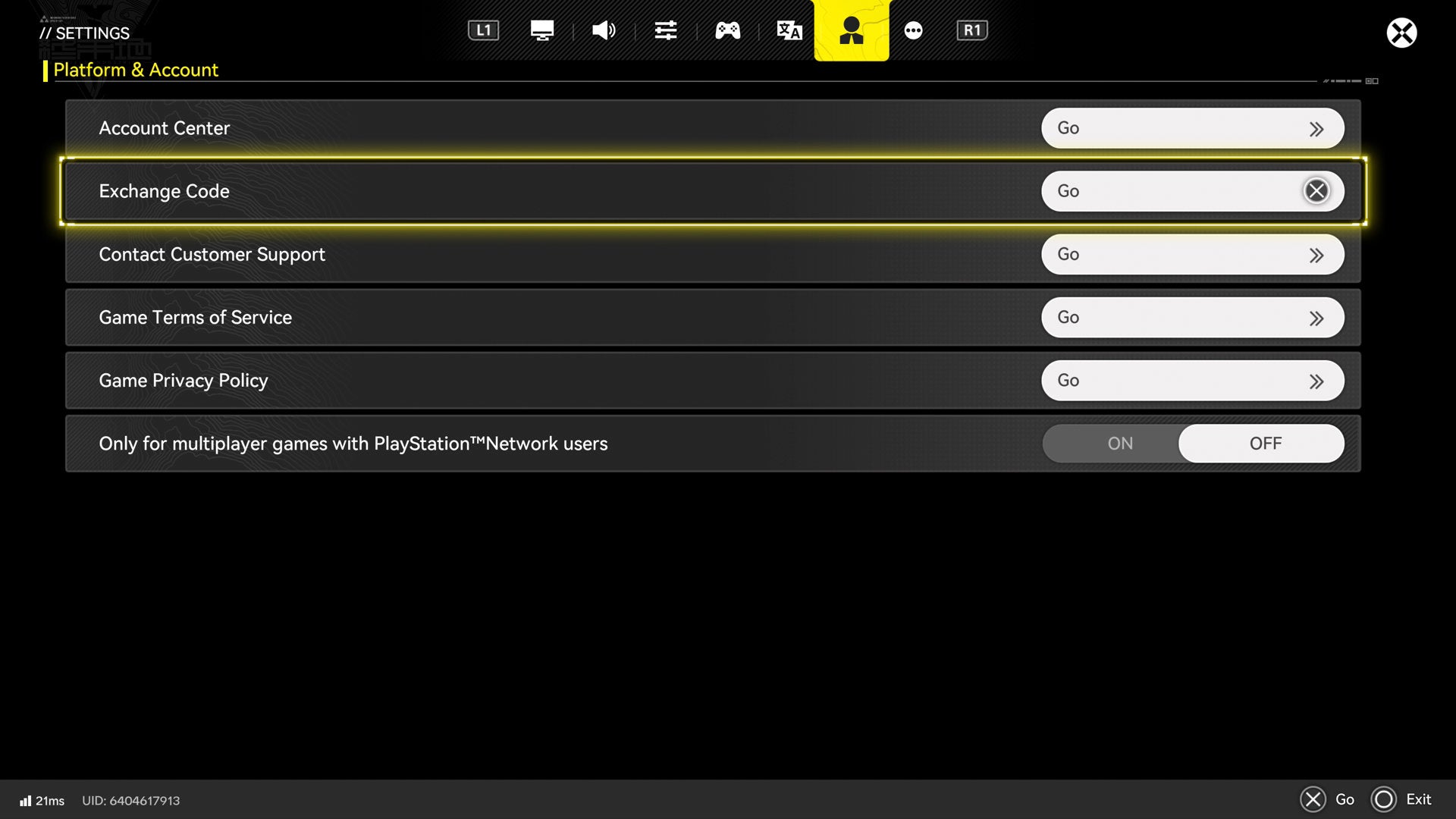
Image source: Eurogamer
AKENDFIELDSUB
and
ENDFIELDRENEW
are reported as expired by several sources, including
GamesRadar
. While some legacy accounts may still find them valid, most players will receive an "Expired" notification upon entry.
How to Unlock the Redemption Menu in Arknights Endfield
Unlike many mobile titles that allow immediate code entry, Arknights: Endfield requires players to prove their progress through the initial narrative arc. This ensures that players understand the value of the resources they are receiving. The redemption menu is hidden within the sub-menus and only becomes accessible after specific milestones.
Progressing Through the Prologue Missions
To access the "Exchange Code" button, you must first complete the prologue sequence on Talos-II. This involves finishing the missions "Process: Cold Start" and "Process: Awakening." These missions serve as a tutorial for basic movement, combat, and the initial interaction with the Endfield Industries interface. According to Game8 , this process typically takes 15 to 30 minutes depending on your playstyle.
Accessing the Account Settings Interface
Once the prologue is complete, follow these steps to enter your codes:
- Open the Main Menu (ESC on PC, the Watch icon on Mobile, or the Options button on PS5).
- Select the Settings icon (represented by a gear).
- Navigate to the Platform & Account tab, which is identified by a small icon of a person.
- Locate the Exchange Code section and click the "Go" or "Exchange" button.
- Type or paste your code into the field and confirm.
Where to Find Your Rewards After Redeeming a Code
A common point of confusion for new players is the "Mailbox Gap." After a successful redemption message appears, the items are not immediately added to your inventory. Instead, they are sent to the in-game mail system, which has its own unlock requirements.
Unlocking the Mailbox via Break the Siege
The Mailbox system remains locked until you complete the "Break the Siege" mission in Chapter 1. This mission occurs shortly after you establish your first base camp. If you redeem codes before reaching this point, do not worry; the rewards are held securely and will appear as soon as the mail icon (an envelope) becomes visible in the top-left corner of your HUD.
Quick Access Shortcuts for Console and PC
For players using a controller (PC or PS5), navigating menus can be cumbersome. You can use a shortcut to check your mail: hold LT (Left Trigger) to open the radial menu and press Up on the D-Pad . This allows you to claim rewards instantly without diving into the full settings menu. Remember that most mail rewards expire after 30 days, so it is a top-tier practice to claim them as soon as they arrive.
Why Your Endfield Code Is Not Working and How to Fix It
Technical hurdles are common in large-scale live-service games. If you encounter an error while trying to claim your T-Creds or Oroberyl, it is likely due to one of the following documented issues.
Resolving the Current State Error Message
Many players have reported a message stating, "This cannot be accessed in the current state." This typically occurs when there is a synchronization lag between the Gryphline account server and your local game client. To fix this, simply restart the game. If the issue persists, ensure your account is fully linked via the official Gryphline website rather than playing on a "Guest" account, as guest accounts often face restrictions on external reward claims.
Handling Platform Restrictions and Cross-Save Workarounds
The code
ENDFIELD4PC
is specifically designed for the Windows client. If you attempt to enter this on a mobile device, it will return a "Platform Mismatch" error. However, because Arknights: Endfield supports full cross-save, you can use a simple workaround:
- Log into your account on a PC.
- Redeem the code in the PC settings menu.
- The rewards will be sent to your mailbox.
- Log back into your mobile device; the rewards will be waiting in your mail, as the mailbox is account-bound across all platforms.
How to Use Blueprint Codes for Factory Optimization
In addition to standard gift codes, the Endfield community frequently shares Blueprint Strings . These are not used for free currency but are essential for mastering the Automated Industrial Complex (AIC) system. While gift codes provide the "what," blueprints provide the "how."
Importing AIC Layout Strings
Blueprint codes are long alphanumeric strings that represent a specific factory layout—including conveyor belt paths, power grids, and assembler placements. To use them:
- Open the Factory Interface while at your base.
- Navigate to the Layouts or Blueprints tab.
- Select Import and paste the community string.
- The game will show a "Ghost" overlay of the factory. If you have the required materials, you can auto-build the entire section.
Benefits of Using Community Blueprints
Early-game factory building often results in "Metallic Spaghetti"—a disorganized mess of belts that is difficult to scale. Community-sourced blueprints are widely regarded as one of the most effective ways to ensure 1:1 production ratios for T-Cred generation. By importing an optimized layout, you can skip the trial-and-error phase and focus on exploring Talos-II while your base generates passive income.
Top Strategies for Spending Your Free Oroberyl and T-Creds
Receiving free resources is only half the battle; spending them wisely is what separates casual players from top-tier strategists. The economy in Endfield is balanced around long-term planning.
Understanding the 120-Pull Rule for Limited Banners
Oroberyl is the premium currency used for obtaining new Operators. A critical mechanic to understand is that "pity" (the guaranteed high-rank drop) does not always carry over between different types of limited banners. Expert players recommend the 120-pull rule : do not spend your Oroberyl on a limited banner unless you have enough saved to reach the 120-pull hard guarantee. This ensures you never "waste" resources on a banner that expires before you get the featured character.
Managing the Self-Sustaining Battle Pass Loop
According to strategic analysis from the Aiming4Gaming community , active players can create a self-sustaining loop with Origeometry. By earning 29 Origeometry through seasonal gameplay and code rewards, you can purchase the premium Battle Pass. Completing the pass returns 32 Origeometry, effectively making every subsequent Battle Pass free while providing a steady stream of Ascension materials and T-Creds.
Frequently Asked Questions
How do I get more Arknights Endfield codes?
The most reliable way to find new codes is to follow the official Gryphline social media accounts on X (Twitter) and join the official Discord server. Codes are frequently distributed during version update livestreams and major gaming events like Tokyo Game Show or Gamescom. These livestream codes often have a very short validity window, sometimes as brief as 24 to 48 hours.
Is there a web redemption portal for Endfield?
As of October 2026, there is no official web-based redemption portal for Arknights: Endfield. All codes must be entered directly through the in-game settings menu. This is a departure from the original Arknights game, which utilized a web-based system. Be cautious of third-party websites claiming to offer "web redemption"—these are often phishing attempts designed to steal account credentials.
Can I use codes on the PS5 version of the game?
Yes, the PlayStation 5 version supports the same redemption system as the PC and mobile versions. Simply press the Options button to open the main menu and follow the same path: Settings > Platform & Account > Exchange Code. Any rewards claimed on PS5 will be available on other platforms if your accounts are linked via a Gryphline ID.
What is the difference between Oroberyl and Origeometry?
Oroberyl is the primary "pull" currency used for the gacha system, often rewarded through codes and mission completions. Origeometry is a more versatile premium currency that can be converted into Oroberyl or used to purchase skins and the premium Battle Pass. Generally, 1 Origeometry is worth significantly more than a single unit of Oroberyl in terms of purchasing power.
Are Endfield codes case-sensitive?
Based on testing by major publications like MMOCulture , Endfield codes are generally not case-sensitive. You can enter "ENDFIELDGIFT" or "endfieldgift" and receive the same rewards. However, you must ensure there are no leading or trailing spaces in the text box, as extra spaces will trigger an "Invalid Code" error.
Why did my code say "Already Redeemed" if I never used it?
This error usually occurs if you have already claimed a code from the same "set." For example, if Gryphline releases three different codes for a single livestream, they may limit accounts to only one redemption from that specific event. Additionally, if you share an account or play on multiple servers, remember that codes are typically limited to one use per account ID, regardless of the server region.
Key Takeaways for Maximizing Your Rewards
Mastering the economy of Talos-II requires a combination of timely code redemption and strategic resource management. Follow these steps to stay ahead:
- Redeem ENDFIELDGIFT immediately to secure your starting 150 Oroberyl.
- Complete Chapter 1 "Break the Siege" as your first priority to unlock the mailbox.
-
Use the PC-Mobile workaround
to claim platform-exclusive rewards like
ENDFIELD4PC. - Save Oroberyl until you reach the 120-pull threshold for guaranteed limited Operators.
- Import Blueprint Strings from the community to skip the "Metallic Spaghetti" factory phase.
- Check your mail weekly to ensure rewards do not expire before you claim them.
- Link your Gryphline ID to avoid "Current State" errors and enable cross-platform play.
Start by entering the Steam anniversary code today to secure your exclusive portrait frame before the November expiration date.