Home
How to Install and Configure the Diverse Stardew Valley Mod for 1.6
The Diverse Stardew Valley (DSV) mod stands out as a top choice for players looking to transform Pelican Town into a more inclusive and vibrant community. Rather than simple recolors, this modification introduces deep cultural, ethnic, and identity-based representation to the game's beloved cast. With the release of Stardew Valley 1.6, the DSV team launched version 6.0, which streamlines the experience and adds significant new content like the Lunar New Year festival.
According to the official DSV website , the mod is designed to be fully modular, allowing you to choose exactly which characters change and which remain vanilla. Whether you are looking for Sikh Harvey, Samoan Alex, or a transgender variant for Penny, this guide will walk you through the technical setup and configuration required to get the most out of this notably innovative project.
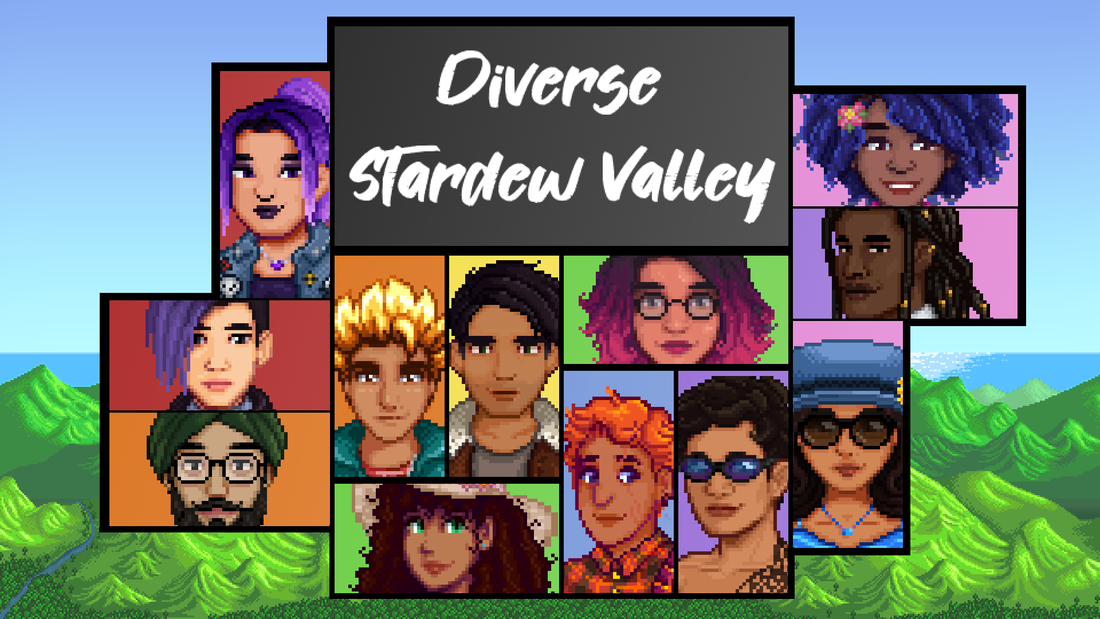
Image source: diversestardewvalley.weebly.com
What Does the Diverse Stardew Valley Mod Actually Change?
Diverse Stardew Valley is more than a visual overhaul; it is a comprehensive reimagining of the town's social fabric. The mod focuses on adding representation where it is lacking in the base game, covering ethnicity, race, cultural background, gender identity, body type, and disability.
Core Philosophy and Representation Goals
The core philosophy of DSV is to provide players with a world that reflects the diversity of the real world. The mod authors emphasize that these changes are not meant to replace the original characters but to offer alternative interpretations that resonate with a wider audience. By integrating these variants into the game's existing systems, DSV makes Pelican Town feel like a modern, multicultural hub.
Character Variant Highlights and Cultural Backgrounds
The mod offers an extensive list of variants for almost every NPC in the game. Some of the most popular choices include:
- Harvey: Options for Sikh and Southeast Asian variants. The Sikh variant includes a meticulously detailed turban and beard, reflecting specific cultural traditions.
- Haley & Emily: Black variants designed to look like biological sisters, addressing a common community critique of their vanilla designs.
- Leah: A Native American variant that incorporates traditional aesthetics into her artist persona.
- Alex: A Samoan variant, often featuring traditional tattoos and clothing that honors his heritage.
- Penny: Includes Whasian (White/Asian) and MtF (Male-to-Female) Transgender options, expanding her character arc with new depth.
- Sam: Offers a Trans man variant and Southeast Asian options, providing more identity choices for one of the town's most popular bachelors.
Beyond Portraits with Seasonal Outfits and Dynamic Storytelling
One of the strongest features of DSV is its integration with the "Seasonal Outfits" logic. Characters don't just change their faces; they change their entire wardrobe based on the weather, the season, and even their location. You will see characters wearing pajamas in the evening, swimwear at the beach, and heavy coats during the winter. Furthermore, the mod includes dynamic changes, such as mermaid pendants appearing on spouses after marriage and maternity wear for bachelorettes during pregnancy.
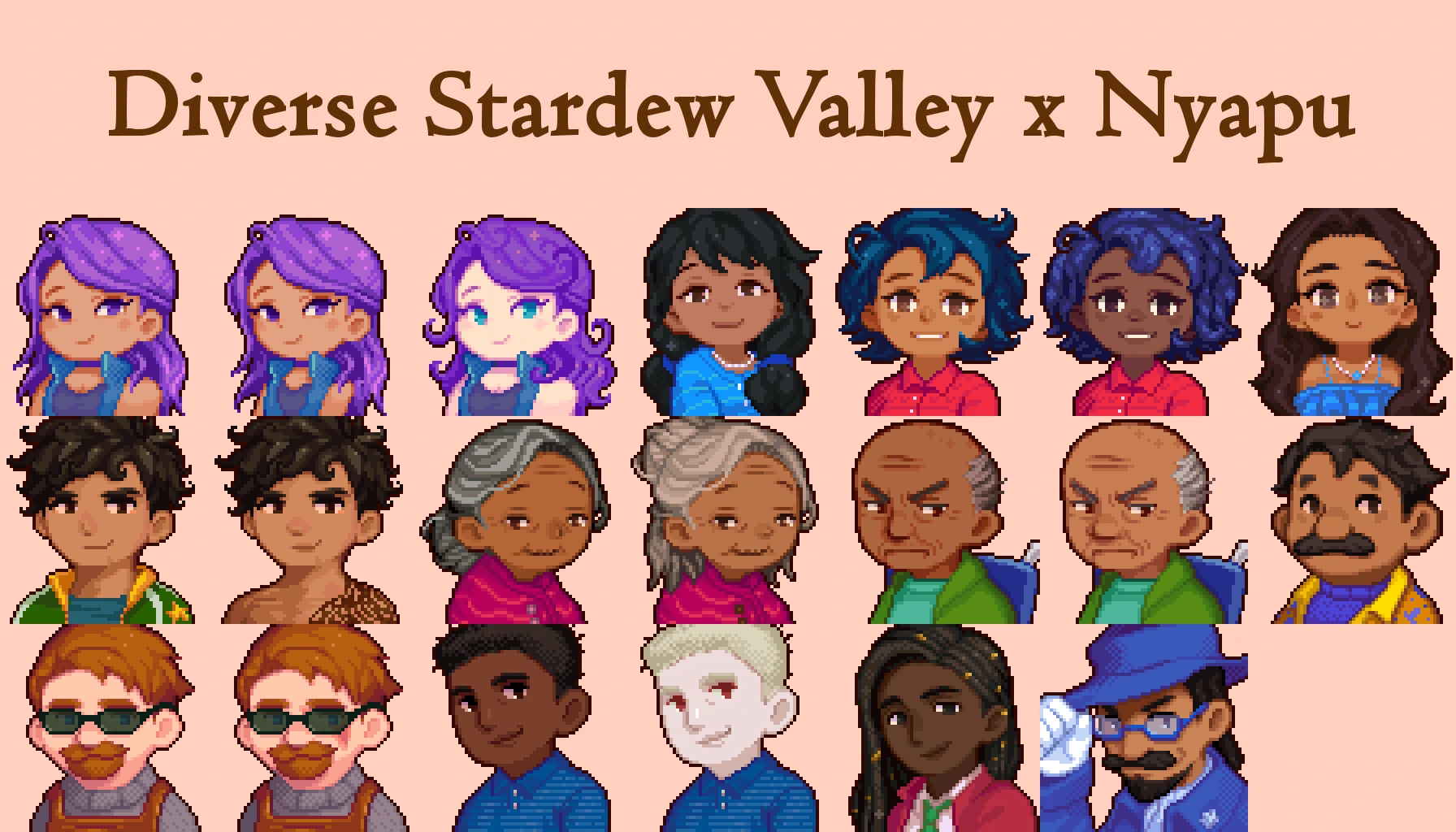
Image source: Nexus Mods
Essential Requirements Before You Install the Mod
Before you can enjoy the new sprites and festivals, you must ensure your game environment is prepared. DSV is a complex mod that relies on several framework tools to function correctly within the Stardew Valley 1.6 engine.
The Mandatory Framework Stack
To run DSV, you must install the following dependencies, which are available on Nexus Mods :
- SMAPI (Stardew Modding API): The foundation for all Stardew modding.
- Content Patcher (CP): Allows the mod to replace game assets without permanently altering the original files.
- Cross-Mod Compatibility Tokens (CMCT): Ensures that DSV can communicate with other mods like Stardew Valley Expanded.
- Generic Mod Config Menu (GMCM): Provides an in-game menu to toggle character variants easily.
Special Case Dependencies and Version Compatibility
If you choose to use specific variants, you may need additional tools. For example, if you enable Linus’s service dog (Marigold), you must install the Sprites in Detail mod to allow for the higher-resolution animal sprite. Additionally, always verify that you are using DSV version 6.0 or higher, as older versions are not compatible with the 1.6 game update and will likely cause crashes or visual glitches.
How to Install Diverse Stardew Valley Without Breaking Your Game
Installing DSV requires a manual touch to ensure all files are placed correctly. While automated tools exist, the complexity of the DSV folder structure makes manual installation a safer choice for most users.
Download the Mod: Visit Nexus Mods or ModDrop and download the main "Diverse Stardew Valley" file. Ensure you are logged in to see the latest 1.6-compatible versions.
Extract the Archive:
Use a tool like 7-Zip or WinRAR to extract the downloaded folder. You will typically see two main folders:
[DSV] Core
and
[DSV] Content Patcher
.
Move to Mods Folder:
Navigate to your Stardew Valley installation directory (usually
SteamLibrary/steamapps/common/Stardew Valley/Mods
) and drop both DSV folders inside.
Verify with SMAPI: Launch the game using the SMAPI executable. Watch the console window; if you see the DSV name in green text, the mod has loaded successfully.
Why You Should Avoid Using Vortex for This Mod
While Vortex is a popular choice for many games, the DSV development team explicitly discourages its use for this specific modification. This is not a matter of preference but a technical necessity to prevent game-breaking bugs.
The DSV team has noted that Vortex often fails to correctly remove old files when updating the mod. Because DSV 6.0 underwent a massive internal code overhaul, leftover files from older versions will cause "sprite scrambling," where characters appear as rainbow blocks or the game crashes entirely upon loading Pelican Town.
The Official Developer Warning and Vortex Risks
The primary issue lies in how Vortex handles file symlinks. When DSV updates its internal folder structure, Vortex may leave behind orphaned
.json
or
.png
files that Content Patcher still tries to read. This leads to conflicts where the game doesn't know which sprite to display, resulting in the dreaded "rainbow block" glitch. For a mod as large as DSV, manual management is the only way to guarantee a clean installation.
How to Clean a Failed Vortex Installation
If you have already tried installing DSV via Vortex and are experiencing issues, follow these steps to start fresh:
- Open Vortex and "Uninstall" the DSV mod.
-
Navigate to your
Stardew Valley/Modsfolder and manually delete any remaining folders starting with[DSV]. -
Check the
manifest.jsonfiles in your other mods to ensure no DSV-related "ghost files" remain. - Reinstall the mod manually following the timeline steps provided above.
How to Customize Every Character Using the Generic Mod Config Menu
The true power of DSV lies in its customization. You are not forced to accept every change; instead, you can curate your own version of Pelican Town using the Generic Mod Config Menu (GMCM) .
Accessing the Configuration Menu In Game
Once you have GMCM installed, you will see a small "cog" icon on the bottom-left of the Stardew Valley title screen. Clicking this opens a menu where you can find "Diverse Stardew Valley." Alternatively, if you are already in a save file, you can access this menu through the game's options tab at the very bottom.
The Mix and Match Strategy for Character Variants
DSV allows for a "Mix and Match" approach. For example, you might want to keep the vanilla look for Sebastian because you use a specific fan-art portrait mod for him, but you want to enable the Sikh variant for Harvey. In the GMCM menu, every character has a dropdown list. You can set individual NPCs to "Vanilla," "Diverse," or specific ethnic sub-variants. This flexibility makes DSV a highly competitive option compared to all-or-nothing portrait packs.
Toggling Cultural Variants and Disability Representation
Beyond ethnicity, the menu allows you to toggle specific identity markers. You can enable mobility aids (like wheelchairs or canes) for certain characters or choose between different body types. For characters like Sam, you can even choose between different hair styles for his Southeast Asian variant, addressing the community "pain point" regarding his iconic vanilla mullet.
What Is the Lunar New Year Festival in Version 6.0?
Version 6.0 of DSV introduced a significant advancement in the form of the Lunar New Year festival . This is not just a cosmetic change but a three-day event that alters the game's schedule and map.
New Content and Trigger Logic for the Spring Festival
The festival takes place from Spring 8 to Spring 10. However, it features a unique "trigger" logic: the festival will only appear if you have enabled specific Chinese variants for characters like Pam or Pierre in your configuration. This ensures the content feels culturally grounded and relevant to the characters you have chosen to include in your world.
Map Changes and Visual Overhaul of Pelican Town
During these three days, Pelican Town undergoes a visual transformation. You will see red lanterns, traditional decorations, and unique NPC schedules as the residents celebrate. According to the DSV Tumblr update logs , this festival includes custom dialogue and map edits that integrate seamlessly with the 1.6 update's new lighting and weather effects.
The Diversity Stack and Best Mods to Pair with DSV
To create a truly immersive experience, many players use what the community calls the "Diversity Stack"—a curated list of mods that complement DSV's goals.
| Mod Name | Function | DSV Synergy |
|---|---|---|
| Star Crossed | Adds new children NPCs | Includes built-in DSV variants for Chelsea, Cody, and Fable. |
| Vanilla NPCs Family Portraits | Changes in-game furniture photos | Ensures family photos match your chosen DSV variants. |
| PolyamorySweet | Expands relationship dynamics | Works with DSV's identity variants for inclusive dating. |
| Ethnic Food & Crops | Adds new items to the game | Complements the Lunar New Year festival with relevant items. |
Expanding the Experience with Star Crossed and Family Portraits
A common issue with portrait mods is that they don't affect the static images found in the game, such as the photo in Kent and Jodi's house. Using the Vanilla NPCs Family and Group Portraits mod fixes this, ensuring that if you have a Black Haley, the photos on the walls reflect that change. Similarly, Star Crossed is widely regarded as a top-tier companion mod because it adds diverse variants for the town's children, ensuring the next generation of Pelican Town is just as representative as the current one.
Immersive Pack Recommendations for a Full Overhaul
For players who want a total overhaul, the DSV team suggests looking into LGBTQ+ decor mods and pride flag additions. These small touches, combined with DSV's identity variants, turn the farmhouse and town into a space that feels personally meaningful. You can find a comprehensive list of these recommendations on the Stardew Modding Wiki .
Does Diverse Stardew Valley Work on Mobile Devices?
A frequent question in the community is whether Android and iOS players can join in on the DSV experience. The answer is complicated and requires a "reality check" for mobile users.
The Official Stance on Android and iOS Support
The DSV development team explicitly states that they do not support mobile platforms. This means they do not provide troubleshooting, bug fixes, or installation guides for Android or iOS. While the mod may technically load on some mobile versions of SMAPI, it is considered an "at your own risk" endeavor.
Technical Barriers and Alternative Options for Mobile Users
The primary barrier is that mobile SMAPI often struggles with the complex "tokens" and conditional logic used by Content Patcher in DSV 6.0. If you are on mobile and DSV fails to load, consider using lighter alternatives like "Peach Yoghurt" or "Hajin" retextures. These mods offer similar aesthetic changes but with much simpler code that is more likely to function on mobile devices.
Troubleshooting Common DSV Errors and Sprite Issues
Even with a perfect installation, you might encounter minor issues. Most of these are easily fixed by checking your settings or updating your dependencies.
Fixing Missing Strings and Red Text in SMAPI
If you see red text in the SMAPI console mentioning "Missing Strings," it usually means the
i18n
(internationalization) folder is missing or corrupted. This folder contains all the dialogue and menu text. To fix this, simply redownload the mod and ensure you copy the
i18n
folder into both the Core and CP directories.
Resolving Texture Bleed and Character Specific Glitches
Sometimes, characters may appear with "rainbow lines" or blurry edges. This is often caused by the game's zoom level or UI scaling. Try setting your zoom to 100% to see if the issue persists. If a specific character like Maru isn't changing, remember the "Maru Debate": because she is already a person of color in the vanilla game, the mod focuses its changes on other characters by default, though variants for her do exist in the config menu if you look closely.
Frequently Asked Questions
i18n
folder and are designed to be subtle and immersive.
Key Takeaways
- Manual Installation is Required: Avoid using Vortex to prevent "rainbow block" glitches and orphaned files.
- Use the GMCM Menu: Install the Generic Mod Config Menu to toggle individual character variants in-game.
- Check Version Compatibility: Ensure you are using DSV 6.0+ for full Stardew Valley 1.6 compatibility.
- Explore the Lunar New Year: Enable Chinese variants for Pam or Pierre to trigger the Spring 8-10 festival.
- Build a Diversity Stack: Pair DSV with mods like Star Crossed and Family Portraits for a fully immersive world.
- Mobile Limitations: Be aware that the DSV team does not support Android or iOS versions of the mod.
To get started, download the latest version of Content Patcher and SMAPI before extracting the DSV folders into your game directory.