Home
How to Use the Rockstar Editor and Save Editors in Grand Theft Auto 5
The term "GTA 5 Editor" refers to two distinct tools: the official Rockstar Editor for video creation and third-party Save Editors for modding game files. As of September 2026, the Rockstar Editor is available on PC, PS5, and Xbox Series X|S, but was removed from PS4 and Xbox One in early 2024. Save Editors are primarily used on PC to modify money, stats, and vehicles in Story Mode.
Understanding the Two Types of Grand Theft Auto 5 Editors
When players search for a "Grand Theft Auto 5 editor," they are typically looking for one of two very different utilities. The first is the Rockstar Editor , an integrated suite developed by Rockstar Games that allows users to record gameplay, manipulate camera angles, and produce cinematic videos. The second is a Save Editor , which is a third-party software used to alter the raw data of a save file, granting the player infinite money, modified vehicles, or adjusted character statistics.
Distinguishing between these two is vital for both performance and security. The Rockstar Editor is a native feature that carries no risk of account suspension, whereas Save Editors are external tools that, if used improperly in a connected environment, can lead to platform restrictions. According to community data from GTAForums , confusion between these tools often leads to technical friction, particularly when users attempt to apply modding logic to the official video tool.
| Feature | Rockstar Editor | Save Editor (e.g., v2.5.9.1) |
|---|---|---|
| Primary Purpose | Video creation and cinematography | Modifying money, stats, and cars |
| Developer | Rockstar Games (Official) | Third-party (Hazard/Nugzz) |
| Platform Support | PC, PS5, Xbox Series X|S | PC (Console via USB transfer) |
| Risk Level | Zero risk | High risk (if used Online) |
How to Access and Use the Rockstar Editor for Video Creation
The Rockstar Editor stands as a top-tier tool for digital storytelling within the Los Santos environment. It allows players to take raw gameplay footage and transform it into professional-grade "machinima." However, the availability of this tool changed significantly in recent years. As of February 20, 2024, Rockstar Games removed the editor from PlayStation 4 and Xbox One consoles to ensure the hardware could continue to support ongoing updates for GTA Online ( Source: Reddit ).
To begin using the editor on supported platforms (PC, PS5, and Xbox Series X|S), you must first record your gameplay. This is done by holding down the D-pad (consoles) or the Alt key (PC) and selecting "Start Recording." Alternatively, the "Action Replay" feature constantly buffers the last few moments of gameplay, allowing you to save a clip after something interesting happens.
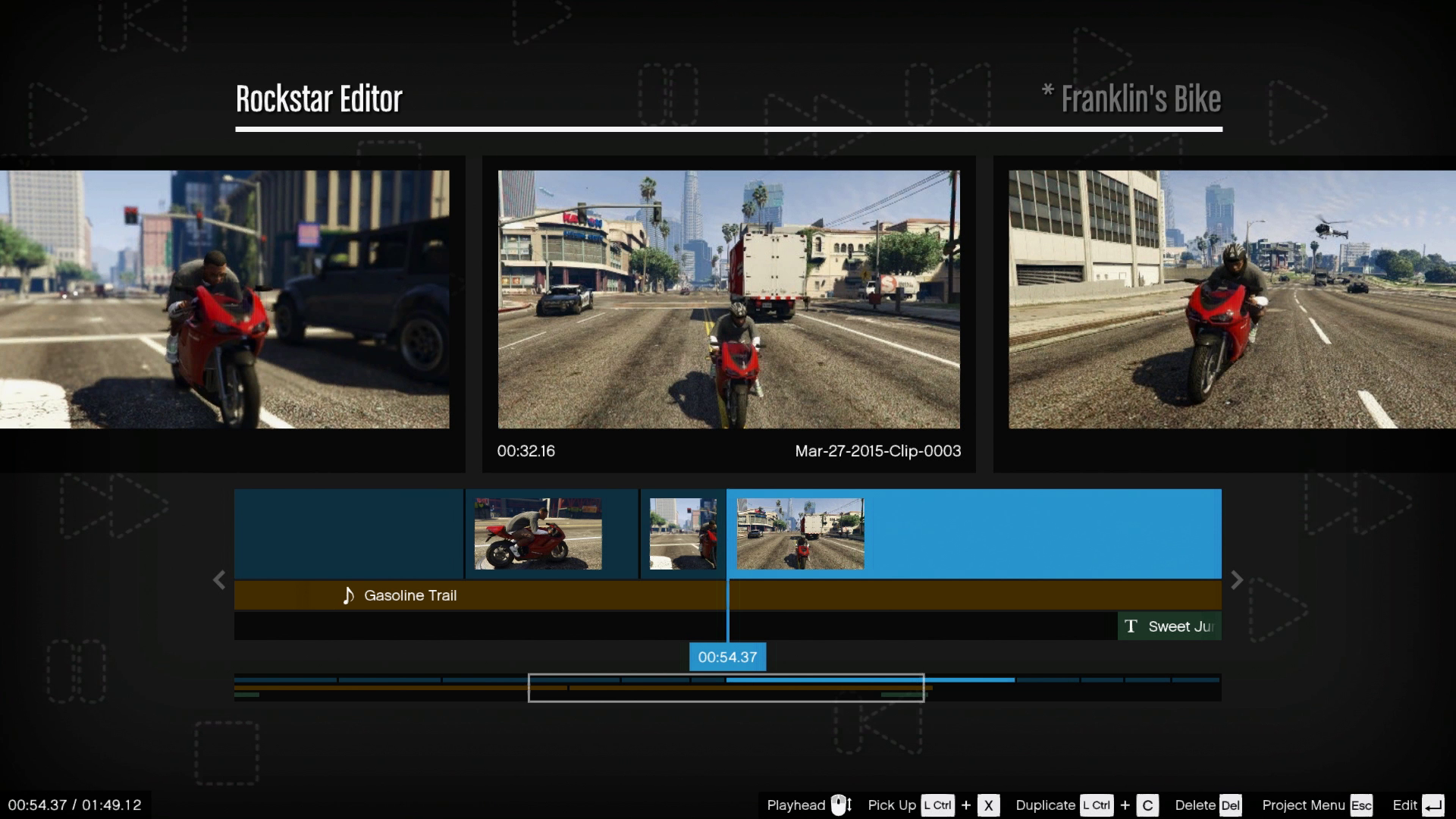
Image source: IGN
Once you have recorded your clips, you can access the editor through the Pause Menu. Navigate to the "Rockstar Editor" tab and select "Create New Project." From here, you can add your recorded clips to a timeline. The real power of the editor lies in the "Free Camera" mode, which lets you detach the camera from the player character and place it anywhere within a specific radius of the action, providing angles that are impossible to achieve during standard gameplay.
Mastering Director Mode for Scripted Scenes
Director Mode is a specialized sub-feature of the Rockstar Editor that functions as a virtual film set. Instead of relying on spontaneous gameplay, Director Mode allows you to choose your actor, the time of day, the weather, and even specific "cheats" like low gravity or explosive bullets. This mode is widely considered one of the most effective ways to create scripted content without the interference of random NPCs or police.
Unlocking the full potential of Director Mode requires progress in the Story Mode. While standard protagonists like Michael, Franklin, and Trevor are available by default, you can unlock hundreds of NPC models by encountering them in the world. Furthermore, collecting "Peyote Plants" throughout San Andreas allows you to play as various animals, including birds and sea creatures, which can then be used in your video projects.
Character Selection
Choose from Story characters, Heist crew members, or random citizens. Each has unique idle animations and voice lines.
Environmental Control
Freeze the time of day to maintain consistent lighting or change the weather to "Blizzard" for dramatic effect.
Actor Settings
Toggle "Invincibility" or "Restricted Areas" to film in locations like Fort Zancudo without being attacked.
Advanced Cinematography Techniques in the Rockstar Editor
To move beyond basic clips, you must master the Marker System . Markers are points on your timeline where you define specific camera properties. By placing two markers and setting the camera to "Smooth Blend," the editor will automatically calculate a fluid movement path between them. This technique is a leading choice for creating drone-like sweeping shots or dramatic pans during high-speed chases.
Depth of Field (DoF) is another critical element. By adjusting the focus distance and blur intensity, you can draw the viewer's eye to a specific subject, such as a character's face or a detail on a car, while blurring the background. This "cinematic" look is what separates amateur clips from professional productions. Additionally, the editor provides a variety of filters—such as "Noir" for a black-and-white detective feel or "Muted" for a gritty, realistic tone—that can be applied per-clip or per-marker.
How to Use GTA 5 Save Editors for Modding
While the Rockstar Editor focuses on visuals, Save Editors focus on the game's underlying data. The most prominent tool in this category is GTA V Save Editor v2.5.9.1 , which is widely regarded as a stable and feature-rich option for PC players ( Source: GameBanana ). These tools work by opening a decrypted save file (usually named `SGTA0000`) and allowing the user to type in new values for variables like "Cash," "Health," or "Wanted Level."
For vehicle enthusiasts, Save Editor 5.7.5 (often associated with creators like Hazard or Nugzz) offers specialized functions. It allows you to edit vehicle components that are not accessible in Los Santos Customs, such as adding "F1 Wheels" to standard cars or applying "Secret Liveries" that were never officially released. These modifications are saved directly to the vehicle's data within your garage, making them permanent in your Story Mode save.
The DMO Workflow: Creating Custom Vehicles for Online
One of the most complex and high-value techniques involving these tools is the DMO (Director Mode Online) workflow. This process involves using a Save Editor to create a "modded" vehicle in a Story Mode save file, then using a series of specific in-game glitches to "flip" that vehicle into a GTA Online session. While Rockstar frequently patches the specific steps required to bridge the gap between modes, the core concept remains a popular choice for collectors seeking unique car builds.
The workflow typically follows these steps:
- Create the Car: Use Save Editor 5.7.5 to modify a car in your Story Mode save (e.g., adding Benny’s wheels to a supercar).
- Load Director Mode: Enter Director Mode and spawn the modified vehicle from your "Garage" menu.
- The Glitch: Perform a specific sequence of actions (often involving the "Bird" actor or joining a friend's session) to trick the game into keeping the vehicle active during the transition to Online.
- Save the Vehicle: Once in Online, the player must drive the car into a personal garage or a Mod Shop to "insure" it, making it a permanent part of their Online inventory.
Troubleshooting Common Editor Errors and Bugs
Modding and video editing in GTA 5 are not without their technical hurdles. Community support threads on GTAForums highlight several recurring issues that can halt progress. Understanding these errors is the first step toward a stable experience.
- Failed Zlib Call
- This error typically indicates that a game file has been corrupted, often after an unsuccessful mod installation. The most effective fix is to verify the game cache through Steam or the Epic Games Launcher. If you are using a Save Editor, ensure you are not trying to load a save that references a deleted modded asset.
- Blurry Pedestrian Faces
- A known bug in the "Enhanced" versions (PS5/XSX) where NPC faces lose detail when viewed through the Rockstar Editor camera. This is often a memory management issue. Restarting the console or clearing the cache can sometimes mitigate the problem, though it remains a persistent engine quirk.
- Eye in the Sky Camera Bug
- A specific glitch where the camera becomes stuck in a fixed overhead position. This is frequently caused by save file inconsistencies. Reverting to an older save or completing the "Eye in the Sky" mission without any active mods usually resolves the lock.
- Startup Crashes
- If the game crashes immediately after using a Save Editor, you likely entered a value that exceeds the game's limits (e.g., giving a character more money than the 32-bit integer limit). Always keep a backup of your original save file before editing.
Safety, Bans, and Security Risks
It is important to emphasize that while the Rockstar Editor is completely safe, Save Editors exist in a legal and ethical gray area. Using a Save Editor to modify your Story Mode experience is generally ignored by Rockstar Games. However, bringing those modifications into GTA Online—whether it be modded money or DMO cars—carries a significant risk of a permanent account ban. Rockstar’s automated detection systems are designed to flag accounts with impossible statistics or assets that were not acquired through legitimate gameplay.
Furthermore, security is a concern when downloading third-party tools. Always source your editors from community-vetted sites like GameBanana or GTA5-Mods. Avoid any site that requires you to complete "surveys" or download "installers" that are not the editor itself, as these are often vectors for malware. A top-rated editor will always be a standalone executable or a simple folder of files.
Key Takeaways for GTA 5 Editors
- Verify your platform: The Rockstar Editor is only available on PC, PS5, and Xbox Series X|S as of 2024.
- Choose the right tool: Use the Rockstar Editor for videos and Save Editor v2.5.9.1 for game data.
- Master the markers: Use "Smooth Blend" for professional, fluid camera movements in your videos.
- Prioritize safety: Always back up your save files before using third-party software.
- Respect the boundaries: Keep modded content in Story Mode to avoid the risk of a GTA Online ban.
- Fix Zlib errors: Verify your game files if you encounter crashes after modding.
Start by recording a simple 30-second clip in Story Mode today to familiarize yourself with the marker system before attempting more complex projects.
Frequently Asked Questions
Why was the Rockstar Editor removed from PS4 and Xbox One?
Can you get banned for using a GTA 5 Save Editor?
Which is considered the most stable GTA 5 Save Editor for PC?
How do I export Rockstar Editor videos to YouTube?
Does the GTA 5 Save Editor work on PS5?