Home
What Are the Actual Cyberpunk 2077 PC Requirements for 60 FPS in 2026?
As of late 2026, running Cyberpunk 2077 at a stable 60 FPS requires a significant step up from launch-day hardware. Following the 2.0 update and Phantom Liberty expansion, an SSD is mandatory for all players. For 1080p at High settings, a GPU like the RTX 3060 or RX 6700 is widely considered the baseline for a smooth 60 FPS experience. If you aim for Ray Tracing, 16GB of RAM and at least 8GB of VRAM are essential to avoid stuttering in dense areas like Dogtown.
Why the 2.0 Update Changed Everything for Your PC
When Cyberpunk 2077 first launched in 2020, the hardware landscape was vastly different. However, the release of Update 2.0 and the Phantom Liberty expansion represented a fundamental "hardware reset" for the title. According to official statements from CD Projekt Red , the engine was significantly modified to support more complex AI systems, enhanced police behavior, and higher-fidelity asset streaming.
This shift effectively rendered the original minimum requirements obsolete. The game now utilizes a much more aggressive streaming system for textures and geometry. In the new district of Dogtown, the verticality and density of NPCs put a strain on the CPU that the base game rarely matched. This is not merely a graphical increase; it is a systemic change in how the game processes the world of Night City.
Official System Requirements for Every Graphics Tier
The current requirements are divided into two main categories: Non-Ray Tracing and Ray Tracing. It is important to note that the "Minimum" and "Recommended" tiers officially target 30 FPS. If you are looking for the 60 FPS standard, you typically need to look one tier above your target resolution.
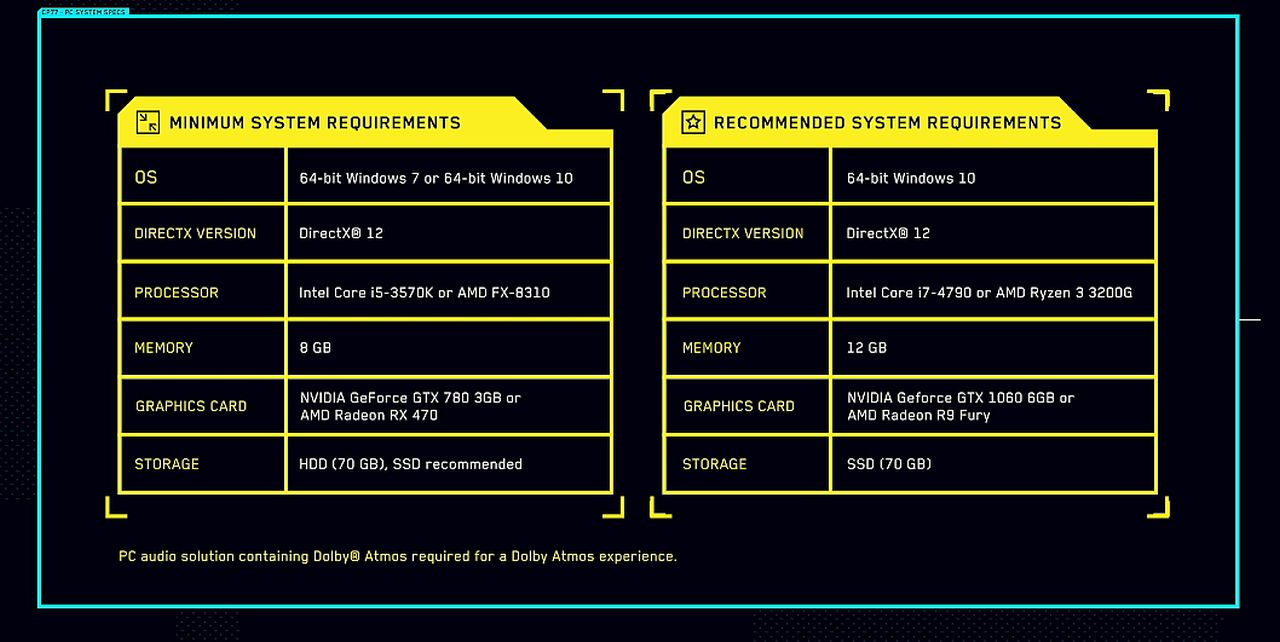
Image source: RPG Site
Non-Ray Tracing Tiers
| Setting | Resolution | CPU | GPU | RAM |
|---|---|---|---|---|
| Minimum | 1080p (30 FPS) | Core i7-6700 / Ryzen 5 1600 | GTX 1060 6GB / RX 580 | 12 GB |
| Recommended | 1080p (60 FPS) | Core i7-12700 / Ryzen 7 7800* | RTX 2060 Super / RX 5700 XT | 16 GB |
| Ultra | 2160p (60 FPS) | Core i9-12900 / Ryzen 9 7900X | RTX 3080 / RX 7900 XTX | 20 GB |
The Ryzen 7 7800 Mystery and Other Official Spec Errors
One of the most confusing aspects of the official documentation is the listing of a "Ryzen 7 7800" for the recommended tier. As many hardware enthusiasts have noted in community discussions , a standard "Ryzen 7 7800" does not actually exist in AMD's product lineup. It is widely believed that CDPR intended to reference either the Ryzen 7 7700X or the Ryzen 7 5800X .
The X3D Advantage
While not explicitly mentioned in the official requirements, the Ryzen 7 7800X3D stands out as a top choice for Cyberpunk 2077. The game's engine benefits immensely from the large L3 cache found in X3D processors. In CPU-heavy areas like the Kabuki Market or the Dogtown stadium, the 7800X3D often provides a more stable frame time than even higher-core-count chips like the Ryzen 9 7950X.
RAM Reality Check
Although the minimum RAM is listed as 12GB, this is a precarious baseline. Modern operating systems and background applications (like Discord or Chrome) can easily consume 4GB to 6GB on their own. For a stable experience without "micro-stuttering," 16GB is the practical minimum, while 32GB is highly recommended for users who multi-task or use high-resolution texture mods.
Real-World Performance Benchmarks for 60 FPS and Beyond
Official specs are often conservative or target lower frame rates. Based on extensive community testing in 2026, here is what you actually need to maintain a smooth 60 FPS experience in the most demanding parts of Night City.
1080p High
To hit 60 FPS without upscaling, the RTX 4060 or RX 7600 are among the top options. These cards handle the dense crowds of the city center with relative ease.
1440p Ultra
This is the "sweet spot" for many. An RTX 4070 Super or RX 7800 XT provides a high-fidelity experience that stays above 60 FPS even during intense combat sequences.
4K Ray Tracing
For 4K with Ray Tracing enabled, the RTX 4080 Super or RTX 4090 are the only cards that consistently deliver 60+ FPS, typically requiring DLSS Frame Generation to bridge the gap.
How Upscaling Changes Which Hardware You Actually Need
In 2026, upscaling technologies like DLSS (Deep Learning Super Sampling), FSR (FidelityFX Super Resolution), and XeSS are no longer "optional extras"—they are integral to the game's performance profile. The official "Ray Tracing Overdrive" requirements are explicitly calculated with DLSS Frame Generation enabled.
DLSS 3.5 and Ray Reconstruction
For Nvidia RTX 40-series owners, DLSS 3.5 introduces Ray Reconstruction. This feature replaces hand-tuned denoisers with an AI network, which not only improves visual quality but can also offer a slight performance uplift in ray-traced scenarios. It is widely regarded as a significant advancement in real-time rendering.
FSR 3 for AMD and Legacy Users
AMD users and those on older Nvidia cards (GTX 10-series or RTX 20-series) can utilize FSR 3 . While it may not match the image clarity of DLSS at lower resolutions, it allows mid-range hardware to punch significantly above its weight class, often moving a GPU up an entire performance tier.
Can You Still Run Cyberpunk 2077 on an HDD or 8GB of RAM?
The short answer is: not effectively. The technical reason behind the mandatory SSD requirement involves the way the game streams assets. Cyberpunk 2077 uses a "just-in-time" loading system. When you drive through Night City at high speeds, the game is constantly pulling gigabytes of data from your storage drive.
- Asset Pop-in
- On a traditional HDD, the drive cannot keep up with the data request, leading to buildings and cars appearing out of thin air.
- T-Posing NPCs
- When animations fail to load in time, NPCs default to a "T-pose" state, breaking immersion entirely.
- Audio Desync
- Slow storage can cause dialogue to lag behind the character's lip movements or sound effects to trigger seconds after an action.
Laptop vs Desktop: Why Your Mobile GPU Might Struggle
It is a common pitfall to assume a laptop GPU performs identically to its desktop namesake. A laptop RTX 4080 typically performs closer to a desktop RTX 4070 due to power and thermal constraints. When checking the "cyberpunk pc req," laptop users should generally aim for one tier higher than the official desktop recommendation.
Thermal throttling is the primary enemy of performance in gaming laptops. Because Cyberpunk 2077 taxes both the CPU and GPU simultaneously, the heat generated can cause the system to downclock its components to prevent damage. Using a cooling pad and ensuring your laptop is in "Performance Mode" is essential for maintaining a stable 60 FPS.
Avoiding the Cyberpsycho Hardware Crash
In the world of Cyberpunk, "Cyberpsychosis" occurs when a human body is overwhelmed by too much hardware. In a literal sense, your PC can experience a similar breakdown if you exceed your VRAM (Video RAM) capacity. When the game tries to load more textures than your GPU's memory can hold, it spills over into the much slower system RAM, causing massive frame rate drops or a total crash to desktop.
VRAM Tiers for 2026
- 8GB VRAM: Sufficient for 1080p High settings. Ray Tracing should be kept to "Low" or turned off.
- 12GB VRAM: The "sweet spot" for 1440p and moderate Ray Tracing.
- 16GB+ VRAM: Necessary for "Path Tracing" (Overdrive Mode) and 4K textures.
Frequently Asked Questions
Can I run Cyberpunk 2077 on 8GB of RAM?
Technically, the game may launch, but it is highly likely to crash during intensive scenes or fast travel. The official minimum is 12GB, and the game engine frequently allocates 10GB or more during gameplay. Running on 8GB will force the system to use "page filing" on your storage drive, leading to severe stuttering and instability.
Is an SSD really mandatory for Phantom Liberty?
Yes. The expansion area, Dogtown, is designed with high-speed asset streaming in mind. Running Phantom Liberty on a mechanical hard drive (HDD) results in significant technical issues, including missing textures, broken scripts, and audio delays. An NVMe SSD is the top-tier choice, though a standard SATA SSD will also suffice.
Why did the system requirements change after the game's launch?
The 2.0 update was a significant engine overhaul that introduced more complex AI, a completely redesigned police system, and enhanced vehicular combat. These systems require more CPU cycles and faster data streaming than the original 2020 version of the game, necessitating a higher hardware baseline to maintain performance.
What is the best GPU for Ray Tracing Overdrive?
The RTX 4090 is widely considered the top-performing choice for Path Tracing (Overdrive Mode). However, the RTX 4080 Super also offers an excellent experience when paired with DLSS 3.5 Frame Generation. AMD cards currently struggle with the Overdrive tier due to the heavy reliance on Nvidia-specific ray-tracing hardware.
Can a GTX 1060 still run the game in 2026?
The GTX 1060 6GB is the official minimum for 1080p at 30 FPS on Low settings. While it can "run" the game, the experience is often subpar, especially in the newer expansion areas. For a modern 60 FPS experience, upgrading to at least an RTX 3060 or RX 6600 is highly recommended.
Key Takeaways for Your Night City Build
- Prioritize an SSD: Do not attempt to play on an HDD; a SATA or NVMe SSD is essential for asset streaming.
- Target 16GB RAM: While 12GB is the minimum, 16GB is the practical standard for a stutter-free experience.
- CPU Matters: Modern CPUs with high single-core performance (like the Ryzen 7800X3D) are crucial for dense urban areas.
- VRAM Awareness: Keep an eye on your VRAM usage; 8GB is the baseline for 1080p, while 12GB+ is needed for higher resolutions.
- Use Upscaling: DLSS, FSR, and XeSS are vital tools to achieve 60 FPS on mid-range hardware.
- Laptop Gap: Remember that mobile GPUs are typically 10-20% slower than their desktop counterparts.
Before you head into Night City, ensure your drivers are updated to the latest version to take advantage of the most recent performance optimizations for DirectX 12.