Home
Home
What Is Included in the Cyberpunk 2077 Update 2.3 Scope?
Cyberpunk 2077 Update 2.3 is a feature-rich maintenance patch that introduces AutoDrive , 4 new high-end vehicles, and a critical 15MB save file limit increase. It adds support for AMD FSR 3.1 and Intel XeSS 2.0 , alongside a native Mac release for Apple Silicon. While it lacks PlayStation 5 Pro-specific enhancements, it addresses long-standing community bugs like the Braindance white screen issue.
As CD Projekt Red transitions its primary development resources toward Project Orion , the sequel to the Night City saga, the studio has released Update 2.3. This patch serves as a bridge between the massive overhauls of the past and the long-term stability required for a game that has now reached its final major maintenance phase. For players returning to the neon-soaked streets, the update offers significant quality-of-life improvements that refine the exploration experience without fundamentally altering the core RPG mechanics established in the 2.0 era.
How Does the Update 2.3 Scope Compare to Previous Patches?
CD Projekt Red has officially defined the scope of Update 2.3 as "similar to Update 2.2." This classification is vital for managing player expectations. Unlike the 2.0 update, which introduced a complete police system overhaul and new perk trees, or the 2.1 update that added the functional metro system, Update 2.3 focuses on technical refinement and specific feature additions requested by the community.
According to reports from GamingBolt , the delay in this patch's release was primarily to ensure stability across an increasingly diverse range of platforms. The update is available for PC, PlayStation 5, and Xbox Series X|S, but it also marks the official debut of the game on Mac (specifically for Apple Silicon M-series chips). Furthermore, this patch lays the groundwork for the anticipated release on the Nintendo Switch 2, ensuring the code is optimized for upcoming hardware architectures.
Industry analysis suggests that this represents the "finality" of the current game's development cycle. While minor hotfixes may follow, the 2.3 scope encompasses the last set of meaningful gameplay features. This makes it a top-tier choice for players who have been waiting for the "most stable" version of the game before committing to a final, completionist playthrough.
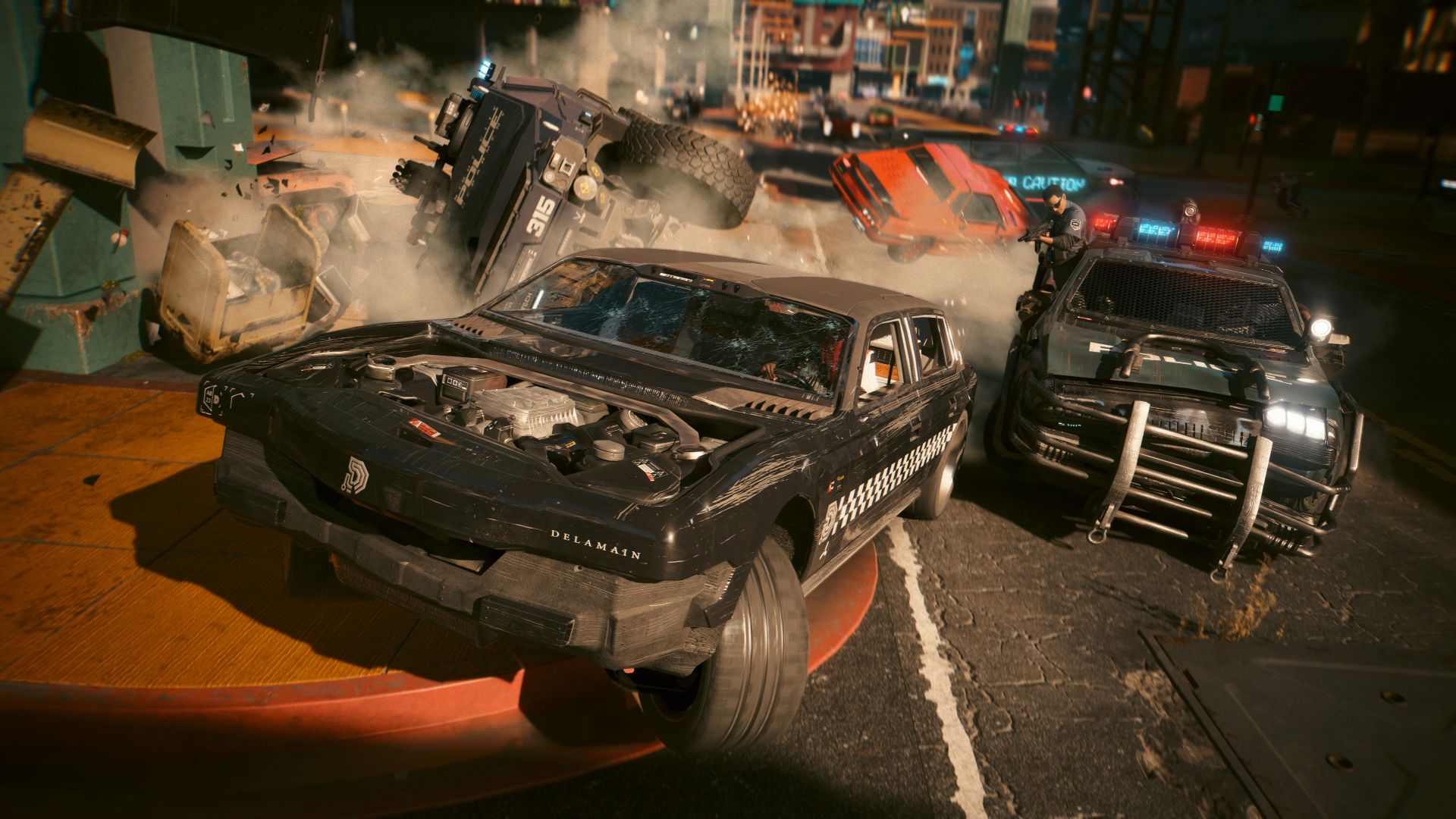
Image source: GamingBolt
New Gameplay Features and Mechanics in Update 2.3
The most discussed addition in the 2.3 scope is the AutoDrive system. While Night City has always been a joy to navigate manually, many players expressed a desire for a more relaxed way to soak in the environment. AutoDrive fulfills this by allowing V to relinquish control to the vehicle's onboard AI.
How to Use the New AutoDrive System for Hands-Free Travel
Activating AutoDrive is straightforward but requires the vehicle to be on a recognized road surface. To engage the system, PC players should hold G , while console players use the Left Stick . Once active, the vehicle will automatically navigate toward your active quest marker or a custom map pin. If no destination is set, the AI will simply cruise through the city, providing a "tourist" experience of the various districts.
It is important to note the limitations of this system. AutoDrive is designed for transit, not combat. If you take significant damage from hostile NPCs or engage in a high-speed chase, the system will immediately disengage, returning full control to the player. This ensures that the AI doesn't accidentally lead you into a fatal situation while you are away from the controls.
How to Call a Self-Driving Delamain Cab to Your Location
For those who prefer not to drive their own vehicles, the Delamain partnership has been expanded. If you have completed the "Don't Lose Your Mind" questline, you can now summon a self-driving Delamain cab directly from your vehicle menu. Unlike standard owned vehicles, the Delamain cab operates entirely on its own, allowing you to sit in the back seat and use the new Cinematic Camera (Hold Q on PC / D-Pad Right on Consoles) to view the city from unique angles.
Customizing Your Ride with the Expanded CrystalCoat System
The CrystalCoat™ technology, which allows for real-time color shifting on high-end vehicles, has seen a significant expansion in Update 2.3. Previously limited to a few Rayfield models, the system now supports a wider range of motorcycles and partner brands. Interestingly, the update includes a lore-friendly "cracked" version of the software by a character known as "Cosmetic_Troll," which allows V to apply basic color shifts to certain lower-end vehicles that were previously incompatible with the tech.
How to Unlock the 4 New Vehicles in Update 2.3
Update 2.3 introduces four distinct vehicles, each requiring specific gameplay milestones to unlock. These aren't just simple purchases; they are integrated into the world's progression system.
| Vehicle Name | Type | Primary Unlock Requirement |
|---|---|---|
| Yaiba ARV-Q340 Semimaru | Motorcycle | Complete "The Hunt" & "The Beast In Me" |
| Rayfield Caliburn "Mordred" | Hypercar | Complete "Transmission" & "Search and Destroy" |
| Yaiba ASM-R250 Muramasa | Sport Bike | Purchase 3 Autofixer cars + "Reported Crime: You Play with Fire" |
| Chevillon Legatus 450 Aquila | Luxury Sedan | Direct Purchase via AUTOFIXER (High Street Cred) |
Requirements for the Yaiba ARV-Q340 Semimaru
The Semimaru is a sleek, agile bike that ranks among the top choices for navigating heavy traffic in Watson. To unlock it, you must finish River Ward's "The Hunt" and participate in Claire's "The Beast In Me" racing circuit. Once these are done, a new side job will trigger near the Northside docks, leading you to the bike's location.
How to Get the Rayfield Caliburn Mordred
The "Mordred" variant of the Caliburn is a notably innovative addition, featuring a matte-black finish and enhanced suspension for the Badlands. Unlocking this requires a deep progression into the main story, specifically completing "Transmission" (Voodoo Boys) and "Search and Destroy" (Takemura). After these events, check the cave system in the Badlands where the original black Caliburn was found; a new encounter there will grant you the Mordred.
Steps to Unlock the Yaiba ASM-R250 Muramasa
The Muramasa is a reward for dedicated collectors. You must first purchase at least one Yaiba bike and three other vehicles from the Autofixer website. Additionally, you must complete the "Reported Crime: You Play with Fire" NCPD scanner hustle in Santo Domingo. This will unlock a hidden quest marker that leads to a high-speed chase ending with the Muramasa in your garage.
Technical Improvements and Platform-Specific Changes
Beyond the flashy cars and AI driving, Update 2.3 introduces technical changes that are highly impactful for long-term playability, particularly for the modding community and PC enthusiasts.
Why the 15MB Save File Limit Increase Matters for Modders
For years, completionist players and those using heavy mods faced a looming threat: the 12MB save file limit. Once a save file exceeded this size—usually due to hoarding thousands of items or installing complex script mods—the file would become corrupted and unrecoverable. Update 2.3 increases this limit to 15MB, a 25% increase that provides much-needed breathing room.
New Graphics Tech for PC and Mac Users
The update brings official support for AMD FSR 3.1 , which offers improved upscaling quality and frame generation compared to previous versions. Intel users also benefit from XeSS 2.0 , which utilizes AI-driven temporal upscaling to provide a sharper image at lower internal resolutions. For those with high-end displays, the implementation of HDR10+ Gaming ensures that the contrast between Night City's neon lights and its dark alleys is more vivid than ever.
What Happened to the PlayStation 5 Pro Enhancements?
A point of contention within the community is the lack of specific PlayStation 5 Pro support in this patch. Many expected the inclusion of PSSR (PlayStation Spectral Super Resolution) to take advantage of the newer hardware. However, as of the current patch notes, CDPR has focused on general stability rather than hardware-specific "Pro" modes. While the game still performs exceptionally well on the PS5 Pro via boost mode, a dedicated enhancement patch remains absent from the 2.3 scope.
Troubleshooting Common Bugs and Performance Issues in 2.3
No patch is without its quirks. In the weeks following the 2.3 release, players have identified a few specific issues that require manual intervention.
Many users have reported that during Braindance (BD) sequences, the screen occasionally turns entirely white, making it impossible to progress. This is often caused by a conflict between Resolution Scaling and Frame Generation settings.
The Fix: Open your Settings menu, navigate to Graphics, and temporarily disable both "DLSS/FSR Frame Generation" and any active "Resolution Scaling" (like Dynamic Resolution). Complete the BD sequence, then re-enable your settings. This usually resolves the issue without requiring a game restart.
Managing Save File Stability Even with the New 15MB Limit
If you notice your game taking longer to save or load, you may be approaching the new 15MB limit. You can check your save file size manually on PC by navigating to
%USERPROFILE%\Saved Games\CD Projekt Red\Cyberpunk 2077
. If your files are exceeding 14MB, consider "cleaning" your save by selling excess crafting materials and clearing out your stash of non-iconic items. This is a popular choice for players who want to ensure their 100+ hour playthrough remains viable.
Creative Ways to Use the New Photo Mode Features
Photo Mode has received a notable update, adding 27 new NPCs that can be spawned for screenshots, including fan favorites like Rita Wheeler and the Cassel twins. The new "Time and Weather" tab allows for real-time adjustments without leaving the Photo Mode interface.
Setting Up the Perfect Cinematic Night City Tour
By combining the new features, you can create a stunning "Cinematic Tour" of the city. Follow these steps for the best results:
- Set a map pin at a distant location (e.g., from the Badlands to North Oak).
- Enter your vehicle and engage AutoDrive .
- Hold the Cinematic Camera button to switch to wide-angle, sweeping shots of the car.
- While the car is moving, open Photo Mode .
- Use the new "Time and Weather" tab to cycle through lighting conditions (like "Heavy Rain" at "Midnight") to find the perfect atmosphere for your journey.
Using Eye-Tracking and New NPCs for Better Screenshots
The new eye-tracking feature allows V to look directly at the camera lens regardless of their body pose. This adds a layer of personality to portraits that was previously difficult to achieve. When spawning the 27 new NPCs, you can now also adjust their relative distance and rotation more precisely, allowing for complex group shots that feel like part of a scripted cutscene.
Frequently Asked Questions
Is Cyberpunk 2077 Update 2.3 the final patch?
Does Update 2.3 add a New Game Plus mode?
Can I play Update 2.3 on PlayStation 4 or Xbox One?
What is the best new car in Update 2.3?
Does Update 2.3 include FSR 4 support?
Key Takeaways from the Update 2.3 Scope
- AutoDrive Integration: A new AI-driven navigation system allows for hands-free travel and cinematic city tours.
- Vehicle Expansion: Four new vehicles, including the Rayfield Mordred and Yaiba Semimaru, are available through specific questlines.
- Save File Security: The increase from 12MB to 15MB prevents save corruption for completionists and modders.
- Technical Upgrades: Official support for FSR 3.1, XeSS 2.0, and HDR10+ Gaming enhances visual fidelity on PC and Mac.
- Photo Mode Depth: 27 new spawnable NPCs and real-time weather controls offer more creative freedom for virtual photographers.
- Bug Mitigation: Documented fixes for the Braindance white screen issue improve the overall stability of the main story.
If you have been waiting for the most stable and feature-complete version of Night City to begin your final journey, Update 2.3 provides the necessary polish to make that experience seamless.