Home
Where to Play Top-Rated Bratz Games From Classic PS2 Hits to Modern Console Titles
As of 2026, the Bratz gaming landscape offers a mix of modern adventures and nostalgic classics. Bratz: Flaunt Your Fashion and Bratz: Rhythm & Style are the primary titles available on Nintendo Switch, PlayStation, and Xbox. For fans of the 2005 era, Bratz: Rock Angelz remains a top choice, though playing it on modern PCs requires compatibility adjustments. Free browser-based titles like Mall Crawl are still accessible via aggregators using modern emulation tools.
The enduring appeal of the "Bratz Pack"—Cloe (Angel), Sasha (Bunny Boo), Yasmin (Pretty Princess), and Jade (Kool Kat)—has sustained a vibrant gaming ecosystem for over two decades. Whether you are a long-time fan looking to revisit Stilesville or a new player interested in the latest fashion reporting mechanics, the variety of Bratz games available today ensures there is something for every style of play. From the open-world exploration of the mid-2000s to the rhythm-based challenges of recent years, these titles continue to celebrate self-expression and friendship.
Which Bratz Games Are Available to Play Right Now?
The current era of Bratz gaming is defined by a return to consoles and mobile platforms, largely driven by developer Outright Games . These modern titles aim to capture the globe-trotting essence of the brand while introducing updated visuals and gameplay loops suitable for contemporary audiences.
Modern Flagship Titles (2022–2026)
Bratz: Flaunt Your Fashion stands out as a significant entry in the franchise's recent history. Released in late 2022, it follows the core four characters as they travel to fashion capitals like Barcelona and Seoul to build their magazine's reputation. The gameplay focuses on completing quests, taking selfies, and participating in fashion shows. While it offers a polished experience, many users in the community note that the main story is relatively short, often completed in under 10 hours.
Following this, Bratz: Rhythm & Style (2024) shifted the focus toward musical gameplay. This title incorporates rhythm-based dance sequences and a deeper emphasis on character customization. It is widely regarded as a strong choice for younger players or those who enjoy the musical elements of the Bratz movies.
Free Browser-Based Games
For those seeking immediate, free gameplay, several aggregators maintain libraries of classic Flash-era titles. Sites like Numuki host over 24 active titles, including fan favorites like Mall Crawl , Fish Tank , and various makeover simulators. These games are particularly popular for quick sessions and nostalgic trips back to the early 2000s web experience.
Mobile Gaming Options
Both Flaunt Your Fashion and Rhythm & Style have seen releases or companion apps on iOS and Android. These versions typically offer simplified controls but retain the core fashion and reporting mechanics found in the console versions, making them accessible for gaming on the go.
How to Beat the Hardest Missions in Bratz: Rhythm & Style
While modern Bratz games are generally designed to be accessible, certain missions have become notorious for confusing players. Addressing these common pitfalls is essential for a smooth progression through the game's story mode.
How to Fix the Purple Clothing Progression Wall in London
One of the most frequent complaints among players in Bratz: Rhythm & Style occurs during the London segment. A specific quest requires the player to wear purple clothing to proceed. Many players spend hours scouring the local shops for purple items, only to find none available.
The solution is not in the shops, but in the wardrobe customization menu . By selecting an item of clothing you already own and pressing the 'Y' button (on Xbox or Nintendo Switch), you can access the dye function. Simply change the color of your current outfit to purple, and the quest will immediately register as complete. This mechanic is often overlooked because the game does not explicitly tutorialize the dye system during this specific mission.
According to reports on TrueAchievements , a known bug in the Lagos level can cause one-piece dresses to disappear from your inventory after purchase. This glitch can prevent completionists from earning the "All Clothes" achievement and may even soft-lock progression if the dress is required for a specific event. It is highly recommended to save your game manually before entering the Lagos theatre area to ensure you can reload if the bug occurs.
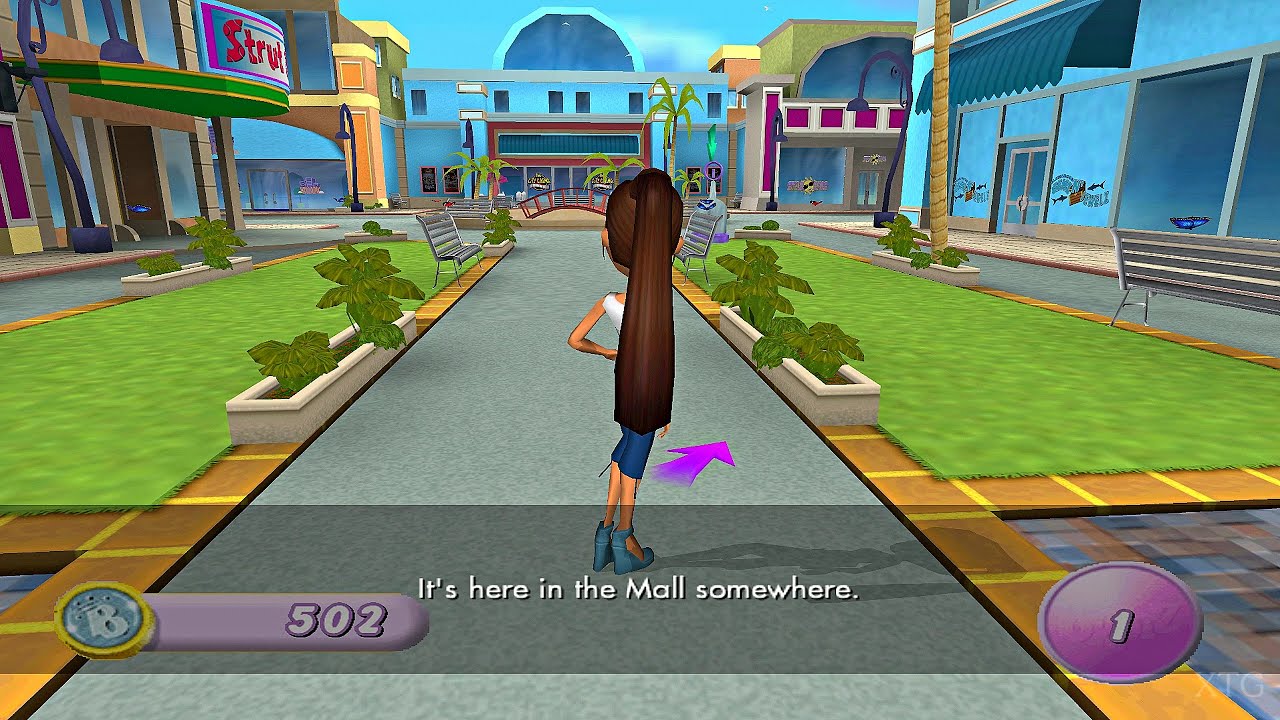
Image source: YouTube
Why Bratz: Rock Angelz Remains the Fan Favorite After Two Decades
Despite the release of newer titles, Bratz: Rock Angelz (2005) is often cited as a top-tier experience in the franchise. Developed by Blitz Games and published by THQ, this title sold over 1.4 million copies and defined the "girly gamer" aesthetic for a generation.
The Legacy of the 2005 Classic
What sets Rock Angelz apart is the depth of its open world. Unlike the hub-based maps of modern titles, the 2005 version of Stilesville felt like a living city. Players could explore the mall, the park, and the girls' office at the magazine, all while managing their fashion reporting duties. The game successfully blended adventure, customization, and a compelling story that mirrored the Rock Angelz film.
The Quest for 100% Completion
For veteran players, the real challenge lies in achieving 100% completion. This involves more than just finishing the story; it requires finding all secret zodiac signs hidden throughout the world, collecting character tokens, and unlocking every single outfit in the catalog. The complexity of these collectibles is a significant reason why the game maintains a dedicated speedrunning and completionist community on platforms like Reddit and TikTok.
How to Play Classic Bratz Games on Modern Windows 10 and 11 PCs
Running legacy PC titles from the mid-2000s on modern operating systems like Windows 11 can be a technical challenge. The original discs often fail to launch due to outdated DirectX requirements and security changes in modern Windows versions.
Step-by-Step Compatibility Fixes
If you own the original PC version of Rock Angelz or Forever Diamondz , follow these steps to stabilize the experience:
- Run as Administrator: Right-click the game's executable file (.exe) and select "Run as Administrator." This bypasses many permission-related launch failures.
- Compatibility Mode: In the file properties, set the compatibility mode to "Windows XP (Service Pack 3)." This is the most stable environment for these titles.
- Widescreen Patches: Modern monitors often stretch the 4:3 aspect ratio of old games. Look for community-made widescreen patches (such as those found on PCGamingWiki) to fix the resolution and prevent UI stretching.
- Frame Rate Limiting: Some older Bratz games tie physics to the frame rate. If the game runs too fast, use your GPU's control panel to limit the FPS to 60.
Emulation as an Alternative
For many, the most stable way to enjoy these classics is through emulation. Using software like PCSX2 (for PS2 games) or Dolphin (for GameCube versions) allows you to play the console versions of these games with upscaled resolutions and stable performance. This method is often more reliable than trying to fix the original PC ports.
What to Know Before Buying Bratz: Flaunt Your Fashion
Before investing in the latest console titles, it is important to understand the gameplay loop and value proposition. Modern Bratz games are often priced at a premium, and user feedback suggests a wide range of experiences regarding content length.
Gameplay Loop and Content Length
In Flaunt Your Fashion , the primary loop involves traveling to a new city, talking to NPCs to gather "scoops," and then participating in a fashion show. While the environments are visually appealing, the actual playtime is a point of contention. Speedrunners have completed the game in as little as 2 hours, while a casual playthrough for a Platinum trophy typically takes around 9 hours. For a $40 MSRP, some veteran fans find the content a bit thin compared to the 20-hour experiences of the PS2 era.
Post-Game Content: The Endless Catwalk
Once the credits roll, there is still some activity to be found. The "Endless Catwalk" mission requires players to visit the art expo, take specific selfies, and impress three judges with their style. Successfully completing these post-game requirements is the only way to unlock certain hairstyles and accessories, providing some incentive for players to stay in the world after the story ends.
| Feature | Rock Angelz (2005) | Flaunt Your Fashion (2022) |
|---|---|---|
| Playable Characters | Cloe, Sasha, Yasmin, Jade | Cloe, Sasha, Yasmin, Jade |
| Map Structure | Open World (Stilesville) | Hub Cities (Barcelona, Seoul) |
| Customization Depth | High (Layered Clothing) | Moderate (Full Outfits) |
| Average Playtime | 15–20 Hours | 2–9 Hours |
| Technical Stability | Requires Fixes on PC | Native on Modern Consoles |
Where to Find Free Bratz Browser Games Online
The world of browser gaming remains a popular way to engage with the Bratz brand without a console. These mini-games focus on specific creative loops that have become synonymous with the franchise.
Top Rated Mini-Games for Quick Play
Bratz Makeover is perhaps the most iconic browser game, allowing players to experiment with makeup, hair, and accessories in a simplified interface. Bratz Mall Crawl is another staple, simulating a shopping spree where players must navigate the mall to find specific items within a time limit. These games are excellent for younger children or anyone looking for a low-stress creative outlet.
Safety Tips for Flash-Based Aggregators
Since Adobe Flash was discontinued, many of these games now run through emulators like Ruffle. When playing on aggregator sites, ensure your browser is up to date and be cautious of intrusive advertisements. Using a reputable site like Numuki generally provides a safer experience than obscure gaming portals.
Frequently Asked Questions
Can you play Bratz games on the Nintendo Switch?
Yes, modern titles like Bratz: Flaunt Your Fashion and Bratz: Rhythm & Style are both available on the Nintendo Switch. These versions are well-optimized for the handheld experience, though they may have slightly longer loading times compared to the PlayStation 5 or Xbox Series X versions.
What is the top-rated Bratz game of all time?
While "best" is subjective, Bratz: Rock Angelz (2005) is widely considered the most significant and beloved entry in the franchise. Its open-world design and deep customization set a high standard that many fans feel modern titles have yet to fully match. However, for modern accessibility, Flaunt Your Fashion is a popular choice.
How do you change clothes in Bratz: Rhythm & Style?
You can change clothes by accessing the wardrobe in any of the girls' apartments or at specific changing stations in the game world. To customize or dye your clothes, look for the button prompt (usually 'Y' on Switch/Xbox) while highlighting an item in your inventory.
Are there Bratz games on Roblox?
While there is no official Bratz game on Roblox, the community has created numerous "fan-made" experiences that feature Bratz-inspired fashion and roleplay. These are popular among younger fans but are not officially endorsed by MGA Entertainment.
Is Bratz: Flaunt Your Fashion worth the price?
This depends on your expectations. If you are looking for a short, polished fashion adventure with modern graphics, it is a strong contender. However, if you are looking for a deep, long-form RPG experience similar to the older titles, you might find the 2-9 hour completion time a bit short for the $40 price tag.
The Bottom Line on the Bratz Gaming Universe
Navigating the world of Bratz games in 2026 requires a balance between modern convenience and technical nostalgia. Here are the key takeaways for every player:
- Modern vs. Legacy: Modern games are highly accessible on Switch and PS5 but tend to be shorter; legacy games like Rock Angelz offer more depth but require technical setup on PC.
- Progression Fix: If you are stuck on a color-specific quest in Rhythm & Style , always check the "Dye" function in your wardrobe rather than searching shops.
- Bug Awareness: Be cautious in the Lagos level of Rhythm & Style to avoid the wardrobe glitch that can cause dresses to disappear.
- PC Compatibility: Use Windows XP Service Pack 3 compatibility mode and run as administrator to play classic titles on Windows 11.
- Character Core: All games, regardless of era, revolve around the unique personalities of Cloe, Sasha, Yasmin, and Jade .
- Browser Safety: Use reputable aggregators like Numuki to play Flash-era mini-games safely using modern emulators.
Before you start your next fashion adventure, double-check your system requirements for legacy titles and remember to save frequently during the Lagos missions in the newer releases.