Home
Where to Find Top-Tier Sims 4 Alpha Custom Content for Realistic Gameplay
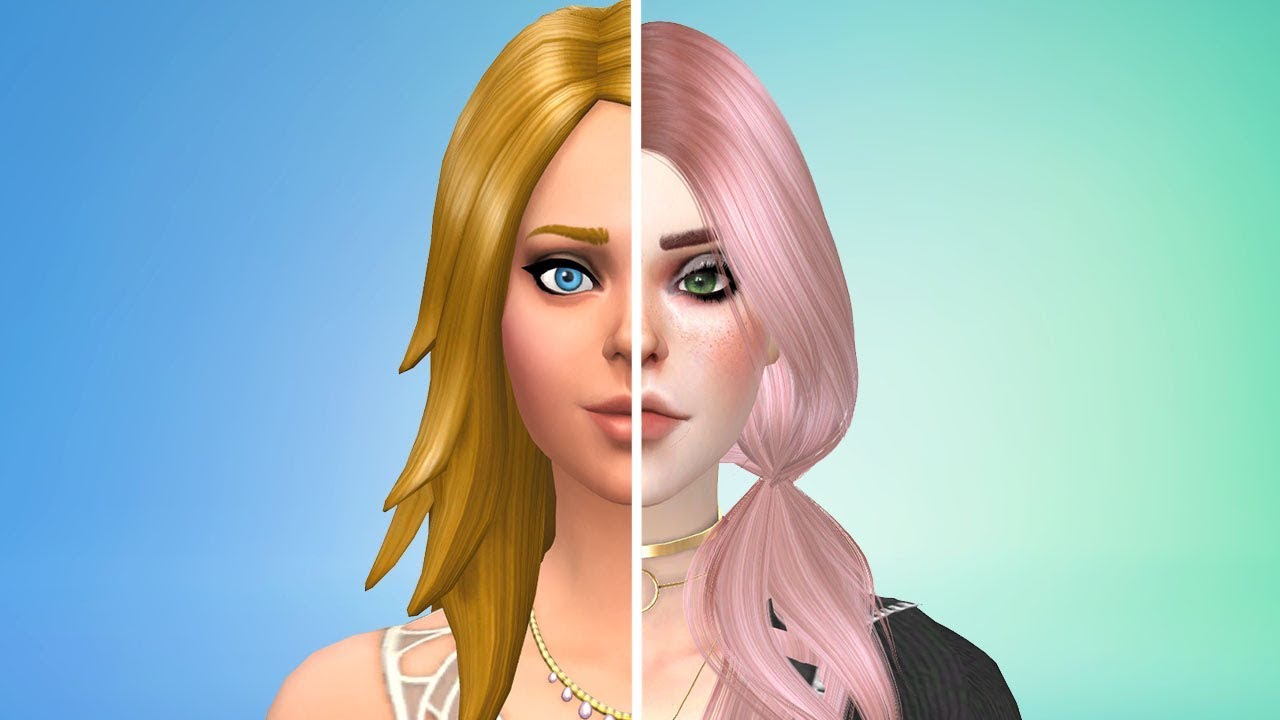
Image source: YouTube
What Is the Difference Between Alpha and Maxis Match CC?
In the Sims 4 community, the aesthetic divide is primarily between "Maxis Match" and "Alpha." Maxis Match content is designed to blend seamlessly with the base game's art style—think "clay-like" hair, simplified textures, and vibrant, matte colors. It maintains the cartoony charm that Electronic Arts originally intended for the franchise.
Alpha CC, conversely, aims for a hyper-realistic, often high-fashion look. According to community standards, Alpha hair is characterized by individual strands and realistic transparency, rather than solid blocks of color. Clothing often features photo-sourced textures, including realistic denim weaves, leather grains, and intricate lace patterns. This style is a top choice for players who enjoy digital photography, storytelling, or creating Sims that look like real-world celebrities.
The visual difference is most notable in lighting and specular highlights. While Maxis Match items often have a flat or semi-matte finish, Alpha CC frequently utilizes advanced texture maps to reflect light realistically. This can lead to the "Uncanny Valley" effect, where Sims look remarkably human, which is exactly the goal for many high-fidelity players. As noted by The Sims Resource , the shift toward Alpha clothing often involves complex layering and high-end fashion aesthetics that deviate significantly from the standard game catalog.
Why Does Alpha CC Make Your Game Lag?
One of the most common complaints among Alpha users is a decrease in game performance, often manifesting as "Simulation Lag" or frame rate drops. This is not a glitch, but rather a result of technical complexity. Alpha CC is built using a higher number of "polygons"—the small triangles that make up a 3D model. The more polygons an object has, the harder your Graphics Processing Unit (GPU) must work to render it.
According to data from Sims4Luxury , these high polycounts are necessary to achieve realistic curves and fine details, but they come at a cost. If you fill a room with dozens of high-poly Alpha items, your game may struggle to keep up. Furthermore, many Alpha creators design their content for "HQ Mode" (High Quality). This is a hidden setting in The Sims 4 that allows the game to render textures at a much higher resolution (often 2048x4096 instead of the standard 1024x2048). Running HQ mode requires a significant amount of VRAM, which can lead to crashes on lower-end systems.
To manage performance, many experienced Simmers use a "Hero Piece" strategy. They place a few high-detail Alpha items in the foreground of a room while using lower-poly or Maxis Match items for background clutter. This balances visual fidelity with technical stability.
How to Install Alpha CC in Your Sims 4 Mods Folder
Installing Alpha CC follows the same general process as any other mod, but organization is key due to the large file sizes. Here is the standard pathing for installation:
-
Locate your Mods folder:
On both PC and Mac, this is typically found at
Documents > Electronic Arts > The Sims 4 > Mods. -
Download your files:
Alpha CC usually comes in
.packageformat. If the file is a.zipor.rar, you must extract it first. - Organize by category: Unlike script mods, which can only be one sub-folder deep, Alpha CC packages can be organized into multiple sub-folders. Many users create folders for "Hair," "Skin," and "Furniture" to make troubleshooting easier.
-
Enable Mods in-game:
Launch The Sims 4, go to
Game Options > Other, and check the boxes for "Enable Custom Content and Mods" and "Script Mods Allowed."
Remember that every time The Sims 4 receives an official patch, the game will automatically disable your mods. You must re-enable them and restart the game to see your Alpha content again. If your Alpha hair appears with strange blonde or white streaks, ensure that "Laptop Mode" is turned OFF in your graphics settings, as this mode disables the transparency layers required for realistic hair strands.
Top Alpha CC Creators for Realistic Create-a-Sim Items
Finding high-quality Alpha content requires knowing where the "Power Creators" host their work. The community has established several highly regarded names that consistently set a high standard for realism.
Genetics and Skin Details
For realistic skin, Obscurus-sims is widely considered a top-tier choice. Their skin overlays include realistic pores, fine lines, and anatomical details that transform a Sim's face into something resembling a high-resolution photograph. They are also known for their "Nose Sets" and "Lip Sliders," which allow for a level of customization far beyond the base game's capabilities. Layering these skin details—such as adding eye bags, forehead creases, and realistic moles—is a common technique used by expert Simmers to achieve a lifelike appearance.
Hair and Makeup
When it comes to accessories and makeup, Pralinesims stands out as a top contender. With thousands of downloads on platforms like The Sims Resource, they offer everything from hyper-realistic eyeliner to intricate jewelry sets that feature realistic specular maps (the layer that tells the game how to reflect light). For hair, creators like Stealthic and Anto are famous for their strand-based designs. These hairs often include dozens of color swatches, ranging from natural tones to vibrant ombres, providing a highly versatile wardrobe for any Sim.

Image source: YouTube
Clothing and High Fashion
For those seeking an edgy or formal aesthetic, VentaStudio offers exceptionally strong options. Their collections often focus on high-fashion silhouettes, including leather jackets, formal gowns, and streetwear. As noted in recent trend reports, Alpha clothing sets now frequently offer between 8 and 78 swatches per item, allowing for immense variety in a single download. This level of detail is a significant advancement over the limited color palettes found in the base game.
How to Find Realistic Alpha Furniture for Build and Buy Mode
While CAS items are the most popular form of Alpha CC, the "Alpha" aesthetic extends deeply into interior design. Realistic furniture uses high-resolution textures and 3D modeling techniques (often utilizing software like Shapr3D) to create environments that look like architectural renders.
Current trends in Alpha Build/Buy include "Wabi Sabi" and "Dark Academia" styles. These aesthetics rely on realistic wood grains, wrinkled fabric textures on sofas, and "clutter" items that look like real-world objects. Sims4Luxury is a notable creator in this niche, providing high-end, luxury furniture sets that include everything from designer kitchens to realistic bathroom fixtures. Using these items can completely change the silhouette of a build, making a Sim's home feel like a modern luxury apartment.
| Feature | Maxis Match Furniture | Alpha Furniture |
|---|---|---|
| Texture Detail | Painted/Stylized | Photo-realistic/3D Mapped |
| Polycount | Low (Performance Friendly) | High (Potential for Lag) |
| Visual Style | Cohesive with Game | Architectural/Modern |
| File Size | Small (KB to low MB) | Large (Often 10MB+ per item) |
Where to Find Alpha CC for Infants and Toddlers
For a long time, Alpha CC was primarily focused on Young Adult Sims, leaving younger life stages with fewer realistic options. However, recent years have seen a surge in high-quality content for infants and toddlers. According to creators like Simply Willeke , players can now find realistic fur-trimmed winter coats, matching sweatshirt sets, and even realistic strand-based hair specifically scaled for the smallest Sims.
When downloading for infants, it is vital to check for compatibility with the "Growing Together" expansion pack. Some older Alpha CC may not work correctly with the new infant animations or "milestones" introduced in recent updates. Look for creators who specifically tag their content as "Infant Update Compatible" to avoid visual glitches where the Sim's limbs may distort during certain interactions.
How to Layer Alpha CAS Details for Maximum Realism
Achieving a truly realistic Sim isn't just about picking one good skin; it's about the art of layering. Expert users often employ a specific "stacking" method in Create-a-Sim (CAS) to build depth. This involves using multiple categories of "Skin Details" simultaneously.
For example, a common strategy involves using a "Nose Piercing Trio" from Simsylvaa alongside custom nose sets and body gems. By layering a base skin overlay with additional "face shine" masks, realistic eyelashes (often found in the glasses or skin detail category), and custom eye presets, you can create a Sim with remarkable physical depth. As discussed in Simsylvaa's creator notes , the coordination of formal wear with specific Alpha accessories—like the "Marilyn Set"—is essential for maintaining a cohesive, high-end look across all outfit categories.
How to Fix Broken Alpha CC and Manage Your Mods
With thousands of files, it is inevitable that some Alpha CC will eventually break, especially after major game updates. Managing this requires a few essential tools and an understanding of the creator economy.
The Patreon-to-Public Pipeline
Many top Alpha creators operate on a "Patreon Early Access" model. This typically involves a 2-3 week period where new content is exclusive to paying supporters before being released for free to the general public. This model adheres to EA's modding policies while allowing creators to be compensated for their time. If you see a piece of CC you like but it is behind a paywall, check back in a few weeks; by most accounts, it will likely be available for free on platforms like Tumblr or The Sims Resource shortly thereafter.
Essential Management Tools
- Sims 4 Tray Importer
- A highly effective tool that allows you to identify exactly which CC files are on a specific Sim. If a Sim looks "broken" (shiny or covered in red/white question marks), you can save them to your library, open the Tray Importer, and see a list of every file they are wearing to delete the culprit.
- Mod Manager by GameTimeDev
- A visual tool that lets you see thumbnails of your CC packages without opening the game. This is a top choice for organizing large folders and finding duplicate files that might be slowing down your load times.
If you encounter the "Red and White Checkered" glitch, it almost always means you are missing a "Mesh." Many Alpha creators use meshes from other artists. Always read the download description carefully to see if a "Required Mesh" link is provided. Without the 3D structure (the mesh), the texture has nothing to wrap around, resulting in the game's default error pattern.
Frequently Asked Questions
Is Alpha CC free to download?
Yes, the vast majority of Alpha CC is free. While many creators offer "Early Access" on Patreon for 2-3 weeks, EA's official policy requires that mods eventually be made available for free to the community. You can find thousands of free links on Pinterest, Tumblr, and The Sims Resource.
Does Alpha CC work on Mac computers?
Absolutely. The installation process is identical for both PC and Mac. The only difference is the file pathing to your Documents folder, but the
.package
files function exactly the same on both operating systems.
Can I mix Alpha CC with Maxis Match items?
Yes, this is often referred to as the "Mixis" style. Many players find that using Alpha skins and makeup with Maxis Match hair and clothing provides a balanced look that isn't as taxing on their computer's hardware.
Why is my Alpha hair turning blonde or white in-game?
This is usually caused by having "Laptop Mode" enabled in your Graphics settings. Laptop Mode simplifies textures to save power, which breaks the transparency layers (alpha channels) used in realistic hair. Turning this setting off should fix the issue.
Where is a top place to find Alpha CC links?
Pinterest and Tumblr are widely regarded as the top discovery platforms for Alpha CC. Many users create "CC Finds" blogs that curate the best releases from various creators, saving you the time of searching individual sites.
Key Takeaways for Alpha CC Users
- Prioritize Polycounts: Always check the polygon count of furniture to avoid significant game lag.
- Disable Laptop Mode: Ensure this setting is off to properly render realistic hair and transparency.
- Use Management Tools: The Sims 4 Tray Importer is a highly effective way to find and remove broken content.
- Follow Power Creators: Look to Pralinesims, Obscurus-sims, and VentaStudio for high-quality, reliable files.
- Layer for Realism: Combine skin overlays, nose details, and realistic eyelashes to achieve the best visual results.
- Organize Early: Keep your Mods folder sorted by category from day one to make troubleshooting easier.
To start your realistic transformation, try downloading a single skin overlay and a set of Alpha eyelashes to see how your hardware handles the increased detail before committing to a full library of high-poly content.