Home
How to Build Custom Stages Using an Angry Birds Level Editor Safely
Creating custom Angry Birds stages requires third-party tools as Rovio never released an official public editor. For beginners, Redsclub and TurboWarp offer browser-based, no-install options. For serious modders, the Angry Birds Open-Level Editor (ABOLE) is widely considered a top-tier choice for PC, supporting Windows 11. Always verify downloads via VirusTotal, as many community-shared "Maker" files have been flagged for malware.
The legacy of the Angry Birds franchise extends far beyond the official releases. While the original PC versions were discontinued between 2018 and 2020, a dedicated community of modders has kept the spirit alive through custom level design. Whether you want to recreate the challenge of the original "Poached Eggs" episodes or design entirely new physics-based puzzles, using an Angry Birds level editor is the gateway to this creative hobby.
Navigating the world of modding can be daunting, especially with the prevalence of outdated forum posts and broken links. This guide focuses on the current state of modding in 2026, highlighting safe, functional tools that allow you to manipulate blocks, birds, and pigs without compromising your digital security. We will explore three primary paths: web-based experimentation, professional PC modding, and mobile APK adjustments.
Image source: Red's Club
Which Angry Birds Level Editor Is Right for Your Project?
Choosing the right tool depends heavily on your technical comfort level and your target platform. Not all editors are created equal; some focus on ease of use, while others provide deep access to the game's underlying logic. According to community consensus on platforms like Reddit and the AngryBirdsNest forums, the following tools represent the most reliable options currently available.
| Tool Name | Platform | Difficulty (1-10) | Primary Use Case |
|---|---|---|---|
| ABOLE | Windows (PC) | 7 | Professional modding and full game conversion. |
| Redsclub | Web Browser | 2 | Quick, casual level design for sharing strings. |
| TurboWarp (Dan81e) | Web Browser | 3 | Educational use and no-install experimentation. |
| Seasons Mod Revival | Windows / Android | 8 | Thematic modding with custom seasonal assets. |
For those just starting, browser-based tools are highly recommended. They require no installation and eliminate the risk of downloading malicious executables. However, if your goal is to create a standalone mod that others can play as a full game, you will eventually need to transition to PC-based software like ABOLE, which interacts directly with the game's asset folders.
How to Build Levels in Your Browser with Redsclub and Scratch
Browser-based editors have become a popular choice for younger fans and casual creators. These tools often use a "sandbox" approach where you can drag and drop elements onto a canvas. While they don't always allow you to export a playable .exe file, they are excellent for testing level concepts and sharing designs via text strings.
Using Redsclub for Friends-Style Levels
The Redsclub Level Editor is a leading option for those who enjoy the aesthetic of Angry Birds Friends. It features a clean, modern interface that mimics the official game's look. Users can select from various materials—wood, ice, and stone—and place pigs in strategic locations. One of the standout features of Redsclub is the ability to export your level as a data string, which other users can then import into their own browser to play your creation.
Experimenting with TurboWarp and Scratch Assets
For a more educational experience, many creators turn to Scratch-based projects. The version hosted on TurboWarp by Dan81e is a significant advancement in this category. It includes 36 unique blocks and 4 bird types, allowing for a surprising amount of complexity. Because it runs in a sandboxed environment, it is widely regarded as one of the safest ways to experiment with game design logic without touching system files.
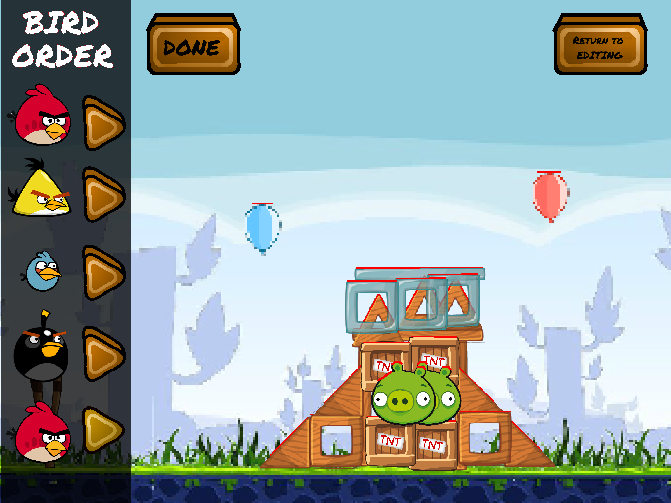
Image source: Bendo - itch.io
How to Set Up the Angry Birds Open-Level Editor (ABOLE) on PC
If you are looking for the most powerful tool in the community's arsenal, the Angry Birds Open-Level Editor (ABOLE) stands out as a top choice. Hosted on SourceForge , this tool has garnered over 10,000 downloads and is a staple for the modding community. Unlike browser tools, ABOLE is designed to work with the actual game files of the PC version of Angry Birds Classic.
Step-by-Step Installation Guide
To get ABOLE running correctly on a modern system like Windows 11, follow these steps carefully:
- Download the Base Game: Since the PC version is no longer sold, you must have an existing installation of Angry Birds Classic (Version 1.6.3.1 is the preferred build for compatibility).
- Acquire ABOLE: Download the latest release from the official SourceForge page to ensure you are getting a clean, community-vetted file.
-
Extract and Link:
Extract the ABOLE files into a new folder. When you run the editor for the first time, it will ask you to locate the
datafolder of your Angry Birds installation. - The Registration Key Hack: Because the PC versions are now considered abandonware, the community has discovered that in version 1.6.3.1, you can enter any text into the registration key field to unlock the full game features.
"ABOLE provides an integrated interface that allows you to see the physics boundaries of your objects in real-time, which is essential for creating levels that aren't just visually appealing, but also fun to play." — Community Modding Insight.
Can You Create Custom Levels on Android and iOS?
Mobile modding is significantly more complex than PC modding due to the way mobile operating systems handle file permissions. However, it is not impossible. For Android users, the process typically involves modifying an APK (Android Package Kit) file. This requires specific versions of the game, most notably v1.3.5 , which is known for having a more accessible file structure for modders.
Tools archived on sites like Battlefield Singleplayer allow users to swap out level files within the APK. However, this requires a "decompile-edit-recompile" workflow that can be intimidating for beginners. On iOS, the situation is even more restricted. Unless you are using a jailbroken device, accessing the game's internal level files is nearly impossible. For this reason, the vast majority of the community recommends using a PC for the actual design phase, even if the final goal is to play on a mobile device.
How to Stay Safe When Downloading Community Mods
Digital safety is the most critical aspect of modding. Because Rovio does not support these tools, you are relying entirely on the integrity of the community. To protect your computer, follow the Safe Download Checklist :
-
Use VirusTotal:
Before running any
.exeor extracting a.zip, upload it to VirusTotal. If more than two or three engines flag it, do not open it. - Stick to Trusted Repositories: SourceForge and GitHub are generally safer than anonymous file-sharing sites because they have version histories and public accountability.
- Avoid "All-in-One" Installers: Many malicious files disguise themselves as "Easy Installers." Prefer manual extraction where you can see exactly what files are being placed on your system.
Advanced Techniques for Customizing Birds and Physics
Once you have mastered the basics of block placement, you may want to change how the game actually functions. This is where LUA scripting comes into play. The Angry Birds engine uses LUA files to define everything from the strength of a bird's ability to the global gravity of a level.
How to Edit LUA Files for Custom Game Logic
Advanced modders use LUA decrypters to open the game's internal scripts. By changing variables like
gravity
or
bird_speed
, you can create entirely new gameplay experiences. For example, you could create a "Moon Gravity" level by reducing the gravity constant in the level's LUA file. This level of customization is what separates a simple stage creator from a high-end modder.
Creating Custom Sprites with Paint.net
Visual modding is another popular avenue. By using programs like Paint.net or even PowerPoint, you can create custom textures for your birds and pigs. The game stores these images in sprite sheets. By carefully replacing the original sprites with your own art—while maintaining the exact pixel dimensions—you can introduce new characters into the game. This workflow is a significant step forward for those looking to create a unique "Total Conversion" mod.
Image source: YouTube
How to Fix Common Level Editor Errors
Modding legacy software on modern operating systems often leads to technical hurdles. Here are the most common issues and their community-vetted solutions:
- The "Hidden Edit Button" Mystery
-
In some PC builds, a developer "Edit" button exists but is hidden. Modders have found that by modifying the
config.luafile to setshow_edit_button = true, you can sometimes trigger a native, albeit primitive, editor within the game itself. - Crashes on Windows 11
- If ABOLE or the base game crashes on launch, right-click the executable, go to Properties > Compatibility, and set it to run in Compatibility Mode for Windows 7 . Additionally, ensure you are running the program with Administrative privileges.
- Levels Won't Save
-
This is usually a folder permission issue. If your game is installed in
C:\Program Files, Windows may block the editor from writing new files. Move your game folder to a non-protected location likeC:\Games\AngryBirdsto resolve this.
Frequently Asked Questions
Is there an official Angry Birds level editor?
No, Rovio has never released an official, public-facing level editor for the Classic Angry Birds games. The tools available today are entirely community-made or are based on hidden developer tools found within the game's code. While some newer titles like Angry Birds Maker were rumored, they were never fully realized for the public.
Is ABOLE safe to download and use?
When sourced from its official SourceForge repository, ABOLE is widely considered safe and is a staple of the modding community. However, you should always scan any downloaded file with VirusTotal. Avoid downloading ABOLE from third-party file-sharing sites or "mod packs" on YouTube, as these are frequently bundled with unwanted software.
Can I play my custom levels on my phone?
Yes, but it requires a complex process of modifying the game's APK file on Android. You would typically design the level on a PC using a tool like ABOLE, then manually move the level file into the assets folder of a decompiled APK before resigning and reinstalling it on your device. This is not recommended for beginners.
Do I need to know how to code to use these editors?
For basic level design—placing blocks, birds, and pigs—no coding is required. Tools like Redsclub and ABOLE use visual interfaces. However, if you want to change game physics, create custom bird abilities, or modify the user interface, you will need a basic understanding of LUA scripting and hex editing.
Why was Angry Birds Maker removed from the internet?
Angry Birds Maker (ABM) was a fan project that was eventually abandoned by its developers. Over time, the links became broken, and malicious actors began uploading infected versions of the software to capitalize on its popularity. The community now advises against searching for ABM and recommends using ABOLE instead.
Key Takeaways for Aspiring Modders
- Choose your platform wisely: Use browser tools like Redsclub for quick fun and ABOLE for serious PC modding.
- Prioritize safety: Always verify community links and avoid "Angry Birds Maker" re-uploads from unverified sources.
- Use the right version: PC version 1.6.3.1 is the most compatible build for modern level editors.
- Master the registration hack: Remember that "any text" works as a key for the discontinued PC versions.
- Explore LUA: Learning basic LUA scripting will allow you to customize physics and bird behaviors beyond simple block placement.
- Check compatibility: Use Windows 7 Compatibility Mode if you encounter crashes on Windows 10 or 11.
Start your journey by experimenting with a browser-based editor today to get a feel for physics-based puzzle design before moving on to more advanced PC tools.