Home
Home
How to Craft a Fletching Table and Use It for Trading in Minecraft
To craft a Fletching Table in Minecraft, open your 3x3 crafting grid and place 2 pieces of Flint in the top-left and top-middle slots. Directly below them, fill the four remaining slots (a 2x2 square) with 4 Wooden Planks of any variety. This block is primarily used to turn unemployed villagers into Fletchers.
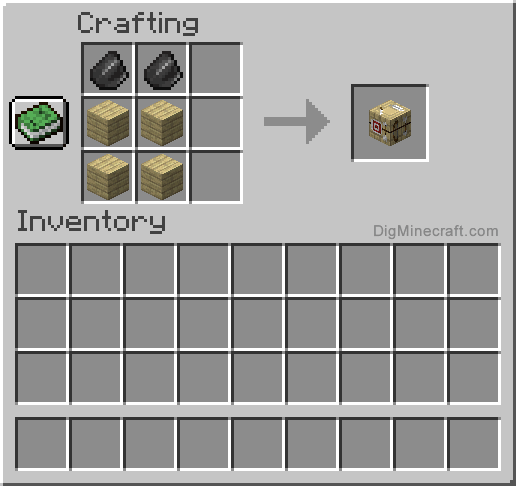
Image source: DigMinecraft
What Materials Do You Need for the Fletching Table Recipe?
The Fletching Table is a relatively inexpensive block to produce, making it a top choice for early-game survival players looking to establish a robust economy. Unlike more complex utility blocks, it requires only two distinct types of materials: Flint and Wood.
The Flint Requirement
You will need exactly two pieces of Flint . Flint is obtained by breaking Gravel blocks. While Gravel typically has a 10% chance of dropping Flint, you can significantly increase your efficiency by using a shovel enchanted with Fortune. According to official Minecraft documentation , a Fortune III shovel guarantees a 100% drop rate for Flint, removing the tedious cycle of placing and breaking Gravel repeatedly.
The Wood Requirement
The recipe calls for four Wooden Planks . One of the most convenient aspects of this recipe is its flexibility. You can use any type of wood planks, including:
- Overworld woods: Oak, Birch, Spruce, Jungle, Acacia, Dark Oak, Cherry, and Mangrove.
- Nether woods: Crimson and Warped planks (which are fire-resistant).
- Bamboo Planks: Added in recent updates, these also function perfectly in the recipe.
You can even mix and match different types of planks within the same recipe if your inventory is cluttered. The resulting Fletching Table will always look identical regardless of the wood used.
A common piece of misinformation circulating on social media platforms like TikTok suggests a recipe involving 2 Flint, 1 Stick, and 2 Wood Planks. This is factually incorrect for all official versions of Minecraft. Following this fake recipe will result in no output in your crafting table. Always stick to the 2 Flint + 4 Plank configuration.
Minecraft vs. Muck — Which Fletching Table Are You Building?
In recent years, search queries for "fletching table recipe" have occasionally led to confusion between Minecraft and the survival-roguelike game Muck . While both games feature a block with the same name, their recipes and functions are entirely different.
The Muck Recipe
If you are playing Muck , the recipe is considerably more resource-intensive. You will need 10 Birch Wood and 10 Flint . In Muck , the fletching table is a vital progression tool used to craft bows and various types of arrows, which are essential for surviving the game's increasingly difficult nights.
The Minecraft Recipe
In Minecraft, the recipe remains 2 Flint and 4 Planks. The primary distinction is that in Minecraft, the table currently lacks a player-facing crafting interface. It serves almost exclusively as a profession block for villagers. If you are looking to craft arrows in Minecraft, you generally use a standard Crafting Table, not the Fletching Table.
How to Turn a Villager Into a Fletcher
The most common reason to craft a Fletching Table is to interact with the villager profession system. A Fletcher is widely regarded as one of the most useful villager types for players who want to farm emeralds or obtain high-quality ranged weaponry.
Finding an Unemployed Villager
To create a Fletcher, you must first find an unemployed villager. These villagers wear simple robes and do not have any specialized hats or tools. Note that "Nitwits" (villagers in green robes) cannot take on professions and will ignore any job site blocks you place near them.
Placing the Job Site Block
Once you have an unemployed villager, place the Fletching Table within their pathfinding range. If the villager is able to reach the block and it is during their working hours (usually between 2000 and 9000 in-game ticks), they will emit green particles and transform into a Fletcher. You can identify them by their unique brown hat and the quiver of arrows on their back.
Natural Generation
If you prefer not to craft the block, Fletching Tables spawn naturally in Fletcher houses within villages. These houses are often recognizable by the target blocks or archery-themed decorations nearby. You can harvest these tables using an axe and relocate them to your own base or villager trading hall.
How to Get Infinite Emeralds Using the Fletcher Trade
The Fletcher is a cornerstone of the Minecraft economy because of its "Stick Trade." This trade allows players to convert a renewable resource (wood) into a valuable currency (emeralds) with minimal effort.
The Novice Trade
At the Novice level, a Fletcher will typically offer 1 Emerald in exchange for 32 Sticks . Since two logs can produce 16 sticks, a small tree farm can quickly generate stacks of emeralds. This ranks among the top methods for early-game wealth accumulation.
Optimization Strategy: The Zombie Curing Loop
To maximize your profits, you can utilize the zombie villager curing mechanic. By allowing a zombie to infect your Fletcher and then curing them with a Splash Potion of Weakness and a Golden Apple, you can permanently lower their trade prices. According to community testing, repeating this process can drop the stick requirement from 32 down to just 1 stick for 1 emerald .
| Trade Item | Villager Level | Standard Cost | Cured Cost (Min) |
|---|---|---|---|
| Sticks | Novice | 32 | 1 |
| String | Journeyman | 14 | 1 |
| Feathers | Expert | 24 | 1 |
| Tripwire Hook | Master | 8 | 1 |
Why Does the Fletching Table Have No Player Interface?
One of the most frequent points of confusion for new players is the "No GUI" (Graphical User Interface) problem. When you right-click a Crafting Table or a Smithing Table, a menu opens. When you right-click a Fletching Table, nothing happens. This has led many to believe their game is glitched.
The "Tabled" Functionality
Mojang Studios introduced the Fletching Table in the 1.14 "Village & Pillage" update. At the time, they stated that player-facing functionality would be added in a future update. However, as of version 1.21, the block remains purely a job site block for villagers. While the 1.21 update introduced the "Crafter" for automated crafting, the Fletching Table's specific utility for players remains "tabled" for now.
The Spectator Mode Secret
Interestingly, there is a small "Easter egg" or technical quirk associated with this block. If a player in Spectator Mode right-clicks a Fletching Table, a Crafting Table UI will briefly flash on the screen before closing. This suggests that the block is technically a subclass of the Crafting Table in the game's code, even though the interface is disabled for survival and creative players.
Technical Stats and Best Tools for Breaking the Block
Understanding the technical properties of the Fletching Table can help you manage your workshop more effectively. While it is a wooden block, it has specific attributes that differ between versions of the game.
- Optimal Tool: The Axe is the fastest tool for harvesting the block. Using a high-tier axe like Netherite will break the block almost instantly.
- Hardness: 2.5. This makes it slightly sturdier than a standard wooden plank (which has a hardness of 2.0).
- Blast Resistance: 2.5. It will not survive a direct TNT blast or a Creeper explosion.
- Flammability: There is a notable version difference here. In Java Edition , the Fletching Table is non-flammable and cannot be destroyed by fire. However, in Bedrock Edition , it can catch fire and burn away.
- Fuel Value: You can use a Fletching Table as fuel in a furnace. It will smelt 1.5 items, though this is generally considered an inefficient use of resources given the flint required to craft it.
Using the Fletching Table for Decoration and Music
Beyond its economic utility, the Fletching Table is a popular choice for builders due to its unique textures. The block features a target on two sides and a set of tools (a bow and a knife) on the other sides.
Directional Textures
Unlike many blocks that rotate based on how the player places them, the Fletching Table's textures are fixed. The "Target" textures always face East and West, while the "Tool" textures face North and South. This can be a bit challenging for builders who want a specific look, requiring them to orient their entire building around the block's fixed axes.
Note Block Interaction
For players interested in Minecraft music, the Fletching Table serves a specific acoustic purpose. When placed directly underneath a Note Block, it causes the Note Block to produce a Bass sound. This is identical to the sound produced by placing a Note Block on top of standard wooden planks or logs.
Frequently Asked Questions
Key Takeaways for Crafting Fletching Tables
- Use the correct recipe: Combine 2 Flint and 4 Wooden Planks in a 3x3 crafting grid.
- Ignore social media myths: The recipe does not require sticks or specific wood types.
- Focus on trading: Use the table to turn villagers into Fletchers for the lucrative stick-to-emerald trade.
- Optimize your economy: Cure zombie villagers to reduce trade costs to as low as 1 stick per emerald.
- Understand the limitations: The block has no player GUI and cannot be used to craft arrows directly.
- Use for decoration: Take advantage of the unique target and tool textures for workshop builds.
- Note the version differences: Remember that the block is flammable in Bedrock but fireproof in Java.
Start by gathering gravel and wood today to establish your first Fletcher and begin building your emerald empire.