Home
Home
How to Craft and Use a Minecraft Anvil to Repair and Enchant Your Gear
To craft an anvil in Minecraft, you need 31 iron ingots (3 Iron Blocks and 4 Iron Ingots). Place the 3 blocks in the top row, 1 ingot in the center, and 3 ingots in the bottom row of a crafting table. Anvils are used to repair gear, rename items, and apply enchanted books. Be aware that every use increases the Prior Work Penalty , which can eventually lead to the "Too Expensive!" error if an operation exceeds 39 XP levels.
In the progression of a Minecraft world, the transition from basic survival to late-game dominance is often marked by the creation of an anvil. While the crafting table and furnace handle your initial needs, the anvil is the primary utility block required for maintaining high-tier equipment and creating specialized "God-tier" gear. Whether you are looking to combine enchantments for a perfect sword or simply trying to keep your favorite pickaxe from breaking, understanding the nuances of this heavy block is essential.
The search term "anvil mine" often leads players to wonder if they can find this block naturally in the world. Unlike a furnace in a village or a brewing stand in an igloo, anvils do not typically spawn as natural loot. To get one, you must mine the raw iron yourself and craft it. This guide will walk you through the resource gathering, the mathematical complexities of XP costs, and the advanced "Pyramid" method used by power users to bypass the game's strict level caps.
Understanding the Role of the Anvil in Gear Progression
The anvil serves three core functions that distinguish it from the simpler Grindstone or Smithing Table. First, it allows for Repairing . While you can combine two items in a crafting grid to restore durability, doing so strips all enchantments. The anvil allows you to restore durability while keeping your hard-earned magical effects intact. According to official Minecraft documentation , using raw materials to repair an item restores 25% of its maximum durability per unit used.
Second, the anvil is the only way to Apply Enchanted Books . While an Enchanting Table provides random buffs, books allow for precision. If you find a Mending or Silk Touch book in a jungle temple, the anvil is your gateway to applying that power to your tools. Finally, Renaming items provides both aesthetic flair and functional utility, such as naming a weapon to see it appear in death messages or naming a chest to change its interface title.
Materials and Recipe for Crafting Your First Anvil
Crafting an anvil is a significant investment in the early game. It requires a total of 31 iron ingots, which is nearly half a stack. This cost reflects the block's power and its status as a mid-to-late game utility. To put this in perspective, 31 ingots is enough to craft a full suit of iron armor plus an iron sword and pickaxe with change to spare.
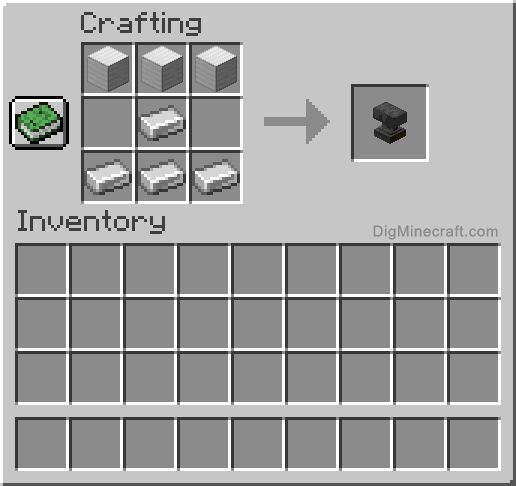
Image source: DigMinecraft
The recipe breakdown is as follows:
- Top Row: 3 Iron Blocks (9 ingots each, totaling 27 ingots).
- Middle Row: 1 Iron Ingot in the center slot.
- Bottom Row: 3 Iron Ingots across the entire row.
Finding Iron Efficiently in Modern Minecraft Versions
Since the 1.18 "Caves & Cliffs" update, iron distribution has changed significantly. If you are mining specifically to craft an anvil, you should target Y-level 16 . This is widely considered the peak altitude for iron density in most biomes. However, if you find a mountain biome, iron becomes even more abundant at high elevations, often exposed on cliff faces.
For those who need iron in bulk, searching for "Large Iron Veins" is a top-tier strategy. These veins are found between Y=-8 and Y=-60 and are mixed with Tuff blocks. A single vein can yield hundreds of raw iron ore, making the 31-ingot cost of an anvil seem trivial. Always use a pickaxe with the Fortune enchantment to maximize your yield from these deposits.
Practical Ways to Use an Anvil for Repairs and Enchantments
Using an anvil is straightforward but requires Experience (XP) levels. When you place an item in the left slot and a material or book in the right slot, the game calculates a cost. If you have the required levels, you can complete the action. However, the order of items matters immensely for your long-term resource management.
Repairing Durability with Raw Materials vs Identical Items
There are two primary ways to fix a damaged tool in an anvil. The first is using the base material. For example, adding a Diamond to a damaged Diamond Chestplate. Each diamond restores 25% of the total durability. This is often a top choice for armor, as four diamonds are cheaper than crafting a brand-new chestplate (which costs eight).
The second method is combining two identical items. If you have two damaged bows, placing them both in the anvil will result in a single bow with their combined durability plus a 12% bonus . This is exceptionally strong for items that are cheap to craft but expensive to enchant, such as bows or stone tools. However, be careful: combining two enchanted items will attempt to merge their enchantments, which can significantly increase the XP cost.
Applying Enchanted Books and Renaming Equipment
Enchanted books are the primary way to create "perfect" gear. Some enchantments, like Mending, cannot be obtained through a standard Enchanting Table and must be applied via an anvil. When applying a book, the anvil checks for conflicts. For instance, you cannot have both Silk Touch and Fortune on the same pickaxe. If you try to combine them, the anvil will show a red "X" over the output slot.
Renaming an item usually costs a flat 1 XP level if it is the only action being performed. A pro tip for efficiency is to rename your item at the same time you are repairing or enchanting it. This incorporates the renaming cost into the larger operation, often saving you XP in the long run. Renaming is also permanent; unlike enchantments, a name cannot be removed by a Grindstone.
Managing the Prior Work Penalty and XP Costs
The most misunderstood aspect of the anvil is the Prior Work Penalty . Every time you put an item through an anvil—whether to repair, rename, or enchant it—the game "tags" that item. The next time you use that same item in an anvil, the cost will be higher. This is a hidden mechanic designed to prevent items from being repaired indefinitely, eventually forcing the player to seek out the Mending enchantment.
The Mathematical Formula Behind Rising Repair Costs
The penalty follows a specific exponential growth pattern. The formula for the penalty is $2^n - 1$, where $n$ is the number of previous operations. According to technical data from the Minecraft Fandom Wiki , the progression of the penalty looks like this:
| Operation Number | Penalty Cost (Levels) | Total Base Cost |
|---|---|---|
| 1st Use | 0 | Enchantment/Repair Cost |
| 2nd Use | 1 | +1 Level |
| 3rd Use | 3 | +3 Levels |
| 4th Use | 7 | +7 Levels |
| 5th Use | 15 | +15 Levels |
| 6th Use | 31 | +31 Levels |
Why the Too Expensive Error Occurs in Survival Mode
In Survival mode, Minecraft imposes a hard cap on anvil operations. If the total cost of an operation (Base Cost + Prior Work Penalty) reaches 40 levels or higher , the anvil will display the "Too Expensive!" message and refuse to work. This is the primary reason why players often find they can no longer repair their favorite sword after a few fixes.
Once an item hits this cap, it is effectively "locked" from further anvil modifications. The only way to bypass this in Survival is to have the Mending enchantment, which repairs the item using XP orbs gathered from the world, bypassing the anvil entirely. Alternatively, you can use a Grindstone to strip the enchantments and reset the Prior Work Penalty to zero, though you lose all the magical progress you've made.
Advanced Strategies to Optimize Anvil Use and Save XP
To create a piece of gear with 5 or 6 high-level enchantments, you cannot simply add books one by one. If you add six books individually, the sixth book will likely trigger the "Too Expensive!" error because the Prior Work Penalty on the tool will have reached 31 levels before even considering the book's cost.
Using the Pyramid Combining Method for High Tier Gear
The Pyramid Combining Method is a significant advancement in gear optimization. Instead of applying books to the tool linearly, you combine the books with each other first. This distributes the Prior Work Penalty across the books rather than stacking it all on the tool.
Imagine you have a sword and four enchanted books (Sharpness, Unbreaking, Looting, and Sweeping Edge). Here is the optimized flow:
- Combine Book 1 and Book 2 to create Combined Book A .
- Combine Book 3 and Book 4 to create Combined Book B .
- Combine Combined Book A and Combined Book B to create the Final Master Book .
- Apply the Final Master Book to the Sword.
By using this method, the sword only "sees" two operations (the final book application and perhaps a previous repair), keeping its penalty low and allowing for future repairs or additional enchantments.
Swapping Item Slots to Reduce Level Requirements
A simple but often overlooked trick is swapping the items in the left and right slots. The anvil calculates the cost based on the item in the left slot being the "base." If you are combining two enchanted books, putting Book A on the left might cost 5 levels, while putting Book B on the left might cost 8 levels. Always check both combinations before clicking the output. This small habit stands out as a top choice for players looking to conserve their XP for other projects.
Anvil Durability and the Three Stages of Wear
Anvils are not permanent fixtures. Every time you use an anvil, there is a 12% chance that it will take damage. On average, an anvil will last for approximately 25 uses before it shatters completely. You can visually track this degradation through three distinct stages:
It is important to note that anvils cannot be repaired. You cannot use iron ingots to fix a Damaged Anvil. Once it breaks, you must craft a new one using another 31 iron ingots. Because of this, many players keep a "backup" anvil or a stack of iron blocks ready in their base.
Using Anvils as Weapons and Redstone Components
Beyond their utility in the crafting room, anvils have unique physical properties. They are one of the few blocks in Minecraft affected by gravity. When an anvil falls, it deals damage to any entity it hits. The damage is calculated as 2 HP (1 heart) for every block fallen after the first one.
The damage is capped at 40 HP (20 hearts) , which is achieved by a fall of 40 blocks. This makes the anvil a premier choice for traps in PvP or for clearing out high-health mobs. Interestingly, wearing a helmet provides a hidden benefit: any helmet reduces the damage taken from a falling anvil by 25%. In redstone circuits, anvils are often used because they are "heavy" blocks that can be moved by pistons but cannot be pushed by slime blocks in certain configurations, though their primary redstone use is as a falling entity that can trigger pressure plates.
Key Differences Between Bedrock and Java Edition Anvils
While the core mechanics are similar, Bedrock Edition offers a few exclusive utilities that Java players often miss. In Bedrock, the anvil can be used for Map Manipulation . You can use an anvil to zoom out a map, clone it, or add a player location marker—tasks that usually require a Cartography Table in Java Edition.
Additionally, Bedrock Edition allows anvils to be waterlogged . This means you can place an anvil underwater without creating an air pocket, which is useful for aesthetic builds or hidden underwater bases. The GUI (Graphical User Interface) also differs slightly, with Bedrock having different character limits for renaming items compared to the Java version.
Deciding Between an Anvil and a Grindstone
Many players confuse the anvil with the grindstone, but they serve opposite purposes. Choosing the right tool is essential for preserving your resources.
Use an Anvil When...
- You want to keep your enchantments.
- You are adding a new enchantment book.
- You want to rename your gear.
- You are combining two high-tier items.
Use a Grindstone When...
- You want to remove enchantments.
- You need to get XP back from a bad item.
- You want to reset the Prior Work Penalty.
- You are repairing basic, non-enchanted gear.
Historical Context of the Real World Anvil Mine
While most modern searches for "anvil mine" relate to the digital world of Minecraft, the term has deep roots in American industrial history. The Anvil Mine was a significant iron ore mine located in Bessemer, Michigan. Operating during the late 19th and early 20th centuries, it was part of the Gogebic Range, which provided the raw materials that fueled the American industrial revolution.
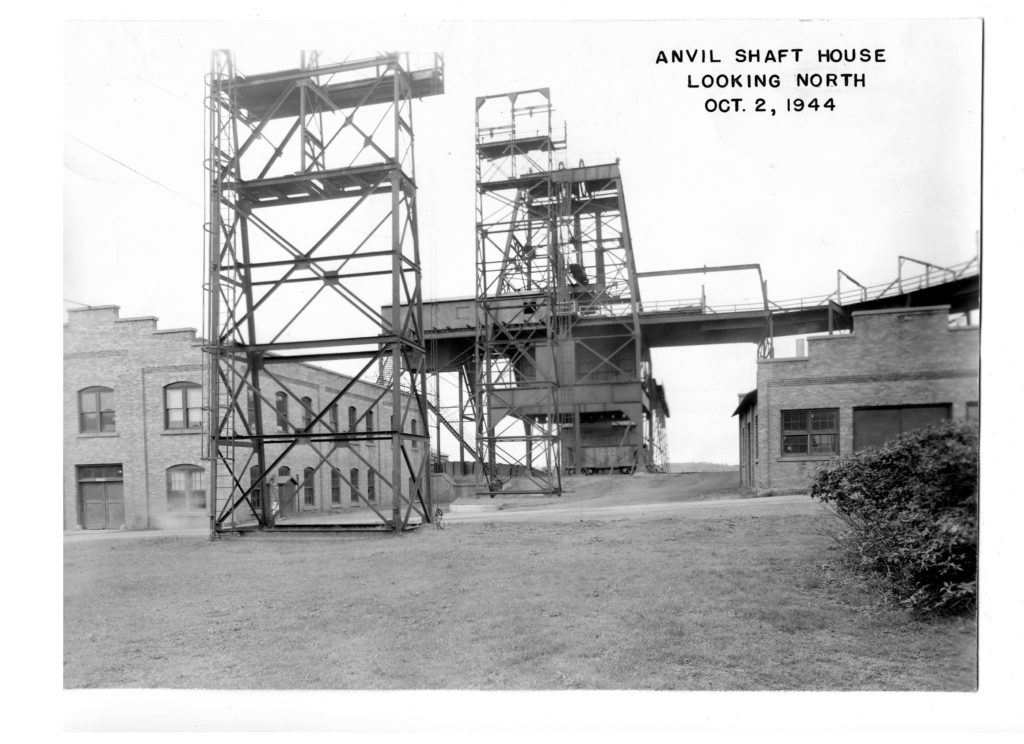
Image source: Bessemer Area Historical Society
Just as players mine iron in Minecraft to craft their tools, the miners in Bessemer worked in dangerous conditions to extract hematite ore. The mine's shaft house and surrounding infrastructure were marvels of engineering for their time. Today, the site is a point of interest for historical societies, reminding us that the "iron age" is not just a gameplay stage, but a foundational part of human history.
Hidden Mechanics and Fun Easter Eggs
The anvil holds several secrets that can add flavor to your world. For example, if you rename a Spawn Egg in an anvil, any mob that spawns from that egg will automatically have that name. This is a top-tier way to create permanent, named pets or guards without needing a Name Tag.
Another popular trick involves renaming containers. If you rename a Chest, Hopper, or Furnace in an anvil, the name you choose will appear at the top of the screen when you open that block's inventory. This is exceptionally useful for organization in large storage rooms. Finally, if you are killed by a player using a renamed weapon, the death message will reflect the custom name, such as "Player was slain by [The Ban Hammer]."
Key Takeaways for Anvil Mastery
- Crafting Cost: You need exactly 31 iron ingots to create one anvil.
- XP Management: Always check both slot combinations (A+B and B+A) to find the lower XP cost.
- The 39-Level Cap: Avoid the "Too Expensive!" error by using the Pyramid Combining method for books.
- Durability: Anvils have a 12% chance to break per use; expect about 25 uses per block.
- Prior Work Penalty: Every anvil operation doubles the future cost of that item.
- Mending is Key: Use the Mending enchantment to bypass anvil repair costs entirely in the late game.
- Falling Damage: Anvils deal 2 HP of damage per block fallen, capped at 40 HP.
Start by gathering 31 iron ingots at Y-level 16 and craft your anvil to begin creating your first piece of specialized enchanted gear.
Frequently Asked Questions
You need a total of 31 iron ingots. This is divided into 3 Iron Blocks (which require 9 ingots each) and 4 individual iron ingots. The blocks form the top of the anvil, while the ingots form the base and the connecting pillar in the crafting grid.
This error occurs when the total Experience cost of an operation exceeds 39 levels. This is usually caused by a high Prior Work Penalty, which increases every time you modify an item in the anvil. To avoid this, use the Pyramid Combining method or apply the Mending enchantment.
No, you cannot repair an anvil. Once an anvil reaches the "Damaged" state and eventually breaks, it is gone forever. You must craft a completely new anvil using another 31 iron ingots. There is no way to restore durability to a chipped or damaged anvil.
No, Mending only repairs the item it is attached to (like a sword or pickaxe). It does not repair the anvil itself. The anvil is a block with a set probability of degrading, and no enchantment can prevent it from eventually breaking after repeated use.
As of the most recent updates in 2026, Y-level 16 is the most efficient altitude for finding iron ore in standard biomes. If you are in a mountain biome, you can also find significant amounts of iron at very high altitudes, often exposed on the surface.