Home
How to Get the Viral Asuka AI Companion Mod in Minecraft
The "Asuka AI Mod" is a specific configuration of the AI Player mod (Java Edition 1.20.1–1.21.1) combined with an ElevenLabs voice profile and a custom System Prompt . To replicate the viral experience, you must install the AI Player framework, connect it to an LLM API (like Groq or OpenAI), and run Ollama in the background for long-term memory. For Bedrock Edition, the MinePal service offers a similar voice-enabled AI companion experience without complex modding.
What Exactly Is the Asuka AI Mod in Minecraft?
The term "Asuka AI Mod" has become a popular shorthand in the Minecraft community, but it is technically a misnomer. There is no single .jar file named "Asuka" that you can download and run. Instead, what users see in viral clips from creators like CatsDontLikeCoffee is a sophisticated "recipe" of multiple technologies working in tandem. The core of this experience is the AI Player mod , a framework that allows an NPC to act as a fully autonomous companion.
The "Asuka" identity (specifically MS Asuka II) comes from applying a specific skin, a custom personality prompt, and a high-quality voice clone. This setup creates an "embodied" AI. Unlike standard chat-based mods, this companion can see your screen, manage its own inventory, follow you through caves, and react to your gameplay in real-time. It represents a significant advancement in how players interact with NPCs, moving away from scripted dialogues toward dynamic, unscripted companionship.
According to community discussions on platforms like Reddit, the appeal of the Asuka persona lies in its "tsundere" personality—a mix of competitive, slightly abrasive, yet loyal traits. This is achieved through Prompt Engineering , where the player provides the AI with a detailed backstory and behavioral guidelines before the game begins. When combined with the vision module, the AI can comment on your building skills or mock you for falling into lava, creating a highly immersive experience that ranks among the top AI integrations in gaming today.
Hardware and Software Requirements for the AI Companion
Running a vision-capable AI companion alongside a resource-heavy game like Minecraft requires a robust technical foundation. Because the AI is essentially "thinking" and "seeing" in the background, your hardware must handle the overhead of the Large Language Model (LLM) and the vision processing. Most users find that 16GB of RAM is the baseline for a smooth experience, though 32GB is highly recommended if you plan to run shaders or heavy modpacks.
On the software side, the framework is primarily built for Minecraft Java Edition . While versions 1.20.1 through 1.21.1 are supported, the developer Shasankp000 has recently focused updates on 1.21.1 to ensure stability with the latest API endpoints. You will need either the Forge or Fabric mod loader installed. Additionally, you must have a stable internet connection for API calls, or a powerful GPU if you intend to run the AI entirely locally.
Step-by-Step Installation for the AI Player Framework
To begin your journey with the Asuka companion, you must first install the underlying engine. The AI Player mod on Modrinth is currently the standard for this experience. Follow these steps to get the framework running:
- Install the Mod Loader: Download and install Fabric or Forge for Minecraft 1.21.1.
-
Download the Mod Files:
Place the AI Player .jar file and its dependencies (like Fabric API or Architectury) into your
/modsfolder. -
Launch Minecraft:
Once the game loads, you will see a new interface option or can use the
/configMancommand to open the configuration menu. - Obtain an API Key: Sign up for a provider like OpenRouter or Groq . Groq is widely regarded as a top choice for Minecraft because its inference speed allows the AI to respond almost instantly to voice commands.
-
Input the Key:
In the
/configManscreen, paste your API key into the designated field and select your model (e.g., Llama 3.1 70B or GPT-4o-mini).
Configuring the API Connection
The connection between Minecraft and the AI is handled via a REST API. In the configuration menu, you can toggle different modules. The Message Module handles the text and voice interaction, while the Bot Module feeds the AI data about your health, coordinates, and inventory. For the Asuka experience, ensuring the "Vision Module" is active is crucial, as this allows the AI to "see" what you are doing by taking periodic screenshots and analyzing them through a Vision-Language Model (VLM).
Choosing Between Forge and Fabric
While both loaders work, Fabric is often preferred for AI mods due to its lighter footprint and better compatibility with performance-enhancing mods like Sodium. Since the AI companion adds significant CPU load, every bit of optimization helps. If you are building a large modpack around Asuka, Fabric generally provides a more stable environment for the AI Player framework to operate.
Creating the Asuka Persona with Custom Voice and Skin
Once the framework is active, you need to "skin" the AI to match the Asuka Langley Soryu character. This involves three distinct layers: the visual skin, the personality prompt, and the voice synthesis. Without these, the AI will simply be a generic NPC named "Player2."
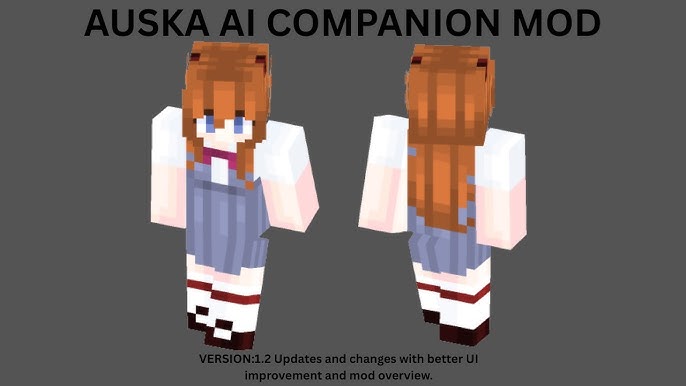
Image source: YouTube
Finding the Right Asuka Skin
You can find high-quality Asuka skins on sites like NameMC or The Skindex. Once you have the skin file, you can apply it to the AI NPC through the mod's settings menu. Some versions of the mod allow you to simply input a Minecraft username to "steal" their skin; searching for "Asuka" on NameMC will provide several active accounts with the correct aesthetic.
Setting the System Prompt for Personality
The "System Prompt" is the most critical part of the setup. It tells the AI who it is and how to behave. A typical Asuka prompt might look like this:
"You are Asuka Langley Soryu from Evangelion. You are playing Minecraft with the user. You are highly competitive, slightly arrogant, and often call the player 'baka.' However, you are a skilled survivalist and will help the player fight mobs and gather resources. Use your vision to comment on the player's actions."
By providing this context, the LLM will filter its responses through the Asuka persona, ensuring that its dialogue feels authentic to the character seen in the viral videos.
Integrating ElevenLabs for the Iconic Voice
To get the specific voice heard on TikTok, you will need an ElevenLabs API key . Within the ElevenLabs dashboard, you can use the "Voice Lab" to find or create a voice that matches Asuka's tone. Once you have the Voice ID , paste it into the AI Player mod's voice settings. This allows the AI to generate speech that sounds like a real person rather than a robotic text-to-speech engine.
Setting Up Ollama for Advanced Memory and Vision
One of the most common complaints with AI mods is that the companion "forgets" what happened five minutes ago. To solve this, the latest versions of the AI Player mod utilize
Ollama
for local embeddings. Ollama is a tool that allows you to run AI models locally on your machine. By running the
nomic-embed-text
model in Ollama, the mod can create a "vector database" of your past interactions.
The Vision Module works by taking a screenshot of your game every few seconds (this frequency is adjustable). It then sends that image to a model like Llama 3.2-Vision or GPT-4o-mini . The AI "sees" that you are standing in front of a creeper and can proactively warn you or start attacking. This level of interaction sets a high standard for companion mods, making the AI feel like a genuine partner rather than a simple follower.
Comparing AI Providers for Your Minecraft Companion
Choosing the right "brain" for your Asuka AI involves balancing cost, speed, and intelligence. Below is a comparison of the top-rated providers currently supported by the mod framework.
| Provider | Best For | Speed | Cost |
|---|---|---|---|
| Groq (Llama 3) | Instant Responses | Extremely Fast | Low / Free Tier |
| OpenAI (GPT-4o) | Complex Logic | Moderate | Pay-per-use |
| Ollama (Local) | Privacy & No Cost | Hardware Dependent | Free |
| OpenRouter | Model Variety | Varies | Pay-per-use |
Options for Minecraft Bedrock Edition Players
Unfortunately, the Java-based AI Player mod does not work on Bedrock Edition (consoles, mobile, or Windows 10 Store version). However, Bedrock players are not entirely left out. The MinePal service provides a viable alternative. MinePal acts as a bridge, allowing you to connect an AI companion to your Bedrock world or Realm.
MinePal supports voice chat in over 55 languages and doesn't require the complex installation of Ollama or local API configurations. While it may not offer the exact "Asuka" persona customization depth found in the Java mod, it is a top-tier option for those on platforms where traditional modding is restricted. It provides a similar sense of companionship and utility, helping players navigate their worlds with an intelligent assistant.
Troubleshooting Common Setup and Connection Errors
Setting up an AI in Minecraft is complex, and errors are common. If your Asuka companion isn't responding, check the following common pitfalls:
- Invalid API Key: Ensure there are no trailing spaces when you paste your key into the config menu.
-
Ollama Port Issues:
Ollama must be running in the background on port
11434. If the mod can't connect, check your firewall settings. - Vision Lag: If your FPS drops significantly, increase the "Screenshot Interval" in the Vision Module settings. Taking a photo every 10 seconds is usually enough for a good experience.
- AI Not Moving: Ensure the "Actions Module" is enabled. This allows the AI to translate its "thoughts" into in-game movements like walking or mining.
- Voice Latency: If ElevenLabs is taking too long, try switching to a lower-latency model in the ElevenLabs settings or using a local TTS engine.
Frequently Asked Questions
Is the Asuka AI mod safe to use with my API keys?
Yes, the mod is generally safe, but you must be cautious. The AI Player mod stores your API keys locally in your configuration files. You should never share your
.minecraft
folder or screenshots of your config menu with others, as this could allow them to use your paid credits. Always download the mod from reputable sources like Modrinth or CurseForge to avoid malicious versions that might steal your credentials.
Can I run the Asuka mod entirely for free?
It is possible to run the setup for free by using local models. By installing Ollama and using a model like Llama 3, you can handle the "thinking" on your own hardware. However, this requires a powerful GPU (like an RTX 3060 or better). For the voice, you would need to use a local Text-to-Speech engine instead of ElevenLabs, which may not sound as realistic as the viral versions.
Does this mod work on Minecraft 1.21.1?
Yes, the AI Player mod has been updated to support Minecraft 1.21.1. In fact, the developer recommends using the latest version of the game to ensure compatibility with new AI features and vision processing improvements. Make sure you are using the corresponding version of Fabric or Forge for 1.21.1 to prevent crashes during startup.
Why does the AI keep repeating the same phrases?
This usually happens when the "History Module" or context window is full. The AI can only remember a certain amount of information before it starts losing track of the conversation. You can try clearing the AI's memory using in-game commands or adjusting the "Context Limit" in the configuration menu. Using Ollama for embeddings also helps the AI manage long-term memory more efficiently.
Can the Asuka AI actually build houses for me?
The AI is capable of basic building through the "Actions Module," but it is not a professional architect. It can place blocks, dig holes, and follow simple construction commands. For complex structures, it is better to think of the AI as a helper that gathers materials or places blocks under your direction rather than a fully automated builder.
Key Takeaways for Setting Up Asuka AI
Integrating an AI companion like Asuka into your Minecraft world is a rewarding technical project that changes the way you experience the game. Here are the essential points to remember:
- Framework First: Install the AI Player mod for Java 1.20.1–1.21.1 as your base engine.
- Persona Recipe: Combine a custom skin, a "tsundere" system prompt, and an ElevenLabs voice ID to create the Asuka character.
- API Choice: Use Groq for the fastest response times or Ollama for a free, local experience.
- Vision & Memory: Enable the Vision Module and run Ollama in the background to give your companion eyes and a long-term memory.
- Bedrock Alternative: Use MinePal if you are playing on console or mobile, as traditional mods are not compatible.
- Hardware Matters: Ensure you have at least 16GB of RAM to handle the game and the AI processing simultaneously.
Start by downloading the AI Player mod and testing a simple API connection before diving into the complex persona and voice settings.