Home
How to Play Fallout Valley and Turn Stardew Valley Into a Wasteland
Fallout Valley is a curated collection of approximately 45 mods for the PC version of Stardew Valley, created and curated by gumbo632 . It functions as a "total conversion" experience, replacing the cozy farming aesthetic with a post-apocalyptic wasteland featuring rusted buildings, radiation mechanics, and themed NPCs. This mod is PC-only and requires SMAPI and the Vortex mod manager for a stable installation. It is distinct from Bethesda's official Fallout 76: Skyline Valley expansion.
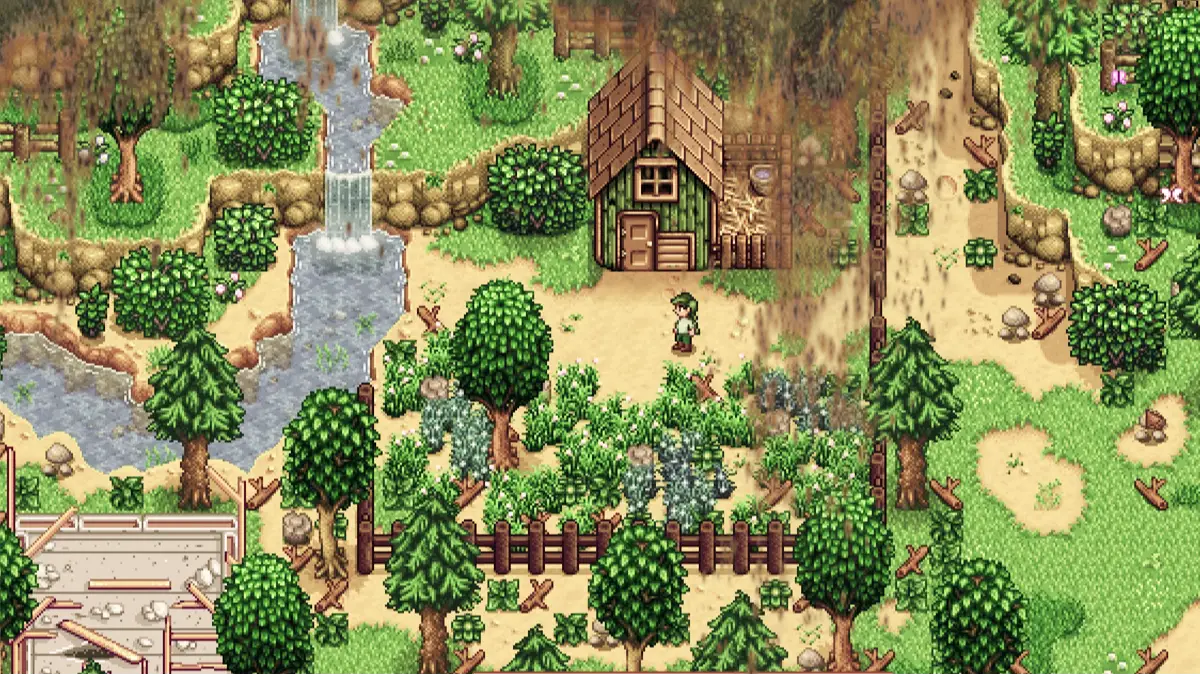
Image source: GAMINGbible
What Defines the Fallout Valley Mod Collection
In the world of Stardew Valley modding, few projects attempt the sheer scale of a total aesthetic and mechanical overhaul. Fallout Valley , a collection hosted on Nexus Mods , is a prominent example of this ambition. Curated by the modder gumbo632 , the collection brings together roughly 45 individual mods to create a cohesive wasteland experience.
Unlike simple texture swaps, this collection aims to change the very atmosphere of the game. According to reports from GAMINGbible , the mod manages to maintain a "sense of tranquility and intimacy" despite the grim-dark setting. You aren't just farming; you are surviving in a world where the grass has turned to dust, the water is suspect, and the buildings are held together by scrap metal and hope.
The core of the experience is the Fallout Valley Buildings mod, which serves as the visual anchor. It replaces the traditional wood and stone structures of Pelican Town with rusted corrugated metal, concrete ruins, and Vault-Tec inspired architecture. When combined with environmental mods that desaturate the world's colors, the transformation is remarkably thorough.
Comparing Fallout Valley and Skyline Valley to Resolve Confusion
One of the most frequent points of confusion for players is the naming overlap between this fan project and official Bethesda content. In recent years, Bethesda released the Skyline Valley expansion for Fallout 76 . While both involve a "Valley" and the "Fallout" brand, they are entirely different experiences on different game engines.
| Feature | Fallout Valley (Mod) | Skyline Valley (Official) |
|---|---|---|
| Developer | gumbo632 (Fan-made) | Bethesda Game Studios |
| Base Game | Stardew Valley | Fallout 76 |
| Platform | PC (Windows/Linux/Steam Deck) | PC, Xbox, PlayStation |
| Gameplay Focus | Farming, Survival, Roleplay | Multiplayer RPG, Combat, Exploration |
| Cost | Free (Requires Stardew Valley) | Included in Fallout 76 / Game Pass |
If you are looking for the official expansion featuring the "Storm Goliaths" and the expansion of the Appalachian map, you are looking for Skyline Valley . If you want to grow irradiated parsnips in a 2D pixel-art wasteland, you are in the right place for the Fallout Valley mod.
Why Fallout Valley Remains Exclusive to PC and Steam Deck
A common question among the community is whether Fallout Valley is available on consoles like the PS5, Xbox Series X, or Nintendo Switch . The short answer is no. Because this is a complex collection of 45 mods that rely on the Stardew Modding API (SMAPI) , it cannot be installed on closed console ecosystems.
Consoles do not allow users to access the game's internal file structure or run third-party executable frameworks like SMAPI. This technical barrier means that "total conversion" mods are effectively locked to the PC version of the game. However, there is a silver lining for handheld fans: the Steam Deck .
Core Features That Change the Stardew Valley Experience
The Fallout Valley collection is more than just a paint job. It introduces several layers of gameplay that align the farming simulator with the survival themes of the Fallout franchise. Based on the Fallout Wiki , the mod includes several key pillars of content.
The Wasteland Aesthetic and Environmental Overhaul
The most immediate change is visual. The lush, green forests of Cindersap Forest are replaced with dead trees and scorched earth. The water in the rivers and ponds takes on a murky, irradiated hue. Every building in Pelican Town, from Pierre’s General Store to the Saloon, has been redesigned to look like a makeshift shelter or a pre-war relic. The "Fallout Valley Buildings" mod is particularly detailed, adding rusted silos and weathered fences to your farmstead.
Radiation Mechanics and Survival Gameplay
In the vanilla game, your primary concerns are energy and health. Fallout Valley adds a layer of environmental hazard through radiation mechanics . Certain areas or weather patterns may impose radiation damage, requiring you to manage your exposure. This shifts the gameplay from a relaxed farming loop to one that requires careful planning and resource management, mirroring the "Survival Mode" found in Fallout 4 .
Reimagined NPCs and Themed Quests
The mod collection includes components that reskin the citizens of Pelican Town. You might find characters wearing gas masks, Vault suits, or scavenged armor. While the core personalities of the NPCs remain, the context of their lives changes. The quests are often tweaked to reflect the scarcity of the wasteland, making every delivery of "clean" food or "pure" water feel significantly more impactful to the community's survival.
Step by Step Guide to Installing the Collection via Nexus Mods
Installing a 45-mod collection manually is a recipe for technical headaches. To ensure a stable experience, it is highly recommended to use the Vortex Mod Manager provided by Nexus Mods. This tool handles the "load order" and ensures that all dependencies are met.
How to Build a S.P.E.C.I.A.L. Character for Your Wasteland Farm
To truly immerse yourself in Fallout Valley, you can adapt the S.P.E.C.I.A.L. system (Strength, Perception, Endurance, Charisma, Intelligence, Agility, Luck) to your Stardew Valley skill progression. While the game doesn't have these exact stats, you can roleplay by focusing on specific Stardew skills that mirror their Fallout counterparts.
The Intelligence Build (XP Maximization)
In Fallout 4 , every point of Intelligence provides a 3% XP bonus , according to data from the Steam Community . You can replicate this by prioritizing the Farming and Crafting skills. By focusing on high-value artisan goods and efficient crop cycles, you "level up" your farm's technology, mirroring a high-INT character who masters the wasteland's mechanics.
The Agility and Combat Build
Agility in Fallout governs Action Points and sneaking. In Stardew, this translates directly to the Combat and Mining skills. A high-Agility roleplay involves clearing the mines quickly, using speed-boosting food (like Coffee or Spicy Eel), and focusing on critical hit professions. This allows you to navigate the dangerous, irradiated depths of the mines with the efficiency of a wasteland scout.
The Endurance and Survival Build
Endurance is about health and resistance. If you want a "Hardcore" experience, you can use the Fallout 4 HP formula logic:
80 + (5 * endurance) + (level-based scaling)
. In Stardew, this means prioritizing the
Combat
skill's health buffs and always carrying high-quality cooked meals to keep your health bar topped off against the wasteland's hazards.
Troubleshooting Common Technical Issues in Fallout Valley
With 45 mods running simultaneously, you may encounter occasional glitches. Understanding how to read the SMAPI log is the most important skill for a modded player. If your game crashes, the log (usually found in your game folder) will highlight the specific mod causing the error in red text.
Fixing the "Purple Texture" Glitch
One of the most frequent issues in Stardew modding is the appearance of bright purple boxes where textures should be. This typically happens when a mod like "Fallout Valley Buildings" cannot find its associated tilesheet. To fix this, ensure that
Content Patcher
is updated to the latest version and that you haven't manually moved any folders inside the
Mods
directory.
NPC Pathing and Schedule Conflicts
Because Fallout Valley changes the layout of the map to include ruins and debris, the original NPC pathing can sometimes break. If you find an NPC walking through a wall or stuck in a "void" area, it is often due to a conflict with another map-altering mod. It is highly recommended to stick strictly to the mods included in gumbo632's collection to ensure the nav-meshes remain functional.
Additional Mods to Enhance the Post-Apocalyptic Atmosphere
While the core collection is exceptionally strong, some players look to push the wasteland theme even further. However, caution is advised when adding "heavy" mods on top of a 45-mod list. For instance, there are 3D and VR mods for Stardew Valley, but combining these with a total conversion like Fallout Valley can lead to significant performance drops and visual artifacts.
Instead, consider "lightweight" additions like hunger and thirst mods. These add a survival layer that feels right at home in a wasteland setting without taxing your CPU. Mods that add "foggy" or "overcast" weather patterns can also enhance the desolation of the Fallout Valley aesthetic, making the rare sunny days feel like a true blessing in a dying world.
Key Takeaways for Your Wasteland Adventure
- Verify your platform: Fallout Valley is strictly for the PC version of Stardew Valley and is not available on PS5 or Switch.
- Use automated tools: Install the collection via Nexus Mods and Vortex to ensure all 45 mods work together without manual errors.
- Distinguish the versions: Remember that this is a fan-made Stardew mod, not the official Skyline Valley expansion for Fallout 76.
- Embrace the roleplay: Use the S.P.E.C.I.A.L. system to guide your skill choices, such as focusing on Intelligence for faster progression.
- Monitor for updates: Keep SMAPI and Content Patcher updated to avoid common issues like purple textures or startup crashes.
- Respect the aesthetic: The mod balances wasteland grit with Stardew's inherent tranquility, creating a unique survival-farming hybrid.
To get started, head to Nexus Mods and ensure your Stardew Valley installation is clean before deploying the Fallout Valley collection.
Frequently Asked Questions
Yes, the Fallout Valley mod collection is entirely free to download via Nexus Mods. However, you must own a legitimate copy of Stardew Valley on PC to use it. While the mod itself costs nothing, some users choose to support the individual mod creators through donations on their respective Nexus profiles.
Compatibility depends on the specific versions of the 45 mods within the collection. As of late 2025 and early 2026, most core mods like SMAPI and Content Patcher have been updated for version 1.6. Always check the "Last Updated" date on the Nexus collection page before installing to ensure compatibility with the latest game patch.
Gumbo632 is the primary creator and curator of the Fallout Valley collection. They authored the "Fallout Valley Buildings" mod, which is the cornerstone of the wasteland aesthetic. Their work is widely regarded as a top-tier example of how to execute a total conversion mod within the Stardew Valley engine.
Yes, you can add additional mods, but you should do so with caution. Adding more map-altering mods or complex script mods can cause conflicts with the existing 45 mods in the collection. If you decide to add more, do it one at a time and check the SMAPI console for any red error messages during startup.
While "Hidden Valley" is a famous location in Fallout: New Vegas , it is not a specific named location within the Fallout Valley Stardew mod. However, the mod does reimagine various areas of the Stardew map to feel like secluded wasteland bunkers or ruins that pay homage to the atmosphere of locations like Hidden Valley.