Home
How to Play NBA Jam Legends On Fire Edition with Michael Jordan and Kobe Bryant
NBA Jam: Legends On Fire Edition is a community-led total conversion mod for the 2011 NBA Jam: On Fire Edition . It addresses the "Michael Jordan Problem" by integrating the Chicago Bulls icon alongside other legends like Kobe Bryant and Magic Johnson, who were missing from the official release. As of 2026, the game is delisted from official digital storefronts, making this mod a top-tier choice for fans seeking the most complete historical roster. To play, users typically utilize the RPCS3 emulator on PC or Steam Deck, applying a specific two-part patch to the base PlayStation 3 game files.
For decades, basketball fans faced a recurring frustration: the absence of Michael Jordan in arcade-style titles. While the 2011 NBA Jam: On Fire Edition was widely regarded as a significant advancement for the series, licensing hurdles meant the "G.O.A.T." was notably absent. The Legends On Fire Edition , maintained by community developer johnz1 , changes this dynamic entirely. By leveraging the robust engine of the 2011 release, this mod transforms a modern sports game into a historical preservation project that ranks among the top experiences in the genre.
Why Legends On Fire Edition Ranks Among the Top Ways to Experience NBA Jam
The Legends On Fire Edition is not merely a roster update; it is a comprehensive overhaul of the game's identity. The modding community has spent years refining the visual and mechanical aspects of the 2011 engine to better reflect the golden eras of basketball. According to reports from the Dream Sports Journal , this project serves as a vital preservation effort for a game that is no longer legally purchasable on modern consoles.
The Shift from Modern to Historical Scenarios
In the original 2011 release, the primary single-player mode was "Road Trip," which focused on modern NBA teams. The Legends mod converts this into a "Historical Scenario" campaign. Instead of facing the current-day rosters, players progress through eras, challenging the 1986 Celtics, the 1996 Bulls, and the 2001 Lakers. This structural change provides a sense of progression that feels more aligned with the "Legends" branding.
Visual and Audio Overhaul
The mod introduces hundreds of new assets, including:
- Period-Accurate Uniforms: From the short-shorts of the 80s to the baggy aesthetics of the early 2000s.
- Custom Arenas: Iconic floors like the classic Boston Garden and the Great Western Forum have been recreated with high-fidelity textures.
- Updated Player Heads: Using the NBA Jam "big head" style, the modders have crafted recognizable likenesses for players like Reggie Miller and Charles Barkley, who are notoriously difficult to license.
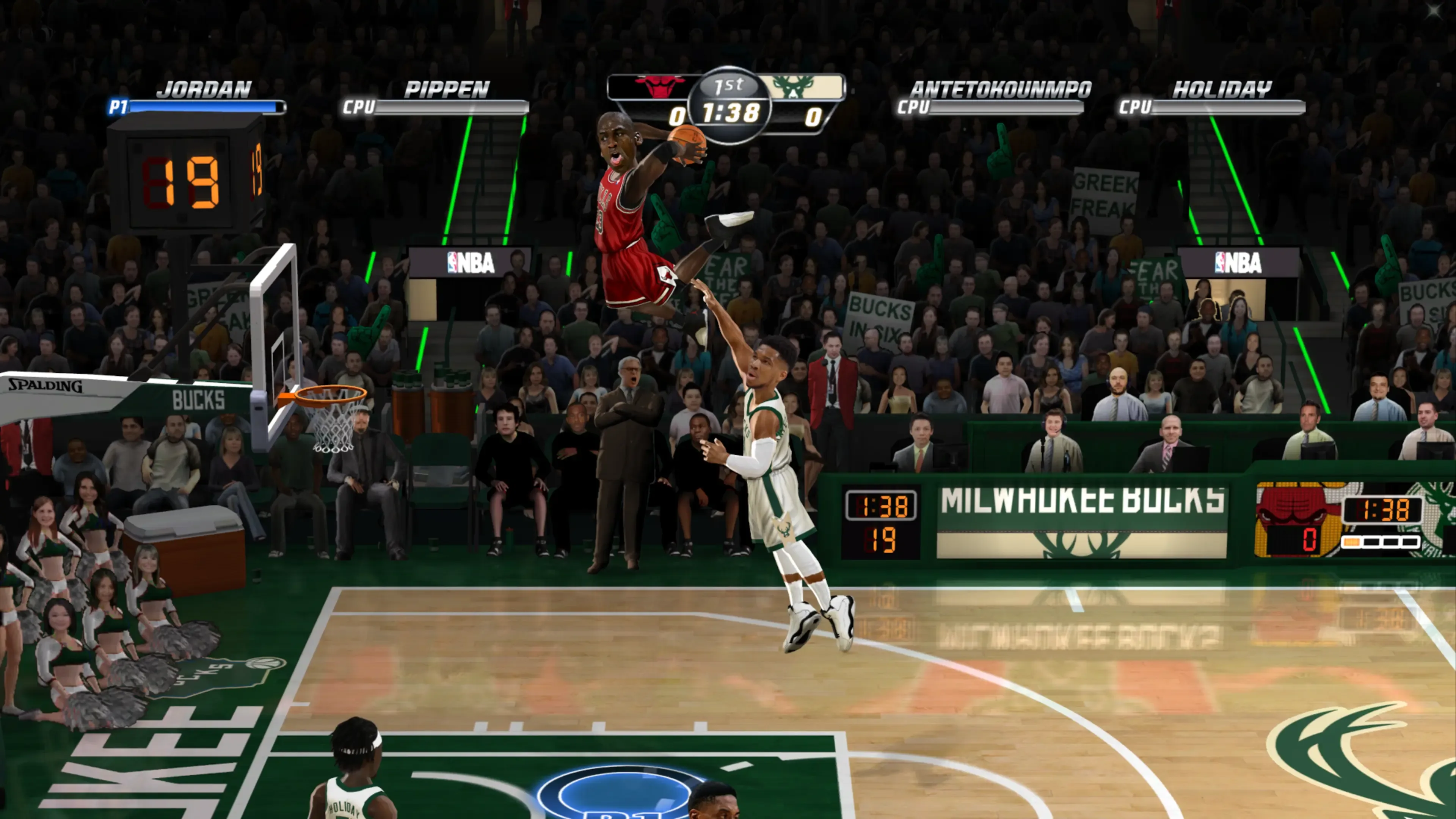
Image source: Backloggd
Which Legendary Players and Teams Appear in the Updated Roster?
The scope of the Legends On Fire Edition is vast, featuring a breakdown of 67 teams that span from the 1980s to the early 2020s. This ensures that fans of every era have a competitive squad to pilot. The mod is widely considered one of the best roster expansions because it doesn't just add names; it adds specific historical versions of those players with tailored stats.
How Michael Jordan and Kobe Bryant Impact Gameplay Dynamics
The inclusion of Michael Jordan is the primary draw for many users. In the mod, the '96 Bulls are a powerhouse, featuring Jordan's high-flying dunks and elite mid-range game. Similarly, the Kobe and Shaq-era Lakers provide a dominant inside-outside threat. Unlike the vanilla game, where these icons were replaced by generic legends or omitted entirely, their presence here restores the "arcade" fantasy of pitting the greatest teams in history against one another.
Hidden Player Advantages and Stat Quirks to Exploit
One of the most interesting aspects of the mod is how it handles player balancing. In the original 2011 code, Scottie Pippen was given an exceptionally high rating (20/24) to compensate for Jordan's absence. The mod retains this "Pippen Buff," making the Bulls duo a defensive nightmare for opponents. Additionally, community members on the NLSC Forums have noted that Mitch Richmond remains a "cheat code" due to his 6/6 dunking rating, despite his reputation as a perimeter shooter.
Detailed Installation Steps for RPCS3 and Steam Deck Users
Because the On Fire Edition was a digital-only PS3 and Xbox 360 title, playing the mod in 2026 requires emulation. The RPCS3 emulator is the standard platform for this, offering high-resolution scaling and stable frame rates. The installation process involves merging the base game with the johnz1 mod files.
Setting Up the Mod on PC Using the RPCS3 Emulator
Optimizing Performance for the Steam Deck Handheld
The Steam Deck is a popular choice for NBA Jam due to its portable nature. According to a popular Reddit guide , users should use EmuDeck to manage the RPCS3 installation. To save space on the Deck’s SSD, you can safely delete the .pkg files after they have been installed into the emulator's internal file structure. For the best experience, set the Steam Deck's refresh rate to 60Hz to match the game's internal logic, preventing "slow-motion" gameplay.
How to Resolve Common Installation and Performance Errors
Modding legacy software often leads to technical hurdles. The most frequent issues involve file pathing and emulator compatibility. Addressing these early ensures a smooth experience.
Fixing the Black Screen Issue on Boot
The "Black Screen" error is a common pitfall for new users. This typically occurs if the base game version does not match the mod's expected region (usually North American/NPUB). If you encounter a black screen, ensure that you have installed the "Rap" file (license file) for the base game. Without the Rap file, the emulator cannot decrypt the game data, leading to a boot loop. For users on jailbroken PS3 hardware (HEN/CFW), the mod must be installed as a "Game Data" patch rather than a standalone app.
Reducing Audio Stuttering and Improving Frame Stability
Arcade sports games rely on precise timing, making audio stuttering particularly distracting. In RPCS3, this is often caused by the SPU (Synergistic Processing Unit) threads being overwhelmed. To fix this:
- Set SPU Decoder to "ASMJIT" for better compatibility.
- Enable SPU Loop Detection to prevent the CPU from wasting cycles on empty audio loops.
- Limit the frame rate to 60 FPS to prevent the "Rubber Band" physics from breaking.
Effective Strategies for Overcoming the Rubber Band AI
The On Fire Edition engine utilizes a notorious "Rubber Band AI" system. This means that if you are leading by a significant margin, the CPU will become "god-like" in the 4th quarter, hitting impossible shots and stealing the ball with high frequency. To win consistently, you must adapt your playstyle.
The "ABS" Rule (Always Be Shoving): In this engine, shoving is mathematically superior to jumping for blocks. A successful shove results in a turnover or a missed shot without the risk of a goaltending call. Focus on shoving the opponent during the first third of their jump animation for the highest success rate.
Clock Management: If you have a lead in the final two minutes, do not rush your shots. Use the entire 24-second shot clock. The AI's "God Mode" is time-dependent; the fewer possessions they have, the less opportunity they have to trigger a comeback. Avoid three-pointers when leading late; high-percentage dunks are the only way to ensure the AI doesn't ignite "Team Fire."
Comparing the Legends Edition to the Modern 2020s Roster Mod
While the Legends On Fire Edition focuses on history, another popular mod exists for the same engine: the 2020s Edition . Choosing between them depends on your preference for NBA history versus current stars.
| Feature | Legends Edition | 2020s Edition |
|---|---|---|
| Primary Roster | Historical (1980-2015) | Modern (2020-2026) |
| Key Icons | Jordan, Bird, Magic, Kobe | LeBron, Curry, Wembanyama |
| Campaign Type | Historical Scenarios | Modern Road Trip |
| Visual Style | Retro/Classic Arenas | Current Team Branding |
| Best For | Nostalgia & Classic Matchups | Current NBA Fans |
Frequently Asked Questions
Currently, there is no native version of the Legends mod for PS4 or PS5. The mod is built specifically for the PlayStation 3 version of the game. While some progress has been made in PS3 emulation on high-end PCs, the modern PlayStation consoles do not support the custom .pkg installation required to run this community project. Your best option for a console-like experience is using a Steam Deck or a PC connected to a television.
Michael Jordan was famously absent from almost every official NBA Jam release due to his individual licensing agreement, which was separate from the NBPA (National Basketball Players Association). While he appeared in some early home console ports like NBA Jam Extreme , he was missing from the 2010 and 2011 revivals. The Legends On Fire Edition is the only way to play as a high-fidelity version of Jordan within the modern On Fire Edition engine.
The Legends On Fire Edition was primarily developed for the PlayStation 3 version (RPCS3). While there have been attempts to port the roster files to the Xbox 360 version for use on RGH/JTAG consoles, the most stable and feature-complete version remains the PS3/PC build. If you are looking for the easiest installation path, the RPCS3 method is highly recommended over the Xbox 360 alternatives.
Team Fire is a core mechanic of the On Fire Edition engine. To trigger it, you must perform three consecutive successful alley-oops or dunks without the opponent scoring. Once activated, both players on your team will have infinite turbo and increased shooting accuracy for a limited time. In the Legends mod, using high-flyers like Dominique Wilkins or Shawn Kemp makes triggering Team Fire significantly easier.
The most reliable source for updates is the NBA Live Software Center (NLSC) forums. The lead developer, johnz1, and other community members frequently post updated .pkg files that include rookie additions or stat adjustments. Always check the "Downloads" section of the NLSC site to ensure you are using the most recent version of the mod, as older versions may contain bugs or outdated player likenesses.
The Bottom Line
The NBA Jam: Legends On Fire Edition stands out as a premier example of community-driven game preservation. By bridging the gap between modern gameplay and historical rosters, it offers an experience that official releases simply cannot match due to licensing constraints.
- Michael Jordan and Kobe Bryant are fully playable with custom stats and likenesses.
- RPCS3 and Steam Deck are the leading platforms for running the mod in 2026.
- A two-part installation of the base game and the johnz1 patch is required.
- The "Always Be Shoving" tactic is essential for defeating the aggressive 4th-quarter AI.
- Historical Scenarios replace the standard campaign for a more nostalgic progression.
- Write Color Buffers must be enabled in emulator settings to prevent visual glitches.
To get started, head to the NLSC forums and download the latest patch to begin your journey through NBA history.