Home
How to Update NBA Jam with 2026 Rosters and Modern Mods
Updating NBA Jam for the 2026 season involves two primary paths: the On Fire Edition (OFE) for PS3/RPCS3 and the Double Z Mod for the SNES Tournament Edition. The OFE mod, led by developers like johnz1, provides high-definition roster updates including the 2024 Celtics and modern stars. For retro enthusiasts, the Double Z mod injects modern talent like Stephen Curry into the 16-bit engine while fixing long-standing bugs. Most modern mods require a jailbroken console or an emulator to function correctly.
What Are the Top NBA Jam Mods Available Right Now?
The modding community for NBA Jam has seen a massive resurgence in recent years, driven by a desire to see modern superstars like Victor Wembanyama and Jayson Tatum in the classic arcade format. Currently, the landscape is divided into two distinct pillars: modern high-definition updates and retro 16-bit overhauls.
The NBA Jam: On Fire Edition (OFE) project stands out as a top choice for players who own a PlayStation 3 or use the RPCS3 emulator on PC. Developer johnz1 has been a central figure in this scene, producing decade-specific roster packs. The 2020s edition, which is frequently updated, ranks among the most comprehensive mods available, featuring complete team overhauls that reflect the 2024 and 2025 NBA seasons. These updates don't just change names; they often include custom portraits and adjusted player attributes to match current real-world performance.
For those who prefer the nostalgic feel of the Super Nintendo, the Double Z Mod for NBA Jam Tournament Edition is widely regarded as one of the best retro projects. It addresses the infamous "Grand Champions" bug that plagued the original 1994 release while adding a massive roster of modern legends. This mod is exceptionally strong because it maintains the original gameplay feel while providing a fresh experience for long-time fans. According to community feedback on the Double Z itch.io page , the mod is a staple for anyone using flash carts like the SD2SNES.
How to Install the 2026 Roster Mod for NBA Jam On Fire Edition
Installing a roster update for the PS3 version of NBA Jam requires a bit of technical legwork, as you are essentially replacing internal database files. Before you begin, ensure you have a jailbroken PS3 (running CFW or HEN) or a properly configured RPCS3 emulator on your PC.
Download the latest roster package from a trusted community source. The
NBA Jam On Fire Edition YouTube channel
often provides links to the most recent v1.0 releases. You will typically receive a
SYS-DATA
file and a roster database.
Use a tool like QuickBMS to extract the contents of the game's archive files. This is necessary because the roster data is often packed within larger container files that the game reads at startup.
Navigate to the game's installation directory (usually
dev_hdd0/game/NPUB30468/USRDIR/
on a physical PS3). Replace the existing roster files with the modded versions. If you are using RPCS3, you can simply right-click the game in your list and select "Open Install Folder."
This is the most critical step. If the game detects a modified file without a corrected checksum, it will throw a "File Damaged" error. You may need to use a hex editor to manually adjust the values at the 0x60-0x63 offset.
The 2026 roster update is a significant advancement for the game, offering a complete overhaul of all 30 NBA teams. Players can expect to see the 2024 Celtics championship roster, the revamped Phoenix Suns, and the emerging young core of the Oklahoma City Thunder. The mod also includes "Decades" teams, allowing you to pit the 1990s Bulls against the 2020s Warriors.
How to Fix Common Installation Errors and Checksum Issues
Modding a console game is rarely a seamless process. The most frequent hurdle players face is the "File Damaged" or "Save Data Corrupted" error upon launching the modded game. This occurs because the PS3 version of NBA Jam performs a security check on its internal files.
Community experts have identified a secondary checksum located at
0x60-0x63
in the
SYS-DATA
file. When you modify the roster database, the total byte count of the file changes, triggering the error. To fix this, you must use a hex editor (like HxD) to update the checksum to match the new file size. While this sounds daunting, many modern mod packages now include a "Checksum Fixer" utility that automates this process.
EBOOT.BIN
and
USRDIR
folder before applying any patches. If the game fails to boot, you can simply revert to the original files without having to reinstall the entire game.
Another common issue involves the "Road Trip" mode difficulty. In the base mod, the AI can sometimes feel unfairly difficult due to how the attributes are scaled for modern players. Developer johnz1 has developed a bounce.db editor that allows users to manually adjust the AI's shooting percentages and defensive aggression. This tool is a popular choice for players who want a more balanced experience while progressing through the campaign.
Why You Should Use a Mini PC to Mod Your Arcade1Up Cabinet
Arcade1Up cabinets are a fantastic way to experience NBA Jam, but the stock hardware is often limited to just a few games. Many enthusiasts choose to "gut" the cabinet and replace the internal PCB with a more powerful brain. While the Raspberry Pi was once the standard for this, the community is shifting toward Low-Cost Mini PCs .
A used Mini PC (such as a Dell OptiPlex or HP ProDesk) can often be found for $40 to $60 and offers significantly more processing power than a Raspberry Pi 5. This allows for better emulation of the PS3 version of NBA Jam, which is widely considered one of the top ways to play the game today. Mini PCs also support the Batocera operating system, which can handle over 230 different emulators with ease.
| Component | Estimated Cost | Benefit |
|---|---|---|
| Used Mini PC (OptiPlex/HP) | $40 - $60 | Higher performance, supports RPCS3 |
| USB Encoders (x2) | $18 | Connects arcade buttons to PC |
| Monitor Controller Board | $20 | Allows PC to use stock A1Up screen |
| Total Brain Swap | ~$80 - $100 | A notably innovative upgrade |
For those looking for a professional-grade solution, companies like Showtime Gaming offer mod kits that simplify the wiring process. These kits often include pre-configured software and mounting brackets, making the transition from a stock cabinet to a multi-game powerhouse much smoother for beginners.
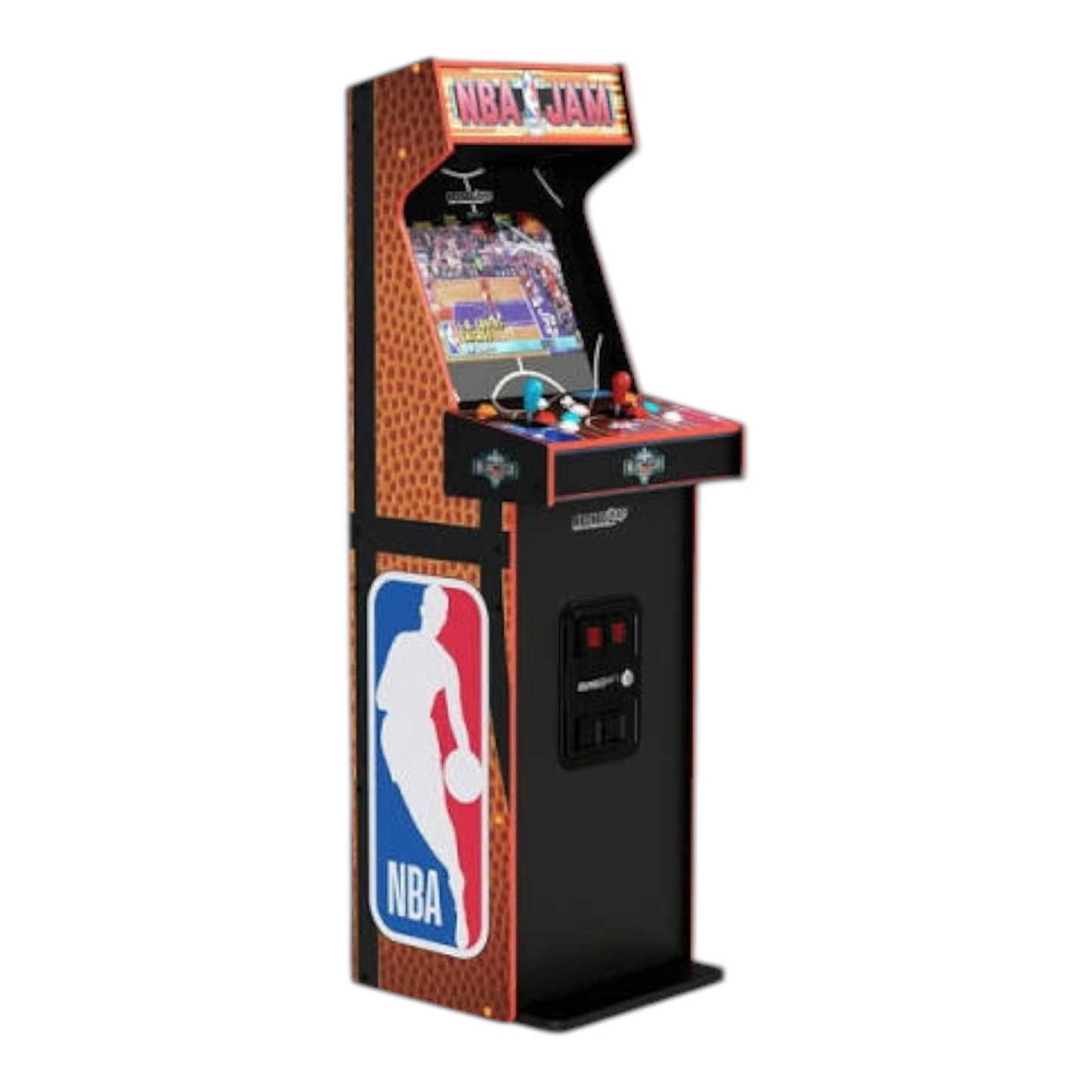
Image source: Showtime Gaming
How to Play the Double Z Mod for NBA Jam Tournament Edition
The Double Z mod is a labor of love that has been active since 2017. It targets the SNES version of Tournament Edition , which many purists believe offers the most balanced gameplay in the series. The mod is a significant step forward because it fixes the "Grand Champions" bug—a glitch in the original game that prevented players from truly completing the game and seeing the final ending screens.
To install this mod, you will need a clean
.sfc
ROM of the original game and a patching utility like
Lunar IPS
. You simply select the patch file provided by Double Z and apply it to your ROM. The resulting file can be played on any standard SNES emulator (like Snes9x) or on original hardware via a flash cartridge.
What makes this mod stand out is the inclusion of modern stars in 16-bit form. Seeing Stephen Curry or LeBron James rendered in the classic 1993 engine is a treat for fans. The mod also updates the team rosters to reflect the 2026 season, ensuring that the game feels current despite its 30-year-old foundation. According to the developer, the mod features all 27 original NBA teams ranked by their 1992-93 standings but populated with modern talent.
Secret Player Codes and Hidden Characters You Can Unlock
One of the hallmarks of the NBA Jam series is the inclusion of secret players. The modding community has taken this a step further by injecting icons that were missing from the original releases due to licensing issues—most notably Michael Jordan and Kobe Bryant.
In the Double Z Mod , secret players are unlocked using specific button combinations and initials at the name entry screen. These characters often have "maxed out" stats, making them a popular choice for casual play. Below are some of the most notable codes discovered in recent versions:
- Stephen Curry: Enter initials CUR and hold Start + Y.
- Hulk Hogan: Enter initials NWO and hold L + R.
- O.J. Simpson: Enter initials OJ_ (underscore) and hold Select.
- Michael Jordan: Often found under the initials MJT (a nod to creator Mark Turmell).
The On Fire Edition mods also include hidden "Legends" teams. By completing specific challenges in the "Road Trip" mode, you can unlock players like Shaquille O'Neal and Magic Johnson. The 2026 mod often replaces the generic "Team EA" secret players with modern icons or community favorites, providing a high standard of variety for long-term players.
Why Scottie Pippen Is a Top-Tier Player in the Game
In the world of NBA Jam modding and competitive play, Scottie Pippen is often cited as a "Tier-0" character. This is not an accident; it is a result of the game's original mechanical design. When Michael Jordan opted out of the game's licensing, the developers at Midway gave Scottie Pippen an exceptionally strong stat block to ensure the Chicago Bulls remained competitive.
Pippen was famously given a 20/24 rating across his primary stats, making him faster than most guards and a better three-point shooter than specialists like Reggie Miller. In modern mods, this "Pippen Meta" is often preserved or even enhanced. According to a mechanical analysis by SB Nation , Pippen's defensive reach and speed make him the ideal candidate for the "Always Be Shoving" (ABS) strategy.
The "Always Be Shoving" (ABS) Strategy
In NBA Jam, blocking is heavily dependent on RNG (Random Number Generation). Even with perfect timing, the game may decide the ball goes in. However, a shove is a guaranteed way to dislodge the ball if it connects during the first third of a player's jump animation. Because Pippen has a high speed rating, he can close the distance and execute a shove more reliably than almost any other player in the game. When playing the 2026 mod, using high-speed defenders like Pippen or modern equivalents like Mikal Bridges is a top-rated strategy for breaking the AI's rhythm.
How to Install NBA Jam Mods on Android Devices
For gaming on the go, the Android port of NBA Jam remains a popular choice. While the official version has been delisted from many stores, the modding community continues to support it with APK updates. These mods typically require Android 5.0 or higher and a specific file structure to work.
To install a modded version, you generally need to place the
.obb
data file in the
/Android/obb/com.ea.game.nba2010_row/
folder. Once the data is in place, you install the modded APK. These versions often come with "Big Head Mode" enabled by default and include updated 2024-2026 rosters. Sites like
APKAward
host various versions of these mods, though users should always exercise caution when downloading files from third-party sources.
The mobile modding scene is less about deep mechanical changes and more about accessibility. It allows players to enjoy the "On Fire" mechanics on their phones, complete with updated rosters and unlocked secret players. While it may not offer the same depth as the PS3 or SNES mods, it stands out for its convenience and ease of use.
Frequently Asked Questions
Unfortunately, no. Because the mod requires replacing internal game files and modifying the
SYS-DATA
structure, you must have a console capable of running Custom Firmware (CFW) or PS3HEN. Without these, the console will not allow you to access the file system or run modified code. If you do not want to jailbreak your hardware, using the RPCS3 emulator on a PC is a strong alternative that offers similar results.
There is significant debate in the community regarding this. While some smaller cabinets can be soft-modded via USB, the full-size 4-player NBA Jam cabinet from Arcade1Up generally requires a hardware swap (like a Mini PC or Raspberry Pi) to run different games or updated rosters. Some users have had success swapping the PCB with one from an "Arcade1Up Blitz" cabinet, but a full "brain swap" remains the most reliable way to get modern mods running on arcade hardware.
The most reliable place to find these updates is the
NLSC (NBA Live Software Center)
forums or johnz1's dedicated YouTube channel. These platforms serve as the central hub for the NBA Jam modding community. Always look for the most recent "v1.0" or "Final" releases, as these typically contain the most stable roster data and the fewest bugs. Be sure to read the included
readme.txt
files, as they often contain specific instructions for checksum fixes.
Yes, it does! The Double Z mod is designed to be fully compatible with original Super Nintendo hardware, provided you have a way to load the ROM. Most players use a flash cartridge like the SD2SNES or FXPak Pro . Because the mod does not exceed the original ROM size limits, it runs perfectly on the original Ricoh 5A22 CPU without any slowdown or graphical glitches beyond what was present in the 1994 original.
The "Road Trip" mode in the On Fire Edition mod can be notoriously difficult because the AI is programmed to be extremely aggressive. To fix this, you can use the bounce.db editor . This tool allows you to open the game's database and lower the "AI Catch-up" logic and shooting accuracy. Many players find that reducing these values by 10-15% creates a much more enjoyable experience that feels closer to the original arcade difficulty.
Key Takeaways for NBA Jam Modders
- Choose your platform wisely: Use PS3/RPCS3 for the best graphics, SNES for pure nostalgia, or an Arcade1Up cabinet for the authentic experience.
- Prioritize hardware: A Mini PC ranks among the top choices for Arcade1Up mods due to its superior power-to-price ratio compared to a Raspberry Pi.
- Master the checksum: Always address the 0x60-0x63 checksum offset in PS3 files to avoid the "File Damaged" error.
- Update your rosters: The 2026 patches from johnz1 and Double Z provide the most current way to play with modern NBA stars.
- Use the meta: Remember the "Pippen Rule"—high-speed defenders and the "Always Be Shoving" technique are your best tools against the AI.
- Backup everything: Never apply a patch without saving a copy of your original game files first.
Start by downloading the Double Z patch or the johnz1 roster pack today to bring your retro basketball experience into the modern era.