Home
How to Use a GTA San Andreas Save Game Editor on PC and Mobile
To modify your GTA San Andreas progress in 2026, the
Lukas Fülling GitHub Fork
stands out as a top choice for modern PC and Steam Deck users because it includes a bundled Java runtime. For a quick, no-install fix, the
GTAStuff Online Editor
is highly recommended. Always locate your save files in
Documents\GTA San Andreas User Files\
and create a backup before editing to prevent data loss.
Grand Theft Auto: San Andreas remains a cornerstone of open-world gaming, but its grind for stats like Lung Capacity or the frustration of missions like "Wrong Side of the Tracks" can hinder the experience. A
gta san save game editor
allows players to bypass these hurdles by directly modifying the
.b
save files. Whether you are playing the original 2004 retail version, the Steam release, or the mobile port, modern tools have made save manipulation more accessible than ever.
In this guide, we explore the most reliable editors available today, how to navigate complex file paths on modern operating systems, and the specific steps required to ensure your save remains healthy and compatible with 100% completion goals.
Which GTA San Andreas Save Game Editor Should You Choose?
Selecting the right tool depends largely on your technical comfort level and the platform you are using. While the community has produced dozens of utilities over the last two decades, three specific options represent the current landscape of save editing.
The Gold Standard: Paul’s Savegame Editor (Legacy v3.2)
For many years, the editor created by paultjuh was widely regarded as the definitive tool for the community. Version 3.2, released in 2013, remains a popular choice for purists. It is a lightweight Java-based application that offers deep control over CJ’s attributes, including his wardrobe, current coordinates, and even the specific weapons held by gang members.
However, the legacy version has drawbacks in a modern environment. It requires a manual installation of Java 6 or higher, which can lead to compatibility issues on Windows 11. Furthermore, it lacks native support for the specific file headers found in some newer Steam versions. According to PaulInternet , users frequently encounter crashes when using the "3D View" for clothing, necessitating a "Without 3D" version for stability.
The Modern Successor: Lukas Fülling’s GitHub Fork
In recent years, the community has migrated toward the updated fork maintained by Lukas Fülling. This version ranks among the top options for 2026 players because it addresses the technical debt of the original. Most notably, it offers a version with a bundled Java runtime, meaning you do not need to install Java separately on your system.
This version is particularly effective for Steam Deck and Linux users running the game via Proton. It handles the German and EU Steam versions more gracefully than the legacy tool and includes UI themes that feel more at home on modern high-resolution displays. You can find the source and latest builds on the official GitHub repository .
The Quick Fix: GTAStuff Online Editor
If you only need to add a few million dollars or skip a single mission, downloading a full desktop suite may be unnecessary. The
GTAStuff Online Editor
provides a browser-based alternative. You simply upload your
GTASAsf1.b
file, toggle the desired stats, and download the modified version. While it lacks the deep garage and clothing customization of desktop tools, it is a remarkably efficient choice for basic needs.
| Feature | Paul's Legacy | GitHub Modern | GTAStuff Online |
|---|---|---|---|
| Platform | Windows/macOS | Win/Linux/Steam Deck | Web Browser |
| Installation | Requires Java | Bundled EXE available | None |
| Garage Editing | Advanced | Advanced | Basic |
| Mission Skip | Yes | Yes | Yes |
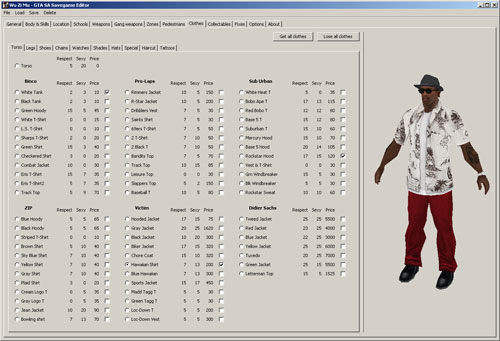
Image source: Paulinternet.nl
How to Find Your GTA San Andreas Save File Location
Before you can use any editor, you must locate the save files. GTA San Andreas uses a specific naming convention:
GTASAsfX.b
, where "X" represents the save slot (1 through 8). Finding these files varies significantly depending on how you installed the game.
Standard PC Retail and Rockstar Launcher Path
If you are using the original disc version or the version currently sold through the Rockstar Games Launcher, your saves are stored in the user's document library. The path is typically:
C:\Users\[YourUsername]\Documents\GTA San Andreas User Files\
Inside this folder, you will see your save files along with
gta_sa.set
, which stores your graphics and control settings. If you do not see the
.b
extension, ensure that "File name extensions" is enabled in your Windows Explorer view settings.
Steam Version Path (Windows)
The Steam version generally uses the same path as the retail version. However, if you have multiple Windows users or have redirected your Documents folder to OneDrive, the editor may fail to find them automatically. Always verify that the files are physically present in the
User Files
directory before attempting to load them into an editor.
Steam Deck and Linux (Proton) Path
Playing on the Steam Deck requires navigating the Linux file system and the Proton prefix (the virtual C: drive created for the game). This is one of the most common points of confusion for modern players. The path is usually:
~/.local/share/Steam/steamapps/compatdata/12120/pfx/drive_c/users/steamuser/Documents/GTA San Andreas User Files/
To access this on a Steam Deck, you must enter Desktop Mode and use the Dolphin file manager. The folder
12120
is the specific AppID for GTA San Andreas on Steam.
How to Edit Your Save Game Using the Modern GitHub Editor
Once you have located your save and downloaded the modern GitHub editor, follow these steps to safely modify your game state. This tool is widely regarded as one of the most stable ways to handle modern save files.
-
Create a Mandatory Backup:
Before opening the editor, copy your
GTASAsf1.bfile to a separate folder. Save editing can occasionally corrupt a file if a value is set outside of acceptable bounds. Having a backup ensures you don't lose dozens of hours of progress. -
Load the Save File:
Open the editor and click "Open." Navigate to your
GTA San Andreas User Filesfolder and select the slot you wish to edit. The tool will populate CJ's current stats, weapons, and mission progress. - Modify Stats and Skills: Navigate to the "Stats" tab. Here, you can max out Muscle, Stamina, and Lung Capacity. A popular choice for players is to set "Fat" to 0 and "Muscle" to maximum to immediately change CJ's physical appearance. You can also set your "Respect" level to maximum to recruit more gang members early in the game.
- Use the Garage Editor: This is a standout feature of the desktop tools. You can select any safehouse you own (like the Johnson House or the Santa Maria Beach house) and add rare vehicles like the Rhino tank or the Hydra jet. You can even toggle "Bulletproof" or "Fireproof" properties for these vehicles, making them exceptionally strong during missions.
-
Save and Overwrite:
Once your changes are complete, click "Save." The editor will overwrite the original
.bfile. When you launch the game, load that specific slot to see your changes in action.
How to Edit GTA San Andreas Saves on Android and Mobile
The mobile version of San Andreas presents a unique challenge. While there are "Cheater" APKs available on various third-party sites, many of these are outdated or contain malware. The most reliable method for mobile editing in 2026 is the Android-to-PC bridge workflow .
Because the mobile save format is largely compatible with the PC version, you can move your saves between devices. First, connect your Android device to your PC via USB. Navigate to the following directory:
Android/data/com.rockstargames.gtasa/files/
Copy the
.b
files to your PC, edit them using the Lukas Fülling tool, and then move them back to the phone. Note that Source 1 from our research indicates that reading Android saves without crashing is still a work in progress for some features, so keeping multiple backups is critical during this process. If the game fails to load the edited save, it usually means the file header was modified in a way the mobile app doesn't recognize; in this case, try using the GTAStuff Online Editor, which often has better luck with mobile-to-PC conversions.
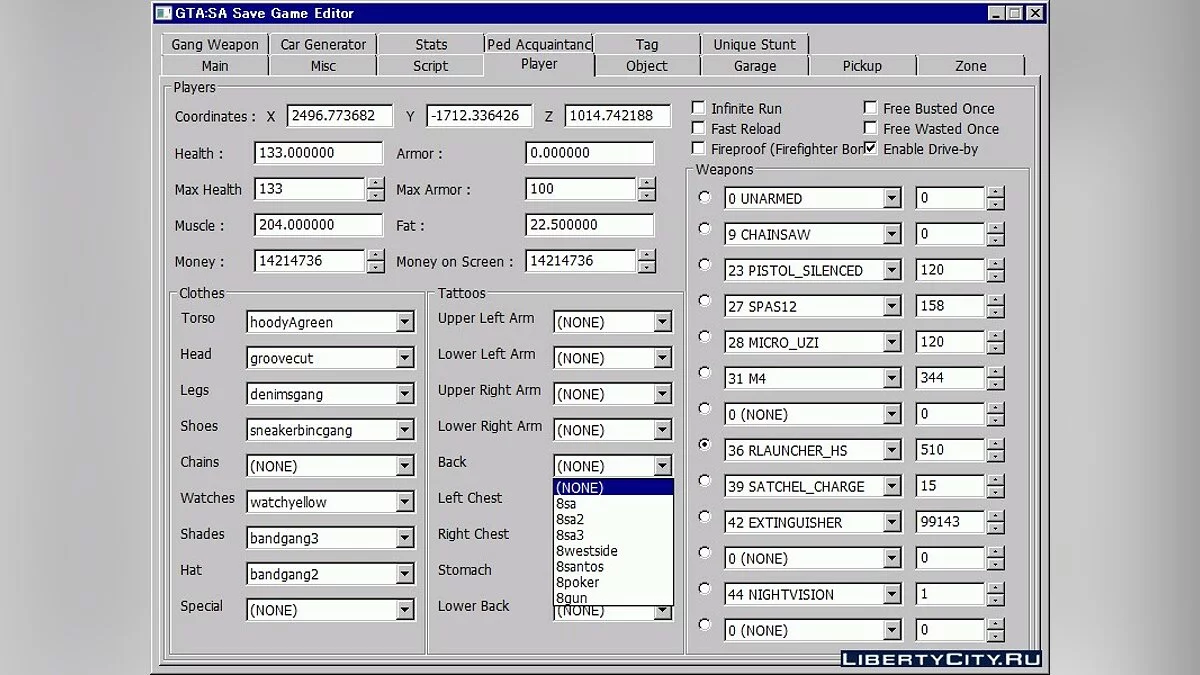
Image source: LibertyCity
How to Fix Common Save Editor Crashes and Java Errors
Technical hurdles are common when working with legacy software. If your gta san save game editor refuses to launch or crashes during use, the following solutions typically resolve the issue.
Solving the "Could Not Find Java" Error
If you are using the
.jar
version of the editor, Windows may not know how to execute the file even if Java is installed. The
Jarfix
utility is a small, free tool that repairs
.jar
associations in the Windows Registry. Running Jarfix once usually allows the editor to open with a simple double-click. If you prefer not to use extra utilities, ensure you are using the modern GitHub version's
.exe
, which bypasses this requirement entirely.
Fixing the 3D View Clothing Crash
As noted by PaulInternet , the 3D preview of CJ's clothing is a common point of failure. This is often due to missing DirectX 9 dependencies on modern systems. If the editor crashes when you click the "Clothes" tab, look for a version of the editor labeled "Without 3D" or "Legacy UI." These versions use simple text lists for clothing items, which is much more stable.
Version Mismatches (Java 6 vs. Java 23)
The original Paul's Editor was built for Java 6. Modern systems often run Java 17, 21, or 23. While Java is generally backward compatible, the modern GitHub fork is specifically compiled to work with the latest Java Runtime Environments (JRE). If you encounter "Unsupported Class Version" errors, it means your Java version is too old for the editor you downloaded. Updating to the latest JRE from Oracle or Adoptium is a significant step forward in resolving these conflicts.
How to Check Your Save File for Glitches and 100% Completion Bugs
For completionists, a save editor is a double-edged sword. While it can help you reach 100% faster, improper editing can permanently glitch your save. This is where GTASnP.com becomes an essential resource.
GTASnP (GTA Save 'n' Post) is a web utility that analyzes your save file for "Save File Glitches." It can detect if your save has the infamous "Pedestrian Riot" glitch (which can be triggered by certain cheats and is irreversible) or if your Driving School missions have become corrupted. According to GTASnP resources , the tool can also identify if you have used cheats that will block the "Key to Her Heart" mission or other story-critical triggers.
If you are aiming for a perfect 100% stat screen, use the editor only for non-scripted values like money or weapon skills. Avoid using the editor to skip missions that involve unique unlocks (like the gym moves or specific girlfriend progress) unless you are prepared to manually toggle those flags in the "Achievements" or "Skills" tabs as well.
Frequently Asked Questions
Does this work for GTA San Andreas Definitive Edition?
Most legacy editors, including Paul's and the standard GitHub fork, are designed for the original v1.0/Steam versions and are not compatible with the Definitive Edition (DE). The DE uses a different file structure and encryption. For the Definitive Edition, you should look for specific "DE Save Editors" or use trainers like WeMod, which modify the game in real-time rather than editing the save file.
Can I get banned for using a save editor?
No, you cannot be banned. GTA San Andreas is a single-player game, and Rockstar Games does not monitor or penalize the use of save editors or mods in the single-player environment. However, you should never attempt to use modified files in GTA Online (for newer titles), as that can result in account sanctions.
How do I skip the "Wrong Side of the Tracks" mission?
Open your save in the editor and navigate to the "Missions" tab. Find the mission titled "Wrong Side of the Tracks" (or its internal script name) and change the status to "Passed." Make sure to also check if the subsequent mission is unlocked, as skipping a mission doesn't always trigger the next phone call or map icon automatically.
Why isn't my save file appearing in the editor?
This usually happens for two reasons: either the file is not in the correct folder, or the file extension is incorrect. Ensure your save is named exactly
GTASAsf1.b
(for slot 1). If you downloaded a save from the internet, it might be named
GTASAsf1.sav
; simply rename the extension to
.b
to make it recognizable to the editor.
Can I teleport CJ to different cities early in the game?
Yes. By editing the X, Y, and Z coordinates in the "Main" or "Player" tab, you can place CJ anywhere on the map. However, if you haven't unlocked the other cities through story progress, you will immediately receive a 4-star wanted level upon arrival. You can use the editor to toggle the "Never Wanted" flag to explore these areas freely.
Key Takeaways
- Choose the right tool: Use the Lukas Fülling GitHub fork for modern PC/Steam Deck compatibility and Paul's Editor for legacy systems.
-
Prioritize backups:
Always copy your
.bfiles to a safe location before applying any edits. -
Know your paths:
Remember that Steam Deck saves are hidden deep within the
compatdatafolder, while PC saves are inDocuments. - Use Jarfix: If the editor won't open on Windows, this utility is a top-performing solution for Java association issues.
- Check save health: Use GTASnP.com to ensure your edits haven't introduced bugs that prevent 100% completion.
- Mobile workflow: Transfer Android saves to a PC for the most reliable editing experience.
Start by backing up your current save file today to explore the full potential of San Andreas without the limitations of the original grind.