Home
How to Use the Elden Ring Nightreign Relic Editor Without Getting Banned
The Elden Ring relic editor is a specialized tool for the Nightreign mod that allows players to modify custom equipment attributes. To use it safely, you should always back up your .sl2 save file , disable Easy Anti-Cheat (EAC) if using real-time tools, and mimic natural RNG by avoiding duplicate effects. The most accessible method is the online browser editor , while the GitHub Save Editor offers advanced features like Excel mass-editing. Using these tools incorrectly can result in a 180-day ban from official servers.
What Is the Nightreign Relic Editor and How Does It Work?
The Nightreign mod is a significant advancement for Elden Ring, introducing a total overhaul of game mechanics, including the "Relic" system. Unlike the base game's talismans, Relics are highly customizable items that offer randomized stat boosts, ranging from physical attack modifiers to unique status effect triggers. Because these items rely heavily on RNG (Random Number Generation), players often spend dozens of hours grinding for a specific combination of traits.
A relic editor bypasses this grind by allowing you to manually input the specific Effect IDs you desire. These tools function by reading your save file (typically located in
%AppData%
) and modifying the hex values associated with your inventory. According to community discussions on
Reddit
, the primary motivation for using an editor is to achieve "God Tier" builds without the frustration of low drop rates.
It is important to understand that these editors are not compatible with the base Elden Ring game. They are specifically designed to recognize the custom data structures introduced by the Nightreign mod. Attempting to load a standard Elden Ring save into these tools will likely result in a parsing error or file corruption.
Which Relic Editing Method Should You Choose?
Depending on your technical skill and what you hope to achieve, there are three primary ways to edit your relics. Each method carries a different level of risk and ease of use.
| Method | Ease of Use | Risk Level | Key Feature |
|---|---|---|---|
| Online Browser Editor | High | Low | No installation required; local processing. |
| GitHub Save Editor | Medium | Medium | Excel mass-editing and automatic backups. |
| Cheat Engine Table | Low | High | Real-time editing; requires disabling EAC. |
How to Use the Online Relic Editor for Quick Changes
The online editor hosted at
nightreign.pretype.com
stands out as a top choice for players who want to make quick adjustments without downloading third-party software. One of the most significant benefits of this tool is that it processes all data locally in your browser—nothing is uploaded to a remote server, which enhances privacy and security.
Step-by-Step Online Editing
-
Locate your save:
Navigate to
C:\Users\%Username%\AppData\Roaming\Nightreign\and find your.sl2file. - Close Steam: This is a crucial safety step. Ensure Steam is completely shut down before touching your save files to prevent cloud sync conflicts.
- Load the file: Open the Pretype editor and drag your save file into the interface.
- Modify IDs: Select the relic you wish to change and replace the existing Effect IDs with your desired ones.
- Download and Replace: Save the modified file and move it back into your AppData folder, overwriting the original.
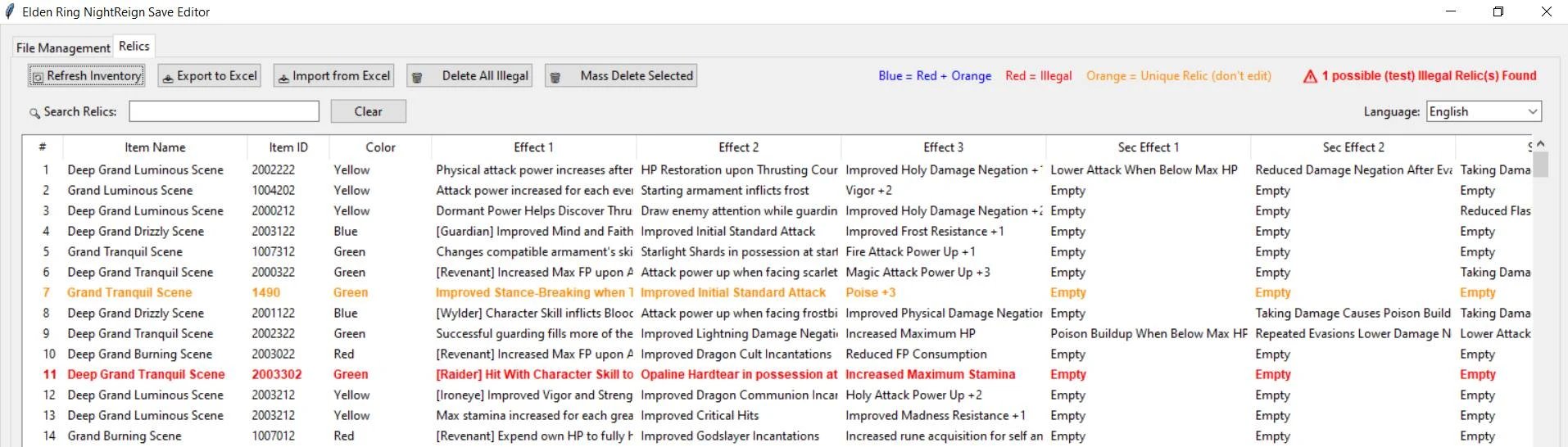
Image source: Nexus Mods
How to Use the GitHub Save Editor for Advanced Modding
For power users, the GitHub Save Editor by Alfizari is widely considered one of the best options available. It supports both PC and PS4 (via decrypted saves) and includes a robust backup system that is highly recommended for anyone performing extensive modifications.
How to Manage Your Save Backups Safely
The Alfizari tool features a notably innovative backup cycle. When you first load a save, it creates a "Root" backup. This file is permanent and is never overwritten, serving as a fail-safe if your save becomes corrupted weeks later. Additionally, the tool maintains a rolling cycle of the five most recent versions of your save. If a specific edit causes a crash, you can easily roll back to a version from ten minutes prior.
How to Mass Edit Relics Using the Excel Export Feature
A unique advantage of the GitHub tool is the ability to export your entire relic inventory to an Excel spreadsheet. This is a highly impactful feature for players building multiple characters. You can use Excel's "Find and Replace" function to swap out dozens of IDs simultaneously, then re-import the sheet to update your entire inventory in seconds. This method is significantly faster than clicking through individual dropdown menus in a browser.
How to Use Cheat Engine for Real-Time Relic Editing
The Cheat Engine (CE) table created by Cissa90 offers a different workflow. Instead of modifying a static file, it allows you to change relic values while the game is running. This is a popular choice for testing different builds on the fly, but it requires the most technical setup.
Why You Must Disable Easy Anti-Cheat (EAC) First
How to Populate Pointers in the Cheat Engine Table
To make the CE table "see" your relics, you must use the Inventory Highlight method. Open your in-game inventory and hover your cursor over the relic you want to edit. This action populates the memory pointers in Cheat Engine, allowing you to see the current IDs. Note that as of recent updates, some status effect increments (like +1 or +2 modifiers) may be non-functional in the current CE table version.
How to Edit Nightreign Relics on PS4 and PS5
Console users often feel underserved in the modding community, but relic editing is possible on PS4. The GitHub Save Editor supports PS4 save files, provided they have been decrypted. You will need a third-party tool like Save Wizard to extract the
memory.dat
file from your console. Once decrypted, the workflow is identical to the PC version. Unfortunately, PS5 saves remain highly encrypted and are currently not compatible with these editors unless you are playing the PS4 version of the game on your PS5 hardware.
How to Avoid a 180-Day Ban While Editing Relics
The standard penalty for detected cheating in Elden Ring is a 180-day ban from online play. While the Nightreign mod is intended for solo or private co-op play, the game's internal "sanity checks" can still trigger if you take an edited save online. Following a "Safety Tier List" is the best way to minimize this risk.
What Makes a Relic Look Legal to the Server?
A "legal" relic is one that could theoretically exist through normal gameplay. To keep your save safe, avoid duplicate effects. For example, having two "Physical Attack Up" slots on a single relic is a high-detection flag because the game's RNG naturally prevents this. Furthermore, ensure that the effects are listed in the correct internal order. Most editors will warn you if a combination is "illegal," and you should heed these warnings strictly.
The Size 3 Relic Strategy for Maximum Safety
One of the most effective safety tips found in community guides is the "Size 3 Strategy." Instead of taking a 1-slot relic and adding two extra slots via an editor, you should grind in-game until you find a natural 3-slot relic. Editing the effects of a 3-slot relic is much harder for the server to detect than changing the number of slots an item possesses. This simple step significantly reduces your profile's risk profile.
Why You Should Unlock Deep Mode Before Importing Saves
Deep Mode is a late-game mechanic in Nightreign that unlocks powerful relics. A common pitfall is importing a save file that contains Deep Mode relics before your character has actually unlocked the mode in-game. This mismatch can cause save corruption or trigger an immediate flag for external manipulation. Always ensure your character's progression matches the items you are adding to your inventory.
How to Fix Common Relic Editor Errors and Parsing Issues
Modding is rarely a perfectly smooth process. Users frequently encounter technical hurdles that can be frustrating if you don't know the cause.
How to Fix the Value Could Not Be Parsed Error
The "value could not be parsed" error is the most reported issue in the community. This usually stems from a conflict between Decimal and Hexadecimal formats. Most editors expect IDs in one specific format; if you enter a Hex ID into a Decimal field, the application will crash. Always double-check which format your chosen tool requires. If you are unsure, try converting your ID using an online hex-to-decimal converter before inputting it.
What to Do After Update 1.15 Breaks Your Editor
When the Nightreign mod updates (such as the recent v1.15 update), the internal memory offsets for items often change. This makes older versions of editors obsolete. If your editor suddenly stops recognizing your save file after a mod update, do not force it. Wait for the tool developer to release a compatibility patch. Using an outdated editor on a new mod version is a guaranteed way to corrupt your save data.
Master List of Nightreign Relic IDs and Effects
Finding the correct IDs is the most time-consuming part of the process. Below are some of the most sought-after IDs used by the community for high-level builds.
- ID 14001: Duchess Crown Medal
- A unique character-specific relic that provides significant boosts to poise and magic defense.
- ID 1000-1050: Physical Attack Modifiers
- This range covers various percentages of physical damage increases. Higher numbers generally correspond to higher percentages.
- ID 1100-1150: Elemental Resistances
- Used to mitigate fire, lightning, and holy damage. Essential for late-game boss encounters.
- ID 2000-2020: Status Effect Triggers
- Includes effects like "Bleed on Hit" or "Frostbite Accumulation." Note that these are often the most scrutinized by anti-cheat systems.
Frequently Asked Questions
Can I use edited relics in Seamless Co-op?
Yes, you can use edited relics in the Seamless Co-op mod, but there are specific requirements. First, ensure your save file is named
NR0000.sl2
, as the mod specifically looks for this naming convention. Second, it is highly recommended that all players in your session are aware of the edits. While Seamless Co-op does not use official servers, using "illegal" relics can still cause synchronization issues or crashes for your teammates if their game doesn't recognize the modified item data.
How long is the ban for relic cheating?
If you are detected by the official Elden Ring anti-cheat system, the standard penalty is a 180-day ban. During this time, you will be restricted to playing in a "cheater's bracket" or forced into offline mode entirely. This ban applies to your entire account's access to official servers. To avoid this, many players choose to keep their modded characters strictly on a separate save file and never launch the game with those characters while connected to the internet.
Does the editor work on the base Elden Ring game?
No, the relic editors discussed here are strictly for the Nightreign mod. The base game does not have a "Relic" item category; it uses Talismans, which have fixed IDs and cannot be modified in the same way. If you attempt to use a Nightreign editor on a vanilla Elden Ring save, the tool will fail to find the necessary data offsets and will likely display an error message or corrupt the file. Always ensure you are using the correct tool for the specific mod you have installed.
Where is the Nightreign save file located?
The default directory for Nightreign save files is
C:\Users\%Username%\AppData\Roaming\Nightreign\<User-ID>\
. Note that the
AppData
folder is hidden by default in Windows. You can access it quickly by pressing
Win + R
, typing
%appdata%
, and hitting Enter. From there, look for the "Nightreign" folder. If you are using the Seamless Co-op version of the mod, the file extension might be
.co2
instead of
.sl2
, depending on your configuration.
Can I add more than 3 slots to a relic?
Technically, you can use Cheat Engine to force a relic to have more than three slots, but this is extremely dangerous. The Nightreign mod is hard-coded to handle a maximum of three effect slots per relic. Adding a fourth or fifth slot will almost certainly cause the game to crash when you hover over the item. Furthermore, this is an "impossible" item that will trigger an immediate ban if detected by any server-side check. It is highly recommended to stay within the game's natural limits.
Key Takeaways for Safe Relic Editing
- Always back up your save file using the "Root" backup method before making any changes.
- Close Steam completely before replacing save files to avoid cloud synchronization errors.
- Disable Easy Anti-Cheat (EAC) whenever using real-time memory tools like Cheat Engine.
- Mimic natural RNG by avoiding duplicate effects and maintaining a maximum of three slots.
- Unlock Deep Mode in-game before attempting to add late-game relics to your inventory.
- Check mod versions to ensure your editor is compatible with the current version of Nightreign (e.g., v1.15).
- Use the Excel workflow for mass-editing if you are managing multiple character builds.
By following these safety protocols, you can enjoy the depth of the Nightreign mod's customization without the risk of losing your account or corrupting your progress.