Home
How to Find and Use Top-Rated Save Editor 2 Tools for Your Favorite Games
Save Editor 2 refers to both sequels (like
Risk of Rain 2
) and modern "Version 2.0" web tools. For Unity or RPG Maker games,
SaveEditOnline.com
is a top choice for simple value changes. For Ren’Py 8.1+ games, you must use
SaveEditor.Online
to handle local security signatures. Always backup your
.sav
or
.dat
files before editing to prevent permanent progress loss.
Which General Online Save Editor Should You Choose?
When you search for a "save editor 2," you are likely encountering two distinct web-based platforms that dominate the landscape. While both allow you to upload a file and modify its internal variables, they cater to different technical needs. Choosing the right one depends entirely on the game engine your title uses.
SaveEditOnline: The Free Generalist
According to SaveEditOnline , this tool is designed as a universal editor for games built on Unity, Godot, and older versions of RPG Maker. It is widely considered one of the best options for users who need to perform quick, one-off edits like increasing gold, experience points, or health. The interface is minimalist: you upload your file, search for the variable name, change the number, and download the modified version. It is entirely free and does not require a subscription for basic functionality.
SaveEditor.Online: The Ren’Py Specialist
For more complex titles, particularly those built on the Ren’Py engine or RPG Maker MV/VX/XP, SaveEditor.Online stands out as a top choice. This platform offers advanced features that the generalist lacks, such as automatic re-signing for modern Ren’Py games. While it offers a free tier, many of its more powerful features are locked behind a Patreon-based subscription. This is often necessary for games that use local encryption or specific signature keys that would otherwise prevent the game from loading a modified save.
| Feature | SaveEditOnline | SaveEditor.Online |
|---|---|---|
| Primary Engine | Unity, Godot, RPG Maker | Ren'Py, RPG Maker MV/VX |
| File Size Limit | 10 MB (Free) | 20 MB (Patreon Tier) |
| Ren'Py 8.1 Support | Limited (Manual) | Full (Auto-Signing) |
| Pricing | Free | Freemium (Patreon) |
save.dat
or
.sav
file to a separate folder or a cloud drive. If the editor corrupts the file or breaks a checksum, you will lose your entire progress without a backup.
How to Edit Saves for the Most Popular Game Sequels
Many users searching for "save editor 2" are looking for specific tools for high-profile sequels. These games often have dedicated community-built editors that are much more user-friendly than general hex editors.
Risk of Rain 2: Unlocking the Roster
For
Risk of Rain 2
, players often want to bypass the heavy grind required to unlock specific survivors or items. There is a dedicated web-based
Risk of Rain 2 Save Editor
that allows you to modify your
UserData
file directly. Instead of manually editing XML tags, you can simply check boxes for the characters and achievements you want to unlock. This tool is highly recommended for players who have lost their progress due to cloud sync errors.
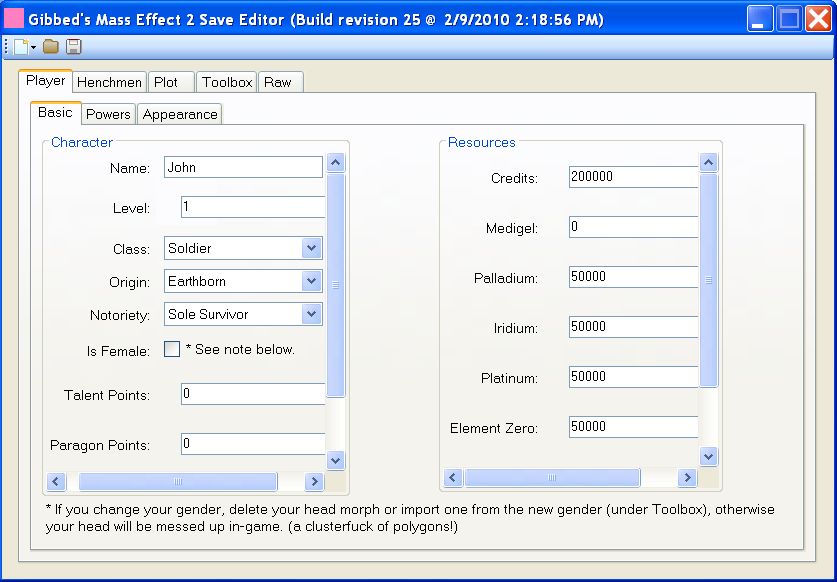
Image source: ModDB
Dying Light 2: Managing Legend Levels
Dying Light 2 saves are more complex due to how the game handles inventory and world states. While simple hex editing is possible, most users prefer standalone community tools found on Nexus Mods. These tools allow you to edit Legend Levels, skills, and even specific event progress. As noted in various community tutorials, these editors are often updated alongside game patches, so ensure you are using a version compatible with the current game build.
Monster Hunter Stories 2: The Decryption Barrier
Editing Monster Hunter Stories 2 (MHST2) is not as straightforward as other titles. The save files are encrypted, meaning you cannot simply open them in a text editor. According to documentation from Fexty12573 on GitHub , you must first use a decryption tool to "unlock" the file. Once decrypted, you can modify your Monstie stats and items before re-encrypting the file for the game to recognize it. This extra step is a significant advancement in game security but can be bypassed with the right community scripts.
Dead Island 2: The CLI Advantage
For
Dead Island 2
, developer Steffenl has produced a Command Line Interface (CLI) editor. While a CLI might seem intimidating, it is a top-tier option for Steam Deck and Linux users. Unlike Windows-only
.exe
files, a CLI tool can run natively in the terminal, making it exceptionally strong for handheld gaming enthusiasts who want to tweak their inventory or level without transferring files to a desktop PC.
How to Fix Ren’Py 8.1 Saves That Refuse to Load
A common frustration for fans of visual novels is the "Signature Problem." Starting with Ren’Py version 8.1, the engine began signing save files with a local security key unique to your installation. If you use a general editor to change a value, the signature no longer matches the file content, and the game will simply ignore the save or show it as corrupted.
Find the
security_keys.txt
file within the game's base directory. This contains the unique identifier the game uses to verify saves.
Upload your save to a tool like SaveEditor.Online, which specifically supports Ren’Py 8.1+ re-signing.
After making your changes, use the "Repack" function. The editor will use your security key to generate a new valid signature for the modified file.
Download the new file and replace the original in your
/saves/
folder. The game should now load the edited progress without error.
How to Move Save Files from a Nintendo Switch to Your PC
Editing saves for Switch sequels like Xenoblade Chronicles 2 or Monster Hunter Stories 2 requires a specific hardware-to-software pipeline. Because the Switch file system is locked, you cannot simply plug the console into a PC and find the files.
Difficulty: Hard Requirements: A modded Nintendo Switch running Custom Firmware (CFW) like Atmosphere.
- Export the Save: Use a homebrew application like Checkpoint or JKSV on your Switch. Select the game and choose "New Backup." This copies the save from the internal system memory to your SD card.
-
Transfer to PC:
Power off the Switch, remove the SD card, and insert it into your PC. Navigate to
SD:/switch/Checkpoint/saves/[Game Name]. -
Edit the File:
Open the
.savor folder-based save in your chosen editor. For XC2 , users often use the "XC2SaveNetThingy" tool, which is verified for versions 1.3.0 through 2.0.1. - Restore the Save: Move the edited file back to the SD card, put it in the Switch, and use Checkpoint to "Restore" the backup.
A Simple Trick for Editing Saves on Mobile and Amazon Fire Tablets
Mobile operating systems like Android and FireOS often hide game directories behind "Scoped Storage," making it nearly impossible to upload a save file to a web editor directly from the device. However, there is a clever workaround known as the "Google Doc Bridge."
Many mobile games include an "Export Save" or "Cloud Sync" button that generates a long string of text (Base64 code). Instead of looking for a file, you can copy this text and paste it into a Google Doc or an email. Open that document on your PC, copy the text into a
.txt
file, and upload that file to a web editor. Once you have edited the values, the editor will give you a new text string. Simply copy that string back into your mobile device's "Import Save" field to apply the changes. This method bypasses the need for root access or complex file explorers.
How to Fix the Sitting Clone Bug in Satisfactory
In Satisfactory , moving a save file between different versions or players often results in the "Sitting Clone" bug. This happens because the game assigns a unique Player ID to every session. When you load a save that doesn't recognize your current ID, it leaves your old character sitting on the floor as an NPC, and you spawn as a new character with an empty inventory.
To fix this, you should use the Satisfactory Calculator Interactive Map (SCIM) . This tool acts as a highly advanced save editor. By uploading your save to SCIM, you can right-click the "clone" character on the map and select "Transfer Inventory to Player." This manually moves all your hard-earned items and equipment from the NPC clone to your new active session ID, effectively merging the two characters and solving the bug.
How to Manually Edit Saves Using Hex Logic
If a dedicated editor does not exist for a niche sequel, you can use a Hex Editor like HxD to modify the file manually. This requires an understanding of how games store data. Most modern games use little-endian formatting, where the least significant byte is stored first.
For example, if you are looking for a health value of 100, you wouldn't search for "100." You would convert 100 to hex (which is
64
) and look for the byte sequence
64 00 00 00
. If the game uses 64-bit floating-point values (common in Unity games), the logic becomes more complex. In these cases, a value of
1
is represented as
00 00 00 00 00 00 F0 3F
, while a value of
3
is
00 00 00 00 00 00 08 40
. By identifying these patterns, you can modify almost any numerical value in a game, provided you can find the correct offset.
Common Problems When Editing Modern Save Files
Even with the best tools, save editing can go wrong. Modern games have built-in protections that can detect or revert unauthorized changes.
- Value Hard-Capping: Many games have a maximum value for stats. If you set your gold to 999,999,999, but the game only supports up to 99,999, the game may reset your gold to zero or crash upon loading.
- Steam Cloud Conflicts: Steam Cloud often detects that your local save is different from the cloud version. It may overwrite your edited save with the old one. To prevent this, disable Steam Cloud for that specific game before you start editing.
- Checksum Failures: Some games (like those from Paradox or Ubisoft) use a checksum—a mathematical "fingerprint" of the file. If you change even one byte, the checksum fails, and the game rejects the file. In these cases, you need a tool that can recalculate the checksum after your edit.
Frequently Asked Questions
In single-player games, the risk of a ban is virtually zero. However, if you edit a save for a game with an active online component or anti-cheat (like Elden Ring or Monster Hunter World ), you risk being banned from online play. Always use save editors in offline mode and avoid bringing modified items into multiplayer sessions.
Most Steam saves are located in the
userdata
folder. The standard path is
C:/Program Files (x86)/Steam/userdata/[YourID]/[GameID]/remote
. You can find the specific Game ID for any title by looking at its URL on the Steam Store page.
This usually happens due to a value overflow or a checksum mismatch. If you set a number higher than the game's variable type allows (e.g., exceeding 2,147,483,647 for a 32-bit integer), the game will crash. Try using a smaller, more reasonable number to see if the file loads correctly.
Yes, SaveEditOnline is generally safe as it operates entirely within your browser. However, you should never upload files that contain sensitive personal information. Since game saves only contain gameplay data, the privacy risk is minimal. Always ensure you are on the official
.com
domain.
Currently, editing saves on PS5 and Xbox Series X is extremely difficult due to high-level encryption. Unlike the Nintendo Switch, there are no widely available homebrew methods to export saves from these consoles. For these platforms, you are generally limited to in-game exploits or cloud-based "save resigner" services, which are often paid and limited in scope.
Key Takeaways for Successful Save Editing
- Always create a backup of your original save file before using any editor.
- Identify the game engine (Unity, Ren'Py, etc.) to choose the correct editing tool.
- Check for encryption or signature requirements, especially for Ren'Py 8.1+ titles.
- Disable Steam Cloud temporarily to prevent your edited file from being overwritten.
- Use reasonable values to avoid crashing the game or triggering hard-coded caps.
- Leverage community tools like SCIM or dedicated GitHub scripts for complex sequels.
- Test the save immediately after editing to ensure all features work as intended.
Start by locating your save folder today and making that essential backup before you begin your first modification.