Home
Where to Find Top-Rated Sims 4 Furniture Custom Content Packs for Your Game
Why Custom Content Furniture Is Essential for Modern Simmers
Building in The Sims 4 has evolved significantly since its launch, yet many players find that the base game and official expansion packs often leave an "aesthetic gap." Whether you are trying to recreate a specific Japandi minimalist living room or a gritty Modern Industrial loft, the limited swatches and styles provided by official kits can feel restrictive. This is where the community's vast library of custom content (CC) becomes a vital tool for any serious builder.
Custom furniture allows for a level of detail that official assets sometimes lack. From realistic clutter that makes a kitchen look "lived-in" to functional items that introduce new gameplay loops, CC fills the void left by standard catalog items. However, before diving into the thousands of available downloads, it is important to understand the two primary stylistic directions: Maxis Match and Alpha .
Maxis Match vs. Alpha: Choosing Your Look
Maxis Match CC is designed to blend seamlessly with the game's original art style. It uses the same clay-like textures and vibrant color palettes found in official EA releases. Many players prefer this style because it maintains the game's visual integrity, ensuring that a custom sofa doesn't look out of place next to a base game coffee table.
Alpha CC, on the other hand, aims for hyper-realism. These items often feature high-resolution textures, realistic fabric weaves, and complex 3D meshes. While Alpha furniture can create stunning, photo-realistic interiors, it often requires more powerful hardware to render without lag and can sometimes clash with the "cartoonish" look of the Sims themselves.
Which Creators Offer High-Quality Furniture CC Packs?
The rise of the "CC Pack" has changed how players shop for furniture. Instead of hunting for individual chairs, creators now release full room sets—often containing 30 to 50 items—that ensure every piece in a room matches perfectly. This approach is not only more efficient but also results in a more polished final build.
SIXAMcc
Widely regarded as a top choice for Maxis Match quality. Known for the "North American Home" and "Japandi" sets.
Syboulette
Offers a "Safe Custom Content" guarantee and specializes in incredibly detailed kitchens and nurseries.
Pinkbox AnYe
A premier option for those seeking functional beds and realistic clutter that adds "soul" to a home.
SIXAMcc has set a high standard in the community, even collaborating with EA on the official "Storybook Nursery Kit." Their work, such as the North American Home Power Set , provides the cohesive, modern aesthetic that many players feel is missing from the base game. Similarly, Syboulette is highly recommended for players who prioritize safety and variety. Syboulette follows a 3-week early access model on Patreon before making items free, ensuring a sustainable way to support high-quality art.
Comparison of Top Furniture CC Creators
| Creator | Primary Style | Best For... | Safety Tier |
|---|---|---|---|
| SIXAMcc | Maxis Match | Full Room Sets / EA Kits | Official Partner |
| Syboulette | Maxis Match/Mix | Kitchens & Nurseries | High (Discord Support) |
| Pinkbox AnYe | Alpha/Realistic | Functional Beds & Clutter | Community Vetted |
Furniture That Actually Works: Where to Find Functional Custom Content
While decorative items are great for screenshots, functional custom content adds actual value to your gameplay. Functional CC refers to items that have unique animations or interactions that aren't found in the base game. This can range from small quality-of-life improvements to entirely new activities for your Sims.
For example, SIXAMcc offers functional baby monitors and "Build the Bassinet" mods that allow for more realistic nursery management. In the kitchen, many creators have developed over-the-range microwaves and working small appliances that save counter space while remaining fully interactive.
Another area where functional CC shines is in bedroom furniture. Pinkbox AnYe is a popular choice for functional bunk beds and specialized mattresses. These items often include custom tuning that allows Sims to gain energy faster or receive specific moodlets that standard EA beds do not provide.
How to Place Furniture Like a Pro Using Advanced Building Tricks
Even the most beautiful CC furniture can look stiff if it is snapped strictly to the game's grid. To make your builds look professional, you need to master a few hidden building shortcuts that allow for more organic placement.
- The "Free Placement" Secret: Hold down the ALT key while moving an object. This allows you to ignore the grid entirely, letting you place chairs at slight angles or push a desk closer to a wall than the game normally permits.
- The Vertical Hack: Use the 9 and 0 keys to raise or lower items. This is essential for placing "clutter" (like books or plants) on CC shelves that may not have enough "slots" for items to snap onto naturally.
- Rotation Mastery: Switch to the Sims 3 Camera mode in the game settings. This allows you to hold ALT and left-click to rotate furniture a full 360 degrees, rather than being stuck with the standard 45-degree turns.
-
The MoveObjects Foundation:
Before you start any CC-heavy build, open the cheat console (Ctrl+Shift+C) and type
bb.moveobjects on. This is a mandatory step that allows objects to overlap, which is key to creating realistic, cluttered environments.
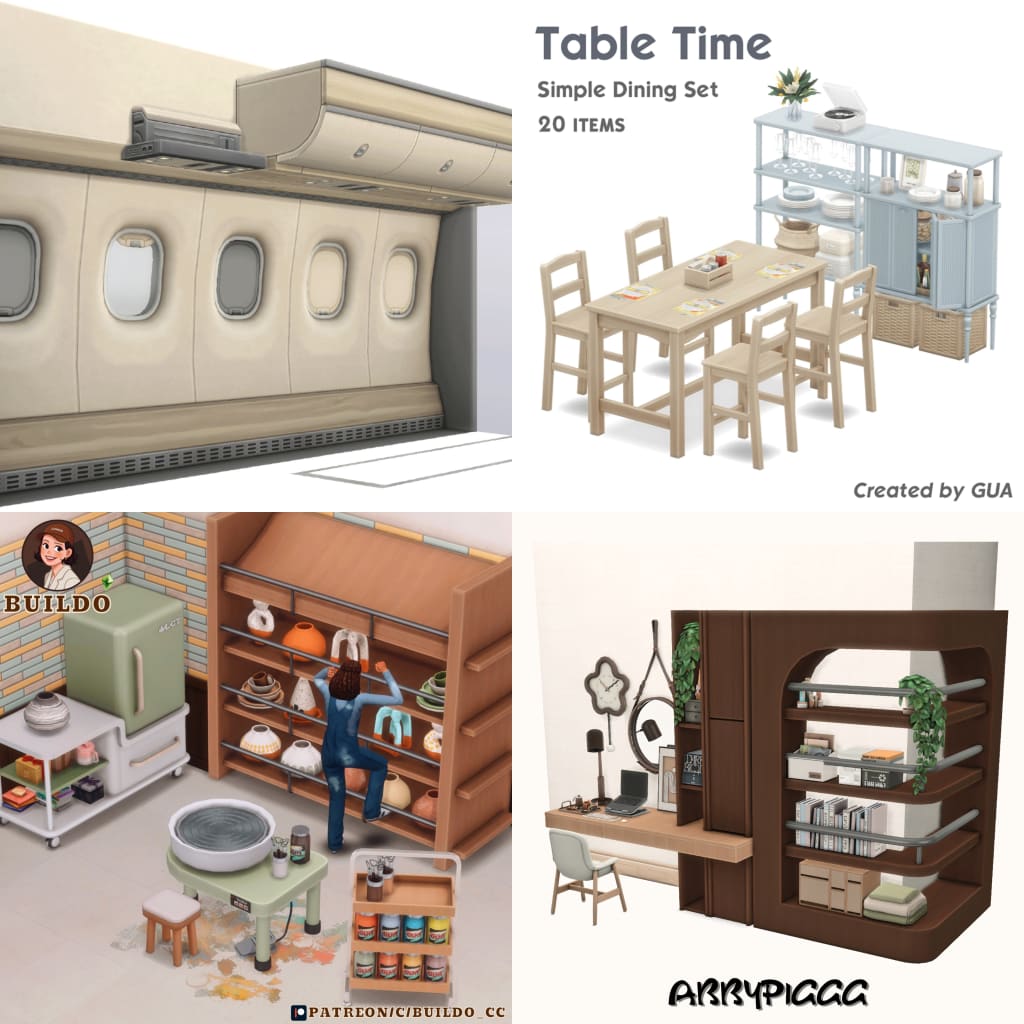
Image source: Vocal Media
Is It Safe to Download Large Sims 4 CC Folders?
New players are often tempted by "CC Hauls" or bulk "CC Folders" found on YouTube or Google Drive, which promise hundreds of items in a single download. While this seems like a significant advancement in convenience, it carries substantial risks.
Bulk folders often contain outdated files that haven't been updated for the latest game patches. This can lead to broken UI, "Blue Square" icons in your catalog, or even game crashes. Furthermore, these folders often include "Alpha" and "Maxis Match" items mixed together, which can ruin the visual consistency of your game.
Instead of bulk downloads, many experienced simmers recommend using the TSR CC Manager from The Sims Resource . This tool allows you to manage thousands of items, update them easily, and uninstall broken content with a single click. Manual curation—downloading only what you truly need—remains the most reliable way to keep your game running smoothly.
How to Install and Organize Your Furniture CC Safely
Proper organization is the difference between a fast-loading game and a frustrating experience. The Sims 4 reads files from the
Mods
folder, but there are specific rules you must follow for the game to recognize your furniture.
The "One Folder Deep" Rule
For furniture CC (which are
.package
files), the game can typically read them even if they are nested in sub-folders. However, to stay safe and organized, most experts recommend keeping your furniture only one or two folders deep. For example:
Mods > Furniture > SIXAMcc > [File Name]
.
A Step-by-Step Installation Guide
-
Locate your Mods folder, usually found at
Documents > Electronic Arts > The Sims 4 > Mods. - Download your chosen CC pack (usually a .zip or .rar file).
-
Extract the
.packagefiles into a dedicated sub-folder within your Mods directory. - Launch The Sims 4 and go to Game Options > Other .
- Ensure "Enable Custom Content and Mods" and "Script Mods Allowed" are both checked.
- Restart your game to apply the changes.
Troubleshooting Why Your Custom Furniture Is Not Showing Up
If you've installed your CC but the items aren't appearing in Build Mode, don't panic. This is a common issue that usually has a simple fix. First, check that you haven't nested the files too deeply. If a file is buried in five sub-folders, the game's engine may fail to index it.
Another common culprit is the
Resource.cfg
file. This small file lives in your Mods folder and tells the game where to look for content. If you accidentally deleted it, your CC will not load. You can usually generate a new one by moving your entire Mods folder to your desktop and restarting the game, which forces The Sims 4 to create a fresh, clean Mods folder.
Finally, if your CC appears as a "Checkered Pattern" or has missing textures, you likely have a missing "Mesh." Some creators release "recolors" of furniture that require you to download the original 3D model (the mesh) from another creator. Always read the download description carefully to see if a "Mesh Required" link is provided.
Frequently Asked Questions
- Does furniture CC slow down The Sims 4?
-
It can, especially if you use high-poly "Alpha" CC. Each item adds to the memory the game needs to load. To prevent lag, try to limit your total Mods folder size and regularly clear your
localthumbcache.packagefile, which helps the game load thumbnails more efficiently. - Is Sims 4 furniture CC free?
- Most CC is free, though many top creators use a Patreon early access model. This means new sets are available to paying supporters for 2-3 weeks before being released to the general public for free. Permanent paywalls are generally discouraged by the EA Terms of Service.
- Can I use furniture CC on console (PS5/Xbox)?
- Unfortunately, no. Custom content and mods are only compatible with the PC and Mac versions of The Sims 4. Console players are limited to official DLC and Kits released by EA.
- How do I know if a CC pack is "Maxis Match"?
- Look for visual cues like smooth, clay-like textures and the absence of photographic details. Most creators will also tag their work with "MM" or "Maxis Match" in the title or description to help players find the right style.
- What happens to my CC furniture when the game updates?
- The game automatically disables mods after a major update to prevent crashes. You will need to re-enable them in the settings. While most furniture stays functional, items with special scripts (like functional beds or appliances) may need to be updated by the creator.
Key Takeaways for Building Your CC Collection
Building a high-quality furniture collection requires a balance of aesthetic taste and technical maintenance. Here is how to ensure your game stays stable and beautiful:
- Prioritize EA-vetted creators like SIXAMcc for the highest level of stability and visual polish.
- Use functional CC to add new gameplay layers, such as working baby monitors or space-saving appliances.
- Master building shortcuts like the ALT key and 9/0 keys to break free from the grid for realistic interiors.
- Avoid bulk CC folders from unverified sources to prevent game corruption and outdated file issues.
- Organize by creator and keep your folders shallow to ensure the game indexes your content correctly.
- Maintain your Mods folder by clearing the cache and checking for updates after every official EA patch.
Start by downloading one full room set from a trusted creator to see how it changes your building experience before expanding to larger collections.