Home
Which Stardew Valley Interactive Map Should You Use for Your Farm?
For farm design, Stardew Planner V3 stands out as a top choice, offering full support for the 1.6 Meadowlands Farm and interior layouts. If you need real-time NPC tracking and completionist data, the Wand App and GameMappers are highly recommended. These tools allow you to import save files to visualize progress, track hidden artifact spots, and plan efficient daily routes across Pelican Town.
- Map Limitations
- Farm Design Tools
- NPC & Museum Tracking
- Importing Save Files
- Modded Map Support
- Tool Comparison
- Route Optimization
Why the In-Game Map Isn't Enough for Advanced Players
While the standard in-game map in Stardew Valley provides a charming, stylized overview of Pelican Town, it often falls short for players aiming for high efficiency or aesthetic perfection. The primary issue is that the in-game map is a static representation rather than a real-time GPS. It does not account for the precise tile-based movement of NPCs, nor does it reflect the actual layout of your farm as you build barns, sheds, and fences.
According to user discussions on Reddit , the low resolution and lack of zoom functionality make it difficult to plan large-scale projects. For example, if you are trying to calculate the exact reach of an Iridium Sprinkler or the scarecrow coverage for a massive pumpkin patch, the in-game interface offers no visual grid. This spatial limitation forces many players to rely on external interactive maps that provide a 1:1 tile ratio.
The release of Version 1.6 in 2024 and its subsequent refinements in 2025 and 2026 have only increased this complexity. With the introduction of the Meadowlands Farm and new environmental events like Green Rain, the need for a dynamic tool has become essential. Interactive maps now allow you to see "hidden" tile properties, such as which areas are hoeable and where building collisions might occur, preventing costly mistakes in the mid-to-late game.
Top-Rated Interactive Maps for Designing Your Farm Layout
When it comes to creative planning, Stardew Planner V3 is widely regarded as a leading option. Unlike earlier versions, V3 was built to handle the massive data influx from the 1.6 update. It allows players to render their entire farm in a browser, providing a sandbox environment where you can place every building, crop, and piece of furniture without spending a single in-game gold piece.
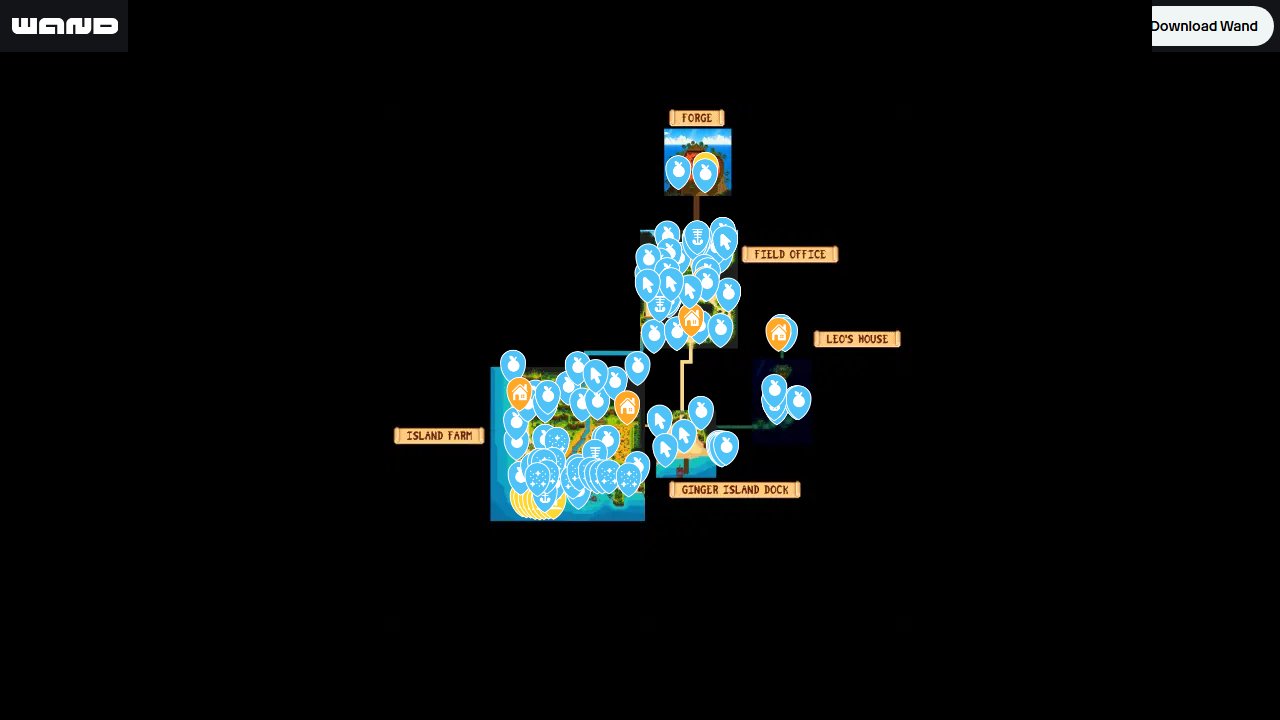
Image source: GameMappers
Meadowlands Farm Support and Interior Planning
One of the most significant advancements in recent mapping tools is the full integration of the Meadowlands Farm . This farm type, which starts players with a small coop and two chickens, has a unique layout that includes large areas of Blue Grass. Stardew Planner V3 provides the exact boundaries for this farm, including the pre-built coop placement, which cannot be moved in the very early game.
Furthermore, the planner has expanded beyond the outdoor farm boundaries. Users can now plan the interiors of their farmhouses, sheds, and even the cellar. This is particularly useful for players who want to maximize their aging wine production by fitting the maximum number of casks into the cellar layout. The tool provides a "cask count" feature that automatically calculates your potential profit based on the layout you design.
How to Plan for New 1.6 Trees and Crops
The 1.6 update introduced Mystic Trees and Blue Grass , both of which have specific growth requirements. Interactive maps now visualize the growth radius and spread patterns for these items. For instance, Blue Grass spreads faster than standard grass, and planners can help you determine where to place lightning rods or fences to "seed" your pastures effectively.
During the Green Rain event, certain trees transform or sprout moss at accelerated rates. Advanced interactive maps can now highlight which trees on your specific save file are eligible for these transformations. This allows you to prioritize chopping or tapping specific trees before the event ends, ensuring you collect the maximum amount of Moss and Fiddlehead Ferns.
Designing Your Greenhouse for Maximum Profit
A common "Pro Tip" sourced from the Stardew community involves the Greenhouse. Many players are unaware that fruit trees can be planted on the decorative tiles outside the central dirt plot. Interactive planners allow you to toggle a "grid view" that shows exactly which floor tiles are valid for tree placement.
Leading Tools for Tracking NPCs and Completing the Museum
For players focused on the "Perfection" tracker, knowing where every NPC is at any given moment is vital. The Wand App stands out for its live tracking capabilities. By syncing with your game data (often via a SMAPI mod), it provides a real-time icon for every villager on a high-resolution map of Pelican Town. This eliminates the need to memorize complex schedules that change based on weather, season, and friendship levels.
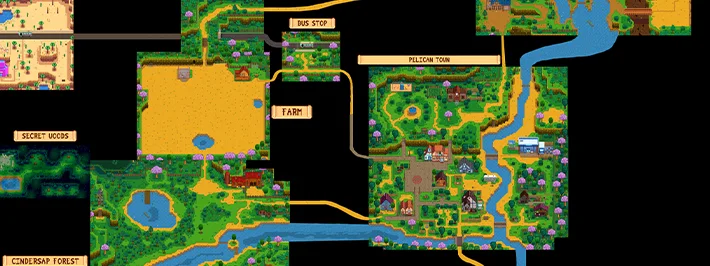
Image source: Wand
GameMappers is another exceptionally strong tool, particularly for museum completionists. It allows you to filter the map by "Artifact Spots" and "Secret Notes." If you are missing a specific prehistoric rib or an ancient doll, the map can show you the probability of those items spawning in specific regions like the Mountains or the Cindersap Forest. According to GameMappers' documentation , their POI (Point of Interest) filtering is updated to include the new 1.6 artifact spots found in the Ginger Island dig site.
Finding Every Fish Based on Current Weather
Fishing is often the most frustrating part of the completionist journey. Interactive maps solve this by offering Dynamic Fishing Markers . You can input your current in-game season, time, and weather (e.g., "Spring, 4:00 PM, Raining"), and the map will highlight only the bubbles where specific fish, like the Legend or the Catfish, are available. This is a significant step forward from static wiki tables, as it provides a visual guide to the exact "fishing zones" (distance from shore) required to catch high-quality specimens.
How to Import Your Save File to See Your Progress Live
One of the most powerful features of modern Stardew tools is the ability to upload your save file. This creates a "snapshot" of your farm, showing exactly where your crops are in their growth cycle, which kegs are finished, and where you left your horse. This is a leading method for sharing your farm progress with the community or troubleshooting layout issues.
Win + R
and type
%appdata%/StardewValley/Saves
. On Mac, go to
~/.config/StardewValley/Saves
.
FarmerName_123456789
). Inside, you will find a file with the same name. This is your raw data.
Fixing Common Save File Import Errors
Many users encounter the "InvalidOperationException" when trying to import save files. This is typically caused by "mod-bloat"—where custom mods add XML tags that the standard planner doesn't recognize. To fix this, you may need to use a text editor to strip out tags related to discontinued mods. Community members on the Stardew Valley Forums suggest keeping a "vanilla" backup of your save before performing deep edits.
Another common issue is browser lag. Because these maps render thousands of tiles, they can be taxing on your hardware. A technical tip from the Stardew Planner developers is to enable "Hardware Acceleration" in your browser settings (Chrome or Edge). If the map still stutters, switching to "Low Performance Mode" in the planner settings will disable animations and high-res textures, providing a smoother experience on older laptops.
Using Interactive Maps for Stardew Valley Expanded and Ridgeside Valley
For those who find the base game too small, mods like Stardew Valley Expanded (SVE) and Ridgeside Valley add massive new regions. Mapping these areas is a challenge because they change frequently with mod updates. However, Stardew Planner V3 now offers experimental support for Immersive Farm 2 Remastered and Grandpa’s Farm , the two primary farm layouts for SVE.
To use these modded layouts, you often need to pull specific JSON configuration files from the SVE Discord or GitHub repository. Once loaded, the interactive map will expand to show the new secret areas, additional NPC houses, and the vast new foraging grounds. This is a highly impactful feature for players who want to ensure their massive SVE farm remains organized and productive.
Comparison of the Top Stardew Valley Map Tools
Choosing the right tool depends on your specific goals for the day. The table below breaks down the most popular options available as of late 2026.
| Tool Name | Primary Strength | 1.6 Ready? | Save Import? | Mobile Support |
|---|---|---|---|---|
| Stardew Planner V3 | Farm & Interior Design | Yes | Yes | Browser Only |
| Wand App | Live NPC Tracking | Yes | Yes (via Mod) | Dedicated App |
| GameMappers | Collectibles & Fishing | Partial | No | Browser Only |
| Fandom Map App | Quick Reference | Yes | No | Dedicated App |
How to Optimize Your Daily Route to Save In-Game Time
In Stardew Valley, time is your most precious resource. A 20-hour in-game day disappears quickly, especially when you have to travel from the Mines to the Beach. Using an interactive map, you can implement a "Chaining Strategy" to maximize your efficiency. Instead of making multiple trips, you plan a circuit based on NPC locations and resource nodes.
For example, a typical optimized route might look like this:
- Morning: Check the map for NPC locations. If Robin is at the store, head to the Mountains first.
- Midday: Chain your visit to the Blacksmith with a trip to the Museum, as they are adjacent. Use the map to see if any artifact spots spawned in the Town Square on your way.
- Evening: Check the fishing markers. If the weather is right for a specific fish, end your day at the Beach or the Cindersap Forest pond.
Another advanced tip involves Tool Reach Visualization . On the interactive grid, you can see the exact area covered by a Copper vs. an Iridium watering can. By aligning your crop rows with these reach patterns, you can reduce the number of clicks required to maintain your farm, saving both in-game stamina and real-world time.
Key Takeaways for Mastering Your Farm
- Select the right tool based on whether you are designing a layout (Stardew Planner) or tracking NPCs (Wand App).
- Leverage 1.6 features like Meadowlands Farm support and Green Rain event tracking to stay ahead of the new content.
- Enable hardware acceleration in your browser to prevent lag when rendering large, complex farm designs.
- Import your save file regularly to get a live snapshot of your progress and identify missing museum artifacts.
- Plan for modded content by using tools that support Stardew Valley Expanded and Ridgeside Valley layouts.
- Optimize your daily route by "chaining" activities together based on real-time NPC movement data.
Start by uploading your current save file to Stardew Planner V3 to see how much space you can reclaim with a more efficient layout.
Frequently Asked Questions