Home
How to Choose and Use a Top-Rated PS4 Save Editor for Your Games
For most users, Save Wizard for PS4 MAX ranks among the top choices due to its massive library of 1,000+ supported games and one-click cheat application. If you prefer a free, community-driven approach and own a jailbroken console, Apollo Save Tool is a leading alternative. For retail (non-jailbroken) users seeking free options, Discord-based tools like EZWizard allow for save resigning, though they require more manual technical steps than paid software.
Understanding the Mechanics of PS4 Save Editing
Modifying a PlayStation 4 save file is significantly more complex than editing a PC game file. Sony employs a robust encryption system that ties every save file to a specific PlayStation Network (PSN) Account ID. To successfully edit a save, a tool must perform three distinct technical operations: decrypting the data, modifying the internal values, and resigning the file so the console recognizes it as valid.
The first step, decrypting , involves stripping away the system-level encryption that makes the save file unreadable to standard text or hex editors. Once decrypted, the "raw" data can be modified to change variables like gold, experience points, or inventory items. However, simply changing these numbers isn't enough. The console will reject any file that doesn't have a matching digital signature. This is where resigning comes in—the process of re-encrypting the file and signing it with your unique 16-digit Account ID.
A critical factor in this process is the CUSA code . Every game version has a unique region identifier (e.g., CUSA00123 for North America, CUSA00456 for Europe). Save editors must match the CUSA code of the save file to the specific cheat database for that region. According to community resources like GBAtemp , using a save from a different region without first "re-regioning" it will result in the console failing to detect the data entirely.
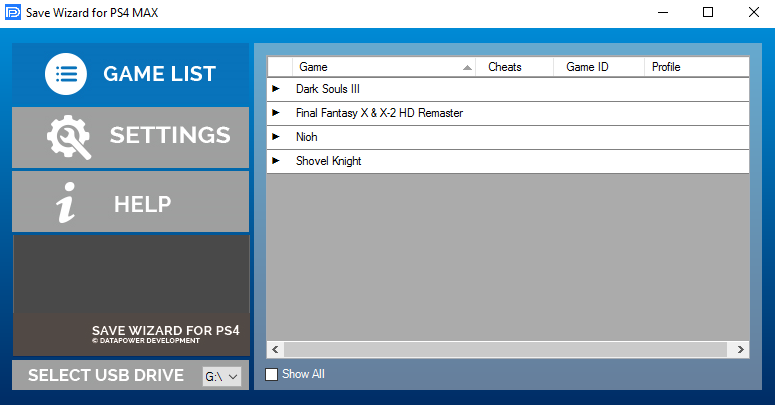
Image source: PSXHAX
Comparing Save Wizard MAX and Free Alternatives
When deciding on a save editor, the primary trade-off is between cost and convenience. The market is currently divided between a dominant paid service and several community-developed free tools. Each caters to a different type of user, from the casual gamer wanting a quick boost to the power user who enjoys deep technical customization.
Save Wizard for PS4 MAX is widely regarded as a top-tier option for retail console owners. Priced at approximately $49.99 for a two-year license, it provides a cloud-based server that handles the heavy lifting of decryption and resigning. According to the official Save Wizard site , the software supports over 1,000 titles, offering a "plug-and-play" experience where users simply select cheats from a list. It also includes an "Advanced Mode" for manual hex editing, though this is restricted on certain high-security titles.
On the other side, Apollo Save Tool stands out as a top choice for the homebrew community. It is an open-source application that runs directly on jailbroken PS4 consoles. Unlike Save Wizard, Apollo does not require a PC for the editing process, allowing users to resign and patch saves locally. For those on official firmware who cannot use Apollo, tools like Savely and EZWizard offer web-based or Discord-based resigning services, though they often lack the extensive built-in cheat databases found in paid software.
| Feature | Save Wizard MAX | Apollo Save Tool | EZWizard / Savely |
|---|---|---|---|
| Price | $49.99 (2-Year) | Free (Open Source) | Free / Donation |
| Console Type | Retail & Jailbroken | Jailbroken Only | Retail & Jailbroken |
| Ease of Use | High (One-click) | Moderate (On-console) | Low (Manual Steps) |
| Game Support | 1,000+ Titles | Community Driven | Manual Resigning |
| Advanced Mode | Yes (Hex Editor) | Yes (Direct Patching) | Limited |
Methods for Editing PS4 Saves Without Software Costs
If you are looking to avoid the $50 entry fee for Save Wizard, you can still modify your saves using community-developed workflows. These methods are notably more technical and require a solid understanding of how PlayStation file structures work. The most popular free method for retail users involves using Discord bots or web-based resigners to process files.
The EZWizard Bot Method is a popular community solution. Users join a specific Discord server, upload their encrypted save file to a bot, and provide their 16-digit Account ID. The bot then processes the file on a remote server and returns a resigned version. While this method is effective for using saves downloaded from the internet, it often lacks the ability to apply specific "cheats" (like infinite health) unless the save you are downloading already has those modifications applied.
To use any free resigning tool, you must know your 16-digit hexadecimal Account ID. You can find this by copying any legitimate save from your PS4 to a USB drive, opening the
param.sfo
file in a hex editor on your PC, and looking for the string associated with the user profile. Alternatively, websites like
psn.fluff.me
can sometimes retrieve this ID if your profile is public.
For those who want to actually edit values (not just resign), the Manual Hex Editing workflow is required. This involves using a tool to decrypt the save into a "decrypted.bin" file, opening that file in a hex editor like HxD, and searching for specific values. For example, if you have 500 gold in a game, you would search for the hexadecimal equivalent (01F4). After changing the value, you must then use a resigning tool to re-encrypt the file for your console. This process is time-consuming but offers a level of control that few alternatives match.
Troubleshooting Corrupt Save Errors and Resigning Issues
A common frustration in the save editing community is the "Corrupt Save" error. You may follow every step correctly, resign the save to your account, and transfer it back to your PS4, only to have the game refuse to load the data. This is frequently caused by the Double Encryption Trap .
Certain high-profile games, such as Burnout Paradise Remastered or recent FC (FIFA) titles, include a secondary layer of internal encryption. While Save Wizard or Apollo can handle the system-level PS4 encryption, the game itself has an internal check that verifies if the "Profile ID" inside the save data matches the "Account ID" of the system. If these don't match, the game triggers a corruption flag. Fixing this requires manually editing the internal decrypted data to update the Profile ID before the final resigning process occurs.
Another frequent issue is the
Zip File Error
. Many online resigning tools require you to upload your save in a specific folder structure. If you simply zip the individual files, the tool will fail. You must ensure the zip file contains the parent folder (usually named
CUSAXXXXX
), which in turn contains the
VFS
,
bin
, and
param.sfo
files. According to
PlayerSquared
, maintaining this directory integrity is the most common fix for failed uploads.
Compatibility of PS4 Save Editors With PS5 Consoles
With the transition to the PlayStation 5, many users wonder if their existing save editors still function. The answer depends entirely on whether you are playing a PS4 game via backward compatibility or a native PS5 title. Standard PS4 save editors, including Save Wizard, work perfectly for PS4 titles played on a PS5. You simply transfer the PS4 save to a USB drive, edit it on a PC, and move it back.
However, native PS5 saves are a different story. Sony changed the file structure and encryption methods for native PS5 titles, and they also disabled the ability to copy save files to a USB drive (saves can only be backed up to the PS Plus Cloud). This effectively blocked traditional save editing for several years. Recently, a significant advancement occurred with the release of Garlic Save Manager .
As detailed by Modded Warfare , Garlic Save Manager is one of the first tools capable of decrypting and mounting native PS5 saves on jailbroken consoles. For retail PS5 users, the options remain extremely limited, as there is currently no way to extract the save files from the system for editing. If you are playing the PS5 version of a game, you generally cannot use a PS4 save editor unless the game supports "Cross-Save" (allowing you to edit the PS4 version and then upload it to the PS5 version via the game's servers).
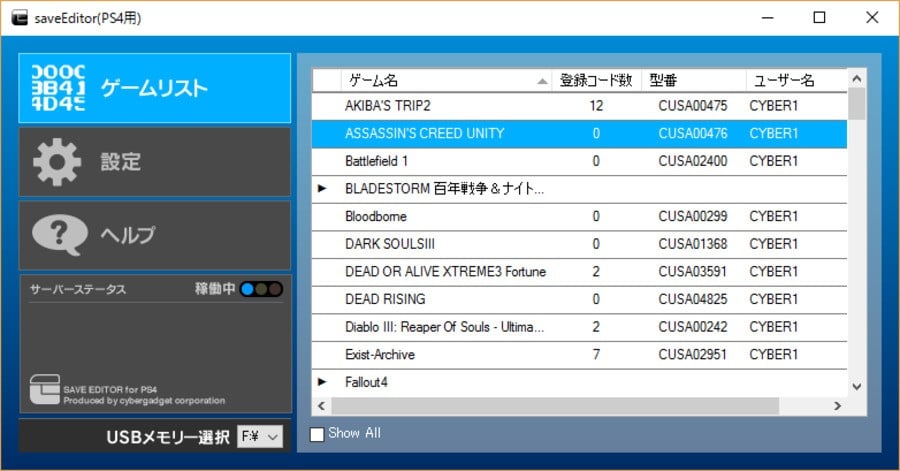
Image source: Push Square
Advanced Strategies for Modding Unsupported Game Titles
What happens when you want to mod a game that isn't on Save Wizard's official list? In these cases, you can use a Combination Workflow . This strategy involves using a tool like Apollo or Savely to perform the initial decryption, giving you access to the raw, unencrypted save data. Once you have this raw file, you can utilize generic engine editors.
Many modern games are built on standard engines like Unity, Unreal Engine, or RPG Maker. These engines often use predictable save formats like JSON, XML, or simple binary arrays. By uploading your decrypted save to a site like
SaveEditOnline.com
, you can often see a list of variables in plain English. You might find a line that says
"player_gold": 100
. Changing that to
999999
and then re-importing the file into your resigning tool allows you to mod games that have no official support.
This method is particularly effective for indie games and niche RPGs. However, it requires caution. Modifying values that the game doesn't expect (such as giving yourself a quest item before the quest starts) can lead to "soft-locks," where the game's logic breaks and you cannot progress. Always keep a backup of your original, unedited save file before attempting these advanced maneuvers.
A Step-by-Step Walkthrough for Your First Save Mod
If you are ready to begin, follow this structured process to ensure a successful modification. This workflow assumes you are using a PC and a standard USB drive formatted to FAT32 or exFAT.
- Prepare the Hardware: Format your USB drive to FAT32 or exFAT. The PS4 will not recognize NTFS drives.
- Export the Save: On your PS4, go to Settings > Application Saved Data Management > Saved Data in System Storage > Copy to USB Storage Device . Select your game and copy the save.
-
Identify the File:
Plug the USB into your PC. You will see a folder named
PS4, thenSAVEDATA, then a folder with your Account ID, and finally theCUSAXXXXXfolder. - Apply Modifications: Open your chosen editor (e.g., Save Wizard). The software should automatically detect the save on your USB. Select the cheats you want and click "Apply."
- Resign (If Necessary): If you are using a save from another user, use the "Resign" function to bind the save to your Account ID.
- Import Back to Console: Safely eject the USB and plug it back into the PS4. Go to Settings > Application Saved Data Management > Saved Data on USB Storage Device > Copy to System Storage . Overwrite the existing file.
Never use modified saves in online multiplayer modes. Sony's anti-cheat systems and server-side checks can detect abnormal values (like impossible stats in FC 24 Ultimate Team ), which may lead to a permanent ban of your PSN account. Keep your mods strictly offline.
Potential Risks When Using Modified Saves Online
While save editing is generally safe for single-player experiences, the risks escalate significantly when you take those modifications online. Sony's Terms of Service (ToS) explicitly prohibit the use of external software to gain an advantage in online play. In recent years, developers have become more sophisticated at detecting "impossible" save data.
For example, in games with global leaderboards or competitive modes, a save file that shows a Level 99 character with 0 hours of playtime is an immediate red flag. According to community discussions on Reddit , users who modified their saves for competitive advantage in titles like Bloodborne or Dark Souls often found themselves "shadow-banned," meaning they could only play with other cheaters rather than the general population.
Furthermore, using save editors to unlock Trophies instantly is a high-risk activity. Sony monitors Trophy timestamps; if you unlock twenty "Ultra Rare" trophies in the same second, your account may be flagged for review. To stay safe, always disable your internet connection while playing with a modified save, and never upload that save to the PS Plus Cloud if you intend to keep the modifications active.
Key Takeaways for PS4 Save Editing
- Save Wizard MAX ranks among the top choices for retail users due to its ease of use and 1,000+ game support.
- Apollo Save Tool is a leading free alternative, but it requires a jailbroken console to function.
- CUSA codes are vital; you must match the save region to the editor's database for the mod to work.
- Double encryption in certain games (like EA titles) can cause "Corrupt Save" errors even after resigning.
- Native PS5 saves cannot be edited with PS4 tools; Garlic Save Manager is the current solution for jailbroken PS5s.
- Account IDs are 16-digit hex strings required by all free resigning tools to validate your save files.
- Offline play is essential when using mods to avoid permanent PSN account bans.
Before you begin, ensure you have a high-quality USB drive and have backed up your original save data to a separate location on your PC.
Frequently Asked Questions
- Is Save Wizard for PS4 a one-time purchase?
- Save Wizard for PS4 MAX typically operates on a 2-year license model. After two years, you must renew your subscription to continue using the cloud-based decryption and resigning services. However, there is also a physical version available through retailers like Hyperkin , though it may have different support limitations compared to the MAX version.
- Can you edit PS4 saves without a computer?
- For retail (non-jailbroken) consoles, a computer is mandatory because you must move the save file to a USB drive and use PC-based software to decrypt it. If you have a jailbroken console, you can use the Apollo Save Tool, which allows you to edit and resign saves directly on the PS4 without needing an external PC.
- What is the best free alternative to Save Wizard?
- The answer depends on your console. For jailbroken users, Apollo Save Tool is widely considered a top choice. For those on official firmware, Savely and the EZWizard Discord bot are the most popular free alternatives, though they require more manual effort and technical knowledge to use effectively compared to paid software.
- Will using a save editor get my PSN account banned?
- If you use modified saves strictly for offline, single-player games, the risk of a ban is extremely low. However, using them in online multiplayer modes or to manipulate global leaderboards is a violation of Sony's Terms of Service and can result in a permanent console or account ban.
- Does Save Wizard work on the latest PS4 firmware?
- Yes. Because Save Wizard edits the save file itself rather than the console's operating system, it remains compatible with the latest official PlayStation 4 firmware. As long as you can copy your save to a USB drive, the editor will be able to process it regardless of your system's software version.