Home
How to Use the Trilogy Save Editor for Mass Effect 1 Legendary Edition
The
Trilogy Save Editor
(developed by Karlitos) is the current standard for modifying Mass Effect 1 Legendary Edition saves. It allows players to adjust plot flags, credits, Paragon/Renegade scores, and inventory. To use it, download the editor from
Nexus Mods
, ensure the
Microsoft Edge WebView2 Runtime
is installed, and open your
.pcsav
files located in your BioWare Documents folder. For console players, a PC and the
Save Wizard
tool are required for decryption.
Which Versions of Mass Effect Are Supported?
Navigating the various releases of the Mass Effect franchise can be confusing when selecting a save editor. While the Trilogy Save Editor is a versatile tool, its support varies significantly between the 2007 original release and the 2021 Legendary Edition (LE).
According to official documentation on
GitHub
, the editor provides comprehensive support for the entire Legendary Edition. However, users of the original 2007 Mass Effect 1 will find that their
.sav
files are not natively compatible. For those players, a specific "injection" workaround is necessary, which involves editing the flags within a Mass Effect 2 save file instead.
| Game Version | Platform | Support Status |
|---|---|---|
| Mass Effect 1 Legendary Edition | PC (Steam/EA) | Full Support |
| Mass Effect 1 Original (2007) | PC | No Direct Support (Use ME2 Injection) |
| Mass Effect 2 & 3 (Original & LE) | PC | Full Support |
| Legendary Edition (PS4/PS5) | Console | Supported (Requires Save Wizard) |
| Legendary Edition (Xbox) | Console | Limited (Cloud Encryption Issues) |
How to Install the Editor and Required Runtimes
Setting up the Trilogy Save Editor is a straightforward process, but it does have one specific technical requirement that often trips up new users. The editor utilizes modern web technologies for its interface, meaning it cannot run without the proper Microsoft runtimes.
Step-by-Step Installation
- Visit the Trilogy Save Editor page on Nexus Mods or GitHub.
-
Download the latest release (usually a
.zipor.7zfile). - Extract the contents to a dedicated folder on your PC. Do not run it directly from the compressed folder.
- Install WebView2: If prompted, you must install the Microsoft Edge WebView2 Runtime . This is a standard Microsoft component required for the editor's UI to render correctly.
-
Launch
TrilogySaveEditor.exe.
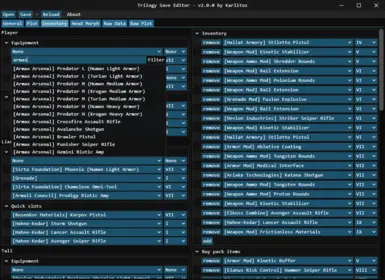
Image source: Nexus Mods
How to Locate Your Mass Effect Save Files
Before you can begin editing, you must know where the game stores your progress. Mass Effect uses a specific naming convention for its save files, typically ending in
.pcsav
for the Legendary Edition.
- Legendary Edition Path
- Documents\BioWare\Mass Effect Legendary Edition\Save
- Original Mass Effect 2 Path
- Documents\BioWare\Mass Effect 2\Save
- Original Mass Effect 3 Path
- Documents\BioWare\Mass Effect 3\Save
Inside these folders, you will see subfolders named after your character (e.g.,
John_11_Soldier_140521
). Your actual saves are files like
Save_0001.pcsav
. When saving your edits, it is a wise practice to
increment the number
(e.g., save as
Save_0002.pcsav
) rather than overwriting the original file. This prevents cloud sync conflicts and gives you an easy way to revert if something goes wrong.
How to Edit Your Mass Effect 1 Legendary Edition Save File
Once you have opened your save file in the editor, you will be presented with several tabs. For Mass Effect 1, the most common edits involve character progression and morality scores.
Adjusting Morality and Credits
If you find yourself locked out of crucial dialogue options because your Paragon or Renegade scores are too low, you can manually adjust them in the Character -> Raw or Morality tabs. Simply enter a value (typically up to 340 for ME1) to max out the bars. Similarly, you can set your Credits, Medi-gel, and Omni-gel to their maximum values to remove the need for resource grinding.
Talents and Leveling
The Legendary Edition changed the level cap and scaling. If you want to reach Level 60 (or Level 30 in the new scaling) without multiple playthroughs, you can adjust your XP and Talent Points here. This is particularly useful for players who want to experience a "New Game Plus" feel on their first run by starting with a full suite of abilities.
Managing Your Inventory and Adding Spectre Master Gear
One of the most persistent frustrations in the original Mass Effect is the 150-item inventory limit. The Trilogy Save Editor provides a robust solution for this by allowing you to bulk-delete junk items or manually add the game's most powerful equipment.
Spawning Top-Tier Gear
Instead of waiting for RNG to favor you at the C-Sec or Alliance Requisition officers, you can use the Inventory tab to add "Spectre Master Gear" (the X-Series weapons like the HMWA X). You can also add rare armors such as the Colossus or Hazard suits by selecting the item type and setting the manufacturer and quality level to 10.
How to Fix Mass Effect 1 Choices in Mass Effect 2
A common issue reported by the community involves the "Import Failure" bug. This occurs when a player edits their ME1 save after defeating the final boss, but those changes fail to carry over when importing the character into Mass Effect 2. This happens because the ME2 import utility often reads the "End Game" state, which is generated the moment the final boss falls and does not always update with subsequent manual edits.
Within the ME2 save, navigate to the Imported ME1 tab. Here, you can manually toggle every major decision from the first game, including:
- Wrex's Fate: Ensure he survived Virmire.
- The Council: Toggle whether the Destiny Ascension was saved or sacrificed.
- Rachni Queen: Set the flag for her survival or extinction.
- Romance: Fix "ninjamancing" issues where the game incorrectly flags a romance with Liara or Kaidan/Ashley.
How to Edit Mass Effect Saves on PS4 and PS5
Editing saves on PlayStation consoles is significantly more complex than on PC due to Sony's file encryption. However, it is possible if you have the right tools. You will need a PC and a third-party paid service known as Save Wizard .
The PlayStation Workflow
- Copy your Mass Effect Legendary Edition save from your PS4 or PS5 to a USB drive. (Note: For PS5, you must be playing the PS4 version of the game, as native PS5 saves are currently not supported by Save Wizard).
- Plug the USB into your PC and open Save Wizard .
- Use Save Wizard to "Resign" or "Advanced Edit" the save, which decrypts the file into a format the Trilogy Save Editor can read.
- Open the decrypted file in the Trilogy Save Editor and make your changes.
- Save the changes and use Save Wizard to re-encrypt the file back onto the USB.
- Copy the save back to your console and load it.
The Situation for Xbox Players
For players on Xbox One and Xbox Series X|S, save editing is currently much more restricted. Because Xbox uses a proprietary cloud-based encryption system that does not allow for easy USB transfers of save data, there is no direct equivalent to Save Wizard for modern Xbox consoles.
Legacy players on the Xbox 360 can still use tools like Horizon or 360Revolution to extract saves from a formatted USB drive. These saves can then be opened in the Trilogy Save Editor, modified, and injected back into the console. For modern Xbox users, the only viable way to "edit" a playthrough is to use the Genesis interactive comic at the start of Mass Effect 2 to set major plot points, though this lacks the granular control of a true save editor.
Troubleshooting Common Save Editor Issues
While the Trilogy Save Editor is exceptionally strong, users may occasionally encounter technical hurdles. Based on community feedback from Steam Community guides , here are the most frequent issues and their fixes:
"Save File Not Found" or Loading Errors
This is often caused by OneDrive interference. Windows sometimes redirects your Documents folder to the cloud, which can prevent the editor from seeing the local files. Ensure your BioWare folder is locally available and not "Online Only."
Changes Not Appearing in Game
If you edit a save but the game looks the same, you likely loaded the wrong file. Remember that the game sorts saves by timestamp. If you created a new save (e.g.,
Save_0013
), make sure you are manually selecting that specific file from the "Load Game" menu rather than hitting "Resume."
Game Crashes on Load
If the game crashes after an edit, a plot flag conflict has likely occurred. The Trilogy Save Editor automatically creates a
.bak
file of your original save. Simply delete the corrupted
.pcsav
and rename the
.bak
file to restore your progress.
Frequently Asked Questions
Does the Trilogy Save Editor work for Mass Effect 1 Legendary Edition?
Can I change my Shepard's appearance mid-game?
.ron
file. This is particularly useful if you want to tweak your character's look after seeing how they appear in different lighting during the early missions of Mass Effect 1.
Will using a save editor disable my achievements?
Is it possible to edit saves for the original 2007 version of ME1?
.sav
files. To "edit" an original ME1 playthrough, the most effective method is to start Mass Effect 2 and use the editor to modify the "Imported ME1" flags within the ME2 save file. This simulates the choices you would have made in the first game.
What is the Microsoft Edge WebView2 Runtime requirement?
Key Takeaways for Successful Save Editing
- Use the Trilogy Save Editor by Karlitos for all Legendary Edition versions on PC.
- Install WebView2 Runtime to ensure the editor's interface functions correctly.
- Always backup your saves manually before making any modifications to avoid data loss.
- Increment your save numbers when saving edits to prevent cloud synchronization errors.
- Use the ME2 "Imported" tab to fix Mass Effect 1 choices if the direct ME1 save edit fails to carry over.
- Utilize Save Wizard for PlayStation edits, keeping in mind that only the PS4 version of the game is compatible.
- Add Spectre Master Gear via the inventory tab to bypass the game's vendor RNG.
Start by creating a backup of your Save folder today to ensure your Shepard's journey remains secure while you experiment with these powerful tools.