Home
How to Download and Use the Xenoverse 2 Save Editor to Modify Your Game Save
The
Xenoverse 2 Save Editor
, primarily developed by
Lazybone
, is a top-tier tool for modifying character levels, attributes, and inventory on PC. To use it, you must link the tool to your game's
bin
folder and locate your save file, typically found in the Steam
userdata
directory. For PS4 users, web-based conversion tools are available, though they often require a VPN for access.
Dragon Ball Xenoverse 2 offers a massive amount of content, but the grind for TP Medals, rare Super Souls, and level caps can be exhausting. This is where the community-developed save editor becomes an essential asset. Widely regarded as one of the most reliable tools for the game, Lazybone’s editor allows players to bypass time-gated events and repetitive grinding to focus on the gameplay they enjoy most.
Whether you are looking to fix a corrupted save, experiment with different character builds, or unlock items that are no longer available through official events, understanding how to navigate this tool safely is vital. In this guide, we will cover everything from the initial download to advanced troubleshooting for the common "Init Fail" error.
Where to Find the Latest Xenoverse 2 Save Editor Download
Finding a safe and updated version of the editor is the first step. Because the game receives frequent updates from Bandai Namco, the editor must also be updated to maintain compatibility. Using an outdated version often leads to immediate crashes or the inability to read your save file.
The primary source for the tool is VideoGameMods.com . Lazybone, the lead developer, maintains the project there. When downloading, always check the version number against your current game version (e.g., v1.26.00). If the editor version lags behind a recent game patch, you may need to wait a few days for a community update.
It is also important to note the role of
Eternity
. While Lazybone built the user interface and editing logic, the tool relies on encryption and decryption code provided by Eternity. This backbone is what allows the editor to "read" the proprietary save format used by the game. Without these libraries, the editor cannot function, which is why most downloads come as a bundled package containing several
.dll
files.
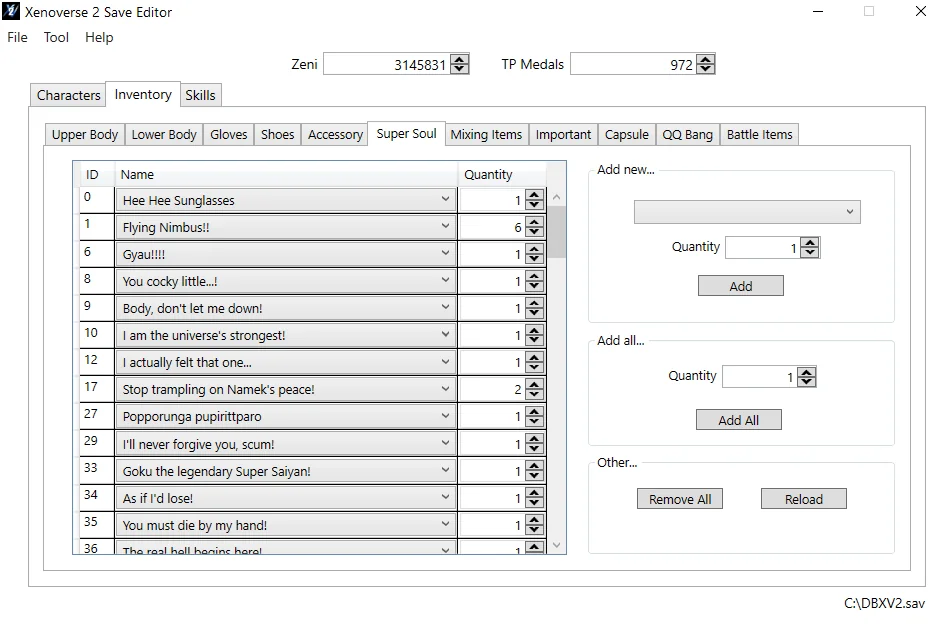
Image source: Video Game Mods
How to Set Up the Editor and Fix the Init Fail Error
Once you have downloaded the files, do not simply run the executable from your downloads folder. For the best results, extract the folder to a dedicated location on your drive, such as
C:\Modding\XV2Editor
. Running the tool with administrative privileges is highly recommended to ensure it has the necessary permissions to write changes to your save directory.
Linking the Game Directory
Upon the first launch, the editor will likely ask you to locate your game directory. You must point it to the
bin
folder within your Xenoverse 2 installation path. This step is critical because the editor needs to scan the game's internal files to generate a list of skill names, item descriptions, and Super Soul effects. If you skip this, many dropdown menus in the editor will appear empty or show generic IDs instead of names.
Solving the "Init Fail" Error
The "Init Fail" error is the most common hurdle for new users. According to community troubleshooting guides , this error typically stems from one of three issues:
- Version Mismatch: Your game has updated, but your editor is still on an older version.
-
Missing DLLs:
Antivirus software sometimes flags the decryption libraries as false positives. Ensure
xv2savdec.dllis in the same folder as the editor. -
Incorrect Pathing:
The editor is looking for the game files in the wrong directory. Go to
Settings > Path
and re-select your
DB Xenoverse 2/binfolder.
Where Is the Xenoverse 2 Save File Located on Your Computer?
Before you can edit anything, you must know where your save file lives. Xenoverse 2 uses a file named
DBXV21
(or
dbxv2.sav
in some versions). Depending on how you purchased or installed the game, this location changes significantly.
| Game Version | Standard File Path |
|---|---|
| Steam (Official) |
C:\Program Files (x86)\Steam\userdata\[YourSteamID]\323470\remote\DBXV21
|
| CODEX / RUNE |
C:\Users\Public\Documents\Steam\CODEX\323470\remote\dbxv2.sav
|
| Windows Store / Game Pass |
%LocalAppData%\Packages\...\SystemAppData\wgs\...
|
A frequent point of confusion occurs when users edit a save file, click save, but see no changes in-game. This usually happens because you are editing a "ghost" save file. Steam often creates backups in different folders. To verify you have the active file, try moving the
DBXV21
file to your desktop and launching the game. If the game starts a new save, you’ve found the correct folder. If your progress is still there, the game is reading from a different directory entirely.
How to Edit Your Character Attributes and Inventory Safely
The editor provides a granular level of control over your Time Patroller. You can change your race, gender, and even your character's name without restarting the story. However, changing your race mid-playthrough can sometimes lead to animation glitches if you are wearing race-specific clothing. It is a top-rated practice to unequip all clothing and skills before performing a race swap.
Managing Levels and Attributes
While it is tempting to set every attribute to 999, the game has internal checks that can cause crashes if your total attribute points exceed the allowed limit for your level. As of the most recent updates, level 180 is considered a stable high-point for editing. While some users report success at level 199, others experience "infinite connecting" loops when trying to enter the multi-lobby.
Inventory and QQ Bangs
The inventory tab allows you to add any item in the game, including those restricted to specific events. You can also create "perfect" QQ Bangs. While the game naturally limits QQ Bangs to a certain number of positive and negative pips, the editor allows you to create +5 in every category. While this is exceptionally strong for offline play, using these in ranked PvP is a quick way to get flagged by the community.
How to Unlock Rare Super Souls and Skills
One of the most popular uses for the Xenoverse 2 save editor is bypassing the "Fear Of Missing Out" (FOMO) associated with timed online events. Many Super Souls, such as "Damn... Gonna have to go all out!", provide significant damage boosts but are only available during specific Raid windows.
By using the "Items" tab in the editor, you can manually add these souls to your inventory. The tool also supports installed mods. If you have added custom skill mods using the XV2 Installer, Lazybone’s editor will automatically detect them and allow you to assign those skills to your character’s loadout. This integration makes it one of the strongest options for players who enjoy a heavily modded experience.
Hero Colosseum Editing
For those who find the Hero Colosseum grind tedious, the editor includes a dedicated tab for modifying your figure collection. You can unlock all figures, set them to max level, and even modify your deck composition. This is a significant time-saver for players who only want the achievements or rewards associated with the Colosseum without spending thousands of TP Medals on RNG packs.
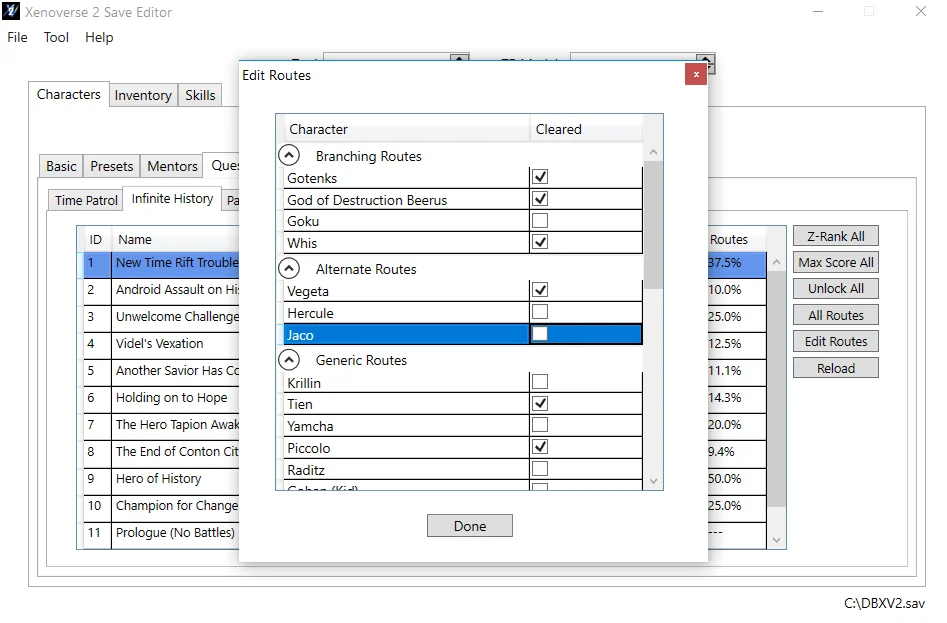
Image source: Video Game Mods
How to Avoid Bricking Your Save or Getting Banned
Modifying save files always carries a small risk. To minimize this, you should follow the Story Skip Safety Protocol . Many users try to check the "Complete All Story" flag immediately on a new character. This often bricks the save because the game expects certain flags (like the first Parallel Quest tutorial) to be completed linearly. Always complete the first PQ tutorial manually before using the editor to skip story progress.
The "Validate Flags" Step
Under the "Tools" menu in the editor, there is an option to "Validate Flags." This is a critical step that many players overlook. Clicking this button forces the editor to check for logical inconsistencies in your save—such as having a skill unlocked but not the corresponding quest. Running this before you save your changes significantly reduces the chance of a corrupted file.
Anti-Cheat and Online Play
Xenoverse 2 does not have a traditional "anti-cheat" that scans your hard drive, but it does have server-side checks for impossible stats. To stay safe:
- Avoid using "Lobby Auras" (like the Festival Champion aura) if you didn't earn them.
- Keep your attribute points within a realistic range for your level.
- Do not use modded skills in public Ranked matches.
-
Always keep a backup of your original
DBXV21file before editing.
Can You Use the Save Editor on PS4 or Nintendo Switch?
The Lazybone editor is a Windows-based application, meaning it cannot run directly on a console. However, a bridge exists for PS4 players. By using the website
xenoverse2saveeditor.fun
, users can upload their decrypted PS4 save files, edit them in a web interface, and then re-sign them to their console.
According to discussions on Reddit , this site is frequently taken down or blocked in certain regions. Users often need a VPN to access the interface. For Nintendo Switch users, the process is much more complex, requiring a homebrewed console to extract the save file before it can be edited on a PC. For the vast majority of console players, the PC version remains the most accessible platform for modding.
Troubleshooting Common Save Editor Problems
If you encounter issues where your changes aren't appearing, or the game crashes on the loading screen, check the following checklist:
- Changes Not Reflecting In-Game
- You are likely editing a save file in a different directory than the one Steam is currently using. Check your Steam Cloud settings.
- Infinite Loading Screen
- This usually happens if you have assigned a modded skill that was recently deleted or if your attribute points are glitched. Use the editor to "Reset Attributes" and try again.
- Windows 11 Permission Errors
- Windows 11 has stricter folder protections. Right-click your save folder, go to Properties, and ensure "Read Only" is unchecked.
The Bottom Line
Using a save editor can significantly enhance your Xenoverse 2 experience by removing tedious barriers, provided you handle the technical steps with care.
DBXV21
file first.
For your next step, locate your Steam userdata folder and create a backup folder for your saves today.
Frequently Asked Questions
Is the Xenoverse 2 Save Editor safe to use?
Yes, the editor is widely considered safe for offline use. Thousands of players use Lazybone's tool to manage their characters. However, there is always a risk when modifying game files. As long as you maintain backups and avoid using impossible stats in competitive online modes, the risk of a ban or corrupted save is minimal.
How do I fix the "Init Fail" error?
The "Init Fail" error is usually caused by a version mismatch between the editor and the game. Ensure you have the latest version from VideoGameMods. Additionally, make sure the editor is pointed to your game's
bin
folder in the settings menu and that all
.dll
files are present in the editor's directory.
Can I change my character's race without losing progress?
Yes, the editor allows you to change your race and gender at any time. However, you should unequip all race-specific clothing and skills before doing so. If you change from a Saiyan to a Namekian while wearing Saiyan-only armor, the game may crash or display visual glitches until you change your outfit in-game.
Where is my Steam ID for the save path?
Your Steam ID is a unique number associated with your account. You can find it by looking at the folder names inside
C:\Program Files (x86)\Steam\userdata\
. If you are the only person who uses your PC for Steam, there will likely only be one folder with a long string of numbers. That is your Steam ID.
Does the editor work on the latest 2026 update?
Lazybone and the modding community are very active. Usually, an update for the editor is released within a few days of a major game patch. Always check the "Last Updated" date on the download page to ensure compatibility with the most recent version of Xenoverse 2.