Home
How to Use a Diablo II LoD Character Editor for Classic and Resurrected
A Diablo II character editor allows you to modify
.d2s save files
for offline play. For
Diablo II: Resurrected (D2R)
, web-based tools like
d2runewizard
are the modern standard. For
Classic LoD (v1.14d)
,
Hero Editor v1.04
remains a top-tier choice. Always back up your save files located in
Saved Games
before editing, and never use modified files on Battle.net to avoid permanent bans.
Modifying your character in Diablo II: Lord of Destruction (LoD) or the modern Resurrected (D2R) version can significantly enhance your offline experience. Whether you are theory-crafting a new build, testing item combinations for a Holy Grail run, or simply bypassing the grind of leveling, a character editor provides the tools necessary to adjust stats, skills, and equipment. However, because these games span over two decades of technology, the tools and methods vary significantly depending on which version you are playing.
It is vital to understand that character editing is strictly intended for Single Player/Offline mode. Blizzard Entertainment maintains a zero-tolerance policy regarding modified files on their Battle.net servers. Attempting to bring an edited character online will likely result in a ban. This guide focuses on the safe, technical application of these tools for personal enjoyment and testing.
Where to Find Your Diablo II Save Files
Before you can use any editor, you must know where your character data is stored. The location of these files has changed over the years as Windows evolved its file structure and Blizzard updated the game's architecture.
Locating files for Diablo II: Resurrected
In the modern era, Diablo II: Resurrected stores all offline character data in a standardized Windows directory. This makes it much easier to manage than older versions. You can typically find your files at the following path:
C:\Users\(YourUsername)\Saved Games\Diablo II Resurrected
Within this folder, each character consists of several files. The most important is the .d2s file, which contains your character's stats, skills, and inventory. Other files like .key (hotkeys) and .map (revealed map data) are also present but are rarely the target of editors.
Locating files for Classic LoD (v1.14+)
When Blizzard released the v1.14 patch for the classic game, they moved the save directory to comply with modern Windows user permissions. If you are running the classic game on a modern OS, look here:
C:\Users\(YourUsername)\Saved Games\Diablo II
Locating files for Legacy LoD (Pre-v1.14)
If you are playing an older version of the game (such as v1.09 or v1.13c for specific mods like PlugY), the save files are usually located directly within the game's installation directory. Look for a folder named
/save/
inside your main Diablo II folder. Note that if you installed the game in
C:\Program Files
, you might need to check the "VirtualStore" folder if Windows redirected the write permissions.
Effective Character Editors for Diablo II: Resurrected
For players of the Resurrected version, web-based editors have become the preferred method. These tools are platform-agnostic, requiring no installation, and are updated frequently to handle the new data structures introduced in D2R, such as Sunder Charms and Terror Zones.
One of the most widely used tools is d2runewizard's Hero Editor . This tool offers a visual interface that allows you to drag and drop items, adjust level sliders, and even modify shared stashes. It is particularly useful because it supports modern mods like "Reign of the Warlock" and handles the larger stash sizes of D2R without corrupting the file.
Another excellent choice for theory-crafters is d2emu . This editor is highly regarded for its item generation capabilities. If you want to see how a specific runeword performs with a perfect roll, d2emu allows you to generate that item instantly and export it to your save file. These web tools are significantly safer than downloading executable files from untrusted sources, as they run entirely within your browser's sandbox.
How to Use Hero Editor v1.04 for Classic LoD
While web tools are great for D2R, the classic Diablo II: Lord of Destruction community still relies heavily on Hero Editor v1.04 , originally created by ZonFire99. This legacy application is widely considered a standard for deep, hex-level item customization that modern web tools sometimes lack.
However, running a 20-year-old Visual Basic 6 (VB6) application on Windows 11 requires some preparation. You may need to install the VB6 runtime files if the editor throws an "MSVBVM60.DLL not found" error. Once running, the interface can be daunting, but it offers granular control over every attribute of your character.
A critical step for compatibility with v1.14d files is setting the Item Decode version. In the "Description" panel of Hero Editor, ensure the toggle is set to "1.10-1.13." If this is not set correctly, the editor may fail to read items properly or crash when saving. You can find the legacy download and community patches on ModDB .
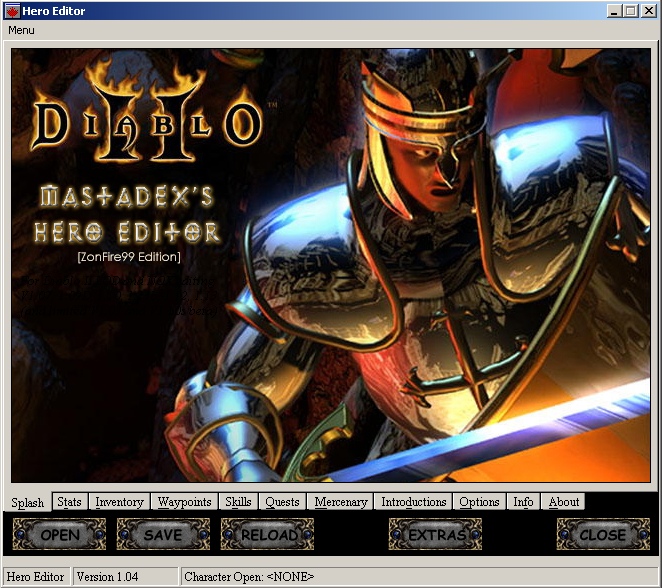
Image source: ModDB
The Hybrid Workflow for Advanced D2R Editing
A common problem for D2R players is that modern web editors sometimes lack the ability to edit specific item hex codes or create "impossible" items for testing purposes. Conversely, the powerful Hero Editor v1.04 cannot natively open D2R save files because the file format has changed.
To solve this, advanced users employ a Hybrid Workflow using conversion tools. This process allows you to bridge the gap between the two eras of the game:
- Convert D2R to Legacy: Use a web-based converter (such as the one found at dschu012.github.io) to transform your D2R .d2s file into a classic LoD format.
- Edit in Hero Editor: Open the converted file in Hero Editor v1.04. Here, you can perform deep edits, such as adding specific frame-rate breakpoints or custom attributes to items.
- Convert Back to D2R: Once your edits are complete, save the file and use the converter again to bring it back to the D2R format.
- Import: Place the new .d2s file back into your D2R save folder.
This method is highly impactful for players who want the precision of legacy tools with the visual fidelity of the Resurrected engine. However, be cautious: adding D2R-exclusive items (like Sunder Charms) to a legacy file during this process will likely cause the conversion to fail or the items to disappear.
Troubleshooting Common Editor Errors
Because these tools often interact with old code and registry settings, users frequently encounter technical hurdles. Below are the most common issues and their verified fixes.
- The "Save Path" Registry Error
-
Hero Editor often fails to find the game because the v1.14 installer does not create the expected registry keys. To fix this, open
regeditand navigate toHKEY_CURRENT_USER\SOFTWARE\Blizzard Entertainment\Diablo II. Manually add a String Value named Save Path and set its value to your actual save folder path. - The "Item Code (sc) not found" Bug
- This is a regional conflict. If your Windows System Region is set to a non-English locale (such as Japanese), the editor may crash when loading items. Temporarily switching your system region to US or UK usually resolves this conflict.
- Failed to Join Game
- If your character fails to load after an edit, it is usually due to "Bad Item Data." This happens if you give an item an attribute it cannot legally have, or if your stat points exceed the internal cap. Try removing the last edited item to see if the character loads.
Running Character Editors on Linux and Steam Deck
With the rise of the Steam Deck, many players are enjoying Diablo II: Resurrected on Linux. Running legacy Windows editors in this environment requires a bit more setup. Using Bottles or Lutris is the most effective way to manage these applications.
For Hero Editor v1.04, you should set up a 32-bit bottle using a GE-Proton runner. This provides the necessary compatibility layers for the old VB6 code to execute. To find your save files on the Steam Deck, you must navigate through the Proton prefix folder, which is typically located at:
~/.local/share/Steam/steamapps/compatdata/1574090/pfx/drive_c/users/steamuser/Saved Games/Diablo II Resurrected
Using a web-based editor is much simpler on the Steam Deck, as you can simply open the browser in Desktop Mode, upload your file, and download the modified version directly into the folder.
Advanced Customization with Item Packs
Instead of manually editing every attribute of an item—which is prone to error—many experts recommend using Item Packs . These are collections of pre-verified items stored in a format that editors can import instantly.
| Feature | Hero Editor v1.04 | d2runewizard (Web) | IGHE (Mod) |
|---|---|---|---|
| Platform | Windows Desktop | Web Browser | In-Game (PC) |
| D2R Support | Via Conversion | Native | Native |
| Item Crafting | Deep/Hex Level | Basic/Presets | Real-time |
| Setup Difficulty | High (Registry fixes) | Zero | Moderate |
The Ginger Gaming Mentor (GGM) Pack and Jordan Brauer’s GitHub Pack are among the most acclaimed resources in 2026. These packs include every unique item, set item, and high-tier runeword in the game, ensuring that the data is "legal" and won't cause your game to crash. Using these assets is a significant step forward for players who want to jump straight into testing builds without the risk of file corruption.
Frequently Asked Questions
Will using a character editor get me banned from Battle.net?
No, provided you only use it for Offline/Single Player characters. Battle.net characters are stored on Blizzard's servers and cannot be edited by these tools. However, if you attempt to use third-party software to modify the game while connected to Battle.net, you risk a permanent account ban. Always keep your edited files strictly in the local "Saved Games" folder.
Can I use these editors on PS5, Xbox, or Nintendo Switch?
Directly, no. Console file systems are encrypted and locked, preventing you from accessing the .d2s files. However, if you have the PC version of D2R, you can use the "Cross-Progression" feature. You can edit an offline character on PC and, in some cases, sync the data, though this is technically complex and often restricted to online characters which cannot be edited. For most users, editing is a PC-only feature.
Why does my character say "Failed to Join Game" after editing?
This error is almost always caused by "Bad Item Data." If you create an item with attributes that exceed the game's internal limits (like +100 to all skills) or give an item to a class that cannot hold it, the game engine will reject the file. To fix this, open the character in the editor again and remove the most recently added or modified items.
What is the "In-Game Hero Editor" (IGHE) mod?
The IGHE is a mod created by developers like Warren1001 that allows you to edit your character while the game is actually running. Unlike external editors, this requires installing a mod into your D2R directory. It is a popular choice for streamers and testers who need to make rapid changes without restarting the game. You can find the source on GitHub .
Does Hero Editor work with Diablo II: Resurrected?
Not directly. Hero Editor v1.04 was built for the classic game engine. To use it with D2R, you must use a conversion tool to turn your D2R save into a classic save, perform your edits, and then convert it back. For most D2R players, using a native web-based editor is a much simpler and more reliable option.
Key Takeaways
- Always backup your .d2s files before using any editor to prevent permanent data loss.
- Use web editors like d2runewizard for Diablo II: Resurrected to ensure compatibility with new items and stash sizes.
- Apply the Registry Fix if Hero Editor v1.04 cannot find your classic Diablo II installation path.
- Leverage Item Packs to avoid "Bad Item Data" crashes by using verified, pre-made equipment.
- Stay Offline to ensure your Battle.net account remains in good standing; never take modified files online.
- Use the Hybrid Workflow if you need deep hex-editing capabilities for your D2R characters.
Start by locating your save folder and creating a backup copy of your favorite character today.