Home
How to Paint Your Farmhouse and Buildings in Stardew Valley
Yes, you can paint your farmhouse and farm buildings in Stardew Valley as of the 1.5 Update . To do this, visit Robin’s Carpenter Shop , select "Construct Farm Buildings," and click the small paintbrush icon at the bottom right of the building's menu. Painting is free but requires the building to be fully upgraded (Deluxe level for barns/coops and the Nursery upgrade for the farmhouse).
Can You Actually Paint Your House in Stardew Valley?
For years, players were restricted to the default wood-and-stone aesthetic of the Pelican Town valley. However, the introduction of the 1.5 Update marked a significant advancement in farm customization. This update added a robust painting system that allows players to modify the exterior of their homes and utility buildings without using mods.
Unlike interior decorating, which involves wallpapers and flooring purchased from Pierre’s or the Furniture Catalogue, exterior painting is a structural service. It is widely considered one of the best ways to personalize a late-game farm, allowing you to coordinate your sheds, barns, and house into a unified color palette. Whether you prefer a minimalist "Modern White" look or a rustic "Classic Red," the system provides enough flexibility to satisfy most aesthetic preferences.
According to official game data , this feature is available across all platforms that support version 1.5, including PC, console, and mobile. The service is notably innovative because it doesn't just change the walls; it allows for independent color control over the Roof, Walls, and Trim .
What Are the Requirements to Unlock Painting?
While the act of painting itself is free, the prerequisite upgrades are not. You cannot paint a basic starter cabin or a small coop. The game requires the building to reach a specific structural maturity before the "overlay" system for paint can be applied.
Farmhouse Upgrade Levels
To paint your primary residence, you must have completed at least two upgrades with Robin. The first upgrade adds the kitchen, and the second upgrade adds the Nursery (the room for children). Once the Nursery is built, the paintbrush icon will appear in Robin's menu. It is important to note that you do not need the final Cellar upgrade to unlock painting; the Nursery level is sufficient.
Farm Building Upgrade Levels
For functional farm buildings, the requirement is even stricter. Barns, Coops, and Sheds must be at their Deluxe level. This means a standard Barn or a Big Barn cannot be painted; only the Deluxe Barn qualifies. The Stable is a unique case—it is paintable as soon as it is constructed, as it has no further upgrade tiers.
| Building Type | Required Upgrade Level | Cost to Paint |
|---|---|---|
| Farmhouse | Nursery Upgrade (2nd Upgrade) | Free |
| Barn / Coop | Deluxe Level | Free |
| Shed | Big Shed | Free |
| Stable | Base Level (No upgrades needed) | Free |
| Slime Hutch | Not Paintable | N/A |
Where Do You Go to Paint Your Farm Buildings?
There are two primary locations where you can access the painting interface. While most players default to Robin, the late-game alternative offers more flexibility for busy farmers.
Visiting Robin’s Carpenter Shop
Robin is the primary architect of Pelican Town. To paint, head to her shop in the Mountain area (north of town) during her business hours (9:00 AM to 5:00 PM, closed Tuesdays). Interact with her desk and follow these steps:
- Select "Construct Farm Buildings" from the menu.
- Use the arrows at the bottom to scroll through the buildings until you find the one you wish to paint.
- Look for the small paintbrush icon located in the bottom right corner of the building's display box.
- Click the icon to open the HSB (Hue, Saturation, Brightness) slider menu.
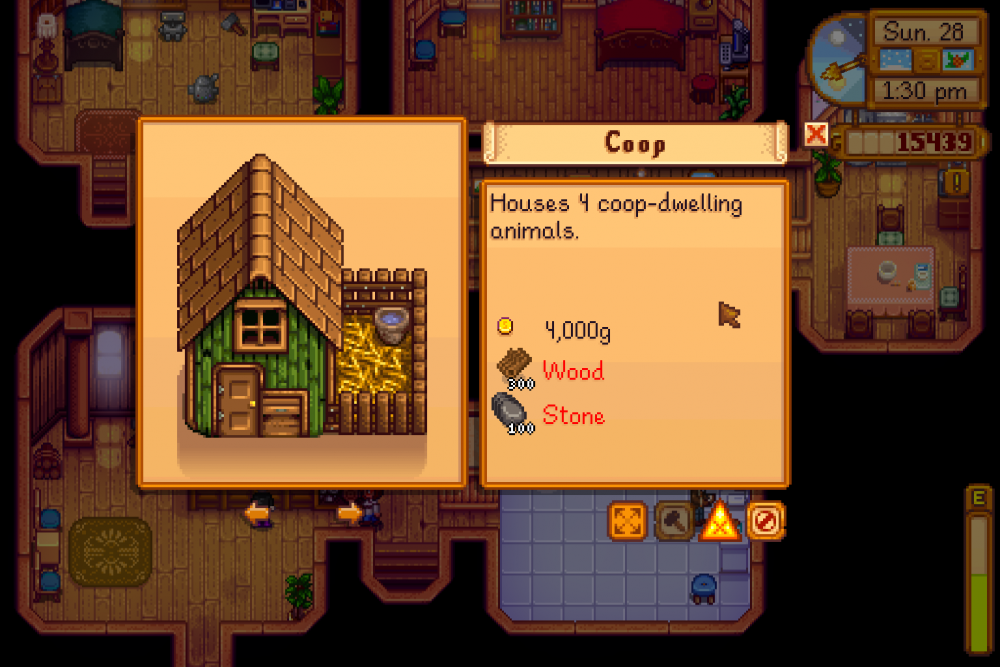
Image source: Stardew Valley Forums
Using the Wizard’s Tower Alternative
A "pro-tip" often discussed in community forums is using the Wizard’s Tower. Once you have completed the "Goblin Problem" quest and unlocked the Wizard's magical construction book, you can move and paint buildings from his tower.
This is a top-tier option for two reasons:
- No "Busy" Lock: If Robin is currently building something on your farm, her shop menu is locked. The Wizard, however, is always available to paint.
- Extended Hours: The Wizard’s Tower is open until 11:00 PM, giving you more time in the game day to handle your farm's aesthetics.
How to Use the Painting UI and Color Sliders
The painting interface in Stardew Valley uses an HSB slider system rather than a simple color picker. This allows for millions of potential combinations, but it can be slightly confusing for those unfamiliar with color theory.
Navigating the Three Sections: Roof, Walls, and Trim
When you open the painting menu, you aren't just changing one color. At the top of the UI, you will see small arrows that allow you to toggle between three distinct sections of the building:
- Roof: Changes the primary shingles or covering.
- Walls: Changes the main siding of the building.
- Trim: Changes the window frames, door frames, and corner beams.
Many players mistakenly believe they can only paint the walls because they miss these toggle arrows. By coordinating these three elements, you can create a highly sophisticated look for your farmstead.
Mastering the Hue, Saturation, and Brightness Sliders
The sliders function as follows:
- Hue: This determines the actual color (Red, Blue, Green, etc.).
- Saturation: This determines how "vivid" the color is. Low saturation leads to greys and pastels; high saturation leads to neon or deep colors.
- Brightness: This determines how light or dark the color is. Use this to create deep navy blues or bright whites.
Using the Copy-Paste Feature for a Cohesive Farm
One of the most useful features in the UI is the "Save Color" function. Represented by an icon that looks like two sheets of paper , this allows you to save a specific HSB configuration. Once saved, you can open the menu for a different building and apply that exact same shade instantly. This ensures that your Deluxe Barn and your Deluxe Coop match perfectly, which is a common goal for players seeking a professional farm layout.
Why Can't I Paint My House? (Troubleshooting Checklist)
If you find that the paintbrush icon is missing or greyed out, you are likely encountering one of a few common restrictions. Based on Steam community discussions , here is a checklist to resolve the issue:
- Check Upgrade Status: Is your Barn "Deluxe"? Does your Farmhouse have the Nursery? If not, the icon will not appear.
- Check Robin's Schedule: If Robin is currently standing on your farm hammering away at a new building, you cannot use her shop menu to paint. Wait until she finishes her 3-day project.
- The Slime Hutch Exception: The Slime Hutch is currently not paintable in the base game. To make it fit in, many players choose to paint their other buildings in shades of purple or green to match the Hutch's fixed palette.
- Mobile UI Precision: On mobile devices, the sliders can be finicky. Instead of dragging the slider, try tapping the specific point on the bar where you want the slider to jump. This often provides better control on touchscreens.
- Greenhouse and Shipping Bin: These structures are currently not part of the painting system. You can move them, but their colors remain default.
"I spent three hours trying to paint my coop before realizing it was only a 'Big Coop' and not a 'Deluxe' one. The game doesn't explicitly tell you why the button is missing, which is a major pain point for new players." — Common community sentiment on Reddit.
Aesthetic Ideas and Color Slider Settings
Creating a beautiful farm is one of the most rewarding aspects of Stardew Valley's end-game. Here are a few popular "color recipes" to get you started:
-
Modern Farmhouse (White & Black):
- Walls: Hue (Any), Saturation (-100), Brightness (100)
- Roof: Hue (Any), Saturation (-100), Brightness (-100)
- Trim: Hue (Any), Saturation (-100), Brightness (-80)
-
Gothic / Witchy Farm:
- Walls: Hue (280 - Purple), Saturation (20), Brightness (-60)
- Roof: Hue (Any), Saturation (-100), Brightness (-100)
- Trim: Hue (280), Saturation (40), Brightness (-40)
-
Forest Cabin (Natural Greens):
- Walls: Hue (120 - Green), Saturation (30), Brightness (-20)
- Roof: Hue (30 - Brown), Saturation (40), Brightness (-30)
- Trim: Hue (30), Saturation (20), Brightness (-50)
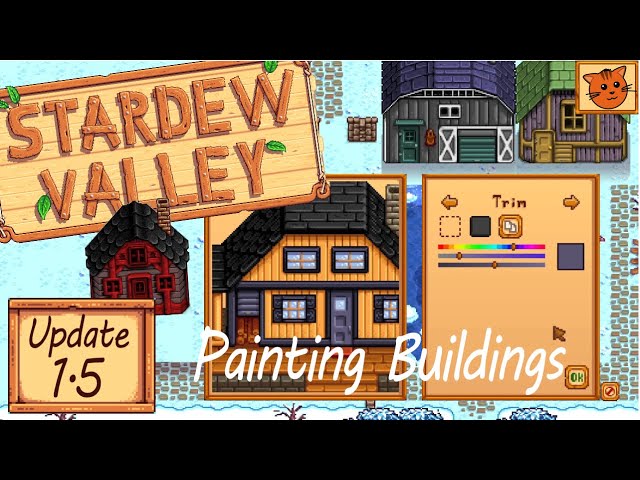
Image source: YouTube
Frequently Asked Questions
Does painting the house take time or gold?
No, painting is instantaneous and completely free. Unlike building upgrades which take three days and thousands of gold pieces, you can change your building colors as many times as you like in a single day without spending a single copper or waiting for Robin to finish the work.
Can I paint the interior walls of my house this way?
No, the building painting menu only affects the exterior appearance (Roof, Walls, Trim). To change the interior, you must use Wallpapers and Flooring, which can be purchased from Pierre’s General Store, JojaMart, or the Furniture Catalogue.
Is painting available on the mobile version of Stardew Valley?
Yes, as long as your game is updated to version 1.5 or higher. The mobile UI includes the same paintbrush icon in the Carpenter Shop menu, though some users find the touch-based sliders require a bit more precision to use effectively compared to a mouse.
Can I reset my house to its original colors?
Yes! In the painting UI, there is a "Default" button for each section (Roof, Walls, Trim). Clicking this will immediately revert that specific section to the game's original color scheme, allowing you to start over if you aren't happy with your custom palette.
Why can't I paint my Greenhouse?
The Greenhouse is considered a unique structure in the game code. While it can be moved after it is repaired, it does not currently support the overlay system required for painting. Most players choose to paint their other buildings to complement the Greenhouse's white and glass aesthetic.
Key Takeaways for Customizing Your Farm
- Upgrade first: Ensure your farmhouse has the Nursery and your buildings are at the Deluxe level.
- Visit the right spot: Use Robin’s shop during the day or the Wizard’s Tower for late-night customization.
- Look for the icon: The small paintbrush in the bottom right of the construction menu is your gateway to painting.
- It's free: Don't worry about costs; painting doesn't require gold or materials.
- Toggle sections: Remember to use the arrows to switch between painting the Roof, Walls, and Trim.
- Save your colors: Use the "copy" icon to ensure every building on your farm matches for a professional look.
- Check your version: Ensure you are playing on version 1.5 or later to access these features.
Start by visiting Robin today to see which of your current buildings are eligible for a fresh coat of paint.