Home
How to Play Multiplayer on Stardew Valley Across PC Console and Mobile Devices
To begin a multiplayer session in Stardew Valley, the host must select "Co-op" from the main menu and choose "Host." You must have one cabin for every friend joining your farm. On PC and Switch 2, you can host up to 8 players, while other consoles are limited to 4. Note that all players must be on the same platform (e.g., PC to PC) as cross-platform play is generally not supported between consoles and computers.
Stardew Valley, developed by ConcernedApe, has evolved from a solo farming simulator into a robust social experience. Whether you are looking to share the workload of a massive farm or simply want to explore the Mines with friends, the multiplayer mode offers a significant advancement in how the game is played. According to the official Stardew Valley Wiki , the game supports various connection methods depending on your hardware, ranging from local split-screen to online invite codes.
How to Start a New Multiplayer Farm from the Main Menu
Starting a fresh journey with friends is often the most seamless way to experience co-op. When you select "Co-op" and then "Host," you will be prompted to "Host New Farm." This menu looks similar to the single-player character creation screen but includes several critical multiplayer-specific settings.
Configuring Starting Cabins
One of the most important decisions is the number of "Starting Cabins." You should set this to your desired player count immediately. While you can add cabins later, starting with them saves you 100g and the 10 Stone/Wood required for Robin to build them. You can also choose the layout of these cabins—either "Close" to the main farmhouse or "Separate" to give each player their own corner of the property.
Profit Margins and Shared Money
Multiplayer introduces the concept of "Profit Margins." Because multiple players can produce significantly more goods than one, you can choose to reduce the sell price of items (25%, 50%, or 75%) to maintain the game's challenge. Additionally, you must decide between a Shared Wallet or Separate Wallets . Shared money is excellent for highly coordinated teams, while separate wallets allow for individual progression and financial independence.
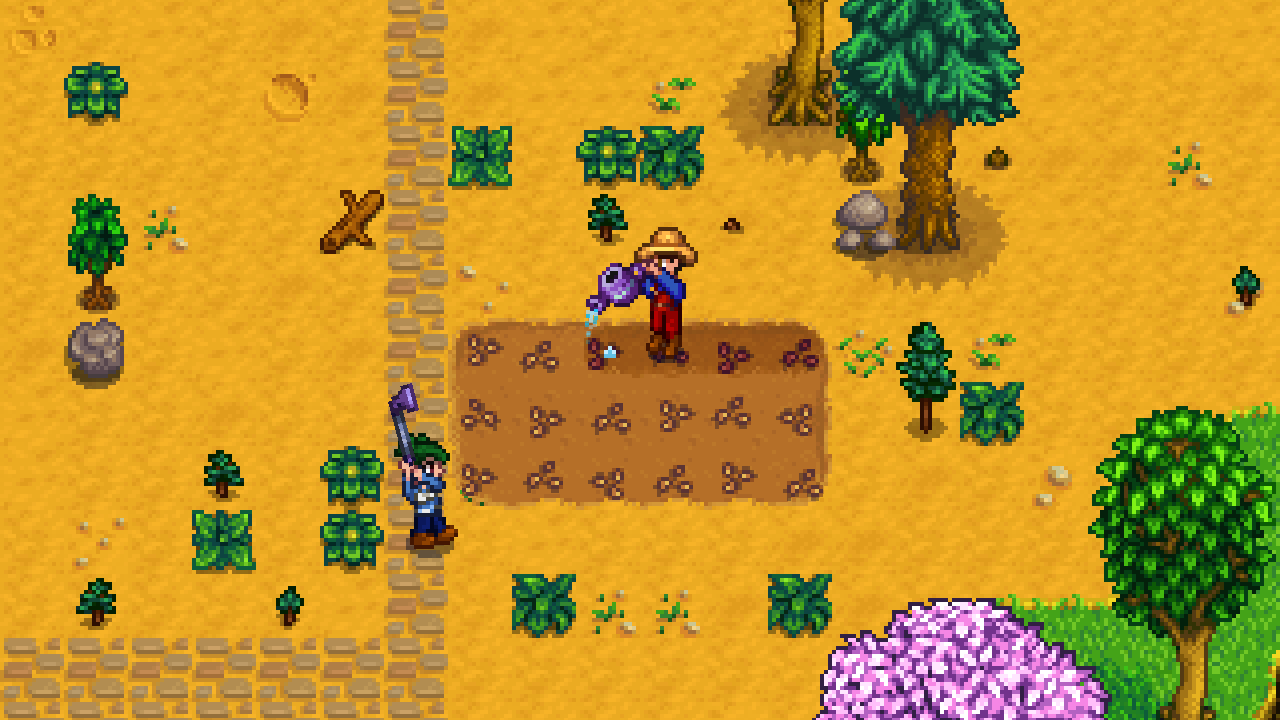
Image source: IGN
How to Add Multiplayer to an Existing Single-Player Save File
If you have a solo farm that you’ve spent dozens of hours perfecting, you don't have to start over to play with friends. You can convert any single-player save into a multiplayer world by following a few simple steps.
First, you must visit Robin the Carpenter at her shop in the mountains. Under the "Construct Farm Buildings" menu, you will find three types of cabins: Stone, Plank, and Log. Each cabin costs a mere 100g and a handful of basic resources (10 Stone or 10 Wood). Once the cabin is built—which happens instantly—your world is technically ready for a farmhand.
After the cabin is placed, save your game and return to the main menu. Now, instead of loading through the "Load" button, go to "Co-op" and select "Host." Your existing save will appear there. When you load it, the game will open the connection for other players to join. This flexibility makes Stardew Valley a top-tier choice for players who want to transition from a solo experience to a social one without losing progress.
How to Play Stardew Valley Multiplayer on PC
The PC version (Steam, GOG, and Microsoft Store) offers the most flexible connection options. With the release of the 1.6 update, the player cap on PC was increased from 4 to 8 players , making it a popular choice for large groups.
Steam and GOG Integration
If you and your friends are on Steam or GOG, joining is as simple as using your friends list. The host starts the game, and friends can right-click the host's name in the chat client and select "Join Game." If the "Join" button doesn't appear, ensure the host has their status set to "Online" rather than "Invisible."
Using Invite Codes and IP Addresses
For those who prefer not to use friend lists, Stardew Valley generates a unique 10-12 character alphanumeric Invite Code . The host can find this in the in-game options menu under the multiplayer section. Farmhands can then enter this code in the "Join" tab of the Co-op menu. For local networks, you can also connect via IP address using UDP port 24642 , which is a highly reliable method for LAN parties.
How to Set Up Multiplayer on Nintendo Switch and Switch 2
The Nintendo Switch version is widely regarded as one of the best ways to play Stardew Valley due to its portability. However, there are specific hardware distinctions to keep in mind, especially with the introduction of newer hardware.
Online and Local Communication
To play online, all players must have an active Nintendo Switch Online subscription. If you are in the same room, you can use "Local Communication," which allows consoles to connect directly to each other without an internet connection. This is perfect for travel or areas with poor Wi-Fi.
Switch 2 Enhancements
According to recent technical specifications, the Switch 2 offers enhanced multiplayer capabilities compared to the original hardware. While the original Switch is limited to 4 players online and 2-player split-screen, the Switch 2 supports up to 8 players online and 4-player split-screen . This puts the newer console on par with the PC version in terms of social scale.
How to Play Multiplayer on PlayStation and Xbox
Console players on PlayStation 4/5 and Xbox One/Series X|S have a straightforward but more restricted experience. These platforms remain capped at 4 players per farm.
- Subscription Requirements: You must have PlayStation Plus or Xbox Game Pass Core/Ultimate to access online features.
- Invite Systems: Use the native console "Invite to Game" overlay. Once the host is in the farm, they can send invites directly through the console's social menu.
- Split-Screen: Both platforms support up to 4-player local split-screen, provided you have enough controllers and the host has built the necessary cabins.
How to Unlock the Secret Mobile Multiplayer Mode
For years, mobile players were left out of the co-op experience. However, the 1.6 update introduced an experimental multiplayer feature for iOS and Android. It is hidden behind a secret "Konami-style" code on the title screen.
The Secret Unlock Sequence
- Open Stardew Valley on your mobile device.
- On the main title screen, look at the four leaves on the logo.
- Tap the leaves in this specific order: ↑ ↑ ↓ ↓ ← → ← → (Top, Top, Bottom, Bottom, Left, Right, Left, Right).
- Tap the "?" button in the bottom right corner.
- The "Co-op" button will now appear on your main menu.
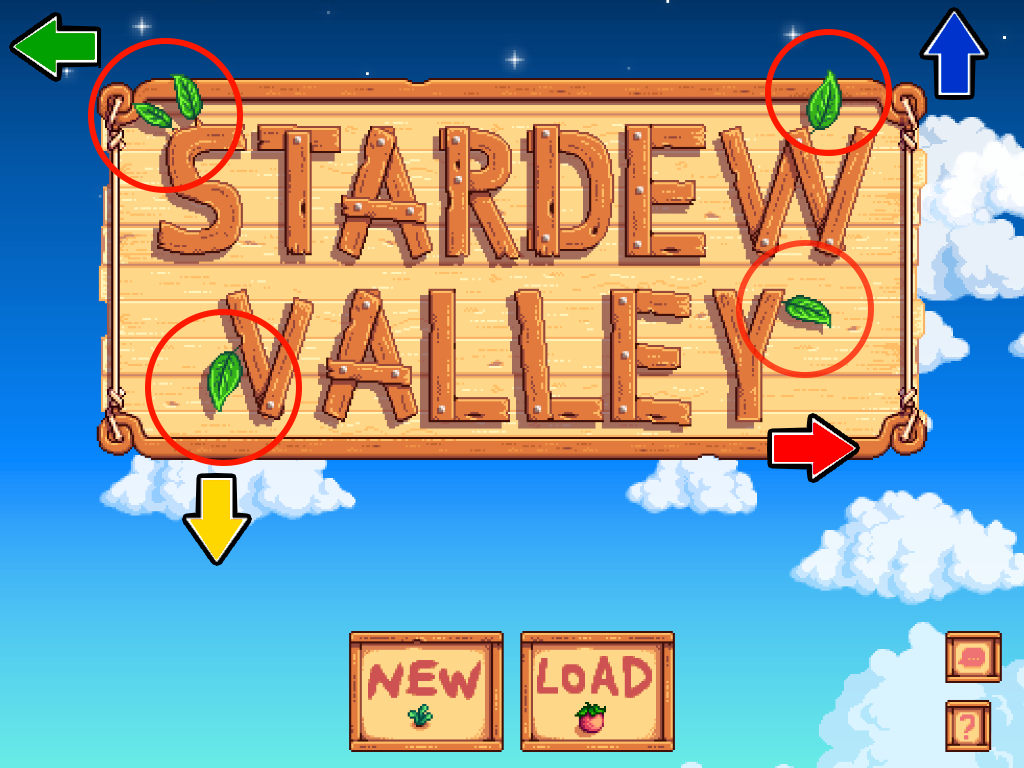
Image source: Stardew Valley
As noted in the Official Mobile Multiplayer Guide , this feature is experimental. Mobile devices do not have a "farm discovery" list, so you must connect via the host's IP address. Furthermore, hosting from a phone on a cellular network is not recommended due to stability issues; a stable Wi-Fi connection is essential for a smooth experience.
How to Set Up Local Split-Screen Couch Co-op
Split-screen is a fantastic way to play with family or roommates on a single device. To set this up, the host must first load their farm (either a new co-op farm or an existing one with a cabin). Once in the game, the second player simply needs to connect a controller and press the "Start" or "Options" button.
On PC, you can play split-screen with one player on Keyboard/Mouse and others on controllers. On consoles, each player needs their own controller. A common tip for split-screen players is to go into the "Options" menu and adjust the UI Scale and Zoom Level . Reducing these can help reclaim screen real estate that is lost when the view is divided, making the game much more playable on smaller televisions.
Which Platforms Support Cross-Play and Cross-Platform Play?
One of the most frequent questions in the community is whether a Switch player can join a PC player. Unfortunately, Stardew Valley does not support true cross-platform play between consoles and PC. The compatibility is strictly limited to the same hardware families.
| Platform A | Platform B | Compatible? |
|---|---|---|
| Steam (PC) | GOG / Microsoft Store (PC) | Yes |
| PC | Mobile (iOS/Android) | Yes (via IP) |
| Nintendo Switch | PlayStation / Xbox | No |
| PC | Nintendo Switch | No |
| PlayStation 4 | PlayStation 5 | Yes |
A major hurdle for cross-play is Version Mismatch . When a significant update like 1.6 launches, it typically hits PC first, followed by consoles and mobile weeks or months later. Players cannot connect if their game versions do not match exactly (e.g., 1.6.8 vs 1.5.6).
How to Manage Resources and Skills Through Multiplayer Strategy
Playing with friends introduces what veteran players call the "Multiplayer Tax." While you have more hands to water crops, you also have more mouths to feed and more tools to upgrade. Resources like Hardwood, Iridium, and Coal become significantly harder to accumulate when four people need them simultaneously.
Specializing Professions
To combat resource scarcity, your team should specialize. If everyone tries to do everything, you will experience "XP Dilution," where it takes much longer for anyone to unlock critical recipes like the Cheese Press or Iridium Sprinkler. A highly effective strategy involves assigning roles:
- The Miner: Focuses on the Blacksmith profession to increase the value of metal bars.
- The Farmer: Focuses on the Artisan profession to maximize the sell price of wine and cheese.
- The Forager: Takes the Botanist profession to ensure all foraged items are iridium quality, saving inventory space.
Resource Coordination
In the Mines and Skull Cavern, ore nodes are shared. If one player breaks a node, the ore drops for them. To maximize efficiency, players should stick together in the Mines to share the luck of finding ladders, but coordinate tool upgrades so that the team isn't left without a pickaxe during a high-luck day.
Why Can't I Join My Friend's Stardew Valley Farm?
Connection issues are the most common frustration in Stardew Valley multiplayer. If you are seeing a "Connection Failed" error, check these common pitfalls:
- "Invite Code Missing": This usually happens when the host's Steam or GOG status is set to "Invisible." Change it to "Online" and restart the game.
- "This character belongs to another player": This occurs if the game thinks you are a different user than the one who originally occupied the cabin. This can happen if you switch storefronts (e.g., moving from Game Pass to Steam). The host may need to manually edit the save file to clear the user ID.
- Firewall Issues: Ensure that your antivirus or Windows Firewall isn't blocking Stardew Valley. If using IP connection, ensure UDP Port 24642 is open on the host's router.
- Cabin Availability: Ensure there is an empty, unowned cabin available. If all cabins are claimed, the host must ask Robin to build a new one.
Key Takeaways for Successful Multiplayer Farming
- Check Compatibility: Ensure all players are on the same platform family and game version.
- Build Cabins First: The host must have one cabin per farmhand before anyone can join.
- Use Invite Codes: This is generally the most reliable way to connect on PC and consoles.
- Unlock Mobile: Use the secret leaf-tapping code to access experimental co-op on phones.
- Coordinate Roles: Specialize in different professions to maximize profit and resource efficiency.
- Manage Money: Decide early if you want a shared wallet or individual finances to avoid friction.
Start by checking your game version in the bottom corner of the title screen to ensure everyone is ready to farm together.
Frequently Asked Questions
Do we share the same house in multiplayer?
No, each player has their own cabin. While you can enter each other's homes and even decorate them, your "spawn point" and mailbox are tied to your specific cabin. However, you can choose to sleep in the same bed to end the day, which is a fun way to save time.
Can you marry another player in Stardew Valley?
Yes! Unlike NPCs who require a Mermaid's Pendant, marrying another player requires a Wedding Ring . The recipe for the Wedding Ring can be purchased from the Traveling Cart for 500g. You will need one Iridium Bar and one Prismatic Shard to craft it.
Does time stop when someone is in a menu?
In single-player, opening your inventory pauses time. In multiplayer, time continues to run even if you are in a menu, chest, or dialogue. The only way to pause time is for the host to use the
/pause
command in the chat box, or for all players to be in a menu simultaneously while the host has the game paused.
What happens to my items when I log off?
Your items stay in your inventory. If you leave the game, your character simply disappears from the world. If the host decides to delete your cabin while you are offline, your items will not be lost; they will appear in a chest in Mayor Lewis's house for the host to retrieve.
Can I play the farm if the host is offline?
No. The save file is stored locally on the host's device (or in their cloud save). For farmhands to play, the host must be active and in the game. If you want a "persistent" world, the host would need to leave their device running with the game open 24/7.