Home
How to Use an Enshrouded Save Editor and Manage Your Game Files
To modify your Enshrouded experience, you can use automated tools like
Enshrouded Manager
for backups or
WeMod
for live gameplay adjustments. Save files are typically found in your Steam
userdata
folder if Cloud Sync is active, or in
Saved Games
for local play. When transferring saves, you must include the
index files
(character-index/world-index) to ensure the game recognizes the latest progress.
Enshrouded offers a vast, voxel-based world where progression is tied to both your character's growth and the evolution of the world itself. However, technical hurdles like bugged quests, the desire to migrate to a dedicated server, or simply wanting to bypass a tedious resource grind often lead players to seek out an Enshrouded save editor . Managing these files requires a bit of technical knowledge, especially regarding how Steam Cloud interacts with local data.
Whether you are looking to fix a corrupted world or want to experiment with infinite building materials, understanding the file structure is the first step. This guide covers the most reliable tools available, manual editing techniques, and the critical "index system" that often causes confusion during file transfers.
Where Are Enshrouded Save Files Located?
Finding your save files is the most common hurdle for players. The location varies significantly depending on your Steam settings and whether you are running a local game or a dedicated server. According to technical documentation from Supercraft Host , the game splits data between character stats and world state.
How to Find Saves When Steam Cloud Is Enabled
By default, Steam Cloud is active for most players. In this scenario, your saves are not stored in the standard "Saved Games" folder but are tucked away within Steam's internal directory structure. You can find them at the following path:
C:\Program Files (x86)\Steam\userdata\[YourSteamID]\1203620\remote\
The folder
1203620
is the unique AppID for Enshrouded. Inside the
remote
folder, you will see files with hexadecimal names like
3ad85aea
. These represent your individual save slots.
Where Local Saves Are Stored Without Steam Cloud
If you have manually disabled Steam Cloud synchronization in the game's properties, Enshrouded defaults to a more standard Windows location. This is often the preferred setup for those who frequently use an Enshrouded save editor, as it prevents Steam from overwriting manual changes. The path is:
C:\Users\[YourUsername]\Saved Games\Enshrouded
If you cannot see this folder, ensure you have launched the game at least once to generate the initial directory structure.
Finding Save Files on a Dedicated Server
For those hosting their own adventures, the save files are located relative to where the server executable is installed. Look for a folder named
/savegame/
. Unlike local saves, server saves are often named differently, but they follow the same internal logic. Admins must be careful to back up the entire folder, as the world data and character data are interdependent.
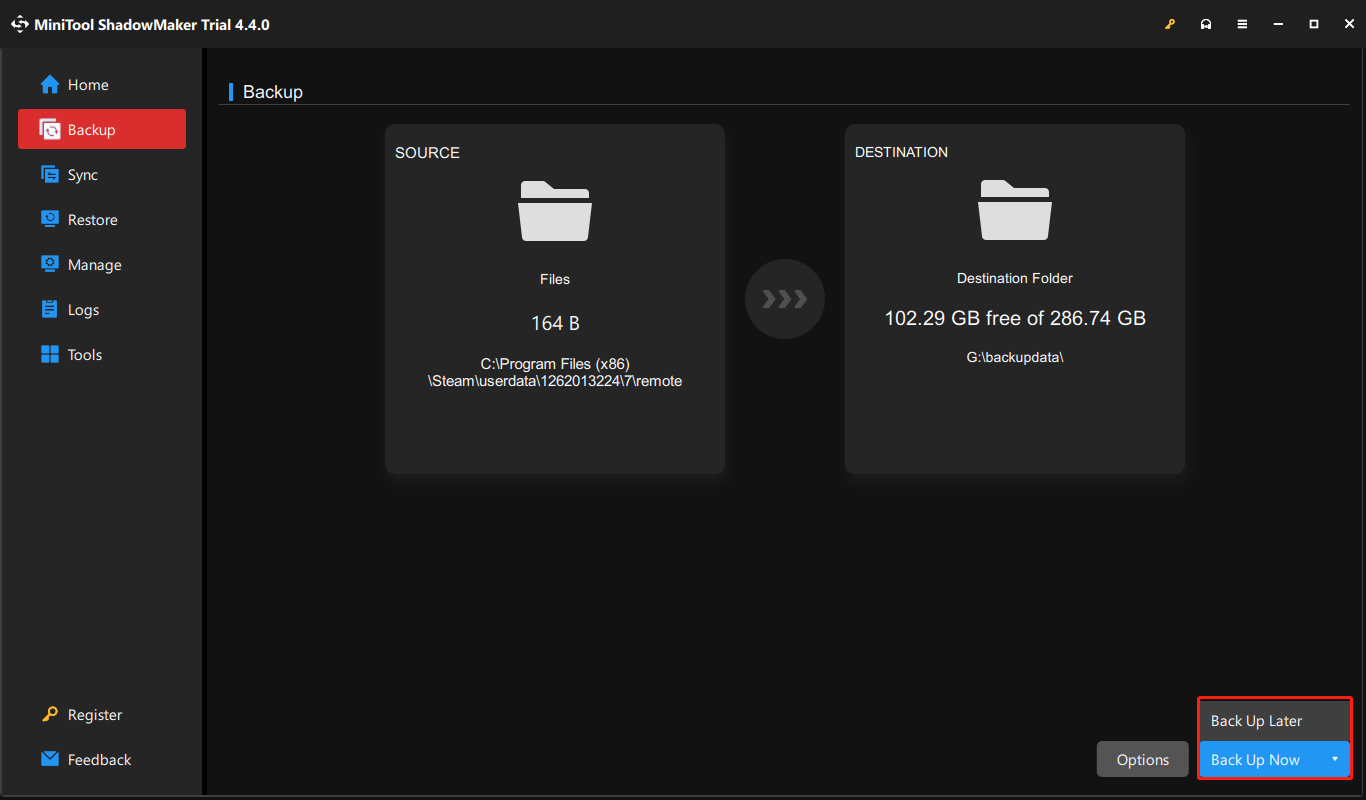
Image source: MiniTool Software
| Save Slot | Hexadecimal ID |
|---|---|
| Slot 1 | 3ad85aea |
| Slot 2 | 3bd85c7d |
| Slot 3 | 38d857c4 |
| Slot 4 | 39d85957 |
| Slot 5 | 36d8549e |
Which Enshrouded Save Editor Should You Use?
There isn't a single "official" editor, but the community has developed several tools that rank among the top choices for different needs. Depending on whether you want to manage files or change live gameplay values, your choice will vary.
Managing Backups and Files With Enshrouded Manager
The Enshrouded Manager available on Nexus Mods is widely considered one of the most reliable tools for file management. It acts as a wrapper that automates the backup process, which is vital before attempting any manual edits. It allows you to easily swap between different world saves and restore previous versions if a crash occurs.
Many users find this tool essential for server migration. It simplifies the process of identifying which hex ID corresponds to which world, reducing the risk of accidentally deleting hours of progress.
Modifying Live Gameplay With the WeMod Trainer
If your goal is to edit values like stamina, XP, or loot rates while the game is running, a "trainer" is more effective than a static file editor. The WeMod Trainer is a popular choice for this. It allows for real-time memory editing, such as:
- Infinite Stamina and Health
- XP Multipliers for faster leveling
- Legendary loot drop rate increases
- Skill points that do not decrease when used
Note that this is not a permanent file editor; the changes are active only while the trainer is running, though some effects (like gained XP or items) will persist in your save file.
Using Pre-Made Sandbox Saves for Infinite Resources
For players who enjoy the building mechanics but dislike the resource gathering, downloading a pre-made sandbox save is a top-tier option. "Nine’s Sandbox Save" on Nexus Mods is a well-known example. These files come pre-loaded with millions of building blocks and rare materials. However, be aware that resetting your skills in these saves may revert your skill points to your actual level-appropriate values, potentially losing the "modded" extra points.
How to Edit Your Enshrouded Save Files Manually
For advanced users, manual editing provides the most control. This involves manipulating the raw data files or using JSON conversion tools to fix specific issues like bugged quest flags.
Why You Must Include the Index File During Transfers
A common mistake when moving saves is only copying the data file (e.g.,
3ad85aea
). Enshrouded uses an
Index System
to track save versions. Within your save folder, you will see files named
character-index
and
world-index
. These files act as a table of contents for the game.
If you replace a world file but do not update the index, the game may fail to recognize the new file or might revert to an older version stored in the cloud. Always move the data file and the corresponding index file together to ensure a successful transfer.
Modifying JSON Data to Fix Bugged Quests
When a quest becomes stuck or a Point of Interest (POI) won't clear, you can use GitHub-based tools to convert your save into a readable JSON format. This allows you to search for specific "Quest Flags" and toggle them from
false
to
true
. This workflow is a significant advancement for players who encounter progression-blocking bugs that the developers haven't yet patched.
remote
folder. One misplaced comma in a JSON file can render the entire save unreadable by the game engine.
How to Move a Local Save to a Dedicated Server
Migrating a world you started with friends locally to a 24/7 dedicated server is a frequent request. This process requires careful renaming to match the server's expected file structure.
Preparing Your World and Character Files
It is important to remember that Enshrouded treats characters and worlds as separate entities. Your character (inventory, levels, skills) stays with you across different worlds. When moving to a server, you are primarily moving the World File (buildings, terraforming, quest progress). Ensure you have identified the correct Hex ID for the world you wish to migrate using the table provided earlier.
Renaming Files for Server Compatibility
Dedicated servers often expect a specific filename, usually
3ad85aea
(Slot 1) or a generic
world_save
. You must rename your local hex file to match the filename the server has already generated. Stop the server, replace the file in the
/savegame/
directory, and restart. If the world appears empty, check that you also transferred the
world-index
file.
Solving Common Save Editing Problems and Errors
Editing saves often introduces friction, especially with Steam's aggressive cloud synchronization and the game's internal item limits.
How to Stop Steam Cloud From Overwriting Your Changes
Many users experience the frustration of replacing a save file, only for Steam to "restore" the old version the moment the game launches. To bypass this, use the Force Update strategy:
- Launch Enshrouded and stay on the Main Menu.
-
Alt-Tab out of the game and navigate to your
remotesave folder. - Replace the files with your edited versions.
- Return to the game and load your world.
- Once the world loads, exit the game normally. This triggers Steam to see the "new" files as the most recent version and sync them to the cloud.
Why Pressing the T Key Can Break Modded Item Stacks
If you are using a sandbox save with "oversized stacks" (e.g., 900,000 wood logs in one slot), be extremely careful with the 'T' key (Move All). The game's engine has a standard stack limit. Pressing 'T' to move items into a chest can trigger a check that resets these massive stacks back to the standard limit (roughly 48,000 or lower), effectively deleting the majority of your resources instantly.
Fixing Lag Spikes Caused by Memory Trainers
Using trainers like WeMod on private servers can sometimes cause stuttering or lag spikes every 30 seconds. This is likely due to the game's integrity checks reacting to memory edits. If you experience this, try disabling "Infinite Health" or "Unlimited Stamina" and see if the performance stabilizes. Often, the "XP Multiplier" is safer to use as it doesn't require constant memory polling.
Frequently Asked Questions
Can I edit my character's appearance after creation?
Will using a save editor get me banned from the game?
How do I fix a "Corrupted Save" error?
world-index
file doesn't match the data file. The best way to fix this is to use the Enshrouded Manager to restore a previous backup. If you don't have a backup, you can try deleting the
world-index
file and letting Steam Cloud redownload it, though this only works if the cloud version is still healthy.
Where are saves located on the Steam Deck?
/home/deck/.local/share/Steam/steamapps/compatdata/1203620/pfx/drive_c/users/steamuser/AppData/LocalLow/Keen Games/Enshrouded/
. You will need to enable "Show Hidden Files" in the Dolphin file manager to see the
.local
folder.
Can I move a renovated town to a new world save?
Key Takeaways for Managing Enshrouded Saves
-
Always backup
the
remotefolder before using any Enshrouded save editor. - Include index files (character-index/world-index) whenever you move or replace save data.
- Use the Alt-Tab trick to prevent Steam Cloud from overwriting your manual changes.
- Avoid the 'T' key when handling modded resource stacks to prevent them from resetting.
- Enshrouded Manager is a top choice for safe file backups and restoration.
- WeMod is effective for live gameplay changes but may cause minor UI bugs or lag.
- Check Hex IDs carefully to ensure you are editing the correct save slot.
For the safest experience, rely on automated backup tools and only perform manual JSON edits when fixing specific progression bugs.
All trademarks, copyrighted content, and quoted material referenced in this article belong to their respective owners. Brief excerpts are used under fair use (17 U.S.C. § 107) for purposes of commentary, criticism, and informational reporting. This article is not affiliated with or endorsed by Keen Games or Steam.