Home
How to Use the UESP Build Editor to Optimize Your ESO Character
uespLog
add-on to export your character data directly from the live game, bypassing the need for manual gear and skill entry.
Theorycrafting in The Elder Scrolls Online (ESO) is a complex endeavor involving hundreds of gear sets, thousands of skill combinations, and a Champion Point system that significantly alters performance. While many players rely on static guides, the UESP build editor stands out as a top choice for those who want to fine-tune their specific setup. Unlike simpler tools, UESP provides a deep mathematical breakdown of how every passive, buff, and item trait interacts with your character's base stats.
As of September 2026, the editor remains a staple for the community, particularly for its transparency. Because it is hosted by the Unofficial Elder Scrolls Pages (UESP), the logic behind the numbers is open for inspection. Whether you are trying to hit the 18,200 physical penetration cap for dungeon bosses or optimizing your critical damage for a trial group, mastering this tool is a significant step forward in your gameplay efficiency.
How to Get Started with the UESP Build Editor Interface
When you first load the UESP Build Editor , the interface can appear overwhelming due to its desktop-centric design. However, the tool is logically organized into five core tabs that mirror the character development process in ESO. Understanding these tabs is essential for accurate simulation.
- General Tab: This is where you set your character's level, race, class, and attribute points (typically 64 points into a single stat). Crucially, this tab also contains the "Target Stats" section, which we will discuss later for simulating real combat.
- Items Tab: Here you select your armor, weapons, and jewelry. You can specify traits (like Divines or Bloodthirsty) and enchantments. The editor automatically pulls data from the latest game patches, including Update 45.
- Sets Tab: This tab tracks your active set bonuses. It is important to ensure you have the correct number of pieces equipped (e.g., 5/5 for a full set bonus) to trigger the mathematical calculations.
- Skills Tab: You can drag and drop skills into your primary and secondary bars. The editor calculates the cost and damage of these skills based on your current stats.
- CP Tab: This section allows you to allocate your Champion Points. According to UESP documentation , the editor supports the full 3600 CP cap introduced in Update 29.
One vital note for new users: while anyone can view or tweak an existing build, a free UESP Wiki account is mandatory if you wish to save your progress or clone a build to your own profile. Without an account, your changes will only exist in your current browser session and will be lost upon closing the tab.
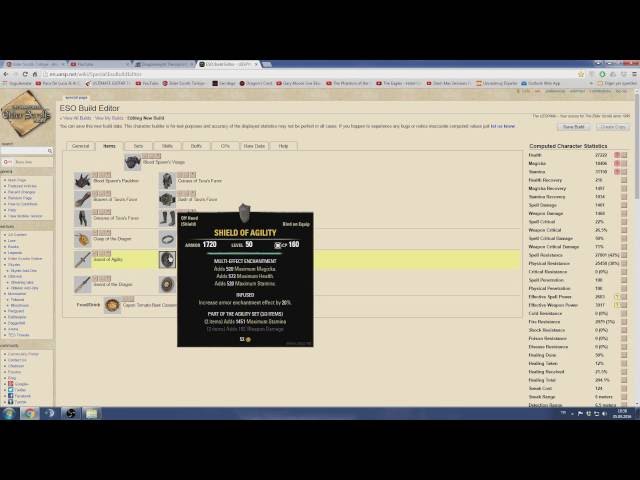
Image source: YouTube
How to Save and Share Your ESO Builds Without Errors
A frequent frustration among users is the "Error Saving Build" notification. This typically occurs because the UESP website uses a validation token that can time out during long theorycrafting sessions. If you have spent 30 minutes meticulously adjusting CP nodes only to be met with a save error, do not panic.
- Do not refresh the page, as this will wipe your unsaved changes.
- Highlight and copy the entire URL from your browser's address bar. The UESP editor dynamically updates the URL with your current configuration.
- Open a new browser tab or window and paste the URL.
- If the new tab asks you to log in, do so.
- Click the "Save" or "Save As" button in the new tab. The fresh validation token will allow the save to complete successfully.
When sharing builds, you have two primary options. You can share the "Permanent Link," which is a static version of the build at a specific point in time, or you can share the "Live Link" if you want others to see updates as you make them. For most Discord or Reddit discussions, a static Permanent Link is preferred to ensure everyone is looking at the same data points.
How to Import Your Character Data Using the uespLog Add-on
Manual data entry is prone to error. Forgetting a single passive skill or a minor CP node can result in a 5-10% discrepancy in your final numbers. To avoid this, many high-level players use the
uespLog
add-on. This tool acts as a bridge between the live game client and the web-based editor.
To use this workflow, first install
uespLog
via the Minion add-on manager. Once in-game, you can use the command
/uespsavebuild [name]
to capture your current gear, skills, and attributes. The add-on writes this data to a local file on your computer, typically located at:
Documents\Elder Scrolls Online\live\SavedVariables\uespLog.lua
.
After saving in-game, you visit the UESP site and use the "Upload Log" feature. This populates the editor with your exact character state. This method is widely regarded as one of the strongest ways to ensure your theorycrafting begins from a baseline of 100% accuracy. It eliminates the "human error" factor of misremembering whether your jewelry is Infused or Bloodthirsty.
Understanding the Math Behind Computed Statistics and Rules
What makes UESP a top-tier option for serious players is its transparency regarding "Computed Statistics." Most build calculators are "black boxes"—you put in gear and get a number, but you don't know how the tool reached that conclusion. UESP, however, provides access to the Rules Editor .
The editor uses a stacking logic system. It categorizes every bonus into specific buckets: Buff, CP, Food, Item, Set, and Skill. For example, if you have a set that provides 129 Weapon Damage and a potion that provides Major Brutality (20% increase), the editor calculates the base addition first and then applies the multiplicative percentage. According to Source 8 , the backend uses Regular Expressions (Regex) to scan item descriptions. A typical rule might look like this:
/Adds ([0-9]+) Maximum Magicka/i
-> This string tells the editor to find a number followed by "Maximum Magicka" and add it to the character's Magicka pool.
Advanced theorycrafters can use the "Test Rule" function to verify if a new set from a recent patch is working correctly. If you notice that a set like Order's Wrath isn't reflecting the correct Critical Damage bonus, you can check the Rules Editor to see if the Regex is failing to match the item's text description. This level of granular control is exceptionally strong compared to competitors.
How to Use Target Stats to Simulate Real Combat Scenarios
A common mistake in ESO theorycrafting is focusing solely on "Sheet Stats"—the numbers you see when you press the 'C' key in-game. However, sheet stats do not account for enemy resistances or group buffs. The UESP Build Editor solves this through the Target Stats panel in the General tab.
In modern ESO PVE, most dungeon and trial bosses have 18,200 Physical and Spell Resistance. If your build only has 8,000 penetration, you are losing a massive amount of potential damage. By inputting "18200" into the Target Resistance field, the UESP editor will show you your "Effective Damage," which accounts for how much of your hit is actually being mitigated by the boss.
Furthermore, you should account for the 50% base Critical Damage that every character possesses. When you add group buffs like Major Force (+20%) or Minor Brittle (+10%), you can quickly hit the 125% Critical Damage cap. The UESP editor will highlight these numbers in red if you exceed the cap, signaling that you should swap some of your CP or gear into other stats like Weapon Damage or Penetration to maintain efficiency.
Why Your UESP Build Stats Might Not Match Your In-Game Character
Even with perfect data entry, you may notice small discrepancies between the editor and your in-game character sheet. This is usually due to one of three factors: update lag, active buffs, or known calculation bugs.
- Active Buffs: The editor assumes all toggled buffs are active. In-game, you might be missing a passive bonus because you haven't swapped to your front bar.
- Update 45 Lag: While the editor is updated for Update 45 (March 2025), new set mechanics can take several weeks to be perfectly simulated in the Regex engine.
- The Inner Light Bug: Some users have reported that the 5% Max Magicka bonus from the Mages Guild skill "Inner Light" does not always trigger correctly if the skill is on the back bar in the editor.
- Check the "Buffs" section in the General tab to see exactly what is being applied.
- Use the "Rules Editor" to see if a specific set bonus is being "double-counted" or ignored.
- Ensure your Mundus Stone is correctly selected, as this is a frequent source of 5-10% stat differences.
According to community discussions on the ESO Forums , these minor bugs are usually fixed within a few weeks of a major patch release. If your numbers are off by exactly 5% or 10%, it is almost certainly a missing passive or a misconfigured buff toggle.
UESP vs ESO-Hub vs Elder Spores — Which Editor Suits Your Needs?
While UESP is a top-performing tool for math, it is not the only option available to ESO players. Depending on your goals—whether it's social sharing or mobile accessibility—other tools might serve you better.
| Feature | UESP Build Editor | ESO-Hub | Elder Spores |
|---|---|---|---|
| Math Accuracy | High (Regex Based) | Moderate | Moderate |
| Mobile Friendly | Low | High | Moderate |
| Scribing Support | None (as of 2026) | Partial | Full |
| In-game Import | Yes (uespLog) | No | No |
| Social Layout | Text-Heavy | Visual/Clean | Visual |
The most significant gap in UESP's current offering is Scribing . The Scribing system (Grimoires and Scripts) introduced in the Gold Road chapter adds a layer of customization that the UESP Regex engine has struggled to incorporate. For players who rely heavily on Scribed skills, Elder Spores is a popular choice because it features a dedicated configuration tool for these custom abilities. Conversely, ESO-Hub is widely considered one of the best for sharing builds on mobile devices due to its responsive design and clean, screenshot-ready layout.
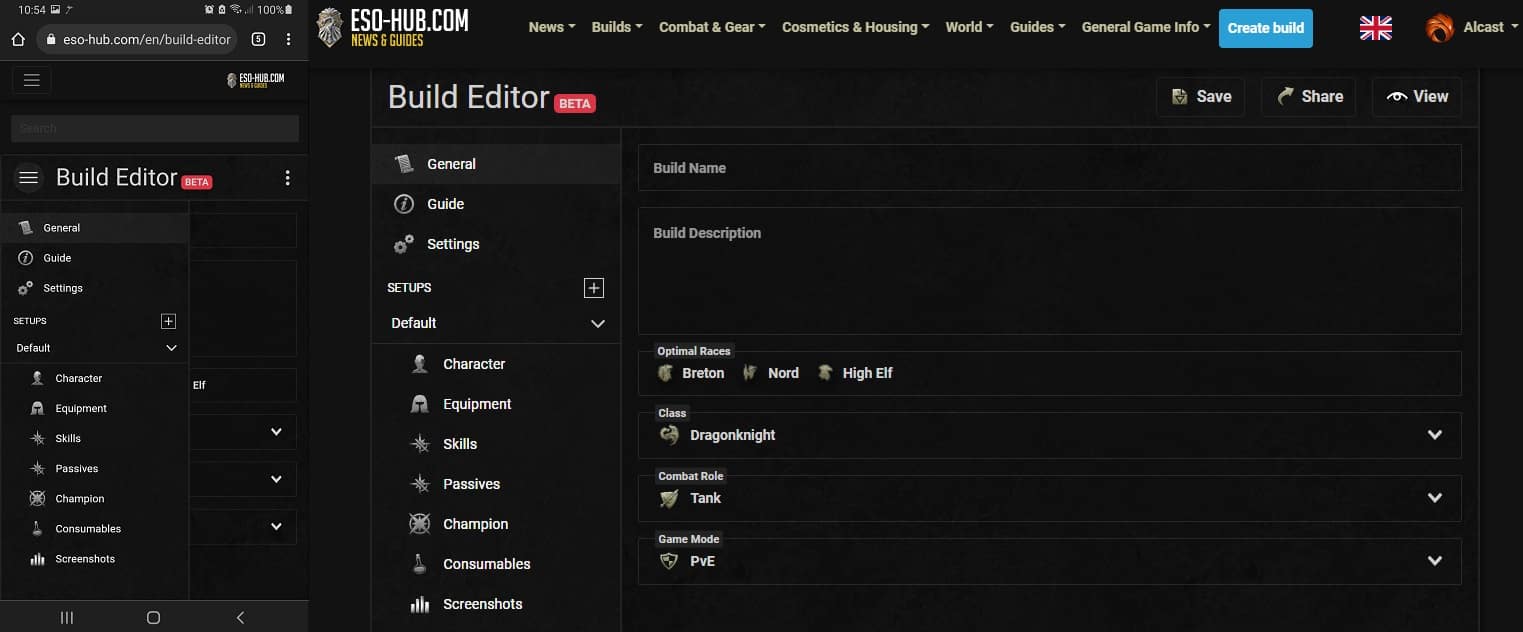
Image source: The Elder Scrolls Online
The Hybrid Workflow for Professional Theorycrafting
Many professional ESO theorycrafters do not rely on a single tool. Instead, they use a "Hybrid Workflow" that leverages the strengths of each platform. This approach ensures that the build is mathematically sound, optimized for the current meta, and easy to share with a guild or audience.
uespLog
add-on to pull your current character data. This provides a "real world" starting point that includes all your current gear traits and CP allocations.
This workflow allows you to use UESP for the "heavy lifting" of calculation while using ESO-Hub for the "presentation" layer. By combining these tools, you ensure that your build isn't just powerful on paper, but also accessible to the players you are trying to help.
Key Takeaways for Mastering Your ESO Builds
- Always log in to your UESP account before starting a build to ensure your progress can be saved.
- Use the URL-copy trick to bypass the "Error Saving Build" bug caused by validation token timeouts.
- Leverage uespLog to import your character data directly from the game, saving hours of manual entry.
- Check Target Stats in the General tab to ensure you are meeting penetration requirements for dungeon bosses (18.2k).
- Consult the Rules Editor if a set bonus seems incorrect; the Regex logic is transparent and verifiable.
- Consider Elder Spores for builds that rely heavily on the Scribing system, as UESP currently lacks this feature.
- Adopt a hybrid workflow by using UESP for math and ESO-Hub for social sharing and mobile viewing.
Start by installing the uespLog add-on today to see exactly how your current in-game character measures up against the theoretical maximums.
Frequently Asked Questions
Final Thoughts on Mastering Your ESO Builds
The UESP build editor remains a cornerstone of the ESO community because it prioritizes data integrity over visual flair. While the learning curve is steeper than other tools, the ability to simulate real-world combat scenarios against specific boss resistances makes it a top-tier choice for any serious player. By understanding the saving workarounds, utilizing the
uespLog
add-on, and checking your math against the Rules Editor, you can ensure your character is performing at its absolute peak. Whether you are a veteran trial runner or a new player looking to optimize your first set, UESP provides the depth necessary to master the complexities of Tamriel.